README from GitHub, MIT
Am MOD
Unofficial SD card mod for the Akai MPC Sample
English · Русский
Download r27q (latest) · Feedback and help · Known issues · Discussions
Am MOD is a community mod for the Akai MPC Sample (firmware 1.3.0.12) that starts from the SD card. On top of the stock app it adds a step sequencer on the pads, a chord mode, typing names with the pads, scale lighting, search across folders, batch copy, a per-pad EQ, resampling, recording from the rear inputs and more. Nothing is flashed: the mod runs a patched copy of the stock app in RAM, and the stock app starts as usual without the card.
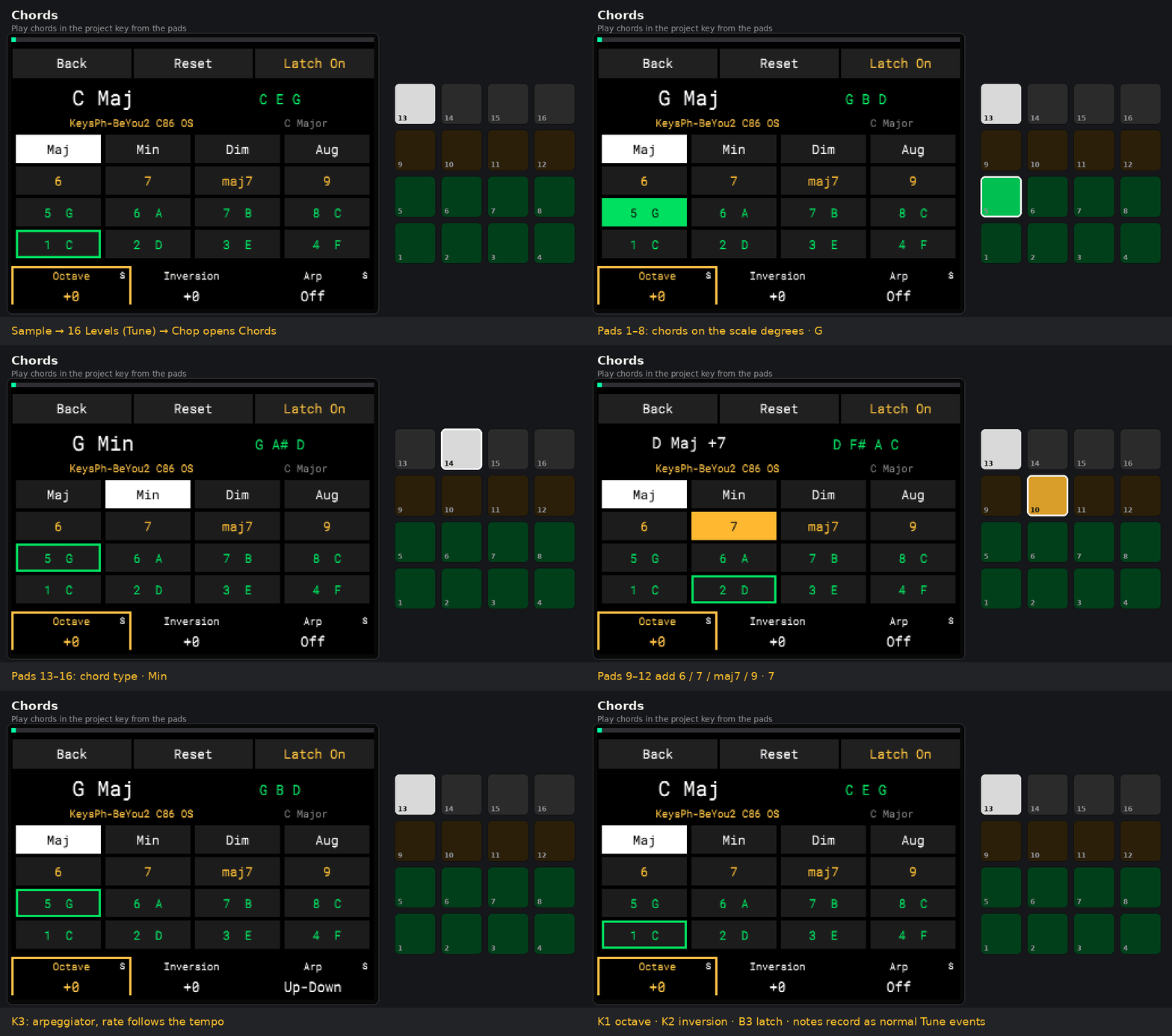
Recorded in the Virtual MPC Sample emulator running the stock firmware with the mod; the pads on the right show the colours the app sends.
Unofficial project. Not affiliated with, endorsed by or supported by inMusic Brands or Akai Professional. No firmware and no Akai code are in this repository or in the release packages: the mod patches the copy of the app already on your MPC Sample. Use at your own risk. See NOTICE.
What's new in r27q
Back up samples and projects before updating.
- Degrees layout. Sample → Tune → Play → Lights → K1 Layout: Degrees. The 16 pads of 16 Levels Tune play only notes of the key, one degree per pad (C Major: C D E F G A B C…); Transpose16 moves by degrees. The tonic, IV and V have their own colours. New defaults in Scale and Degrees: tonic Red, key notes Cyan, IV Violet, V Yellow.
- Search. K2 Search in: Folder, Library, SD Card or All. The first matches appear under the query, preview is on by default, K3 sets its volume. The encoder press enters a letter; with Encoder input, +/− move the cursor and Erase deletes. Shift+Erase clears; the last query is remembered.
- Erase in the name window deletes in both input modes.
- Rear Routing and Mod Settings look like stock lists and panels; confirmations use the stock frame.
- Splash with “MOD” at the height of “Am” and smooth version text.
- Clearer messages instead of technical “… unavailable” errors.
r27q includes everything from r27p (Rear recording and monitoring, Knob FX priority) and r27n (Preview from end, Steps length and grid, eight colours).
All r27q changes · Mod Settings · Testing status · Roadmap and ideas
Thanks to Leusha, mxt1iga and all testers.
Features
Confirmed: checked on a real MPC Sample. Trial: automated and emulator checks passed; a hardware check is still pending.
| Feature | Where | Status |
|---|---|---|
Readable K1–K3 panel: parameter names and values always visible, amber focus, S marks for Shift functions | all standard screens | confirmed |
| Type names with the pads (phone keypad: ABC on pad 14, DEF on 15…, delete on 16) | Save Project / Save Sample, Search | confirmed |
| Orig Note of a sample, project Key / Scale | Sample → Tune → Shift+K1; Project → Key/Scale | confirmed |
| Scale lighting for 16 Levels Tune: Monochrome / Piano / Scale colours, Transpose16 | Sample → Tune/Play/Lights | partly confirmed |
| Degrees: 16 Levels pads play only key notes, tonic/IV/V colours | Lights → K1 Layout | trial |
| Steps: 16-step sequencer on the physical pads, grid 1/4…1/64 and triplets, velocity, mute steps, copy/paste | Shift+SEQ → B2 Steps | confirmed |
| Events editor with Chop / 16 Levels choice and audition, event move on the grid | Step Edit / Steps | confirmed |
| Poly: chords recorded and edited as separate notes | Seq | confirmed |
| Search samples and projects in Folder / Subfolders / Library, preview, load to a pad | Sample Select / Open Project → Shift+B3 | confirmed (basic) |
| Batch Copy of up to 16 sounds with automatic or manual targets | Sample → Shift+Erase → B2 | confirmed |
| Resample a pad (with Pad Link and Bypass) or a sequence to another pad | Shift+Pad 11 | confirmed |
| Power key asks, saves a separate copy of the project to SD, powers off | power key | confirmed |
| Per-pad EQ: one band, 6 types + Bypass, ±18 dB, live spectrum behind the curve | Sample → B3 Filter → Filter Env → EQ | confirmed |
| Stereo → Mono (left or right channel to a new pad) | Sample → Shift+B3 | trial |
| Chords: 8 scale degrees, 6/7/maj7/9, Maj/Min/Dim/Aug/Sus4, octave, inversion, latch, arpeggiator, chord repeat with Note Repeat; recorded as normal Tune events | 16 Levels Tune → Chop | trial |
| OptoCat/Warm: optical-style compression, Gain −6…+6 dB, Shift Attack/Release/Knee; paw follows red GR, shared Bypass | Shift+Pad5 → B2 Type; B1 Warm | trial |
| Am MOD sequence pads: Default + eight colours; selected pulses once per bar at Stop, playing once per beat, queued twice per beat; visible background and stable brightness of other pads | Seq → Shift+K1 (Am MOD) | trial |
| Batch Extract chops to separate samples | Chop → Shift+B2 | confirmed |
| Rear recording: Rear L, Rear R or L + R to pads; monitoring with pan and level | Sample Record → B2 Routing; Input Config → Shift+B2 | trial |
| Preview from end of a sample or slice | hold STOP + pad in Sample / Chop | trial |
| Mod Settings: pad lighting, waveform tint, system colours, cursor pulse | Project → Mod Settings | trial |
Every feature with its controls and status: docs/FEATURES.md. Build history: CHANGELOG.md.
In action
Steps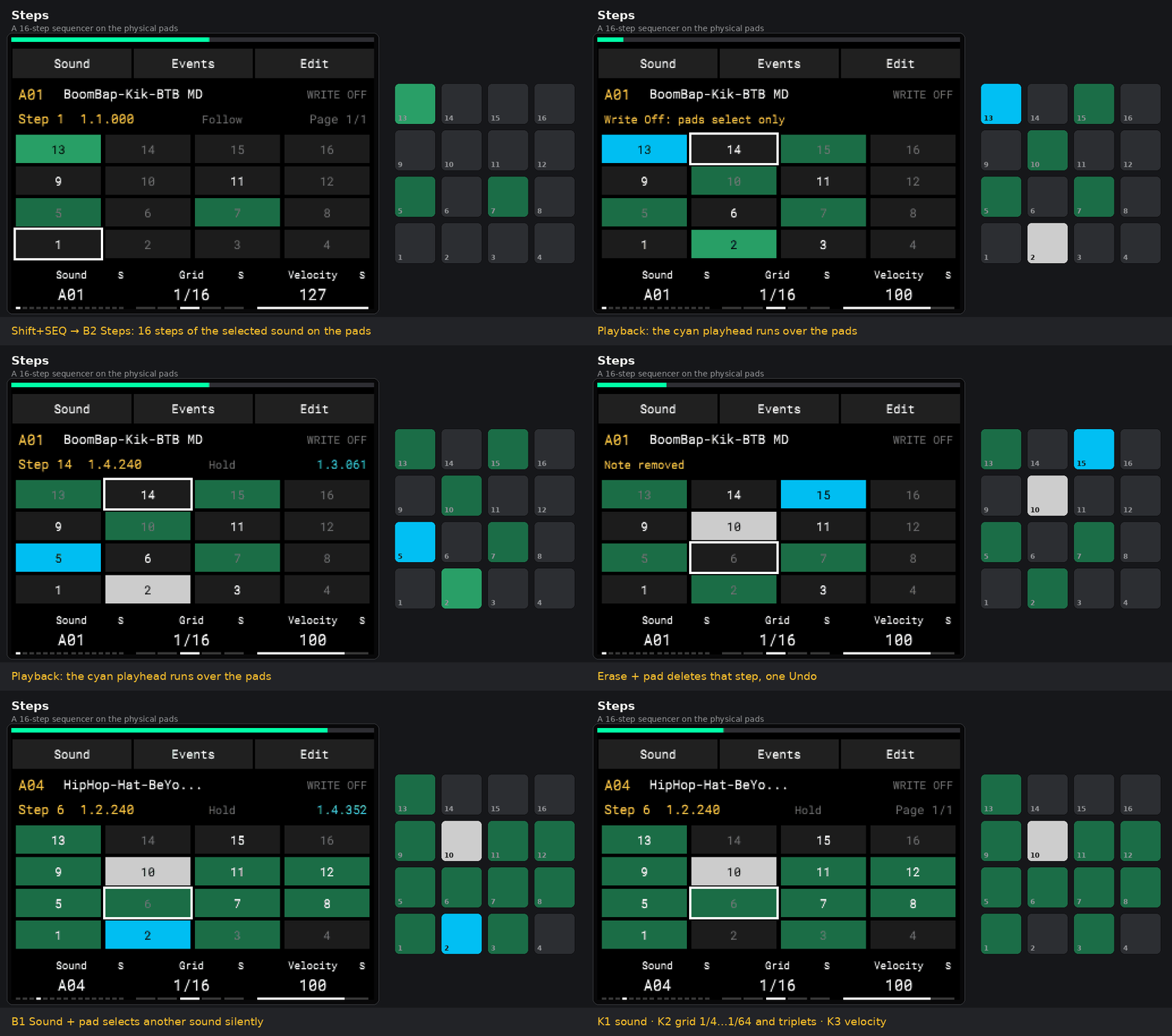 |
Typing names with the pads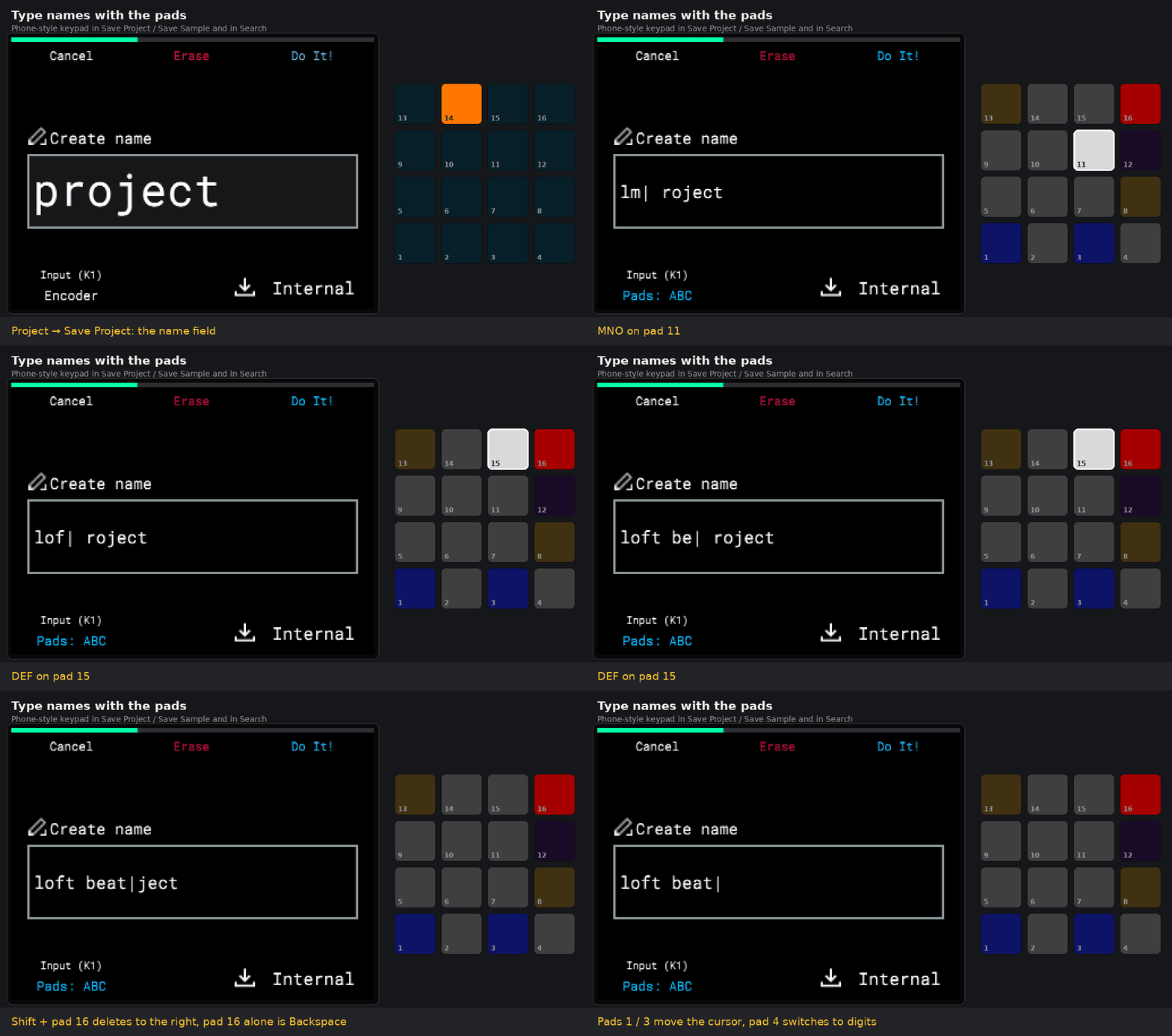 |
Scale lighting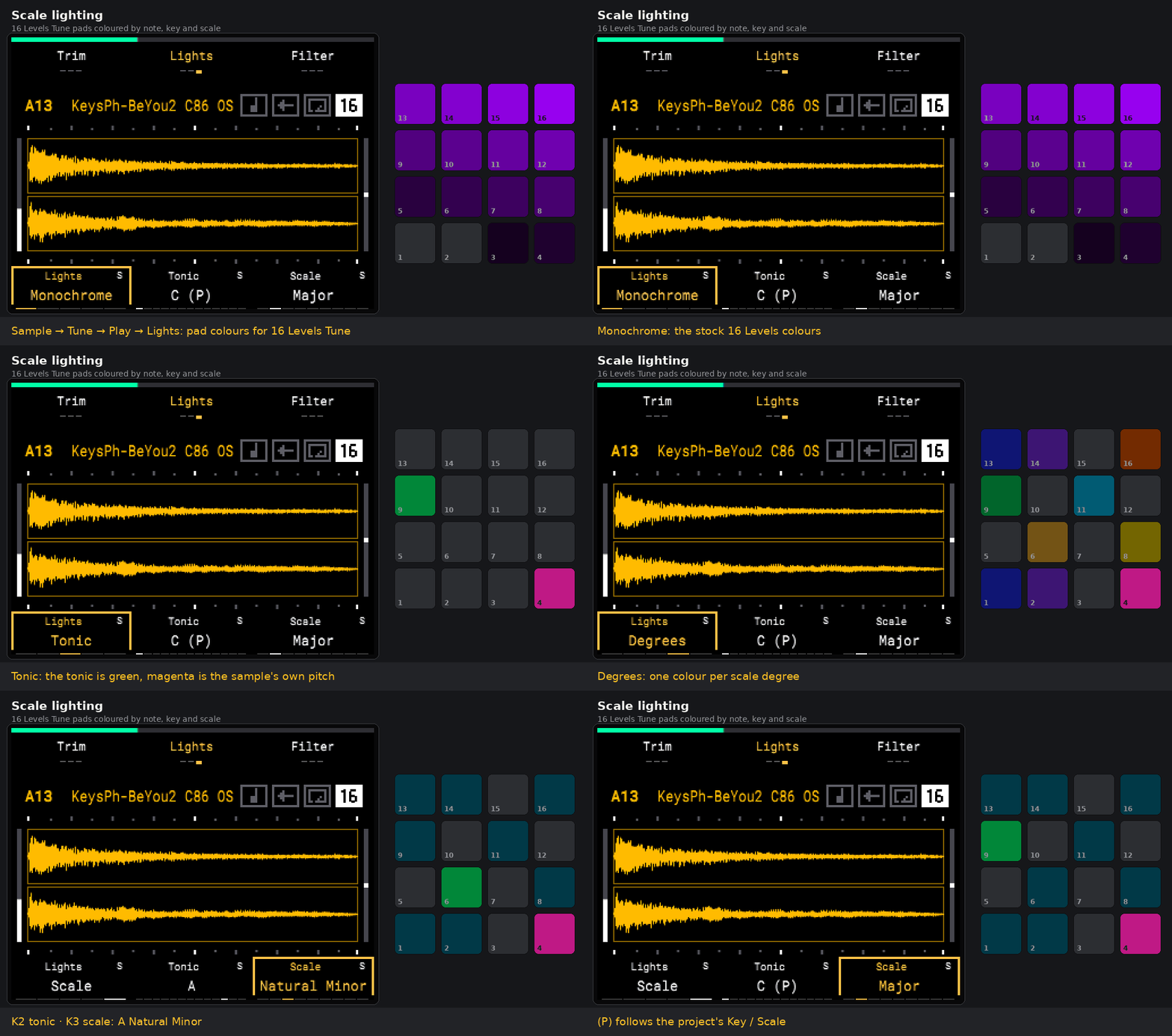 |
Search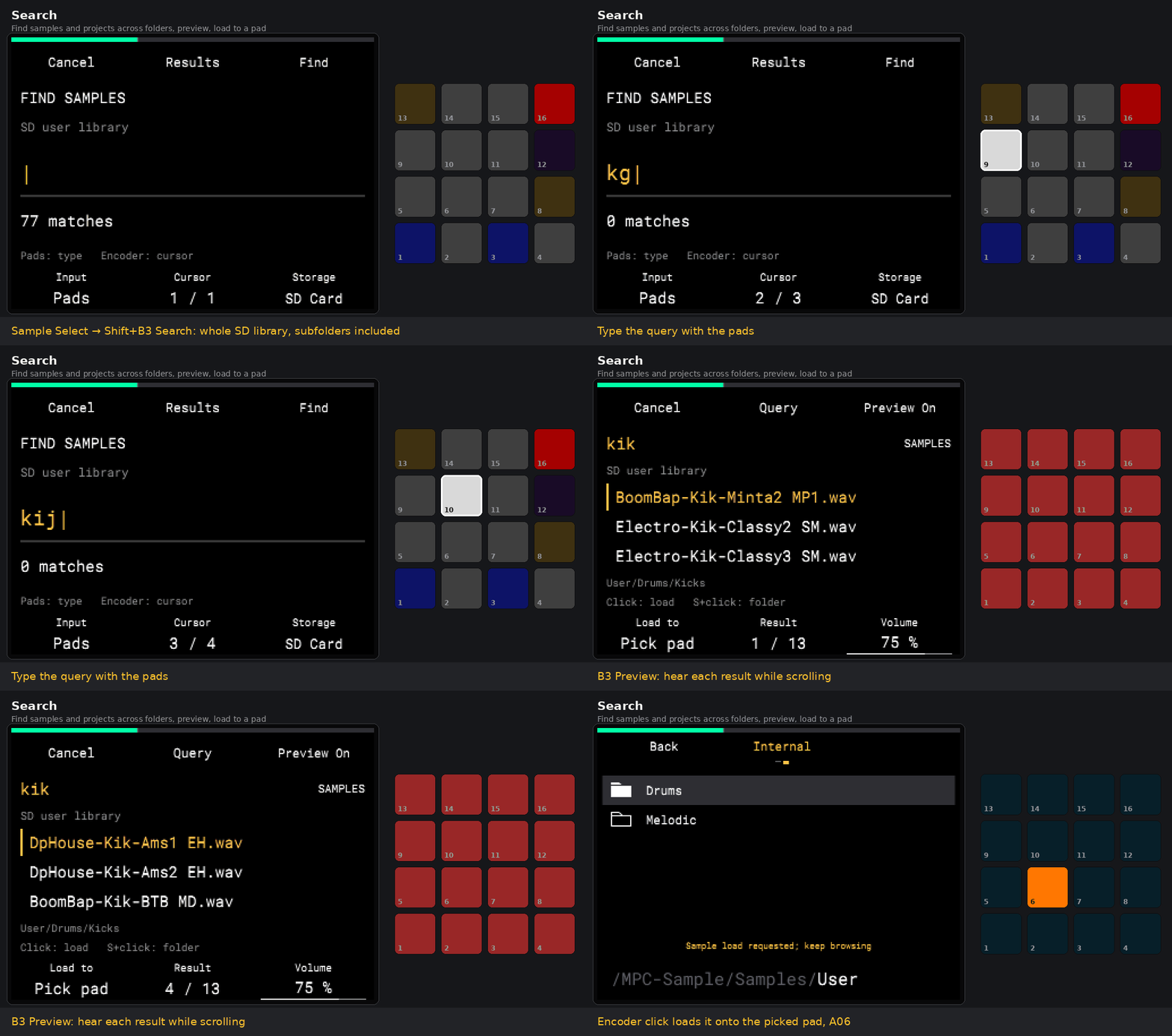 |
Batch Copy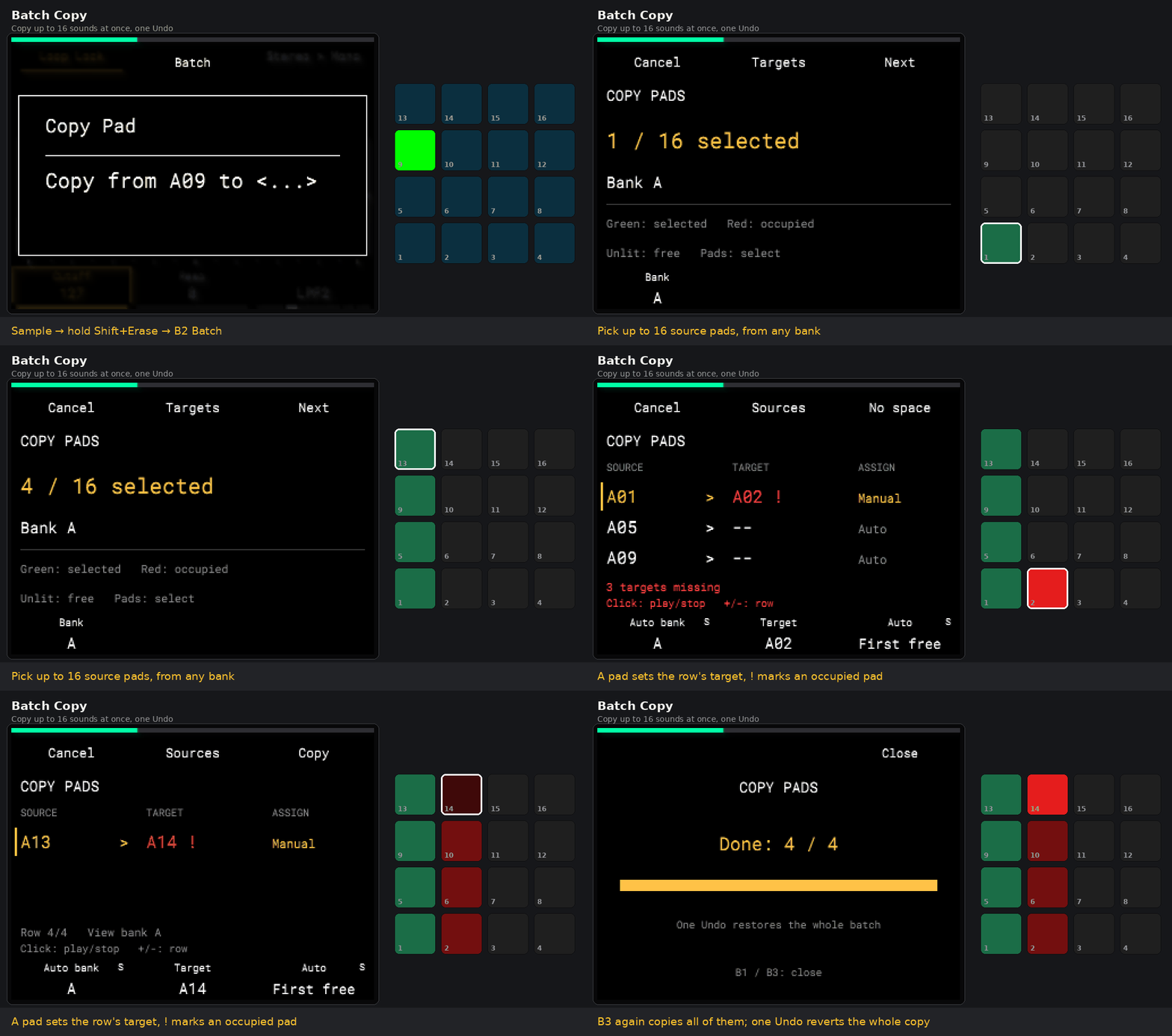 |
Pad EQ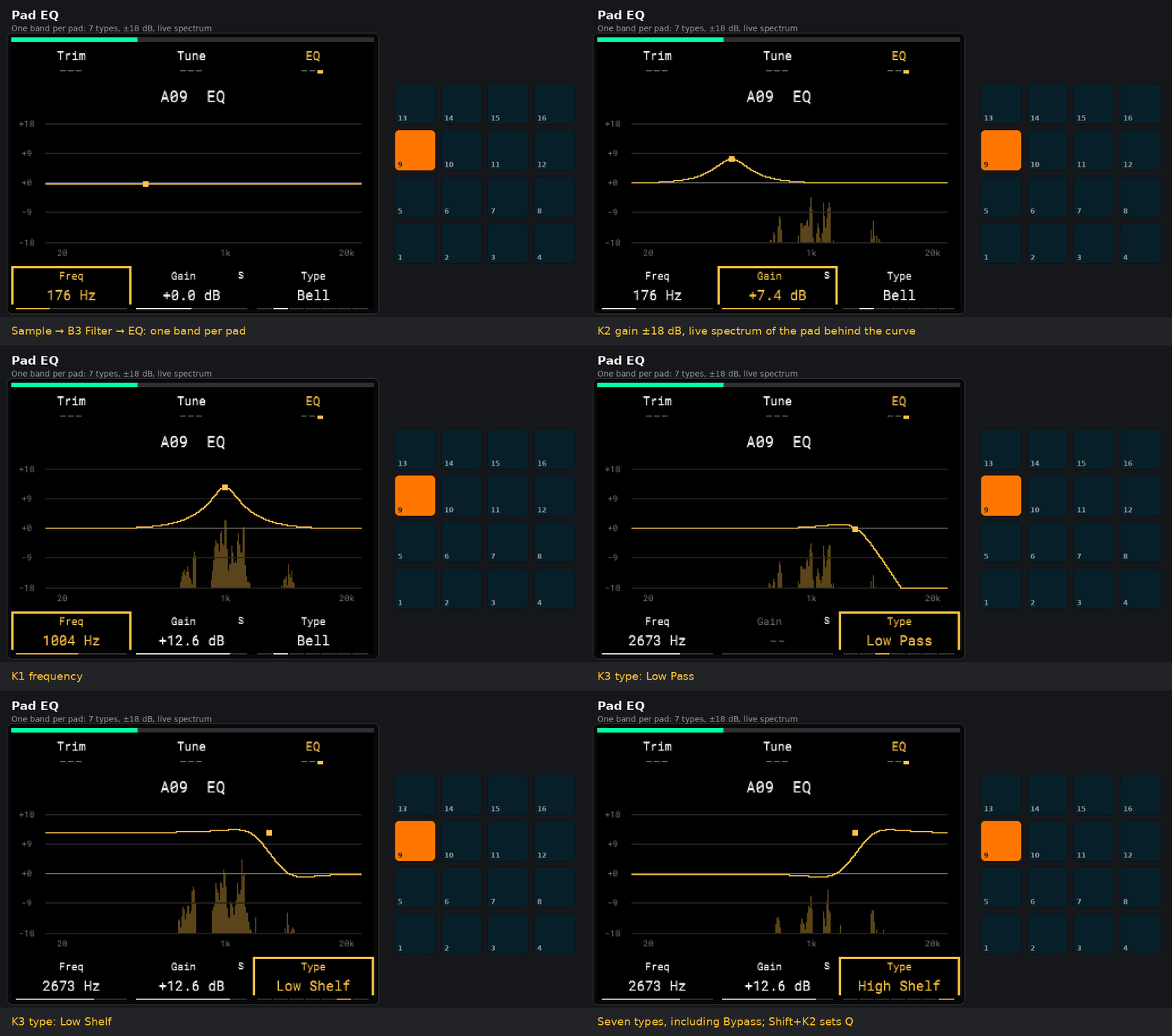 |
Resample a pad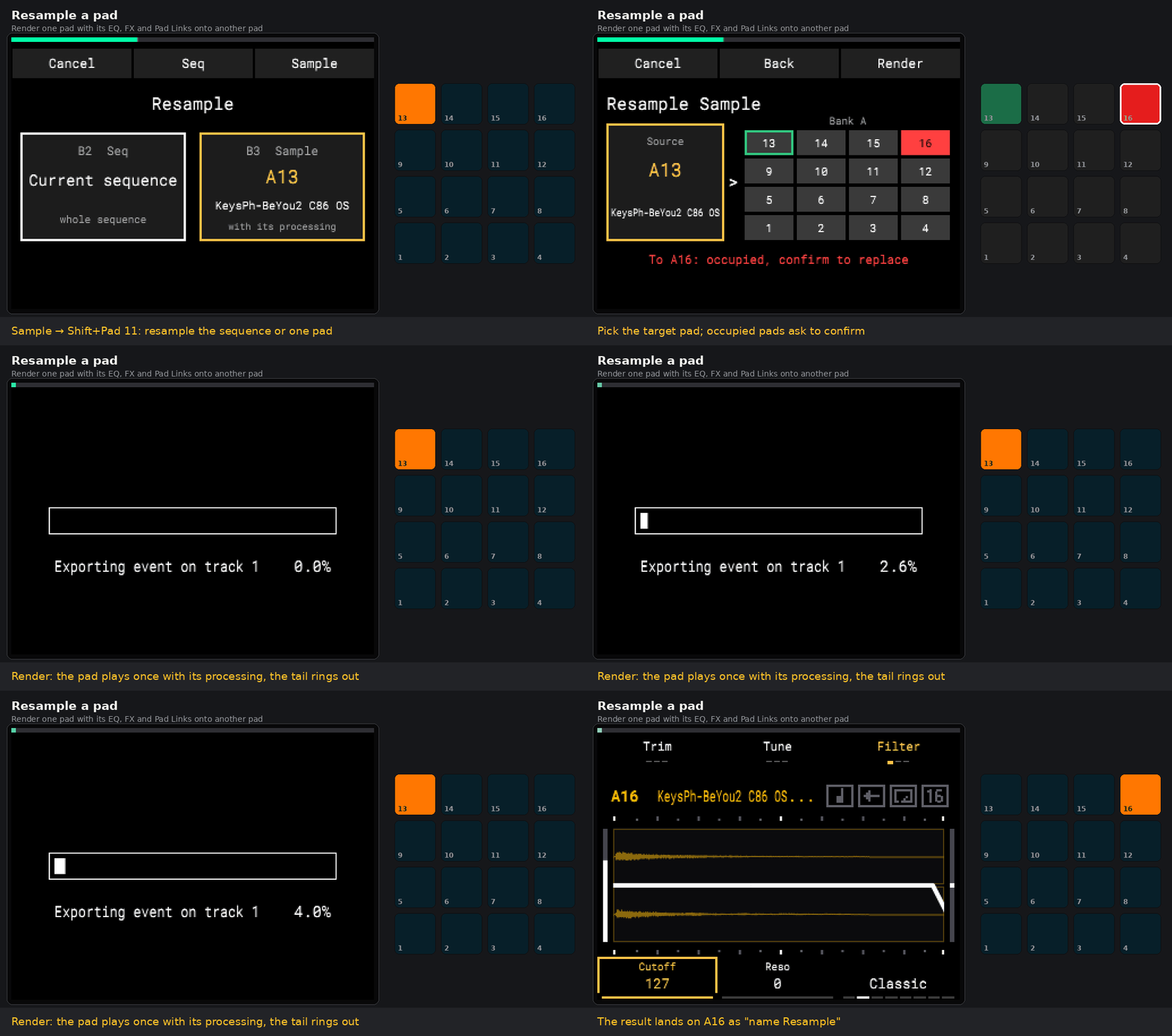 |
Install
[!IMPORTANT] Before installing or updating Am MOD, I recommend backing up all projects and samples from the SD card to your computer or another drive. The installer's backup of
autorun/does not include your projects or samples.
[!IMPORTANT] FAT32 / MS-DOS (FAT32) is available experimentally starting with r26e; exFAT remains supported. FAT32 requires a package r26e or newer (r27q is current) and installer 1.0.2+, or a manual copy of that package's complete
autorun/. FAT32 has been checked in test images and the emulator; physical MPC testing is still pending. The published r26d and earlier packages require exFAT; updating only the installer does not add FAT32 support to an old package.Use a card volume name such as
MPCorMPCSAMPLE. Only ASCII letters, digits,.,_and-are supported; spaces and Cyrillic letters in the card name prevent startup. This restriction applies to the card name, not your sample/project names.Check the filesystem before installing: Finder → select the SD volume → ⌘I → Format on macOS; drive Properties → File system on Windows. Installer 1.0.2+ checks the filesystem, card name and package compatibility before writing.
No reformatting is needed to install the current release on an existing FAT32 card. Keep your projects and samples; replace the mod's
autorun/folder with the complete new version. The installer backs up the previous folder and does not format or convert cards. FAT32 has a limit of 4 GiB minus 1 byte per file.
You need an MPC Sample on firmware 1.3.0.12 (the mod checks the app's SHA-256 and refuses to start on any other version) and a compatible SD card with a supported volume name: exFAT, or experimental FAT32 starting with r26e.
Installer (Windows): download MPC-Sample-Mod-Installer.exe and the
am-mod-*.zip package from Releases, run the installer, pick the zip
(or press Latest release) and the SD card, press Install.
Installer (macOS / Linux / Windows with Python 3.8+):
python3 installer/mpc_mod_installer.py                 # window
python3 installer/mpc_mod_installer.py cards           # list cards
python3 installer/mpc_mod_installer.py install am-mod-r27q.zip --card E:
python3 installer/mpc_mod_installer.py install --latest --card /Volumes/MPC
python3 installer/mpc_mod_installer.py remove --card E:
The installer writes only autorun/ and MPC_MOD_VERSION.json on the card. It checks the
package, backs up the previous autorun/ to ~/AM-Mod-Backups/, writes the files
that start the mod last, and verifies everything it wrote. It never formats the card and
never touches MPC-Sample/ (your projects and samples).
By hand: unzip the package and copy its autorun folder to the root of the card.
Use
-
Insert the card and power on the MPC, or insert it into a running MPC. The mod starts by itself. Preparation time depends on the card and project. If a start ever hangs at 0 %, power on without the card, wait for the normal screen, then insert it.
The mod shows the Am MOD splash while preparing the app, with the version and repository address. Do not power off or remove the card during preparation. The splash has no artificial minimum display time.
-
The mod checks the stock app and its own files before it starts; on any mismatch the stock app keeps running.
-
Work as usual. Save projects and samples to External (the SD card): in the mod, Internal storage is temporary and is lost when the mod stops.
-
Save to External and use the power key to switch off. Remove the card only after shutdown. Start without the mod card to use the stock app.
The power key also works in the mod: it asks, saves a project copy to the card and powers off. Do not pull the card while the mod is starting, saving or shutting down.
Try it without the device
Virtual MPC Sample runs the stock firmware in QEMU with the whole device in your browser, and runs SD autorun packages the way the MPC does. The GIFs above were recorded there:
python3 lab.py autorun am-mod-r27q.zip --no-reboot --yes
Emulator runs are useful for development, but they are not a hardware test: timing, audio latency, battery and USB audio differ from the device.
Build from source
Requirements: Linux or WSL, Python 3, AArch64 GCC/binutils and your own local copy of
the stock firmware 1.3.0.12; the expected SHA-256 of the app is
b6584cba76e416e432ad202509099d34373dc2c3d6a8fb625f5678bf0193b508. The firmware image,
updater, extracted partitions and rootfs are not part of this repository; paths to the
rootfs used by the checks (/home/user/mpc-rootfs-user-20260808 in the scripts) need adjusting.
Order: get the local inputs with the expected hashes → build sd-clone-trial (the loader)
→ build the value patches in sd-k-value-peek → build the current sd-mod-session
revision. sd-mod-session/build_chords_candidate.py compiles the app library
(phone-input.so); verify_*.py run scoped checks. These research scripts depend on frozen earlier
build outputs, verified preceding packages and your local firmware/rootfs; they
are not a standalone fresh-checkout build. r27q was assembled with package_r27q.py over the verified r27p package.
refresh_release_docs.py can refresh documentation
from an explicit verified base ZIP while asserting unchanged autorun bytes. ARM/QEMU checks (verify_*.py, check_*.c) use clearly marked
adapters and do not replace a hardware run.
| Folder | Contents |
|---|---|
sd-mod-session/ | the current mod: sources (src/), build and package scripts, checks, feature docs |
sd-clone-trial/ | the loader: runs a verified copy of the stock app in RAM and restores the stock app |
sd-k-value-peek/ | the first display patches (K1–K3 values) |
installer/ | the SD card installer and its tests |
virtual-mpc/ | an early browser model of the UI (not an emulator) |
research/, docs/ | reverse-engineering notes and scripts, history of the stages |
Most technical documents are in Russian.
Legal
- Akai Professional and MPC are trademarks of inMusic Brands, Inc., used here only to name the device the mod runs on.
- No firmware, Akai code, factory content or Akai artwork is distributed. The mod copies the app that is on your device and patches that copy in RAM; it never writes the firmware or the boot loader.
- Release packages include
xdg-dbus-proxy(LGPL-2.1-or-later) with its source. - Details: NOTICE.md.
License
MIT. Contributions: CONTRIBUTING.md.