README from GitHub, GPL-3.0
▶ Open the emulator · play Ravel in your browser
📖 Read the manual · PDF
⬇ Install the firmware on an FM-1 · download the .fwsc


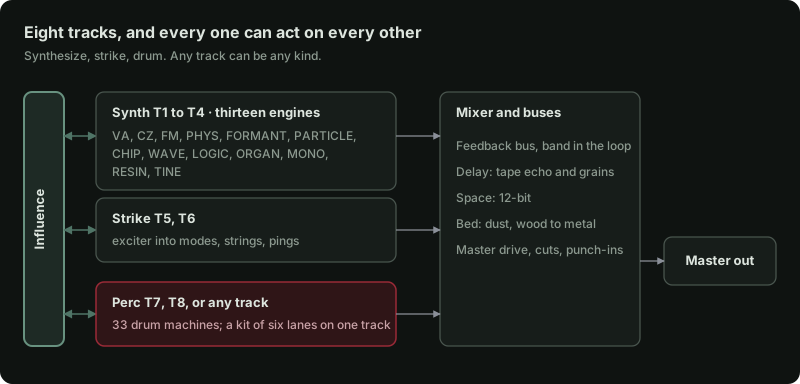
Ravel is a custom firmware for the M-VAVE FM-1 that turns the FM-1 into a pocket groovebox for sound design. It has 8 tracks that synthesize, strike and drum, and that play, excite, and reshape one another
Status: runs on the FM-1 and in the browser emulator. The whole instrument runs in the browser emulator and the desktop simulator, from the same C sources the firmware is built from. The FM-1 firmware is bare metal (no vendor SDK) on the open hardware layer of the Felucca family of community firmwares, and installs from a web installer over USB. It is young: copy your projects to a computer now and then (the emulator's Get from FM-1), and report anything odd on the repository's issues.
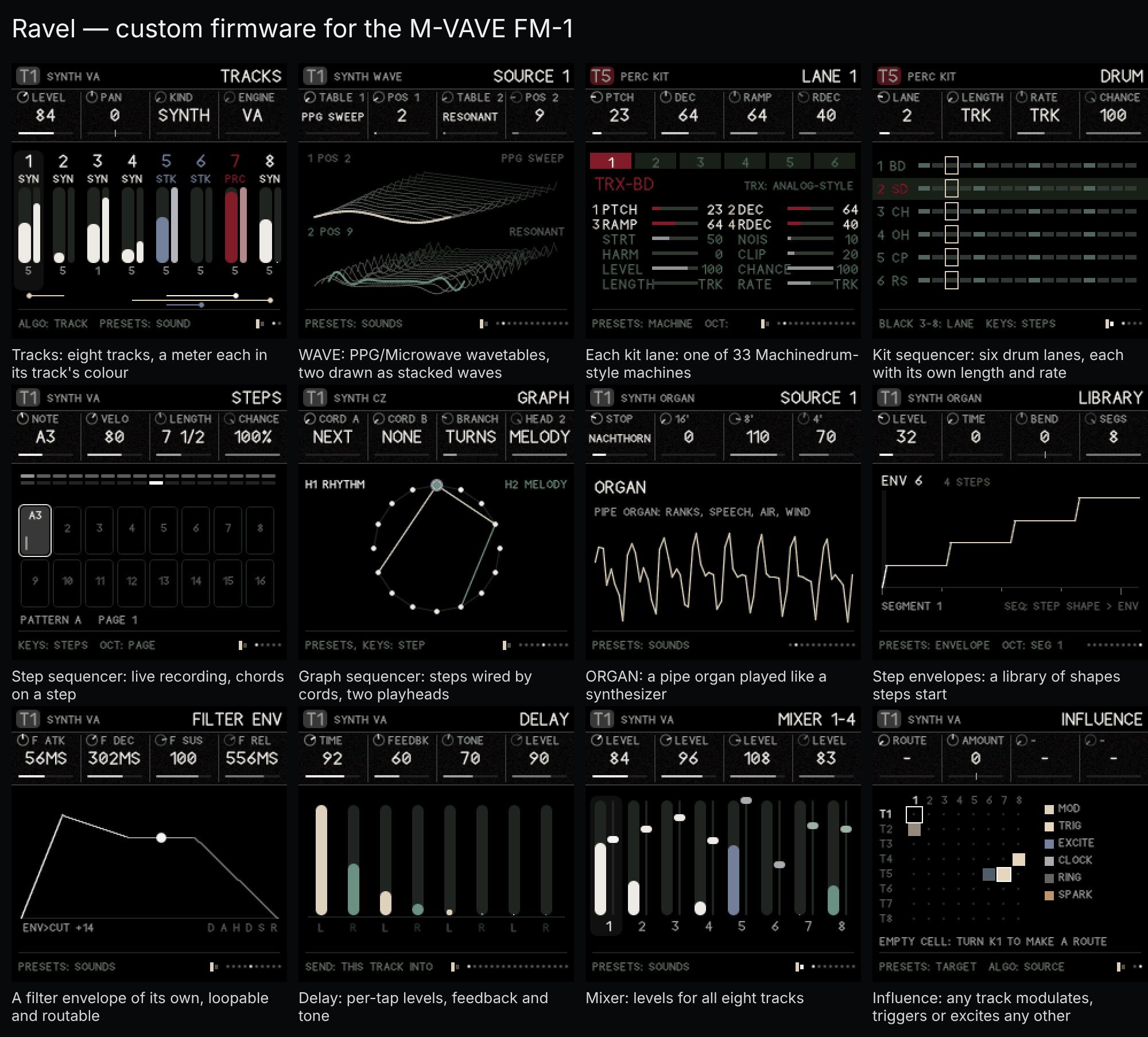
More screens in docs/showcase.
What it is
- Synth tracks (T1 to T4), thirteen engines: VA (saw to pulse, supersaw, sync, sub, noise, through-zero FM), CZ (a full Casio CZ: two lines, the eight CZ waves, 8-step DCO, DCW and DCA envelopes, ring and noise modulation, vibrato and a Juno-60 style chorus), HYBRID FM (4 operators, 12 algorithms, a wave per operator and an envelope on the modulators, run through moving formants after the Yamaha FS1R: eight spectral states to morph between, breath through noise bands, and formant sequences that move the timbre on their own clock), PHYS (string, bowed, blown, membrane), FORMANT (vowel filter bank or FOF grains), PARTICLE (pulsar emitters that pull into sync), CHIP (SID-style waves arpeggiating through offsets, then a decompose stage that crushes and breaks the sound apart), WAVE (after the PPG Wave and Waldorf Microwave: two wavetable oscillators, sync, ring and FM, phase warps, a looping wave envelope), LOGIC (oscillators built from function blocks: arithmetic, bit logic and comparators between three sources, then pitch-synchronous grains), ORGAN (a pipe organ played like a synthesizer: ranks by footage, pipes that speak in their own time, chiff, air and wind), MONO (an SH-101-style voice played like a horn: legato, scoops, delayed vibrato), RESIN (a bowed string or a reed, pushed toward breaking down: scrape, flageolet, growl, multiphonics and a QUAKE knob that makes the player's hand shake), TINE (struck and plucked bars and tines: a rusty kalimba with buzzing rings, a marimba or balafon, and an electric piano after the Rhodes).
- Strike tracks (T5, T6), with GRAIN, a small difference in every hit (as on perc tracks): an exciter (click, noise, metal, FM burst, dust, rain, bow, breath, or EXT: another track's sound) strikes a body (ping filters, modal bars, a struck disc or coupled strings), with a transient layer, ring mod and a pitch drop.
- Perc tracks (any track, KIND PERC): 33 drum machines after the Elektron Machinedrum's synthesis families: TRX (analog-style), EFM (FM), P-I (physical models) and GND, each with the Machinedrum's track effects.
- Arpeggiator on any note track (ARP): up, down, up-down, down-up, as played or random, 1/4 to 1/32 of the clock, over up to four octaves, with gate, hold, repeats and chance; it plays held keys, the track's own steps and influence triggers alike.
- COMP (T8, off until you choose it): a glue compressor on the main mix after the SSL G-series bus compressor, with its stepped ratios, attacks and releases (and AUTO), threshold, makeup, a dry mix and a SIDECHAIN that can listen to any track (muted or not) instead of the mix.
- WEFT (any track, KIND WEFT): a voice you patch from twelve blocks, as in Max or Pure Data: PHASE and WAVE oscillators, Serge-style SLOPE, CYCLE and SLEW, LP/BP/HP filters, ADD, MULT, MIX, MIN, MAX and FOLD, logic (COMP, AND, OR, XOR, FLIP), a short DELAY, harmonic BANDS and sample-and-hold; DUST (particles in clumps) and TICK (pings on the tempo's grid); struck resonators (RING, and six-mode SKIN, BAR, PLATE, BELL, HARMS and a FIXED filterbank); SAT, ABS, DIFFUSE and CHAOS for feedback networks; a one-block STRING, CRUSH and EDGE; sequential switches (SW 1>4, SW 4>1); FOLLOW (an envelope follower), SHAPE (waveshapers), CHEBY (a Chebyshev low pass), FORMANT (vowels), a VOCODER, a RINGMOD, coloured NOISE, a RUNGLER (Benjolin-style shift register), LISSA (a Lissajous LFO), a frequency SHIFTer and a DIODE clipper; outputs: AUDIO (blocks mixed into the voice), CLK OUT (a clock any track's sequencer can follow), MOD OUT (a matrix source) and SEQ OUT (steps, jumps, restarts, gates or changes the pattern of another track's sequencer); VIOLENCE sources (V TAP, V HELD, V TURN: how hard the panel is being played); cross-patched with feedback anywhere, input B able to move any block's second setting; built-in pitch, gate, trigger, velocity, noise and LFOs; live scopes on every block; twenty-eight factory patches; a patch library on the FM-1; patched on the FM-1 or in the emulator's drag-and-drop patcher, and shared as files.
- GLITCH LOOPER (any one track, KIND GLITCH): four lanes recorded from the main mix or one track, overdubbing, each with its own level, pitch and speed (pitch and speed apart, by a grain stretch); a threshold to arm a take; quarter slices on the keys that take turns in the order held; PLAY and REC trigs on the steps with sections, Octatrack- and MLR-style. It borrows the effects' memory (it can keep SPACE or DELAY running).
- Influence: an 8 × 8 grid where any track can modulate, trigger, excite, ring, clock, or spark (tap the body of) any other.
- Articulation: onset, continuant and termination stages with curve, overshoot, a loop, a tail and Give (a spring that lets the level lag and bounce), two destinations, its own FILTER ENV, and a library of 32 chainable step envelopes that steps start to move any parameter across the steps.
- Sequencer: each track runs in STEPS or GRAPH mode. Steps: length, rate and direction, parameter locks, microtiming, ratchets that bounce, climb, fall or darken as they roll, conditions, chance, microcuts of the mix with their own shape and size, and a EUCLID page that writes evenly spread hits into the steps. Graph (from Silt): cords set where a playhead goes next, two playheads walk the same graph, each playing notes, only the gate, or only the pitch (so rhythm and melody can take different paths), head 2 can play another track, and each head has a function generator (rise, fall, arch, decay, swell, or an LFO or dust) that moves its speed, times or plus the clock. Plus density arcs, a per-track note interval, scale quantizing, René-style clocking from LFOs or dust, and a two-oscillator master clock. Recording keeps what you play live, chords included (up to four notes on a step), or step by step while stopped (a note or chord a step, rests and back), and each kit lane can run at its own rate.
- Modulation: two LFOs, dust, an 8-slot matrix and 4 macros with 8 destinations each (curves and windows).
- MIDI in over USB and the TRS jack: notes on one channel, any, or channels 1–8 on tracks 1–8; velocity, mod wheel, aftertouch and pitch bend as matrix sources; clock (counted pulse by pulse, so it never drifts), start and stop.
- Buses: a granular tape delay (echoes and a grain cloud from one half-rate tape; wow, flutter, saturation, age, double tracking, freeze), a 12-BIT space (a gritty late-80s rack plate: decay, damp, motion, crunch, low cut), a feedback bus (filter, comb, smear, shift, fold or crush, a band filter in the loop, returning to the master or into a track), a BED of dust on a tuned wood-to-metal body that sinks under busy tracks and rises in the gaps, and master drive with microcuts (even, bouncing or dragging) and punch-in effects on the keys. Each bus page shows the current track's send into it. Every effect starts off: a new project sends nothing into any bus, and a bus with nothing coming in does not run at all.
- Song: patterns A and B per track, 16 scenes that switch or glide over 1–8 bars, a 32-row arrangement, mute and solo, tap tempo, 32 named project slots (compressed on the FM-1), and four banks of your own sounds that PRESETS reaches from any track; projects and sounds move between the emulator and an FM-1 as a .ravel file.
New here? Open the emulator (Opening it), load a demo, press Play, then read The five moves. Everything else is reference.
Contents
The manual
- Opening it
- The panel
- The five moves
- How the parts connect
- HOME: tracks and influence (and the GLITCH LOOPER, step by step; WEFT, a voice you patch)
- EDIT: the voice
- ENV: articulation
- LFO: modulation and macros
- FX: the buses
- SCL: scale
- ARP: the arpeggiator
- SEQ: steps and the graph
- GLO: song, scenes and clock
- SAVE: projects and sounds
- Hold layers (every button held)
- Recording
- Recipes, step by step
- Quick reference
- Questions people ask
On the FM-1: Installing · If the FM-1 will not start
For developers: What's here · Building · The FM-1 build · Licence
The manual
Everything below works the same in the browser emulator and on the FM-1. The pictures are the real screen, taken from the simulator.
1. Opening it
In a browser. Open ravel-emulator.html. It is one file, works offline and needs no install. Click anywhere or press a key once to start the sound; browsers stay silent until you do. On a computer keyboard, Z X C V B N M play the lowest seven keys in order (F, F♯, G, G♯, A, A♯, B), then A S D F G H J K L ; ' play the white keys from C up, with W E T Y U O P the black keys. [ and ] are OCT- and OCT+, 1–8 choose the track and the space bar is PLAY.
The emulator page has three parts:
- The left panel (the workbench) is a set of shortcuts:
- pick a demo and press Load;
- Play and Record;
- T1–T8 pick a track;
- Sound chooses the track's kind, engine and a preset;
- Page ← Back / Forward → steps through the section's pages (the same as turning SELECT, or the ← → keys);
- Go to jumps straight to a section;
- Audio in plays a file into the input;
- Output has a level meter and the volume.
- The FM-1 in the middle is the instrument itself. Everything in this manual is done there.
- The Controls guide and Eight tracks below are short reminders and a level meter for each track. Click a track card to select it; M mutes it.
Using the emulator's controls:
| To | Do this |
|---|---|
| Turn a knob or encoder | Drag it up or down, or scroll on it |
| Press a button | Click it |
| Hold a button (for the hold layers) | Right-click or shift-click it; it stays held (lit) until you click it again. Esc lets go of everything. |
| Play keys | Click or touch them, or use the computer keys A W S E D F T G Y H U J K O L P ; ' (A is middle C, the 5th white key) |
| Octave | [ and ] |
| Start or stop | Space |
| Pick track 1–8 | Number keys 1–8 |
| Turn SELECT (next or previous page) | ← / → arrow keys |
| Stop everything at once | Panic / stop all, top right |
The page has a safety limiter, so nothing can reach your speakers or interface at full scale. Volume starts at 70.
Projects you save in the emulator are kept in your browser, so they are still there next time on the same computer and browser.
On the FM-1. Install it with the web installer (see Installing on the FM-1). Everything works the same as in the emulator, with these differences:
- MASTER is the output volume (the emulator's Volume slider).
- No audio input. The FM-1's USB carries Ravel's sound to a computer (it shows up as an audio input named "Ravel FM-1" you can record), but nothing comes in. The EXT exciter takes its sound from other tracks.
- Saving pauses the sound for a moment, because the code runs from the same flash the project is written to.
- No Bluetooth.
2. The panel
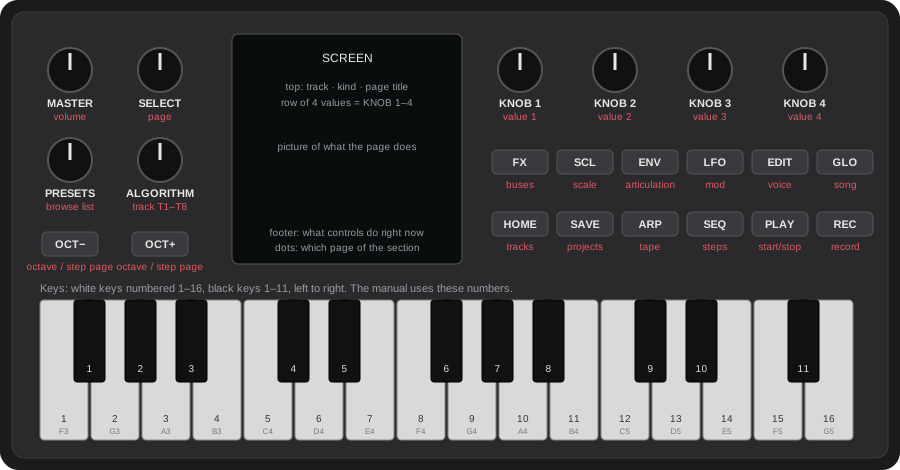
| Control | What it does in Ravel |
|---|---|
| MASTER | Output volume |
| SELECT | Moves to the next page (turn right) or back to the previous one (turn left) in the section you are in |
| ALGORITHM | Picks the track you are working on, T1 to T8. The keys play this track. |
| PRESETS | Browses the list that belongs to the page: sounds on most pages, the step the knobs edit on SEQ's step pages (STEPS, STEP TIMING, STEP SHAPE, STEP CUT, DRUM STEP) and patterns on its other pages, scenes on SONG, slots on SAVE (projects or sounds), steps on GRAPH, routes on INFLUENCE. The footer tells you which. |
| KNOB 1–4 | Change the four values in the row at the top of the screen, left to right |
| OCT− / OCT+ | Move the keyboard down or up an octave. On SEQ pages they move between step pages (1–16, 17–32, …). On pages with more settings than knobs they move the knobs to the next row instead; those pages show the rows on screen, number the knobs, and the footer says what OCT brings next: a kit's LANE pages (machine parameters, then LEVEL, CHANCE, LENGTH), the CZ's DCO, DCW and DCA envelopes (two stages at a time, then SUS and END), and LFO SHAPE (LFO 1 or LFO 2). |
| 10 section buttons | Each one opens a section (a group of pages). Tap it again for the section's next page. |
| PLAY | Starts and stops the sequencer |
| REC | Tap to arm recording on the current track |
| Keys | Play the current track, or act as steps, scenes or switches depending on the page and on what you hold |
The section buttons:
| Button | Section | What lives there |
|---|---|---|
| HOME | Tracks | All eight tracks at a glance, and the influence grid. Hold HOME on any page for a help screen: what each knob, PRESETS, the keys and OCT do there, and the layers that work everywhere; let go and you're back where you were |
| EDIT | Voice | The current track's sound: engine, source pages, pitch, filter, skin, insert, mix, sends |
| ENV | Articulation | How a note starts, holds and ends, the FILTER ENV, and the step envelopes (STEP ENV, LIBRARY) |
| LFO | Mod | Mod matrix, the two LFOs, dust, macros |
| FX | Buses | Delay, space, BED, feedback, master |
| SCL | Scale | Root, scale, transpose, interval |
| ARP | Arp | The current track's arpeggiator: mode, rate, octaves, hold (also a sustain with the arp off); gate, repeat, chance |
| SEQ | Steps | Steps, tempo, step timing and shape, track settings, direction, graph and playheads |
| GLO | Song | Mixers, the clock (tempo first), scenes, arrangement, density arcs, CPU |
| SAVE | Projects and sounds | Save, load, demos, new project; your own sound bank |
Section or layer? A quick tap (less than about half a second) opens the section. Holding a button and using keys or knobs while it is down turns it into a layer instead: SEQ held makes the keys steps, LFO held puts the macros on the knobs, and so on. When you use a button as a layer, letting go of it does not change the page. See Hold layers.
Reading the screen
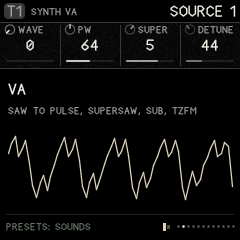
- Top bar:
- left: the track (T1–T8, its badge coloured by kind: white synth, slate strike, maroon perc), its kind and engine;
- right: the page title, and on the FM-1 the audio load (CPU 43% with a thin bar, held a moment at its peak; amber from 75%, red from 90%). The emulator doesn't measure it, so it doesn't show there.
- Value row: a strip divided into four cells, one for each physical knob, always KNOB 1, 2, 3 and 4 in that order. Each cell has a small dial, the name and the value, and a bar showing where it sits in its range; bipolar values have a centre mark. An empty cell keeps its dividers, so you can see which knobs do something on the page. A greyed name and value means that knob does nothing with the track set as it is.
- Picture: what the page does, drawn live (a waveform, a filter curve, the step grid, the graph). Tracks keep their kind's colour in the pictures (their meters, waves and steps); what belongs to no one track (the buses, the graph's two heads, the two WAVE tables) is drawn in white and greys with bone and verdigris.
- Footer:
- left: what the controls do right now. It changes when you hold a button, so read it whenever you are unsure.
- right: small dots, one per page in the section, with the current one lit; then, on the FM-1, the battery: three bars, red and empty when it runs low, or a bolt while USB powers it (the reading means little then).
- Also shown: a play indicator while running, and a red dot when recording is armed.
Short messages ("CAUGHT", "PATTERN B", "SAVED TO 3") flash on the screen when something happens.
3. The five moves (how every page works)
Every page in Ravel works the same way:
- Press a section button to open the section.
- Turn SELECT (or tap the same button again) to walk its pages. On FX, tapping FX again jumps to the next bus (DELAY, SPACE, BED, FEEDBACK, MASTER); SELECT still goes page by page.
- Turn ALGORITHM to choose which track you are editing.
- Turn KNOB 1–4 to change the four values shown.
- Turn PRESETS to browse whatever the page holds.
Knobs speed up when you turn them quickly, so a fast turn crosses a whole range and a slow turn moves one step.
Pages appear and disappear. A section only shows the pages that apply to the current track:
- a VA synth has three SOURCE pages, FM has four;
- the graph's HEAD pages only appear when the track is in GRAPH mode, and HEAD 2's pages only when head 2 is on.
So if a page seems to be "skipped", it is hidden because it does not apply to this track. Change the track or the setting and it comes back.
Greyed-out knobs. When a knob does nothing with the track set as it is, its name and value turn grey. For example, on a strike track with the PING body, DAMP, INHARM, GEOMTRY and MODES are grey, because a ping filter has none of those. The value is kept, so it is ready if you change the setup. So are ENGINE and VELO on strike tracks (engines are for synth tracks; strike takes velocity as it comes), T DECAY until TRANS is up, RING F until RING is up, ORDER, RATE and SEED except with the DUST or RAIN exciter, and on PHYS, POSITN for BLOWN and MEMBRAN.
4. How the parts connect
Ravel has 8 tracks. Each track is one of three kinds, and any track can be any kind (HOME › TRACKS › KIND); T8 can also be the COMP, the mix's compressor, any one track the GLITCH LOOPER, and any track a WEFT voice you patch:
| Kind | What it is | Default tracks |
|---|---|---|
| SYNTH | An oscillator voice with thirteen engines: VA, CZ, HYBRID FM, PHYS, FORMANT, PARTICLE, CHIP, WAVE, LOGIC, ORGAN, MONO, RESIN, TINE. Up to 4 voices. | T1–T4 |
| STRIKE | An exciter hitting a resonant body: drums, metal, wood, rain on glass | T5–T6 |
| PERC | A drum machine: 33 machines after the Elektron Machinedrum (TRX, EFM, P-I, GND). It starts as a KIT, six machines in lanes sequenced together on one track; MODE SINGLE is one machine played by notes. | T7 (a kit), T8 (one drum); any track can be PERC |
| COMP | T8 only, and only when you choose it: not a voice, but a bus compressor on the main mix (see T8 as COMP) | – |
| WEFT | A voice you patch from twelve blocks (see WEFT). Any track; four voices shared | – |
| GLITCH | The GLITCH LOOPER: four lanes of recorded audio, played back and overdubbed (see GLITCH LOOPER). One track at most; the effects buses rest while it is on (it can keep SPACE or DELAY running) | – |
How the sound flows:
- Each track makes sound. On synth, strike and perc tracks the sound goes: source → filter → skin (drive, fold, bits) → insert effect → articulation (the amplitude envelope) → level and pan.
- The mixer adds the tracks together. Each track also sends some of its sound to the three buses (delay or grains, space, feedback), and the buses return into the mix.
- The COMP (when T8 is one) squeezes the mix. The master applies drive and microcuts, then a safety limiter, then goes to the output.
- Influence connects tracks to each other. One track's notes or audio can trigger, modulate, excite, ring or clock another (HOME › INFLUENCE).
- The sequencer plays every track from its own pattern. The modulation (LFOs, dust, matrix, macros) moves parameters over time. Scenes and the arrangement switch patterns and states.
5. HOME: tracks and influence
TRACKS
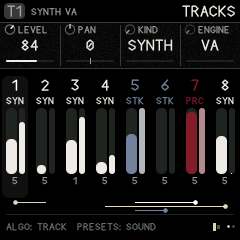
The overview shows all eight tracks:
- each track's number and kind;
- a live level meter;
- how many voices it is using;
- along the bottom, the influence routes drawn as lines.
The current track is highlighted.
| Knob | Value |
|---|---|
| 1 LEVEL | Track volume, 0–127 |
| 2 PAN | −64 left to +63 right |
| 3 KIND | SYNTH, STRIKE or PERC (on T8 also COMP), GLITCH (the GLITCH LOOPER) or WEFT (a voice you patch). Changing it resets the track to that kind's defaults. |
| 4 ENGINE | For synth tracks: VA, CZ, HYBRID FM, PHYS, FORMANT, PARTICLE, CHIP, WAVE, LOGIC, ORGAN, MONO, RESIN, TINE |
ALGORITHM picks the track; PRESETS loads a sound of the track's kind.
T8 as COMP: the bus compressor
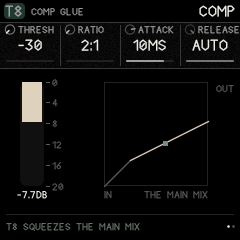
T8 can be a glue compressor for the whole mix, after the SSL G-series bus compressor. It is off by default (T8 is a drum). To turn it on, choose T8 with ALGORITHM, and on HOME › TRACKS (or EDIT › SOUND) turn KIND to COMP. T8 then plays nothing itself: EDIT keeps its first page, SOUND, with KIND (ENGINE, VOICES and VELO greyed out), and the compressor's two pages follow it; it squeezes the mix (the tracks and the buses' returns) before the master's drive and limiter. To turn it off, turn KIND back on SOUND (or HOME › TRACKS; it is also KNOB 3 on COMP 2).
| Page | KNOB 1 | KNOB 2 | KNOB 3 | KNOB 4 |
|---|---|---|---|---|
| COMP | THRESH: −30 to 0 dB | RATIO: 2:1, 4:1, 10:1 | ATTACK: 0.1, 0.3, 1, 3, 10, 30 ms | RELEASE: 0.1, 0.3, 0.6, 1.2 s, or AUTO |
| COMP 2 | MAKEUP: 0–15 dB | MIX: 0–100 % (below 100, the dry mix under it: parallel compression) | KIND | S.CHAIN (the sidechain): MIX (the default: it listens to what it squeezes) or T1–T7 |
SIDECHAIN (S.CHAIN). With a track chosen, the compressor listens to that track instead of the mix, and squeezes the whole mix when it plays: the classic pump of a kick pushing pads and bass down. It hears the track after its own effects but before its LEVEL and mute, so a muted track still works the compressor: a silent "ghost" kick on its own track, at the rhythm you want the mix to breathe, is a common trick. The picture says KEYED BY T1 (and so on).
The meter falls from the top as it squeezes (0 to 20 dB of gain reduction); beside it, the curve it squeezes by, with the mix's level now as a dot. AUTO releases in two stages, as the SSL's does: quickly after a short peak, slowly out of a long squeeze. For glue, start at 2:1 or 4:1, ATTACK 10 or 30 ms, RELEASE AUTO, and lower THRESH until the meter moves 2 to 4 dB on the loudest hits. It costs almost nothing: the level is read once per 16 samples.
The matrix and macros can move its knobs like any track's (THRESH on an LFO pumps). A scene or a sound loaded onto T8 can change its kind like any track's.
GLITCH LOOPER
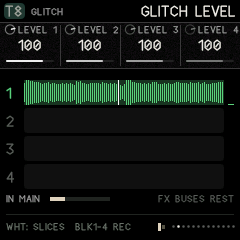
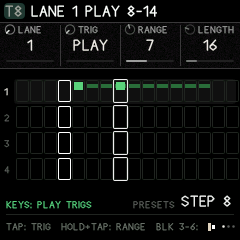
Turn KIND to GLITCH on any one track (EDIT › SOUND, KNOB 1, or HOME › TRACKS, KNOB 3; turn it back the same way to remove the looper). It plays nothing of its own: it records what you hear into four lanes and plays them back, each lane overdubbing as it records. EDIT keeps its SOUND page (KIND; the other knobs greyed), and the looper's pages follow it.
Step by step
The keys below are counted from the left: black key 1 is the first black key (F#), white key 1 the first white key (F).
Your first loop
- Get something playing: load a demo (SAVE › DEMO) or your project, and press PLAY.
- With ALGORITHM, pick a track you aren't using (T8, say). Press EDIT: the first page is SOUND. Turn KNOB 1 (KIND) until it reads GLITCH (if the track had steps, the screen asks you to turn again). The effects stop; the screen's bottom line says FX BUSES REST.
- Turn SELECT one page to GLITCH LEVEL: four empty lanes.
- Press black key 1. Lane 1 records (a red line runs along it) and plays what it has recorded, in time.
- Let it go round once (16 steps, a bar, unless you change LENGTH on SEQ), then press black key 1 again. It stops recording and keeps playing.
- Mute the tracks you recorded (GLO › MUTE / SOLO, white keys 1–8) to hear the loop on its own, then bring them back in.
Shape it
- GLITCH LEVEL, GLITCH PITCH and GLITCH SPEED have a knob a lane: PITCH transposes without changing the time, SPEED changes the time (1/4 to 2, or REV) without changing the pitch.
- Overdub: press black key 1 again while the lane plays and play over it. OVERDUB (GLITCH INPUT, KNOB 3) is how much of the old stays: 127 keeps all of it, 100 (the default) lets it fade a little each pass, 0 replaces it.
- More lanes: black keys 2–4 record lanes 2–4; black keys 5–8 start and stop lanes 1–4 playing.
Play slices
- Hold white key 1: lane 1's first quarter plays, round and round, in place of the lane. White keys 1–4 are lane 1's quarters, 5–8 lane 2's, 9–12 lane 3's, 13–16 lane 4's.
- Hold two or more (even from different lanes): they take turns in the order you pressed them. Let go and the lanes carry on.
Wait for the sound
- On GLITCH INPUT, turn THRESH (KNOB 2) up. Now black key 1 only arms the lane; it starts writing when the sound gets that loud, so a take starts on the first hit.
Record with reverb (or delay)
- On GLITCH INPUT, turn LOOPER (KNOB 4) to +SPACE (or +DELAY). The lanes empty and get a little shorter; SPACE keeps running.
- Send the tracks into SPACE as usual (each track's EDIT › MIX or SENDS) and record from SOURCE MAIN: the reverb goes into the loop.
Sequence it (the transport must be playing)
- Press SEQ: the GLITCH TRIGS page. KNOB 1 (or black keys 3–6) picks the lane, KNOB 2 the trig: REC or PLAY.
- With TRIG on REC, tap white key 1: each time the pattern reaches step 1, that lane records the whole loop. Tap it again to remove it.
- With TRIG on PLAY, tap a step: the lane plays from there. For a section, hold one step and tap another: the section runs from the left one to the right one, both included, whichever you held first (hold 9 and tap 12, or hold 12 and tap 9: steps 9–12). The trig goes on its first step, RANGE (KNOB 3) is set to reach the last, and the keys light along it. A PLAY section plays just those steps of the lane, round and round, until another trig moves it (MLR-style); a REC section records into just those steps. Any other trig of the same lane and kind inside it is removed.
Clear, and get the effects back
- Hold black key 9 and press a record key (black 1–4) to clear that lane. Press black key 11 twice to clear all four.
- To have every effect back: LOOPER to OFF (the track keeps its settings and trigs; the loops are gone), or turn KIND back on EDIT › SOUND.
Recordings are not saved with the project: save keeps the GLITCH LOOPER's settings and trigs, and the lanes start empty.
Reference
The memory. The FM-1 has no RAM to spare, so the lanes borrow the effects buses' memory, and the effects whose memory they hold stand still. LOOPER (GLITCH INPUT, KNOB 4) says how much they take:
| LOOPER | The effects | A lane holds | 16 steps at 120 BPM |
|---|---|---|---|
| ON (the default) | DELAY, FEEDBACK, SPACE and the microcuts rest | about 16 000 samples | about 8 kHz |
| +SPACE | SPACE keeps running; the rest rest | about 13 300 | about 6.7 kHz |
| +DELAY | DELAY keeps running; the rest rest | about 10 000 | about 5 kHz |
| OFF | all of them run; the looper is silent and its keys and trigs wait | – | – |
The lanes are stored 8-bit, spread over the loop's LENGTH: lo-fi on purpose, and a short loop at a quick tempo sounds clearer than a long, slow one. Every change of LOOPER empties the lanes (their memory is laid out again, or handed back), and an effect handed back starts clean. The screen's bottom line says what is running.
Recording with an effect: set LOOPER to +SPACE (or +DELAY), send the tracks into it as usual, and record from MAIN: the reverb (or the echoes) go into the loop. Then, to play with every effect again, turn LOOPER to OFF; the loops are gone, but the track keeps its settings and trigs, ready for the next take. The GLITCH LOOPER's own playback is dry: it sends nothing into the effects.
What it records. SOURCE MAIN (the default) is the main mix, with whatever effect LOOPER keeps running, without the GLITCH LOOPER itself, so it never records its own playback. SOURCE T1–T8 records one track, after its own effects. The FM-1 has no audio input, so the looper can only record Ravel.
| Page | KNOB 1 | KNOB 2 | KNOB 3 | KNOB 4 |
|---|---|---|---|---|
| GLITCH LEVEL | LEVEL 1 | LEVEL 2 | LEVEL 3 | LEVEL 4 |
| GLITCH PITCH | PITCH 1 (±24 semitones) | PITCH 2 | PITCH 3 | PITCH 4 |
| GLITCH SPEED | SPEED 1: 1/4, 1/2, 3/4, 1, 3/2, 2, REV | SPEED 2 | SPEED 3 | SPEED 4 |
| GLITCH INPUT | SOURCE: MAIN, T1–T8 | THRESH: 0 records at once; above 0, an armed lane waits until the sound is that loud | OVERDUB: how much of the old stays under the new (0 replaces it) | LOOPER: OFF, ON, +SPACE, +DELAY (see above) |
PITCH and SPEED are apart: SPEED changes how fast the loop runs, and PITCH transposes it without changing its time (a two-grain stretch). Both can be moved by the LFOs and the matrix.
Playing it by hand (with the GLITCH LOOPER's track chosen, on any page but SEQ):
- Black keys 1–4 record lanes 1–4: one tap starts (or arms, with THRESH above 0), the next stops. A lane that records also plays, the loop's whole length, in time.
- Black keys 5–8 start and stop lanes 1–4 playing.
- Hold black key 9 and tap a record key to clear that lane; tap black key 11 twice to clear all four.
- The white keys play slices, in groups of four: keys 1–4 are the four quarters of lane 1, 5–8 of lane 2, and so on. A held slice replaces its lane while it is held. Hold several, even from different lanes, and they play one after another in the order you pressed them, round and round, as the arpeggiator's PLAYED order does with notes.
Sequencing it (SEQ, like the Octatrack's recorder trigs). The steps carry only PLAY and REC trigs, per lane:
| Page | KNOB 1 | KNOB 2 | KNOB 3 | KNOB 4 |
|---|---|---|---|---|
| GLITCH TRIGS | LANE: the lane the keys write | TRIG: PLAY or REC | RANGE: how many steps the trig plays or records (0: the whole loop) | LENGTH of the loop |
| TRIG CHANCE | CHANCE | CONDITN | – | – |
- Tap a step to place or remove a trig of the chosen kind on the chosen lane; black keys 3–6 choose the lane.
- Hold a step and tap another to set a section (MLR-style), from the left one to the right one, both included, in either order: REC over steps 5–11 records into them and stops; PLAY over steps 8–14 plays that stretch of the lane, looping it until another trig moves it. The trig sits on the section's first step with its RANGE reaching the last; other trigs of the same lane and kind inside it go. On SEQ the keys light the chosen lane's trigs of the chosen kind (TRIG), each along its section.
- A REC trig with THRESH above 0 waits for the sound before it writes.
The recordings are not saved: a project keeps the GLITCH LOOPER's settings and trigs, and its lanes start empty when it loads or the FM-1 starts. The loop's clock follows the GLITCH LOOPER's sequencer while it plays, and keeps running at the tempo while stopped. On v1.6.0 a project's GLITCH LOOPER loads as a blank synth with its steps cleared; firmware older than that should not open such a project.
WEFT: a voice you patch
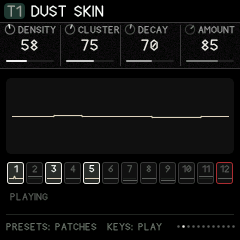
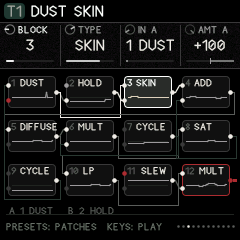
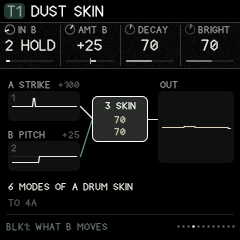
A WEFT track has no engine of its own: you build its voice from twelve blocks, the way a Max or Pure Data patch is built from objects, or a modular from modules. Each block does one thing (makes a ramp, reads it as a wave, rises and falls, filters, multiplies, compares, delays, throws particles, rings when struck) to its two inputs, A and B. An input takes the output of any block, the block itself included, or one of the built-in sources, with an amount (−100 to +100). Any track can be WEFT, as many as you like; they share four voices.
Patch it on the FM-1's pages, or with the mouse or a finger in the emulator's WEFT patcher (below), and move patches between the two.
WEFT step by step
Your first WEFT voice
- Turn ALGORITHM to a track (T1, say) and press EDIT. On SOUND, turn KNOB 1 (KIND) to WEFT. The track starts from the INIT patch: a saw (WAVE) through a low pass (LP), an envelope (SLOPE) opening both, into a VCA (MULT).
- Play the keys. SELECT one page on is WEFT PLAY: the voice's output as a scope, and four of the patch's settings on the knobs (here CUTOFF, RES, FALL and SHAPE).
- Turn PRESETS on any WEFT page to hear the twenty-eight factory patches (below). Keep your own on WEFT LIBRARY, the last WEFT page (below).
Patch a block by hand
- SELECT to WEFT PATCH: the twelve blocks as tiles in three rows, each with its number, its type and a live scope of its output. Cords run from a block's output (right) to an input (left: A above, B below); a coloured dot on an input is a built-in source (bone: PITCH; red: GATE or TRIG; verdigris: an LFO).
- KNOB 1 (BLOCK) picks a block, KNOB 2 (TYPE) sets what it is (an empty block becomes one; the voice is heard from the first block you make), KNOB 3 (IN A) picks where input A comes from and KNOB 4 its amount.
- SELECT to WEFT BLOCK for the same block close up: KNOB 1–2 are input B and its amount, KNOB 3–4 the block's two settings. The picture shows what comes in on A and B, the block, what goes out, and where it goes. Black key 1 sets what input B does: its own job (the table below), or B MOVES: B turns the block's second setting instead (a filter's RES, a ring's DECAY, a clip's BIAS…), up and down from where the knob leaves it, at audio rate. The B label says which; on WEFT PATCH a B port that moves a setting is bone.
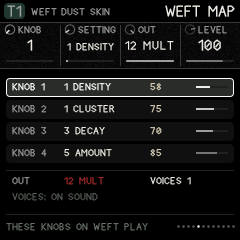
- SELECT to WEFT MAP: KNOB 1 picks one of PLAY's four knobs, KNOB 2 the setting it turns (any block's), KNOB 3 OUT, the block the voice is heard from (AUTO, the default: the last block that isn't an output block, or, if the patch has AUDIO blocks, just them), KNOB 4 RUN: KEYS (the default: the patch plays while a key is held, and its tail) or ALWAYS (one voice runs on its own, no key needed: a drone, a self-clocking network, a patch that drives other tracks; the GATE and TRIG sources still follow the keys, so leave them out of what should run, and PITCH is the last note played). The track's LEVEL is on MIX. VOICES (1 or 2) is on SOUND.
- SELECT to WEFT RATE: KNOB 1 RATE: FULL (the default: every block at 44.1 kHz, as the patch was made) or HALF (the whole patch at 22 kHz, then brought back up: about half the time on the FM-1; what goes is the top octave, above about 10 kHz, and it gets a little grit, so it suits drones, feedback networks, bodies and noise more than bright leads). Times, pitches and envelopes stay as they were. KNOB 2 is RUN again. The picture shows what the track takes now. RATE is saved with the patch (and in its file from the emulator).
Example: a plucked string from nothing
- Start from INIT. Set blocks 1–5 as below, each input not mentioned to - (none). On WEFT PATCH: block 1 SLOPE, input A TRIG (a pulse at each note), and on WEFT BLOCK its RISE 0, FALL about 30: a click of an envelope.
- Block 2 MULT: A = NOISE, B = block 1. A burst of noise.
- Block 3 ADD: A = block 2, B = block 5 (a cord back: feedback). Block 4 DELAY: A = block 3, TIME 0 (the note's own period). Block 5 LP: A = block 4, CUTOFF high. The burst circles round the delay, a little darker each time: a string, at the note you play.
- On WEFT MAP set OUT to block 4. That is Karplus-Strong; the factory PLUCK is the same, with an envelope to stop it when the key is let go.
Any setting of any block also takes step locks (hold SEQ and a step, turn the knob on WEFT BLOCK or PLAY), the matrix and macros, like any parameter: they are track parameters, two a block.
Example: dust on a drum skin
- Load DUST SKIN (PRESETS) and hold a key: block 1 DUST throws particles (DENSITY a second, CLUSTER how much each one makes more follow, so they come in clumps that spread out), block 2 HOLD takes a new random pitch at each, and block 3 SKIN rings at it, a drum skin's six modes. DIFFUSE smears the hits, and a loop back through MULT (moved by a slow CYCLE) and SAT keeps some of the smear going. On PLAY, KNOB 1–4 are DENSITY, CLUSTER, the skin's DECAY and the smear's AMOUNT.
- Resonators in a loop sing: a ring at its pitch passes almost all of what it gets, so feeding a SKIN or a RING back into itself makes a tone that holds. Keep the loop outside the resonator (as here), or the amount small, and put SAT in it.
The blocks
All signals run about −1 to +1; SLOPE and SLEW run 0 to 1 (envelopes). An input left empty reads 0 (MULT's B reads 1, so MULT alone is a level). "High" from the logic blocks is +LEVEL, "low" −LEVEL.
| Block | What it does | Input A | Input B | Settings |
|---|---|---|---|---|
| PHASE | a ramp from −1 to +1 at the note × RATIO: the core of an oscillator | FM (through-zero: the rate swings either way) | SYNC: resets the ramp as B rises through 0 (hard sync) | RATIO (1/4 … 16), FINE (±1 semitone; 64 = none) |
| WAVE | reads a phase as a wave. With nothing on A it runs its own phase at the note: an oscillator on its own | PHASE (e.g. a PHASE block, for sync or FM) | PM: added to the phase (phase modulation) | SHAPE (sine → triangle → saw → square), WARP (bends the phase, the Casio CZ's trick; 64 = none) |
| SLOPE | rises while A is high, holds, falls when it drops (Serge's function generator). With nothing on A it follows the note's gate | GATE (a pulse: an AD envelope) | TIME: faster (up) or slower (down) | RISE, FALL (0.5 ms … 8 s) |
| CYCLE | rises and falls on its own: an LFO, or an oscillator at fast RATE | RATE (exponential) | SYNC: restarts it | RATE (0.02 Hz … 2.6 kHz), SKEW (which way takes longer: saw ↔ triangle ↔ ramp) |
| SLEW | follows A, taking RISE to go up and FALL to come down (portamento, smoothing, envelope following) | IN | TIME | RISE, FALL |
| LP · BP · HP | a state-variable filter: low, band or high pass | IN | CUTOFF, five octaves each way (audio rate: filter FM) | CUTOFF (20 Hz … 20 kHz), RES |
| ADD | A + B + OFFSET | A | B | OFFSET (64 = 0), GAIN (64 = ×1) |
| MULT | A × (B + OFFSET): a VCA, or ring modulation | A | B | OFFSET, GAIN |
| MIX | A into B by BLEND | A | B | BLEND, GAIN |
| MIN · MAX | the lower / higher of A and B + OFFSET (clipping, rectifying) | A | B | OFFSET, GAIN |
| FOLD | A, driven round a sine: folds back on itself as it grows (wavefolding) | IN | DRIVE (more folding) | DRIVE, BIAS |
| COMP | high when A is above B + THRESH, else low | A | B | LEVEL, THRESH |
| AND · OR · XOR | logic on A and B, each "true" above THRESH: square waves from anything, CMOS-style timbres | A | B | LEVEL, THRESH |
| FLIP | turns over on each rise of A: half A's rate (a sub-octave from a square) | CLOCK | RESET | LEVEL, THRESH |
| DELAY | A, later, with its own feedback. Up to 11 ms: combs, flangers, strings, resonators | IN | TIME: two octaves each way | TIME (0 = the note's period, for strings; notes below F2 sound an octave up), FEEDBK (64 = none; up: positive, down: negative) |
| BANDS | four resonant bands on the note's harmonics (1st–4th), summed | IN | SCAN: which band speaks (−1: the 1st … +1: the 4th) | SPREAD (64: harmonic; down squeezes them, up stretches them), RES |
| HOLD | takes A each time B rises (with nothing on B, each note): sample and hold | IN | CLOCK | STEPS (0: smooth; up: fewer levels), GLIDE |
| DUST | random particles: one-sample clicks, each its own height. Each one makes more likely just after it, so they come in clumps that spread out | DENSITY (exponential: ±6 octaves) | BURST: a clump each time B rises (with nothing on B, each note) | DENSITY (0.5 … 2000 a second), CLUSTER (0: an even scatter; up: clumps) |
| TICK | a click on each DIV of the tempo, on the transport's grid (it runs with the transport stopped too) | GATE: ticks only while A is up | JITTER: each click late by up to B × half a DIV | DIV (4 BAR … 1/64, with triplets), CHANCE (127: every one) |
| RING | one resonator, struck: a click in rings at the note × RATIO, dying away over DECAY | STRIKE | PITCH: two octaves each way | RATIO (1/4 … 16), DECAY (2 ms … 8 s) |
| SKIN · BAR · PLATE · BELL · HARMS · FIXED | six resonators tuned as a body's modes, struck by A: a drum skin, a free bar, a plate, a bell (hum, prime, tierce …), the harmonics; FIXED is a filterbank at 150 Hz … 5.5 kHz whatever the note. Filter banks (these, CHEBY, FORMANT, VOCODER): three to a patch | STRIKE | PITCH: two octaves each way | DECAY, BRIGHT (down: the high modes softer and shorter) |
| SAT | A driven into a soft clip (tanh-like): what keeps a loop alive without blowing up | IN | DRIVE: more | DRIVE (1× … 16×), BIAS (64 = none; off centre: even harmonics) |
| ABS | A + B + OFFSET, made positive (full-wave rectifying) | A | B | OFFSET, GAIN |
| DIFFUSE | four allpasses in a row: smears clicks into washes and spreads a loop's echoes without changing its level. Shares the DELAY's memory: DELAY and DIFFUSE, two to a patch together | IN | SIZE: an octave each way | SIZE, AMOUNT |
| CLK OUT | each rise of A through THRESH (every DIV-th) is a step of the WEFT clock: choose WEFT for CLOCK on any track's TRACK page (this one too) and its sequencer follows. Passes A on | CLOCK | RESET: the tracks it clocks back to step 1 | DIV (1 … 16), THRESH |
| MOD OUT | A, smoothed, is the matrix's WEFT source | IN | LEVEL: A × B | SMOOTH, RANGE (−1..1 or 0..1) |
| SHIFT | a frequency shifter: every partial of A moved up (or down) by the same number of Hz, not by an interval, so harmonics go inharmonic. Slow shifts (a fraction of a Hz) phase and swirl; in a feedback loop each pass shifts again, a barber-pole spiral | IN | SHIFT: B × 1 kHz added (audio rate: shift FM) | SHIFT (64 = none; either way, finest near the middle, up to 2 kHz), SIDE (0: down, 127: up, between: both, 64 a ring modulator) |
| DIODE | A through a diode clipper, soft at the knee: one diode (PAIR 0) passes only the top half, gritty and full of even harmonics; a matched pair (127) clips both halves evenly. The offset a single diode makes is taken out, so it sits in a loop | IN | DRIVE: two octaves each way | DRIVE, PAIR |
| AUDIO | A, into the voice's output, mixed with OUT and any other AUDIO blocks: hear two or three parts of a patch at once (a dry and a wet, a ring and its click) without a mixer block. TONE tilts it darker or brighter. With OUT on AUTO and an AUDIO block in the patch, only the AUDIO blocks are heard | IN | LEVEL: A × B | LEVEL, TONE (64 = flat; down: darker; up: brighter) |
| SEQ OUT | each rise of A moves another track's sequencer, in MODE: STEP (one step on: that track then moves only on these, a sequencer clocked by the patch), JUMP (to the step B points at: 0 the first … 1 the last; it plays on from there by its own clock), RESTART (back to step 1), GATE (the track is heard only while A is up: rhythmic gating) or PATTERN (B low: A, high: B; with nothing on B, the other one). Only one voice of the patch drives it. Passes A on | TRIG | WHERE (JUMP's step; PATTERN's choice) | TRACK (T1 … T8), MODE |
| SW 1>4 | a sequential switch, one in to four outs: A goes out on one of SW 1–4 (new sources in every input menu, white dots on the screen), the others silent. Each rise of B (with nothing on B, each note) moves it on in ORDER; in SELECT, B's level picks (−1: SW 1 … +1: SW 4). Its own output is where it is (−1, −⅓, +⅓, +1). The first one in a patch feeds SW 1–4 | IN | STEP (or, in SELECT, which) | ORDER (UP, DOWN, PING, RANDOM, SELECT), SMOOTH (0: a hard switch, the click part of the sound; up to 20 ms crossfade) |
| SW 4>1 | a sequential switch, four in to one out: it reads A's source and the three after it (A on block 3: blocks 3, 4, 5 and 6; A on PITCH: PITCH, GATE, TRIG, VEL), one at a time, at A's amount | FROM: the first of the four | STEP (or, in SELECT, which) | ORDER, SMOOTH |
| STRING | Karplus-Strong in one block: A excites a loop the note's period long, damped as it goes round (the DELAY's memory, shared: two to a patch with DELAY and DIFFUSE; below F2 an octave up) | EXCITE | PITCH: two octaves each way | DAMP (up: darker, shorter highs), DECAY (50 ms … 9 s) |
| CHAOS | the logistic map x → r·x·(1−x), a step at each rise of A (with nothing on A, at RATE): from two values in turn (CHAOS low) through ever longer cycles to noise (high). Out −1 … +1, stepped | CLOCK | CHAOS: more or less | CHAOS, RATE (0.1 Hz … 2.5 kHz) |
| CRUSH | A held RATE samples at a time, in BITS' levels: sample-rate and bit reduction | IN | RATE: three octaves each way | BITS (0: 16 bits … 127: 1), RATE (1 … 64 samples) |
| EDGE | a one-sample click (at LEVEL) each time A rises through THRESH: turns any signal into strikes for the resonators and the switches | IN | THRESH: moved by B | THRESH, LEVEL |
| FOLLOW | an envelope follower: how loud A is (its size), rising over ATTACK and falling over RELEASE, 0 … 1. A drum's level into a filter, ducking, a level to compare | IN | TIME: faster (up) or slower (down) | ATTACK, RELEASE (0.5 ms … 8 s) |
| SHAPE | waveshaping: A × DRIVE through a transfer CURVE: TANH (soft), CLIP (hard), SINE (folds as it grows), CUBE, CHEB3 (a sine in, its third harmonic out), STEPS (four levels), ASYM (lopsided: even harmonics) | IN | DRIVE: two octaves each way | CURVE, DRIVE (1× … 16×) |
| CHEBY | a four-pole Chebyshev low pass: steeper than LP, with ripples in the passband (a slight bump before the cutoff) | IN | CUTOFF: five octaves each way | CUTOFF (20 Hz … 20 kHz), RIPPLE (0.1 … 6 dB) |
| FORMANT | three band passes at a vowel's formants (A, E, I, O, U, morphed between as VOWEL turns): a saw or noise starts to speak | IN | VOWEL: moved by B | VOWEL, SHIFT (the formants an octave down … up; 64 = as sung) |
| VOCODER | A, the modulator, split into six bands (250 Hz … 4 kHz); each band's level rides the same band of B, the carrier (with nothing on B, a saw at the note) | MOD | CARRIER | SHARP (the bands' width), SHIFT (the carrier's bands an octave down … up: formants up or down) |
| RINGMOD | A × B; with nothing on B, A × a sine at the note × FREQ. MIX blends A in | IN | CARRIER | FREQ (1/8 … 16 × the note), MIX (0: A … 127: the product) |
| NOISE | white noise, held RATE samples at a time (stepped, like a slow sample-and-hold, as it falls) and coloured: COLOR down is darker (brown at 0), 64 white, up brighter | RATE | COLOR | COLOR, RATE (127: every sample … 1/1024) |
| RUNGLER | a shift register of 3–8 bits (Rob Hordijk's Benjolin): at each rise of A (else each note) a bit goes in, B's sign (with nothing on B, a coin toss), or with LOOP's chance the bit falling out the end, so the pattern repeats. Out: its last three bits as eight levels, −1 … +1. Into PHASE or a ring's PITCH: stepped melodies that loop and mutate | CLOCK | DATA | LOOP (0: always new … 127: locked), LENGTH (3 … 8) |
| LISSA | a Lissajous LFO: two sines at RATIO of one RATE; X is its output, Y the built-in source LIS Y (the first LISSA in a patch). Into two things at once (two filters, a vowel and a pitch), they trace the figure | RATE (exponential) | PHASE: Y's, against X's | RATE (0.02 Hz … 2.6 kHz), RATIO (1:1, 1:2, 2:1, 2:3, 3:2, 3:4, 4:3, 3:5, 5:4) |
Built-in sources (an input's menu, after the twelve blocks): PITCH (the note, ±1 over four octaves round middle C), GATE (high while the key is held), TRIG (one sample at each note), VEL, NOISE (white), LFO 1, LFO 2 (the global LFOs), WHEEL (MIDI mod wheel), ONE (a constant 1, for offsets), SW 1–4 (a SW 1>4's four outs), LIS Y (a LISSA's Y) and the three VIOLENCE sources, how hard the panel itself is being played, 0 … 1 each: V TAP (each key struck adds to it; it falls away over about half a second, so hammering the keys pushes it up), V HELD (how many keys are held down: six or more is 1) and V TURN (each knob detent adds to it; it falls away faster). Patch them into whichever blocks should answer: a DUST's DENSITY, a SAT's DRIVE, a SEQ OUT's TRIG.
Order and feedback. The blocks run in their order, 1 to 12, once a sample. A block reads the blocks before it from this sample, and itself and the blocks after it from the one before. So any cord can go anywhere, and a loop (a cord back, verdigris on the screen) is feedback one sample late, as in Max's gen~ with history. A patch can't run away: the voice is gently limited, and a filter that blows up starts over.
Voices and cost. WEFT tracks share four voices; a track takes one or two (VOICES on SOUND; with one, the voice carries on from note to note, its oscillators and delays unbroken). Each voice runs the blocks it can be heard through at the full sample rate (or half, with RATE HALF), so a big patch costs about as much as three or four voices of a synth engine: watch GLO › CPU (its WEFT bar, or VIEW TRACKS). The blocks run sixteen samples at a time, each through its whole run before the next, wherever the cords allow; blocks in a loop of each other (a cord from a later block, which is a sample late) run sample by sample together, as cords always have: the sound is the same either way, sample for sample, but a patch without loops costs about half what it did, and one made of loops about the same. A block that nothing heard or sent out depends on doesn't run at all; slow CYCLEs and LISSAs (under about 50 Hz) are worked out every eighth sample and smoothed; the whole voice loop and its bigger blocks run from RAM (on the FM-1, code run from the flash waits for it); on the FM-1, WEFT voices share the second core with the other voices. A released voice ends once it has been quiet a moment (a patch with no envelope after its last block rings on until 12 s after release). When the overload guard is holding voices back, WEFT keeps to two (one when it has to ease more). A patch using more than eight blocks plays one voice, whatever VOICES says (WEFT MAP shows it), until its cost on the FM-1 is measured. A patch with RUN ALWAYS, or with CLK OUT, MOD OUT or SEQ OUT, keeps one voice running all the time, notes or not, so its clock, its source and its sequencer moves go on (the lowest track with one is the one heard, if several have them); it takes one of the four for as long as the block is there.
Factory patches (PRESETS on the WEFT pages): INIT (saw, low pass, one envelope), SYNC LEAD (hard sync, a slow LFO on the synced ramp), DX BELL (two-operator FM at 7:1, its index falling), PLUCK (Karplus-Strong), CMOS XOR (two ramps XORed, a FLIP sub-octave, scanned BANDS), PHASE DIST (an envelope bending a sine, CZ-style), DRONE (two saws a fifth apart, a slowly swept band pass), TANGLE (a triangle phase-modulated by its own folded, filtered self), SPECTRA (noise through four harmonic bands, scanned), S&H BLIPS (a clock sampling noise into the pitch, each tick an envelope), DUST SKIN (clumped particles on a drum skin, smeared, fed back), PLONK (a click of noise strikes a bar, its pitch falling), TOM SKIN (a pulse on a skin, its brightness moved by velocity with B MOVES), PINGS (two clocks on the tempo's grid strike tuned rings while a key is held), TICK CLOCK (sixteenths with a CLK OUT: set another track's CLOCK to WEFT), DUST MOD (smoothed clumps of dust as the matrix's WEFT source; silent), SCATTER (each particle of dust sent at random by SW 1>4 to one of four rings, crushed), PING SWITCH (a clock picks, tick by tick, between two rings, a string and its clipped self with SW 4>1), KS STRING (a click of noise into STRING), CHAOS STRING (a logistic map plucks a string at each zero crossing and sets its pitch), BENJOLIN (after Rob Hordijk's: two free oscillators, a rungler clocked by one and fed by the other bending both, their comparison through a resonant filter), VOWELS (a saw through FORMANT, the vowel wandering with a LISSA), ROBOT VOX (a vowel-shaped saw speaking through a square an octave down: VOCODER), RUNGLE PINGS (a rungler stepping the pitch of a ring struck in sixteenths, a CHEBY after), LISSA DRONE (two saws, a CHEBY and a RINGMOD moved by a LISSA's X and Y), WIND (dark noise through two band passes swept by a LISSA), VIOLENCE (play the panel hard: strikes thicken the DUST that steps T3 and drive the clip, a knob turned unsettles the CHAOS that jumps T4 about, a hard strike restarts T2, held keys bend a ring; give T2–T4 some steps and press PLAY) and THREE LOOPS (no oscillators, after Jaap Vink's feedback patches at the Institute of Sonology: a low pass, a folder and a short delay in one loop; a SHIFT, a DIODE and a smear in a second fed a little of the first; the two ring-modulated and crushed; the second loop's level darkening the first and moving the shift; hold a key).
WEFT LIBRARY: load, save and delete patches on the FM-1
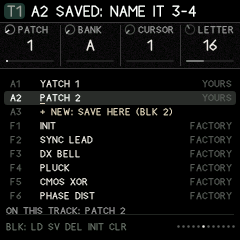
The last WEFT page (SELECT on from WEFT MAP) is the track's patch library. The top line says how many of your patches the current bank holds and how many of its 32 slots are free (any sound takes a slot). The list holds your patches first (the WEFT sounds in that bank, A1…, marked YOURS), then + EMPTY (the bank's first free slot: where a new save goes), then, below a line, the factory patches (F1–F28, marked FACTORY). The factory patches are the same in every bank: they are built in, can be loaded anywhere and take no room. Your patches are kept as WEFT sounds in the sound banks, so they travel with Send to FM-1 and the emulator's sound files, and are kept when you load another project.
- KNOB 1 (PATCH) (or PRESETS) moves through the list; KNOB 2 (BANK) picks bank A–D.
- Black key 1: LOAD the highlighted patch onto the track.
- SAVE (the button) or black key 2: SAVE the track's patch. On one of yours it overwrites it (press twice); anywhere else (+ NEW, or a factory patch, as when you have just made something from the default patch) it goes into the first empty slot at once, named PATCH n, and the cursor moves onto it so KNOB 3–4 can name it.
- Black key 3: DELETE the highlighted patch of yours; press it again to confirm. Factory patches can't be deleted.
- Black key 4: INIT starts the track again from the INIT patch (a saw, a low pass, an envelope); black key 5: CLEAR empties every block, to build from nothing. Each asks for a second press.
- KNOB 3 (CURSOR) and KNOB 4 (LETTER) rename the highlighted patch of yours, a letter at a time (the cursor is underlined); the name is kept a moment after you stop turning.
- The white keys still play the track. ON THIS TRACK at the bottom names the patch the track is playing.
The WEFT patcher (in the emulator)
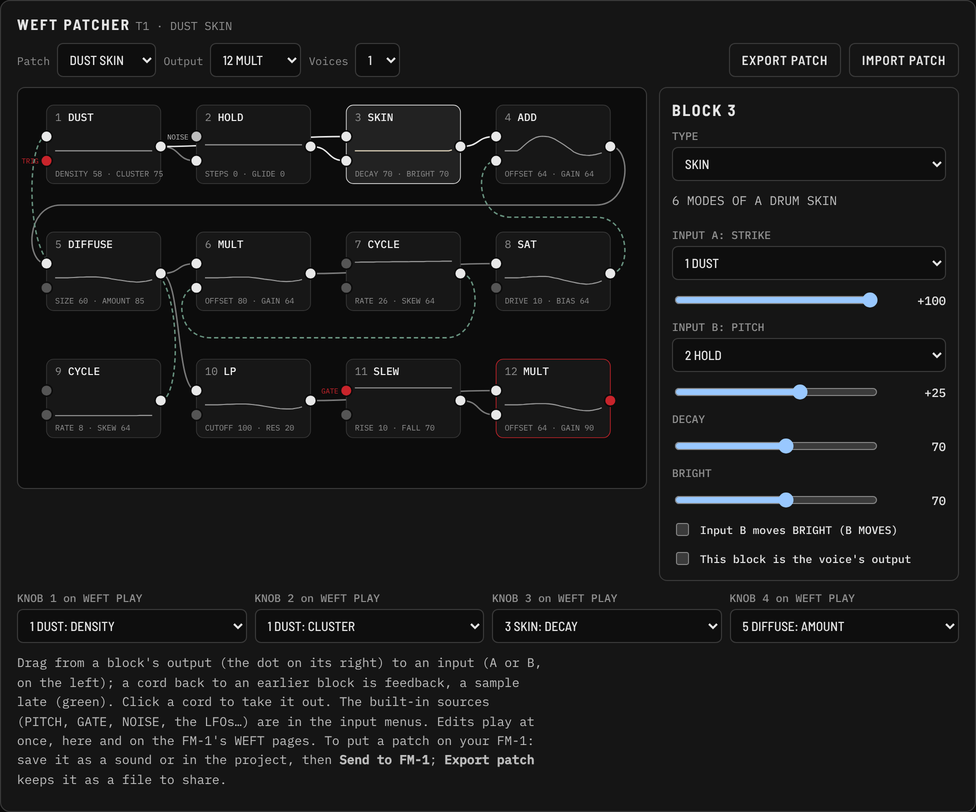
Under the instrument in the emulator, the WEFT patcher shows the current track's patch as a diagram you can play with:
- Make this track WEFT turns the current track into one (or choose Weft (patch) under Sound).
- Drag from a block's output (the dot on its right) to an input (A or B, on its left) to patch; a cord back to an earlier block is drawn dashed in green (feedback). Click a cord to take it out. Drag a block by its title to move it (the layout is only for you; it is kept in your browser).
- Click a block to edit it on the right: its TYPE, each input's source (blocks and built-ins) and amount, its two settings, and whether it is the voice's output. Clicking also picks it on the FM-1's screen in the emulator.
- Patch loads a factory patch; Output, Voices and KNOB 1–4 on WEFT PLAY are the MAP page's settings.
- Each block shows its output live while you play. Everything you change plays at once, and the emulator's own FM-1 screen follows (and the other way round).
- Input B moves … (under the settings) is B MOVES.
- On a phone the blocks stack two a row, larger to touch.
Getting a patch onto your FM-1. A patch belongs to its track, so it travels with the project and in your sound banks: SAVE the project (or Save sound… in the emulator's Sound section), then Send to FM-1 (Projects & sounds). On the FM-1 you can go on editing it on the WEFT pages. Export patch saves it as a small .weft.json file to keep or share; Import patch puts one onto the current track. The file is plain JSON, block types and sources by name:
{"format": "ravel-weft", "version": 2, "name": "PLUCK",
 "blocks": [{"type": "SLOPE", "a": "TRIG", "amtA": 100, "b": null, "amtB": 0, "p1": 0, "p2": 34, "bMoves": false}, ...],
 "out": 7, "map": [9, 6, 2, 12], "voices": 2}
A source is a block number (1–12) or a built-in's name; p1 and p2 are the settings (0–127, or a list's entry from 0: RATIO, DIV, ORDER, RANGE, CURVE, LENGTH, TRACK, MODE); bMoves, input B moving the second setting; out the block heard (0: none, 13: AUTO); map holds 1 + a setting number (block n's settings are 2(n−1) and 2(n−1)+1), 0 for none. Version 1 files (eight blocks) import as they are.
INFLUENCE
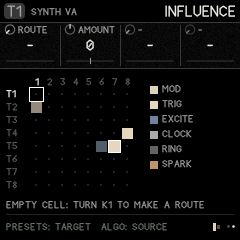
An 8 × 8 grid: rows are sources, columns are targets. Each filled cell is a route, coloured by type.
- Turn ALGORITHM to the source track (its row is highlighted).
- Turn PRESETS to the target column (the box moves along the row).
- Turn KNOB 1 (ROUTE) to choose what the route does. An empty cell says "TURN K1 TO MAKE A ROUTE".
- Set the other knobs. They change name to suit the route.
| Route | What happens | KNOB 2 | KNOB 3 | KNOB 4 |
|---|---|---|---|---|
| MOD | The source's envelope moves one of the target's parameters, every time the source plays | AMOUNT (±) | PARAM: which of the target's parameters | – |
| TRIG | Each note on the source also plays the target, with the same pitch | AMOUNT (below 0 plays the target softer) | DELAY: 0–16 steps later | CHANCE: 0–100 % |
| EXCITE | The source's audio feeds into the target's body or string (best into a strike or PHYS track) | AMOUNT | – | – |
| CLOCK | Each source note moves the target's sequencer one step (René-style: rhythm drives rhythm) | AMOUNT | – | – |
| RING | Ring modulates the target with the source's audio | AMOUNT | – | – |
| SPARK | Each source hit taps the target's body: a strike track rings at its last note, with no exciter and no attack of its own, and plays no note (so it starts no chain of its own). Only strike tracks can be sparked | AMOUNT: how hard the tap | – | – |
To remove a route, turn KNOB 1 back to -.
A trigger chain never plays the same track twice in one pass, so routes can form loops safely (T1 triggers T2, which triggers T1).
6. EDIT: the voice
All pages here act on the current track (ALGORITHM). PRESETS browses sounds for the track's kind on every voice page; the sound's name flashes on screen. A preset doesn't touch the track's sends into the effects (FX): they stay where you set them.
| Page | KNOB 1 | KNOB 2 | KNOB 3 | KNOB 4 |
|---|---|---|---|---|
| SOUND | KIND | ENGINE | VOICES (mono, 2, 3, 4) | VELO: how much key velocity changes the level |
| SOURCE 1–4 | the engine's own controls, see below | |||
| OSC MIX | each oscillator's level, side by side: VA OSC LVL, SUB, NOISE · FM LEVEL1–4 · WAVE LEVEL 1, ASIC · CHIP OSC LVL, SUB · MONO SAW, PULSE, SUB, NOISE |
OSC MIX appears on engines with more than one sound source. OSC LVL (LEVEL1 on FM, LEVEL 1 on WAVE) is the first oscillator's own level, new here; the others are the engine's existing level knobs, shown together (they stay on the SOURCE pages too). The CZ's two lines are levelled by their DCA envelopes, ORGAN's by its rank footages. | PITCH | PITCH (±24 semitones) | FINE (±50 cents) | GLIDE | VCF KEY: the filter's cutoff (or a Z filter's morph) follows the note | | FILTER | FILTER type: LADDER, LOWPASS, BANDPASS, HIGHPASS, LPG, MS-20, SH-101, and six Z filters (Z VOWEL, Z TALK, Z PHASER, Z PEAKS, Z SWEEP, Z METAL) five XT filters (XT LP24, XT BP24, XT NOTCH, XT S&H, XT SHAPE) and SEM | CUTOFF (Hz); on a Z filter, MORPH | RESO; on a Z filter, XFORM | ENV>CUT: how much the FILTER ENV opens the filter (±); the same setting as on ENV › FENV ROUTE, so turning either moves both | | SKIN | DRIVE (saturation of everything the track plays at once: 0 by default, so chords stay clean; turn it up to make them break up together) | FOLD (wavefolding) | BITS (bit reduction) | – | | SKIN 2 | BITMASK (digital grit) | DEREZ (sample-rate reduction) | GRAIN (strike and perc tracks): each hit a little different, see below | – | | INSERT | INSERT effect: OFF, COMB, SHIFT, CRUSH, SMEAR | TUNE: on COMB its note (C4 at the middle, a semitone a step); on SHIFT the shift | AMOUNT | MIX | | MIX | LEVEL | PAN | DELAY send | SPACE send | | SENDS | FEEDBK send | DELAY send | SPACE send | – |
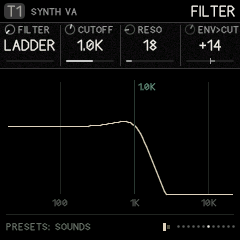
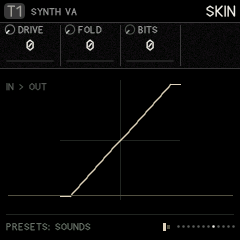
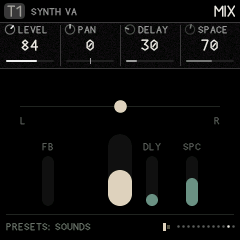
MS-20 is hot and dirty: a two-pole filter whose resonance runs through clipping diodes, with the input driven. Turned up, it barks, then screams. SH-101 is round and liquid: four smooth stages whose resonance sings rather than bites, and keeps its bass as it rises.
The Z filters morph, in the manner of E-mu's Z-plane filters (Morpheus, the Audity, the later samplers). Each is twelve poles: six sections, peaks, dips and slopes, laid out at the four corners of a square. CUTOFF becomes MORPH, which moves across the square one way, and RESO becomes XFORM, which moves it the other. In between, every peak glides at once, so the whole shape turns into the next one rather than a single cutoff moving. The filter envelope (ENV), VCF KEY, the LFOs and the matrix move MORPH like any cutoff. The FILTER picture draws the real response as it morphs. The shapes are Ravel's own:
| Type | MORPH (0 to 127) | XFORM (0 to 127) |
|---|---|---|
| Z VOWEL | "ah" to "ee" | a lower, softer voice to a higher, sharper one |
| Z TALK | "oo" to "ae": a talk box, best moved by the envelope | to "aw" and "er": tighter, more nasal |
| Z PHASER | six notches sweeping up from low to high | from plain notches to notch-and-peak pairs: a phaser with its feedback up |
| Z PEAKS | six resonant peaks rising together | from broad and glassy to narrow and ringing |
| Z SWEEP | closed (a steep twelve-pole lowpass) to open | from smooth to a resonant peak riding the slope |
| Z METAL | one set of clangorous, inharmonic peaks to another | from struck to long and ringing |
Try the TALK BOX, PHASE PAD, Z VOX and Z SWEEP presets. The Z filters are on synth tracks, on any engine.
SEM is after the Oberheim SEM: a single 12 dB state-variable filter, open and creamy rather than fat, whose resonance rises to a vocal peak but never quite self-oscillates. Choosing it adds a SEM page after FILTER: LP-HP sweeps continuously from low pass (0) through a notch (64) to high pass (127), and the matrix and LFOs can move it; BP switches to its band pass, which grows louder as RESO rises (LP-HP is then greyed); CUTOFF and RESO are repeated there. Try the SEM BRASS and SEM NOTCH presets.
The XT filters are digital filters in the manner of the Waldorf Microwave II/XT's: XT LP24 is a clean four-pole lowpass whose resonance rings sharp and glassy, XT BP24 a four-pole bandpass, XT NOTCH cuts a hole at CUTOFF (RESO widens and deepens it), XT S&H samples and holds the sound at a rate CUTOFF sets (a sample-rate reducer that follows the keys with VCF KEY; RESO keeps more of the raw steps) and XT SHAPE is a wave shaper, CUTOFF driving it and RESO folding it further. They suit the WAVE engine but work on every synth engine.
The filter belongs to synth voices. On strike tracks the FILTER page's knobs are greyed out.
LPG is a low-pass gate: the filter closes as the note fades, so sounds get darker as they die away (good for plucks and Buchla-style bongos).
Changing ENGINE resets the SOURCE values to that engine's defaults. Use PRESETS to start from a finished sound instead.
GRAIN (EDIT › SKIN 2, on strike and perc tracks) makes each hit slightly different from the last: a little sharper or flatter (up to half a semitone), a little louder or softer, now and then darker or shorter. Most hits move a little and a few a lot, the way a hand never strikes twice the same. It changes nothing about which steps play or when: it is texture, so sixteen hats sound like sixteen hits instead of one copied. On a kit it acts on every lane.
The thirteen synth engines (SOURCE pages)
VA (virtual analog): the familiar subtractive oscillator, and more.
| SOURCE 1 | SOURCE 2 | SOURCE 3 |
|---|---|---|
| WAVE: saw through to pulse | SUB: sub-oscillator level | SYNC: hard-sync sweep |
| PW: pulse width | NOISE level | DRIFT: slow analog wander |
| SUPER: 1–7 stacked oscillators (supersaw) | TZFM: through-zero FM depth | |
| DETUNE: spread of the stack | FMRATIO: modulator ratio (1/2 to 7) |
CZ: a full Casio CZ (the CZ-101, 1000, 3000, 5000 and CZ-1 all share this voice). It works as the CZ's own sound chip does: a cosine read through a bent phase, where DCW is how bent it is (at 0 every wave is a sine). Each note plays one or two lines, and each line has two waves and three 8-step envelopes: DCO (pitch), DCW (waveform) and DCA (level). Ravel's filter, skin, inserts, LFOs and matrix all still work on top.
General settings, on the SOURCE pages:
| SOURCE 1 | SOURCE 2 (detune: line 2) | SOURCE 3 (vibrato) | SOURCE 4 |
|---|---|---|---|
| LINE: 1, 2, 1+1' (line 1 twice, the second detuned), 1+2' (both lines, line 2 detuned) | DETUNE: + or - | VIB WAV: TRI, SQUARE, UP, DOWN | DCW +-: shifts both lines' DCW; give it an LFO in the matrix to sweep the timbre (the CZ itself could not) |
| OCTAVE: -1, 0, +1 | DT OCT: 0–3 octaves | DELAY before it starts (0–99) | FOAM: takes the fundamental out, leaves the sidebands |
| MOD: OFF, RING (line 2 times line 1), NOISE (line 2's pitch kicked by noise) | DT NOTE: 0–11 semitones | RATE (0–99) | VEL DCW: how much a softer touch closes DCW (0–9, CZ-1 style) |
| CHORUS: OFF, I, II, I+II (Juno-60 style) | DT FINE: 0–60 (60 = a semitone) | DEPTH (0–99; 0 = none) | – |
Then, per line (LINE 1, LINE 2):
| KNOB 1 | KNOB 2 | KNOB 3 | KNOB 4 |
|---|---|---|---|
| WAVE 1: SAW, SQUARE, PULSE, DBL SIN, SAW PLS, RESO 1 (saw window), RESO 2 (triangle), RESO 3 (trapezoid) | WAVE 2: OFF, or a second wave | DCA KF: the level envelope runs faster on higher notes (0–9) | DCW KF: higher notes are duller (0–9) |
And the envelopes, DCO 1, DCW 1, DCA 1 (and DCO 2, DCW 2, DCA 2):
Each envelope page holds all eight stages. OCT+ and OCT− move the four knobs through five rows; the picture lights the two stages on the knobs and marks them with the knob numbers (1 2, 3 4), and the footer says what OCT+ brings next. PRESETS still picks a sound.
| OCT row | KNOB 1 | KNOB 2 | KNOB 3 | KNOB 4 |
|---|---|---|---|---|
| 1 (stages 1–2) | RATE 1: how fast stage 1 moves (0–99) | LEVEL 1: the level it moves to (0–99) | RATE 2 | LEVEL 2 |
| 2 (stages 3–4) | RATE 3 | LEVEL 3 | RATE 4 | LEVEL 4 |
| 3 (stages 5–6) | RATE 5 | LEVEL 5 | RATE 6 | LEVEL 6 |
| 4 (stages 7–8) | RATE 7 | LEVEL 7 | RATE 8 | LEVEL 8 |
| 5 | SUS: the stage the envelope holds while the key is down (OFF, 1–8) | END: its last stage (1–8) | – | – |
Stages after END are drawn dim: they keep their settings but don't play until END reaches them (set END to 8 to use all eight).
- How an envelope runs: from step 1, each step moves at its RATE to its LEVEL, then the next step starts. At the SUS step it waits while the key is held; when you let go it goes on from the step after SUS. It stops at END. Rates and levels follow the CZ's own curves: rate 99 is a few milliseconds, rate 0 almost forever; DCA levels are on the CZ's logarithmic scale.
- DCO levels: up to 63 the pitch rises in 6.25-cent steps (63 is almost 4 semitones); from 64 it jumps in 2-semitone steps (64 is 8 semitones, 99 is 78). The DCO envelope can only raise the pitch, as on the CZ.
- Two waves on a line alternate cycle by cycle, so the note sounds an octave lower with a mix of both characters (the CZ's "cascade"). Two RESO waves cannot be combined, as on the CZ.
- RESO waves are a sine whose frequency rises with DCW, restarting every cycle under a falling window: like sweeping a resonant filter, with no filter.
- High notes narrow DCW automatically, as the CZ does, so thin pulses stay audible.
- The DCA is the level envelope. On a CZ track the ARTICULATION pages' shape knobs are greyed out; the envelope's DESTINATIONS and the influence routes follow the DCA instead; the filter has its own FILTER ENV.
- The pictures: LINE pages draw the line's two cycles at its brightest DCW. Envelope pages draw the 8 stages, the SUS and END points, the two stages on the knobs (white, numbered with their knobs) and where the playing note is (amber dots).
- Presets: CZ BRASS, CZ BELL (ring-modulated lines a twelfth apart), CZ STRINGS, RESO SWEEP, CZ BASS, NOISE HIT and FOAM.
- Projects from before the CZ load with each CZ track set to a plain CZ tone.
HYBRID FM: 4 operators, and after them a body of formants (after the Yamaha FS1R's formant synthesis). With FORM at OFF it is a plain four-operator FM synth.
| SOURCE 1 | SOURCE 2 | SOURCE 3 | SOURCE 4 |
|---|---|---|---|
ALGO: 12 routings (shown as 1>2>3>4 and so on; > means "modulates", + means "mixed") | RATIO3 | LEVEL4 | WAVE4 |
| FEEDBK: operator 1 feedback | RATIO4 | WAVE1 | MOD DEC: how fast the modulators fade (the classic FM "pluck") |
| RATIO1 | LEVEL2 | WAVE2 | TZFM: through-zero FM |
| RATIO2 | LEVEL3 | WAVE3 | VEL MOD: velocity brightens the sound |
Each operator can be SINE, TRI, SAW, SQUARE, HALF, ABS, QUART or BITS.
| MOD ENV | FORMANTS | FSEQ |
|---|---|---|
| MOD ATK: how long the modulators take to rise at each note (0: at once) | FORM: OFF, or the spectral state the formants start from: OO, AH, EE (vowels), BOW (a cello-like wooden body), REED (a sax-like throat), METAL (narrow, ringing, inharmonic), HOLLOW (a tube), NASAL | FSEQ: OFF, or a formant sequence: WAH, TALK, BREATH, BLOOM, STUTTER, ORBIT, SCRAPE, DROP |
| MOD DEC (the same as on SOURCE 4): how fast they fall | MORPH: from FORM toward the next state (NASAL's next is OO) | F RATE: how long each of its eight frames lasts, on the tempo (2 BAR … 1/32), or SCRUB: MORPH moves through the sequence instead |
| MOD SUS: where they settle (32, a quarter, is the classic FM pluck; 127 holds them) | AIR: breath, scrape and hiss: noise through two bands that move with the formants | F DEPTH: how far the sequence moves the formants, and how much of its level and breath it adds |
| VEL MOD (the same as on SOURCE 4) | BODY: how much of the operators goes through the formants (0: none, only the breath) | – |
How it works. The operators make the tone; three formants (resonant band passes at each state's frequencies, widths and levels) shape it, the way a mouth, a cello's body or a metal tube does; AIR adds noise through two more bands. Each state is a whole spectral identity, and moving between them (MORPH, the sequence) glides each formant to its partner in the next state, frequencies through octaves and levels through decibels, so the sound changes shape without jumping. The formants' level follows the operators', so turning FORM or MORPH doesn't make it jump in level, and a soft limit keeps narrow METAL resonances in hand. A formant sequence starts again at each note: its eight frames each move the formants (from FORM, as far as F DEPTH says), set a level and add breath; WAH, TALK, STUTTER and SCRAPE loop, BREATH, BLOOM and DROP play once a note, ORBIT goes back and forth through all eight states. The note, the amplitude envelope and the sequence each keep their own time, so a held note can travel from a bowed string to a throat to metal. FORM, MORPH, AIR and the rest are ordinary parameters: the matrix, the LFOs, the macros and step locks move them too (an LFO on MORPH is a slow vowel). Unlike some FM synths, Ravel never thins the modulation on high notes for you (neither the FS1R nor the DX7 does it on its own); turn the levels down as you play higher if it gets harsh.
Factory sounds (PRESETS): FM PIANO, FM BELLS and FM GROWL are plain FM; FM VOX (vowels that TALK in eighths), FM BOW (a bowed wooden body with SCRAPE), BREATH REED (a reed that starts as breath), STEEL TUBE (inharmonic ratios in a METAL body, slowly orbiting), ORGANISM (a hollow, slowly turning spectral creature) and FM STUTTER (a sequence that gates the voice in sixteenths) use the formants.
PHYS (physical modelling): a virtual instrument that you strike, bow or blow.
| SOURCE 1 | SOURCE 2 |
|---|---|
| MODEL: STRING (plucked), BOWED, BLOWN, MEMBRAN (drum skin) | EXCITE: how hard it is played: pluck strength, bow speed, breath |
| BRIGHT: brightness of the excitation | INHARM: detunes the overtones (metallic); on BOWED, lighter bow pressure (scratchier, airier) |
| DAMP: how quickly highs die | BODY: resonance of the body (not MEMBRAN) |
| POSITN: where it is plucked or bowed (STRING, BOWED) | DECAY |
BOWED and BLOWN keep sounding for as long as the key is held, like a violin or a clarinet. BLOWN speaks an octave lower in character (a clarinet's hollow, odd-harmonic tone) but plays the note you press.
FORMANT: vowels and voices.
| SOURCE 1 | SOURCE 2 |
|---|---|
| VOWEL: sweeps A-E-I-O-U | BREATH: air in the voice |
| SHIFT: moves the formants (smaller or bigger "throat") | GLOTTAL: the shape of the pulse |
| WIDTH of the formants | SPREAD: stereo or choir spread |
| MODE: FILTER (a filter bank on a pulse) or FOF (grain-based, more vocal) | VIBRATO |
PARTICLE: pulsars. Short bursts of a waveform at the note's pitch that can pull each other into sync.
| SOURCE 1 | SOURCE 2 |
|---|---|
| TABLE: SINE, GLASS, REED, VOICE, BELL, BITS, NOISE, DROP | COUPLE: how strongly the emitters pull into sync |
| DUTY: burst length (short = buzzy, long = tonal) | MASK: drop bursts at random |
| EMIT: 1–3 emitters | FORMANT: the burst's own pitch |
| RATIO between emitters | SCATTER: timing randomness |
CHIP: a glitchy chiptune voice, after the Syntakt's SY CHIP. A SID-style oscillator steps through the note you play and up to three offsets at RATE, so one voice plays a fast arpeggio, a chord or a "complex voice". A square sub oscillator sits under it, and a decompose stage after it reduces, crushes and breaks the sound apart.
| SOUR