README from GitHub, MPL-2.0
GIO-1 for the M-VAVE FM-1
▶ Try it in your browser · Install it on your FM-1 · Website · Manual · Quickstart · Screen mirror
GIO-1 turns the M-VAVE FM-1 into a generative electronic disco machine, after Giorgio Moroder's Munich sound. It plays itself from the moment it's switched on: an analog-style bass sequence (or FM) out in front, its repeats on the other side; strings, a choir or detuned saws through a phaser; a synth lead (ten voices) that writes its own phrases, which you can play from the white keys and which answers you; four on the floor with claps, open hats and syndrum fills. Each song is a form (intro, verse, chorus, break) with its own chord changes, and it loops for ever, changing as it goes: a section repeated, a layer let out for a while, the whole song moved up a key for a cycle. You steer it: pick a song, a key, a bass pattern, hold a section, push it on to the next.
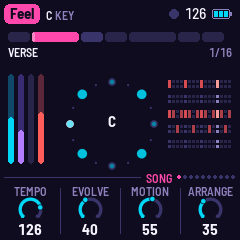
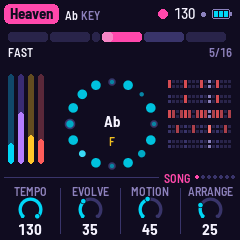
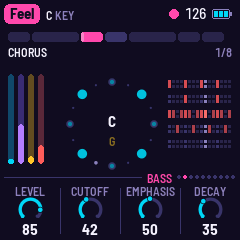
Status: alpha, tested on two FM-1s. The latest release, 0.3.1-alpha, has been installed on two separate FM-1s and works on both, with m-bootloader installed on both too. With 0.3-alpha, other firmware was installed over GIO-1 on each and GIO-1 put back again, so moving between GIO-1 and other firmware has been tried too. Installing it is at your own risk: unofficial firmware could brick an FM-1. See BUILDING.md for the toolchain.
The presets
Nine presets, each with its own tempo, key, chord changes and arrangement. The lines are GIO-1's own, written as it plays.
| # | Preset | BPM | Key | The form |
|---|---|---|---|---|
| 1 | Feel | 126 | C | Intro (bass, hats) · Verse (C) · Chorus (C–E♭–F–G) · Shift (on B♭) · Verse · Chorus · Break |
| 2 | Gio | 113 | A minor | Click (hats on the beat) · Arpeggio · Disco (Am–Em) · Strings (Am–F) · Fills · House |
| 3 | Mutant | 123 | F minor | Dawn (the pad alone) · Sequence · Groove · Theme (Fm–D♭) · Bridge (B♭m–Fm) · Theme |
| 4 | Heaven | 130 | A♭ | Slow ×2 (half time, A♭–E♭–Fm11–E♭) · Lift · Fast (A♭–E♭–B♭–A♭) · Vamp (Fm11) · Fast |
| 5 | TickTock | 126 | C, then E♭ | Intro · Verse (G–F) · Pre (Am–Dm–G–C) · Chorus (G–Em7–G) · Turn (C–E♭) · the same a minor third up · Outro |
| 6 | Energy | 123 | C minor | Intro · Groove (Cm) · Lift (A♭–B♭) · Groove (Cm–B♭) · Break · Build |
| 7 | Fly | 126 | A minor | Liftoff · Theme (Am–F–G) · Drift (Am–Dm) · Theme · Space |
| 8 | Lover | 130 | C minor | Intro · Verse (Cm–B♭) · Hook (A♭–B♭–Cm) · Robot · Hook |
| 9 | Express | 128 | D minor | Intro (the bass alone) · Drive · Strings · Theme (Dm–B♭–C) · Pursuit · Theme · Run |
All of it is a table in app/dsp/gio.c (SONGS), easy to change.
In short
| White keys | The lead, in the song's scale (the chord's notes lit); a call of three notes and a pause, and the lead answers and takes it as its theme |
| Black keys | Eleven drop-in effects, each while held |
| FX | The FX pages, one a press: Bass FX, Pad FX, Lead FX, Drums FX (each: Echo, Reverb, and the one echo's Time and Feedback), then Space; on each, the sixteen effects on the white keys (REC held: the same, on any page) |
| PLAY · REC · SEL | Play / stop · a tap holds the section · the next section, on the next bar |
| EDIT | The edit pages, one a press: the Bassline (the bass pattern as a piano roll; each step's note, accent and length), the Chords (the section's chord changes), the Drum grid (each drum's steps and levels); on the Bassline and Drum grid the white keys are the bar's sixteen steps |
| HOME · ENV · ARP · LFO · SEQ · FX · GLO | The pages: Song (again: Mixer, the four levels), Bass (again: Bass FM, the Analog or FM voice), Lead (again: Lead 2), Pad, Drums, FX (the four FX pages, then Space), Setup (again: MIDI, then Mirror: the screen mirror on or off); KNOB 1–4 set their values |
| SELECT | The previous or next page; with HOME held, the tempo (80–150) |
| ALGORITHM · PRESETS | The bass pattern · the song |
| OCT− / OCT+ | The bass's octave |
| SAVE | Saves; held, puts the song back to its recipe |
Hold any button for a second and a card says what it does. The manual has the rest.
Building and testing
GIO-1 is an app on fm1-base (base/, a git submodule); clone with
--recursive. The toolchain and prerequisites are in BUILDING.md:
sh tests/run_tests.sh                                  # the instrument, the app in the simulator
./build.sh --host                                      # the simulator: app/build/host/gio_host
./build.sh                                             # app/build/gio.fwsc (needs JieLi's toolchain and SDK)
python3 base/tools/fm1_install.py app/build/gio.fwsc   # install it over USB
app/build/host/gio_host SCRIPT OUTDIR runs the whole app on a computer from a script (tests/scenarios/*.gio),
with audio and screenshots coming out. tests/host/gio_render.c renders one song's engine alone to a WAV, with
its sections, levels and the engine's time:
cc -O2 -ffp-contract=off -DEN_HOST -Iapp/dsp -Ibase/include -o gio_render tests/host/gio_render.c app/dsp/gio.c -lm
./gio_render 3 180 heaven.wav          # song 4, three minutes
CHORDS=1 ./gio_render 4 120 clock.wav  # with every chord change printed
Credits
A fork of AMB-1 by Charles Vestal, whose platform, panel, plate reverb and tape echo it keeps. The idea of a song form that loops and changes is DUB-1's and NACHTFAHRT's (no code from either). Built on fm1-base and felucca-bsp, from Felucca by Leo Kuroshita (Hügelton Instruments). MPL-2.0; see LICENSING.md.
M-VAVE and FM-1 are trademarks of their owners. GIO-1 is not affiliated with M-VAVE, Giorgio Moroder, any artist named here, or Hügelton Instruments.