README from GitHub, GPL-3.0

A live groovebox firmware for the M-VAVE FM-1 — for any style.
Free and open source (GPL-3.0). A fork of SLOOP by isod89, itself based on Felucca by Leo Kuroshita / Hügelton Instruments.
Install from the browser · Complete guide · Manual · Guide en français · Web editor · Releases · Changelog · Report a bug
BoopBox is a renamed fork of SLOOP. Its versions start again at 1.0.0, which carries on from SLOOP 2.8.3. The installer updates an FM-1 that runs SLOOP or Felucca, but BoopBox has its own eight-track project format: projects and songs from SLOOP do not open in BoopBox, and SLOOP does not open BoopBox's. Presets, samples and themes carry over. BoopBox is not affiliated with or endorsed by SLOOP's author, Felucca or Hügelton Instruments.
BoopBox turns the FM-1 into an eight-track groovebox you play live: six synths and two drum machines by default (any track can be either), each drum machine with 16 sounds on the white keys, twelve synthesis engines, 153 sounds, 37 drum kits, your own samples, a song mode you play with your hands, USB audio, MIDI in on the jack and MIDI clock — and now physical models (guitars, sitar, bells, hand drums), a noise engine, six-operator FM with DX7 patches, parameter locks, micro timing, fills, a quick chain of sections and the sequencer to MIDI out. House, techno, hip-hop, trap, drum & bass, amapiano, synthwave, lo-fi, ambient, chiptune — it does not pick a style for you. No factory patterns, nothing to load: everything you hear, you play.
Coming from SLOOP, your presets, samples and settings are kept, but your SLOOP projects do not open in BoopBox: save a backup with SLOOP's editor first (it restores into SLOOP). You can go back at any time (see Going back).
Contents
- What's new in 1.4.3
- Screenshots
- Features
- Install
- Your first beat in 60 seconds
- The controls
- The menu: settings of the FM-1
- MIDI and USB audio
- The web editor
- Compatibility
- Troubleshooting
- Specifications
- Documentation
- Building and tests
- Contributing
- Credits and thanks
- Licence
What's new in 1.5.0
Your song as a trainer level. A new page listens to an audio file (MP3, WAV, OGG, M4A...) in your browser, nothing uploaded, and writes a version the FM-1 can play: the tempo, the key, the song's sections (up to four) and their order, and in each a drum beat, a bass line, chords and a lead. Play it next to the original on BoopBox's own sound engines, fix what it heard wrong, then install BoopBox Trainer with it as level 4: the coach teaches you to build the whole song, section by section, and play it in song mode, like the three songs built in. BoopBox itself is unchanged (all changes, the trainer).
1.4.3
BoopBox Trainer explains why: hold HOME during a level and it tells you, in music terms and plain words, what the step you are on does and why it sounds the way it does (45 topics, from the backbeat to song form). BoopBox itself is unchanged (all changes).
1.4.2
The sound browser stays open until you close it: SAVE keeps the sound, HOME puts back the one you had. A drum track reaches PATTERNS (SEQ after SOUND on the DRUMS screen), ALGORITHM changes the track on the DRUMS screen, and LEVEL and PAN read the same on every screen. BoopBox Trainer is easier to follow on levels 1 and 2 (all changes).
1.4.1
BoopBox Trainer is easier to follow: a level picker on HOME held, progress kept even when switched off while playing, only the keys to press lit, and steps and hints that say what is wrong and what to do, with values as the screen shows them (all changes, the trainer). BoopBox itself is unchanged.
1.4.0
BoopBox Trainer, a second firmware that teaches you to make three songs on the FM-1 itself, step by step: lo-fi hip-hop, synthwave and melodic dubstep. A coach on the screen says what to do and lights the buttons and keys to press; every button, knob and key works as in BoopBox. Choose it in the installer (BoopBox Trainer), and install BoopBox again to switch back. It has no web editor and a few sounds fewer. See the trainer. BoopBox itself is unchanged in 1.4.0.
1.3.1
A tuning fix for TANPURA, and room for what comes next (all changes):
- TANPURA stays in tune on the top notes. The sympathetic strings that ring along with the note could be tuned so high on the top octave that they rang louder than the string you played, and the note came out as much as 60 cents off, differently each time. They are left out above 4.4 kHz now; only the highest notes of a sound change, and they stay in tune.
- 4.7 KB more room in the firmware (6.2 KB of the app slot free, up from 1.5 KB). Nothing was taken out.
- Projects, songs, presets and settings from 1.3.0 open as they are, and a saved project sounds as it did.
1.3.0
Even loudness between the factory sounds, and a drum LEVEL that turns (all changes):
- The drum track's LEVEL works on TRACKS: KNOB 2 on a drum track sets its level (it changed nothing before).
- The factory sounds are as loud as each other at the MASTER you play at. They were levelled with MASTER all the way up, where the limiter flattened them, so punchy sounds came out the loudest; many sounds you know (RHODES, ACID 303, the stabs) are quieter than in 1.2.0.
- LEVEL turns every sound up: on 39 presets, LEVEL above its default did nothing; it now has its whole range.
- Projects, songs, presets and settings from 1.2.0 open as they are, and a saved project sounds as it did.
1.2.0
A cleaner screen and quicker controls, after a review of every screen (the review, every screen before and after):
- Every value once, large, in its knob's corner. The 29 pages without a graph (EDIT, VOICE, the DEST pages, GLOBAL, MASTER, DLY…) showed each value twice: small in columns along the top and large below. They now show the four values once, large, from just under the header: KNOB 1 top left, 2 top right, 3 bottom left, 4 bottom right, each label in its knob's colour.
- Whole words. Labels and values were cut at five letters (TARGE MASTE); they now keep up to eight (TARGET MASTER).
- Page tabs. The bottom line names the page between the one before and the one after it (what SELECT or the button again brings), with a dot a page; the track's sound moved into the header, once.
- ALGORITHM picks the track on every page (it worked on TRACKS, PATTERNS and CHORDS only). The page stays and the header says TRACK 3: LOFI FLUTE for a moment.
- GLO has five pages (GLOBAL, MASTER, DRUMS, TEXTURE, TEXTURE 2; it had ten). The MIDI setup has its own pages, from the menu: hold HOME, SELECT to SEQ, OCT+ on MIDI SETTINGS. They are MIDI (CH1–4), MIDI 2 (CH5–8), MIDI 3 (IN, OTHER, OUT, BEND), MIDI 4 (FX CH, DR MAP, REMOTE, CLOCK) and SYSTEM (SYNC, USB). No setting is on two pages any more.
- FX → FILTER holds the INSERT's MIX too (the one-value INSERT 2 page is gone): FX has seven pages.
- GLO held shows faders: the bank's four levels, with mute and solo under each, and FILL, BAR and the tap tempo below. The keys do what they did.
- The step's sheet says what OCT− and OCT+ do (NOTES, OCT+ held): OCT− CLOSE · OCT+ SLIDE, OCT+ OPEN, OCT− BACK · OCT+ ADD.
- The ENV curve in its knobs' colours: attack, decay, sustain and release each in the colour of the knob that sets it.
- Settings that act on a second detent say TURN AGAIN.
- Projects, songs, presets and settings from 1.1.0 open as they are.
What's new in 1.1.0
- A sound browser. On TRACKS, PRESETS on a synth track opens the engines (or the kinds of sound) on the left and their sounds on the right: PRESETS or KNOB 2 moves through the sounds (each one loads as you land on it), SELECT or KNOB 1 jumps to the next group, KNOB 3 shows them by ENGINE or by KIND, KNOB 4 marks a favourite. It closes by itself after 4 s; it replaces the SAVE > PRESETS page. The drum track's PRESETS is still the kit.
- A new visualiser. Six scenes at sunset and in neon replace the twelve styles, all built in beside the web editor: PALMS (the mix's wave as the sea's front wave), NIGHT DRIVE (the spectrum as a city, a car on a road that runs with the beat, its lights flaring on the kick; stopped, it slows down and parks), HORIZON (the spectrum as a neon range over a floor that lights up on the beat in the tracks' colours), FLYOVER (the spectrum over time as a terrain), DENSE CITY (the eight tracks and the mix as towers of 24 floors with peak holds) and KEY CITY (a tower per key, lit in the colour of the track that plays it; a chord lights all its keys). See the visualiser.
- SYNTHWAVE, the new look (the default; MENU → SCREEN → COLOR picks another): night indigo, the tracks in cyan, magenta, sunset orange and violet (5–8 periwinkle, rose, gold, orchid), neon rules with a glow under the headers, large values fading from pink to orange, a neon floor to the horizon where a page has an empty half, and a sun setting on the boot screen. An FM-1 that already has a colour set keeps it; the other palettes and your theme look as before. The web editor's Theme page can start from it. See every screen.
- SEQ → PATTERN is now TIMING (LEN, DIV, SWG, GATE), so it no longer reads like the PATTERNS screen next to it.
- FLYOVER keeps flying: while the song plays the ground always moves, silent bars too; after STOP it moves on until the last peak has gone off the back of the screen.
- The web editor has eight tracks. The track bar, the Tracks page and the LIVE page show tracks 1–8 (tracks 5–8 in their own shades); a drum track is any track whose kind is drums (4 and 8 by default), and its level and sends are its own. LIVE solos any track (protocol v13: 32 bytes of firmware).
- A Patterns page in the editor: each track's eight patterns (play one, copy, clear), its chain, FOLLOW, a pattern's step components (with direction and seed) and the song's chord progression. The editor reads the FM-1's working project, changes it, and sends it back whole; nothing changes until you press Send, and the song must be stopped.
- The Song page keeps the loop region (it used to drop it when sending) and edits it: Loop the entries from … to ….
- SLOOP 2.8.4's fixes. Clean fades (no distortion at the end of notes on the 3.5 mm output and USB), UNISON no longer stacks its voices in phase, PHYS strings in tune, NOISE's NZ ARCADE, SAMPLE and GRAIN follow the top keys, a firm press on a layer button opens its pages, on REC READY a knob changes only its own value, and more (SLOOP's releases).
- Room in the flash. Three tables (FM6's exponent, the sine, the screen font) are built in RAM when the FM-1 starts instead of stored in the flash: byte for byte the same, so the sound and the screens do not change, and the build fits again with the fixes and the visualiser (docs/groovebox-performance.md).
- The CHORDS screen no longer shows what the page before it left under the track buttons (the TRACKS screen's dials, for one).
- Projects, backups, songs, presets and settings from 1.0.0 open as they are; the visualiser style kept with the settings opens as one of the new six.
What's new in 1.0.0
- BoopBox. SLOOP 2.8.3 under its own name: the boot screen, the ABOUT page, the USB device (BoopBox; BoopBox Update while updating), the web editor and the installer. The installer also updates an FM-1 that runs SLOOP or Felucca, and the editor still finds one. BoopBox keeps eight tracks in its own project format: projects, sections and songs from SLOOP do not open in BoopBox, and SLOOP does not open BoopBox's. Presets, samples, the FM6 bank and themes carry over.
- Eight tracks. Six synths and two drum machines by default (tracks 4 and 8); any track can be either (SAVE → TOOLS → KIND). The screens show the bank of four the selected track is in (1–4 or 5–8). MIDI channels for tracks 5–8 (MIDI 2).
- Each track its own colour. Tracks 5–8 take a lighter shade of the colours of 1–4 (a darker one on a light theme), your own theme's too.
- Patterns, step components, harmony, performance effects. Eight patterns a track with chains and quantized changes (the PATTERNS screen); 14 step components; 32 parameter locks a track and SLIDE; the song's key, scale and a chord progression that tracks can follow (the CHORDS screen); punch-in effects with a target, latch and quantize. See the groovebox controls.
- The visualiser, with six styles: oscilloscope, spectrum, VU meters, circle, bounce, wires (tap HOME on TRACKS).
- Its own art: a new logo, the parameter icons and the synthesized drums are drawn and made by code in this repository (GPL-3.0); see LICENSING.md.
- Left out to fit the flash: six of the visualiser's twelve styles, the bitmap boot logo (the boot screen shows the name as text) and the top recording of the BASS sample set (docs/groovebox-status.md).
- Known limits: the web editor shows tracks 1–4 only (its LIVE page and track list) and does not edit patterns 2–8, step components or the chord progression (backups keep them). Lifted in 1.1.0: see What's new in 1.1.0.
Every release's notes are in the changelog.
Version tags such as (2.6) in the guides mark the SLOOP release that brought a feature; SLOOP's own release history is in its repository.
Screenshots
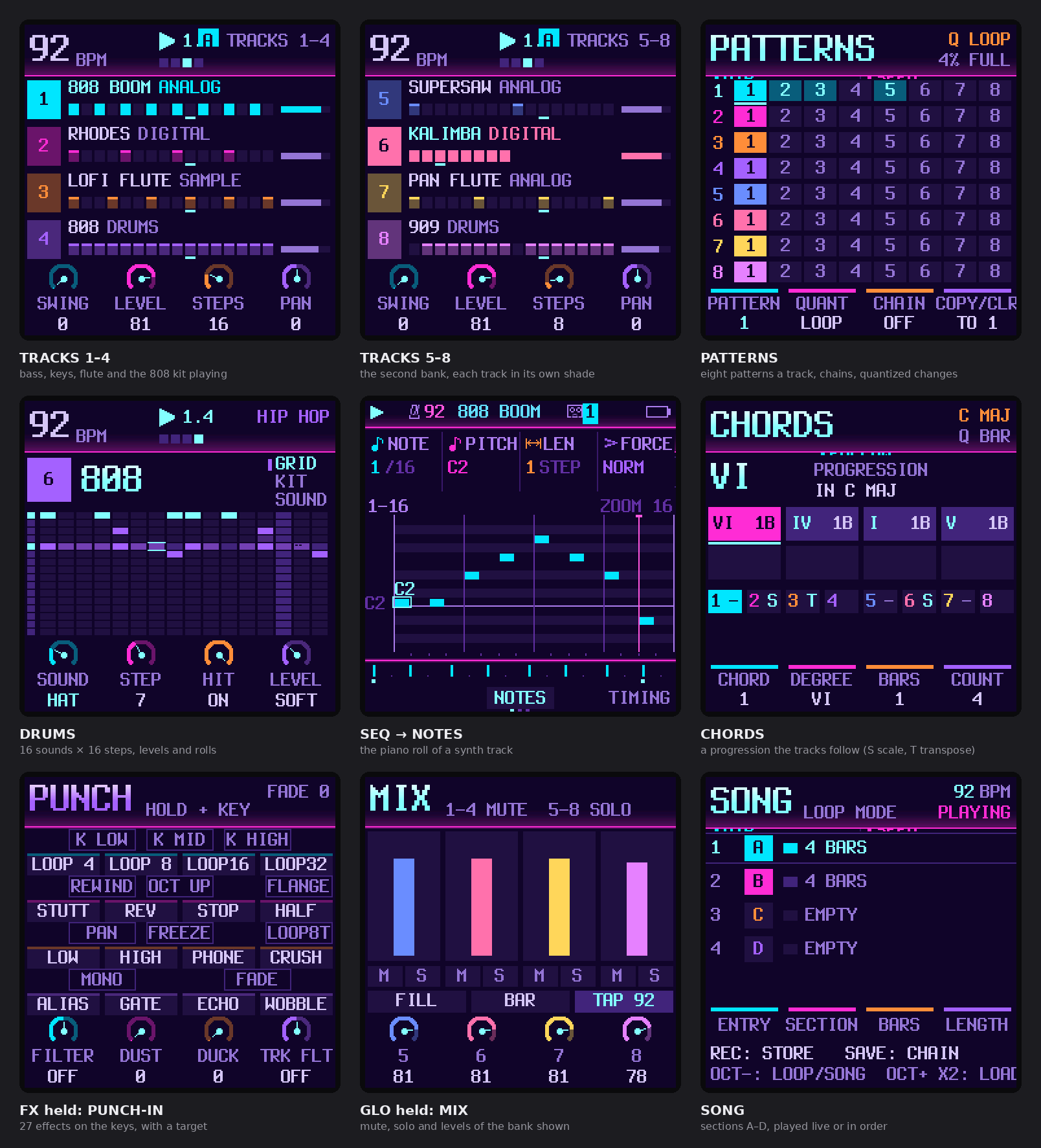
The FM-1's screen in 1.2.0, eight tracks playing: both banks of tracks, the patterns, the drum grid, the piano roll, a chord progression, the punch-in effects, the mix layer of tracks 5–8 and the song. Drawn by the firmware's own code (tools/make_screens.py); every screen of the firmware (tools/make_all_screens.py); every screen in 1.1.0 and 1.2.0.
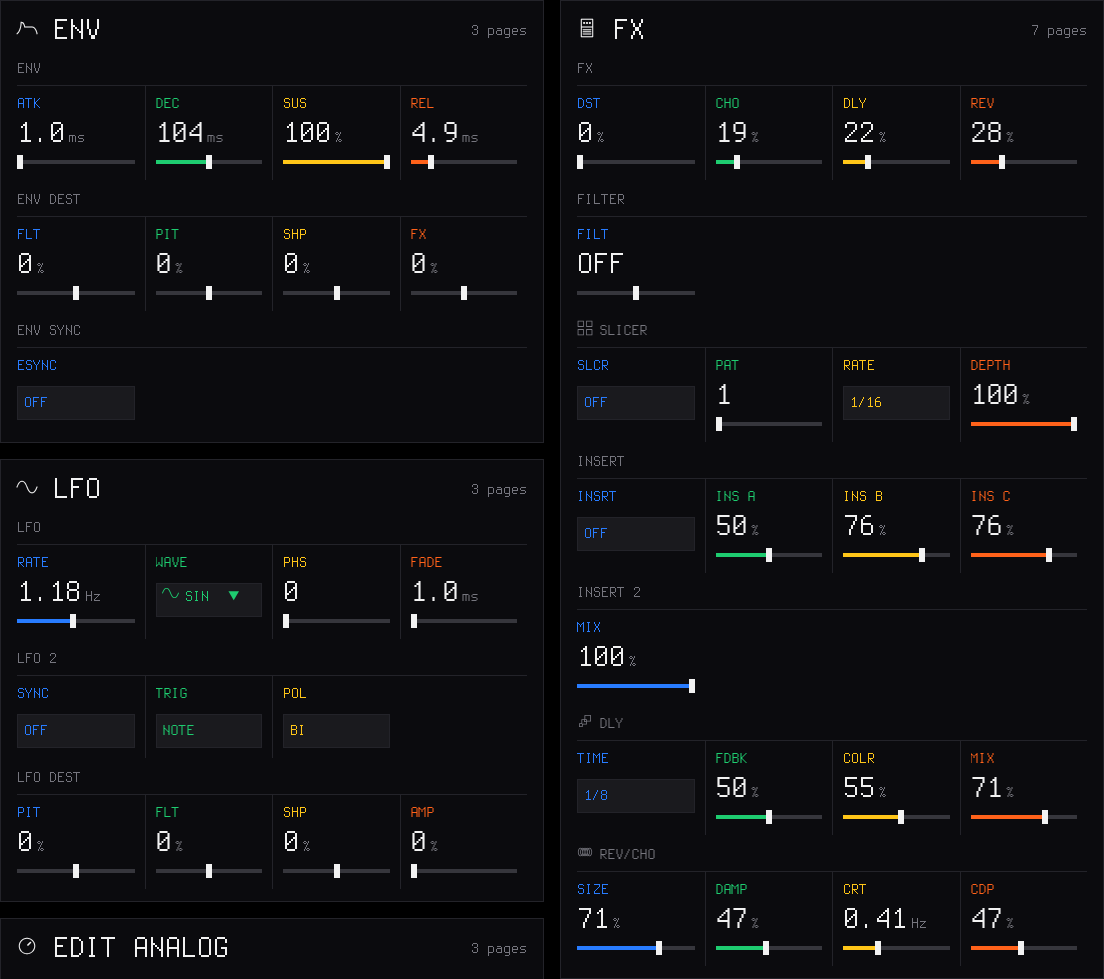
The web editor's Sound page: the envelope, the LFOs and the effects of the selected track (tools/make_editor_screens.mjs).
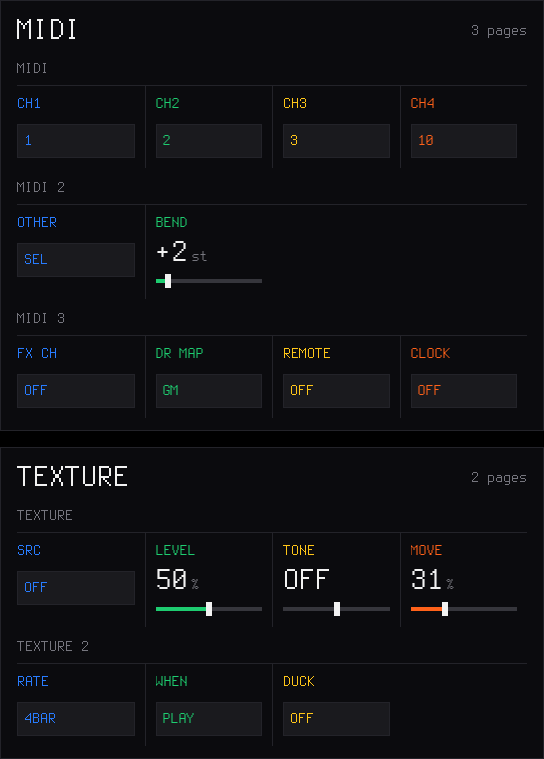
Settings: the MIDI channels, the bend range and the TEXTURE bed.
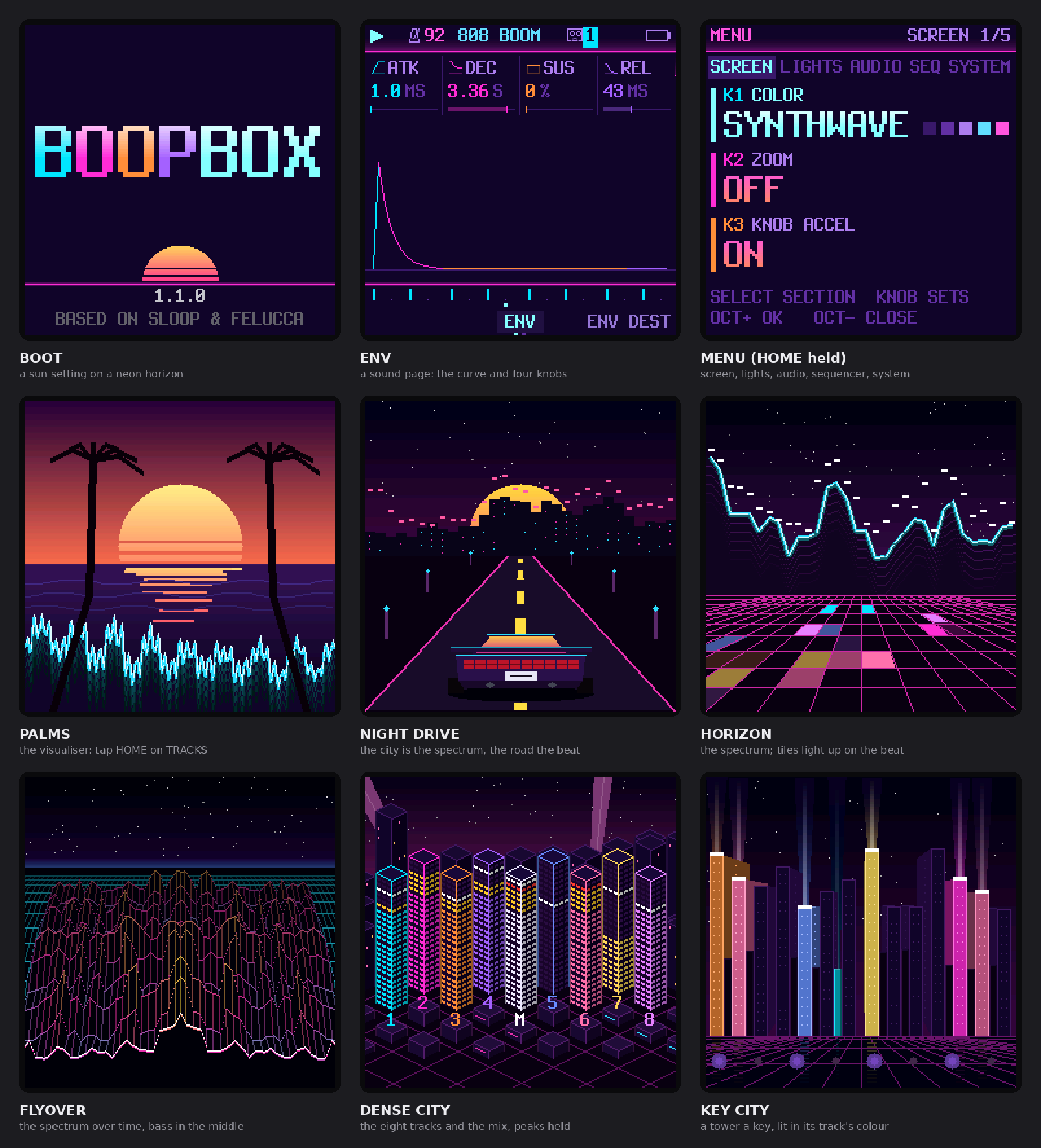
The boot screen, a sound page (ENV), the menu, and the visualiser's six styles (tap HOME on the TRACKS screen).
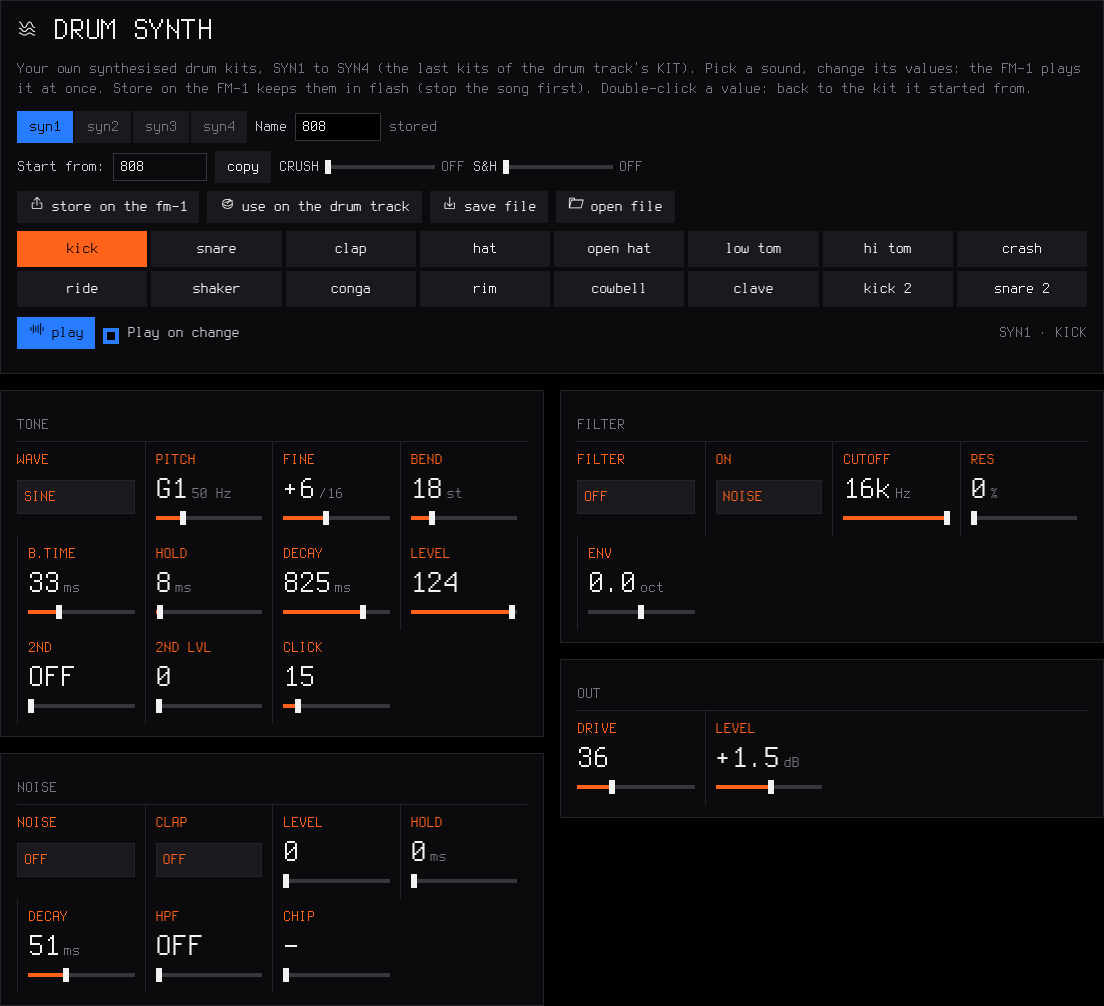
The web editor's Drum synth page: every value of every drum sound, heard on the FM-1 at once.
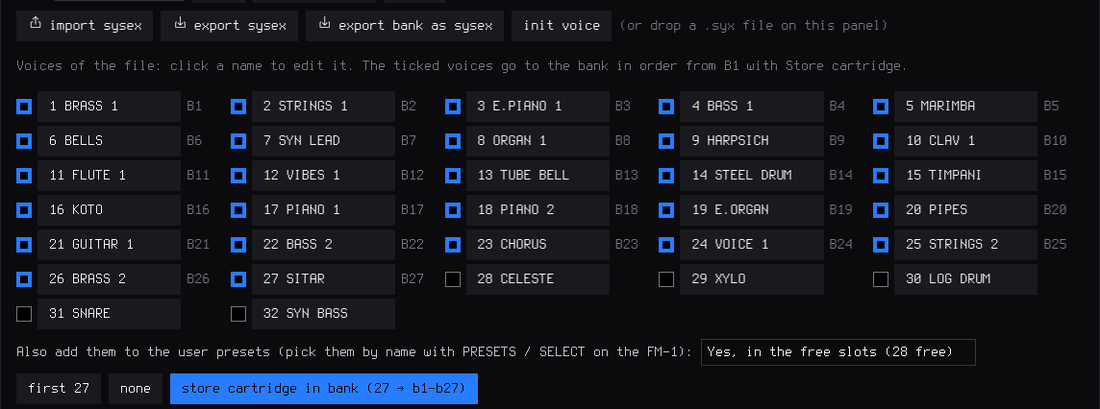
A 32-voice DX7 cartridge dropped on the FM6 panel: 27 voices ticked, into the bank in one write, and as user presets if you choose.
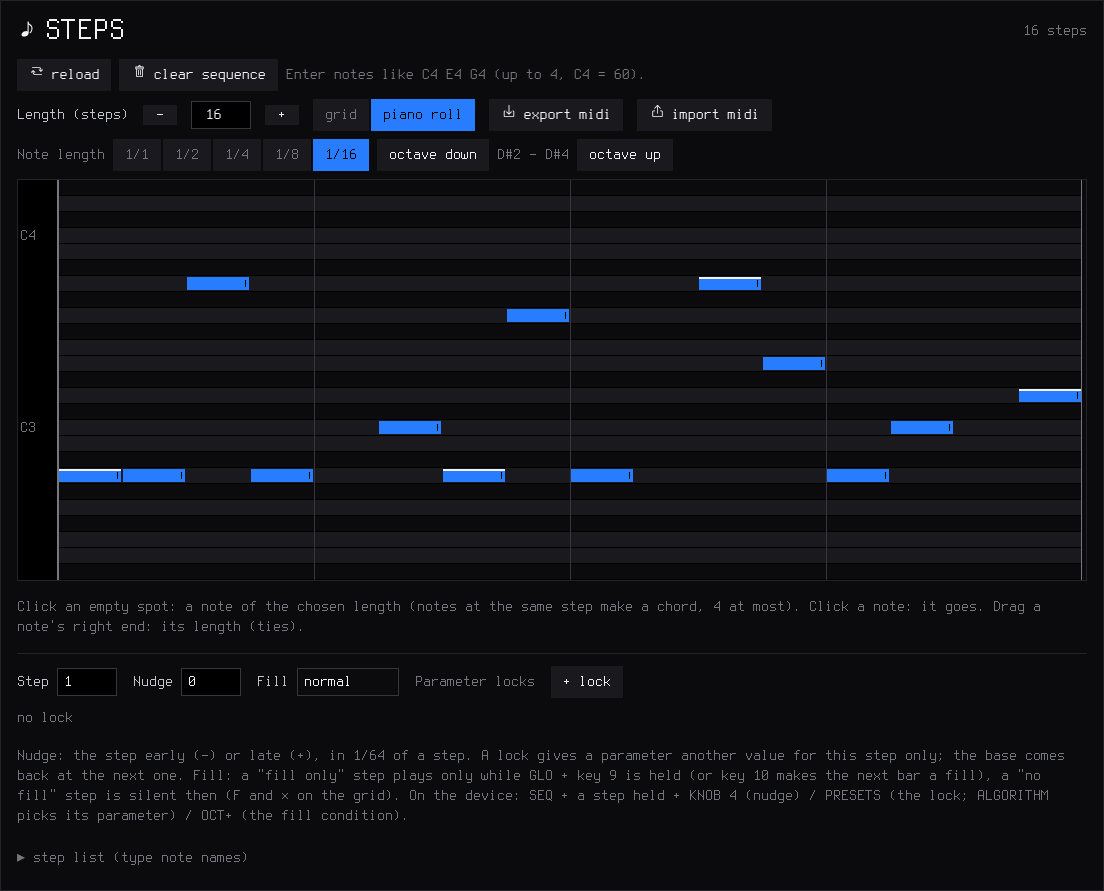
The piano roll: draw, delete and stretch notes and chords with the mouse; Export MIDI / Import MIDI next to it.
Features
Play it live: hold a button, touch a key
Every function button is a layer: hold it and the 16 white keys and the four knobs change job, and the screen shows how. Tap it and its pages open. Hold a layer button and tap HOME to lock it open, both hands free.
| Hold | The white keys | KNOB 1 · 2 · 3 · 4 |
|---|---|---|
| FX — punch | 27 punch-in effects on the whole mix. White keys: loops 1/4–1/32, stutter, reverse, tape stop, half speed, filter sweeps, phone, bit crush, alias, gate, echo, tape wobble. Black keys (2.6): kill low / mid / high, rewind, octave up, flanger, auto-pan, freeze, loop 1/8T, mono, fade out | FILTER · DUST · DUCK · the track's filter |
| EDIT — erase | erase a sound or a note as the loop plays (stopped: from the whole pattern); a black key: live drum mutes (2.6) | SHIFT · LENGTH ×2 / ½ · TRANSPOSE |
| ARP — roll | note repeat on the grid, recorded as ratchets | RATE (1/8 … 1/64) |
| SEQ — steps | the 16 steps of the page; a step held: a level, a ratchet, a nudge, parameter locks (PRESETS / ALGORITHM), a fill condition (OCT+) | SOUND / NOTE · DIV · SWING · LENGTH (a step held: SOUND / NOTE · LEVEL or, synths, VELOCITY · RATCHET · NUDGE) |
| SEL — key | the key of the song | CHORD · SCALE · KEYS · TRANSPOSE |
| GLO — mix | 1–4 mute, 5–8 solo, 9 fill (held), 10 fill on the next bar, 16 tap tempo; F#3: MIDI LEARN (2.6) | the levels of tracks 1–4 |
| SAVE — song | 1–4 play sections A–D (several tapped while held: a quick chain), 5–8 save the loop into them, 13 loop / song, 14 record the song, 16 the chain | — |
Keys 1, 5, 9 and 13 glow dimly while a layer is held: the first key of each row of the 4 × 4 grid on the screen. EDIT + OCT− / OCT+ is undo / redo.
Drums
- 16 sounds on the white keys, kick to cowbell; a black key doubles the white key on its left (fast rolls with two fingers).
- Ghost and hard hits: hold OCT− / OCT+ while you play. Every hit keeps its level (GHOST, SOFT, NORM, HARD) and a ratchet (x1–x4).
- 37 kits, all level-matched: a sampled acoustic kit in 5 treatments (CC0 studio recordings) and 32 synthesised kits — 808, 909, 606, 80s, vintage, trap, drill, boom bap, lo-fi, phonk, house, deep house, techno, minimal, electro, disco, UK garage, jungle, dubstep, reggaeton, amapiano, afrobeat, latin, tribal, synthwave, chiptune, arcade, glitch, industrial, hyperpop, ambient, jazz brushes. Each synthesised sound is built like on the classic machines; softer hits are darker as well as quieter. Your own kits too (2.4): KIT USR1–USR4 (or USR3+4, about 15 s) plays sample slots you fill in the editor's Drum kit page, a sound of yours per lane. And (2.5) SYN1–SYN4, synthesised kits you make in the editor's Drum synth page.
- Grid and kit pages on the FM-1 (EDIT or SEQ on the drum track): on the grid, the keys are the steps of the sound you pick (and you hear it); a 16-lane grid in the web editor.
Synths and sounds
- Twelve engines: analog, 4-op FM, 6-op FM with DX7 patches (FM6, 2.4), phase distortion, three-oscillator, tonewheel organ, formant voice, granular, lo-fi chip, sampler, physical models (PHYS, 2.5), noise (NOISE, 2.5).
- 153 sounds, browsed by kind — basses (sliding 808s, acid 303, reese, FM, bass guitar), guitars, sitar and koto (physical models), keys (Rhodes, a real Steinway grand, house and afro keys), organs and accordion, pads (string machine, granular clouds), leads (supersaw, talkbox, pan flute, harmonica), plucks and bells (harp, steel drum, glockenspiel, celesta, xylophone), stabs and dub chords — every one level-matched. 32 slots for your own presets.
- Envelopes (with a pitch punch for 808s; 2.6: in note values with ENV SYNC), LFO (2.6: tempo-synced, free-running or unipolar), arpeggiator, glide and voice modes (POLY, MONO, LEGATO, UNISON), per-track drive, INSERT effect (2.6: soft / hard clip, wavefolder, fuzz, bit crush, phaser, flanger, chorus) and slicer, ANALOG's filter as LP, BP or HP (2.6), sends to a stereo chorus, a tempo delay (dotted 1/8 and 1/16 too) and a stereo reverb.
- Key and chords (SEL): the key of the song for all synths, 16 scales, one-key chords (triad, 7th, 9th, sus4, power), keys snapped to the scale or the scale on the white keys.
Recording and the sequencer
- Records as you play, no click needed: while it plays, REC records at once and every pass is added on top (overdub). Notes land where you heard them: the ~12 ms of the keys are taken back.
- The REC screen (2.3): mode free — no tempo, no grid: play, press REC on the "1" after your last bar, and the loop's length sets the tempo — or tempo — record at the tempo you set; length 1, 2 or 4 bars; start on your first note, or after a one-bar count-in.
- Hold REC ~2 s to clear a track; undo / redo brings it back.
- 64 steps per track, each track with its own length and division, 1/32 to two bars (polymeters stay in phase); chords up to 4 notes a step, ties, slide; MPC swing, 0 (straight) to 100; one sample-accurate clock for everything: no drift at any tempo.
- Parameter locks, micro timing and fills (2.4): hold a step to give it its own value of any sound parameter, to nudge it off the grid, or to make it play only (or never) during a fill.
- The PLAY light flashes on every beat (a visual metronome); an audible click is in GLO → GLOBAL → CLICK and is never recorded.
Songs
Save up to four sections A–D (SAVE + keys 5–8), play them live on the next bar (SAVE + keys 1–4), and record the song as you play it (SAVE + key 14). Keep SAVE held and tap several sections for a quick chain (2.4). In song mode PLAY plays the whole chain. The SONG screen edits it by hand.
Effects and master
- 27 punch-in effects (FX + a key, white or black), locked to the tempo: DJ kills, rewind, reverb freeze and more.
- Master: DUST (an old sampler and a record: bits, rate, crackle), DUCK (the kick pumps the synths), FILT (a DJ filter: low-pass ← off → high-pass), and an output limiter.
- TEXTURE (2.6): a looping bed under the mix: vinyl, tape, rain, wind, radio, room tone or one of your samples, with level, tone and a slow breath over 1–16 bars.
Your own samples
- Four slots (USR1–USR4) of about 7.4 s each, played by a synth track or as a drum kit (USR3+4: one kit of about 15 s); up to 16 WAV files per slot, each on its own key.
- CHOP in the web editor: open or drop a recording (WAV, MP3, AIFF…) of any length, tap along while it plays (each tap snaps to its hit), or find the hits, a tempo grid, equal parts; keep the chops you want, shorten them or Fit to slot; send them to a slot, one per key, or download them as WAV files.
MIDI
- USB MIDI in and out, class compliant.
- TRS MIDI IN (the 3.5 mm jack, 2.3) for a keyboard or a pad controller.
- MIDI clock in (USB or TRS): tempo, START, CONTINUE, STOP.
- MIDI CCs (2.5): level, pan, filter, resonance, envelope, glide and the sends from a controller's knobs; MIDI LEARN (2.6): any knob of yours onto any parameter of a track.
- MIDI out: the keys always; the sequencer, the arp and the rolls too with MIDI 3 → OUT = SEQ (2.4).
- Details: MIDI and USB audio.
USB audio (2.3)
The FM-1 is also a USB audio input: record its master output on a computer, no driver, over the same cable as MIDI and the editor. Details: USB audio.
Lights for playing in the dark (2.3)
Every button can glow so its label is readable on a black FM-1; the C keys or every white key can glow too; the notes playing can light their keys. Details: The menu.
Memory and safety
- Autosave: stop and leave it 2.5 s, your work is kept; at power-on BoopBox comes back exactly as you left it.
- 1 song of 4 sections (A–D) (more songs as backup files), 32 user presets, 27 FM6 patches, undo / redo.
- Full backup and restore from the web editor (2.3).
- Safe updates: the installer checks the package (SHA-256) before writing it, the update loader checks it again (CRC) before starting it; an interrupted install finishes when you press Install again; USB rescue (OCT− at power-on).
Install
From the browser (recommended)
- Open the BoopBox installer in Chrome or Edge on a computer.
- Connect the FM-1 by USB — a data cable, directly (no hub).
- Press INSTALL, allow MIDI access, and wait for Done. The FM-1 restarts on the BoopBox logo.
Nothing to download or compile. Your projects, user presets, samples and settings are kept. After an install, unplug and plug the FM-1 back in once so the computer finds its USB audio input.
Other ways
- Python: the
.fwscof a release withpython tools/fm1_install.py boopbox-2.4.fwsc(needspip install mido python-rtmidi). - Build it yourself: see Building and tests; on Windows,
INSTALL-BOOPBOX.batbuilds BoopBox and opens the installer locally.
Going back
- To SLOOP: install SLOOP's
.fwsc. Your samples, user presets and settings stay, but SLOOP does not open BoopBox projects: its sections show as empty, and its autosave can write over the music in progress. Save a backup with the BoopBox editor before you go back, and restore it once you are on BoopBox again. - To the official firmware: on the installer page, open Return to the official firmware (V15). Save a backup with the editor first, download FM-1 V15 from m-vave.com and select its
FM-1.fwsc— only that exact file is accepted. M-VAVE's updater, M-UPGRADE, works too. To come back, install BoopBox again and restore your backup.
Rescue
- The FM-1 no longer starts BoopBox: hold OCT− alone while switching it on (BoopBox USB RESCUE), then install again.
- An install was cut off: the FM-1 stays in update mode; press INSTALL again and it finishes.
- If an FM-1 no longer starts at all, recovery needs FM-1-transporter.
Custom firmware is installed at your own risk. No warranty.
Your first beat in 60 seconds
- ALGORITHM to track 4 (orange, drums). The white keys are 16 drum sounds; PRESETS picks a kit (try 808 or BOOMBAP).
- Press REC and play a beat freely, at your own tempo. Hold OCT− while you hit for ghost notes, OCT+ for hard ones.
- Press REC on the "1" after your last bar. The loop closes, its length sets the tempo, the hits snap to the grid and it plays at once. (Prefer a set tempo, or a count-in? Turn KNOB 1 and KNOB 3 on the REC screen before you start.)
- REC again while it plays: you record on top. Hold ARP and hold the hat key for a hat roll.
- ALGORITHM to track 1, REC, play a bass line. Hold SEL and press the key of your song; on track 2, hold SEL and turn KNOB 1 to 7TH: every white key now plays a chord.
- Hold FX and press a key (white or black) for a punch-in effect; still holding FX, turn KNOB 2 for DUST, KNOB 3 for DUCK.
- A mistake? Hold EDIT and press OCT−: undo.
The controls
| Control | What it does |
|---|---|
| MASTER | volume (and the USB audio level, if USB AUDIO is on MASTER) |
| SELECT | on HOME and inside a layer: tempo · on a page: the previous / next page of its group (the tabs at the bottom name them) · DRUMS: grid / kit |
| ALGORITHM | the selected track, 1–8, on every page (1.2.0; the header names it) |
| PRESETS | the selected track's sound, or the drum kit |
| KNOB 1–4 | the four values on the screen, each in its colour: on a page of values KNOB 1 top left, 2 top right, 3 bottom left, 4 bottom right; on TRACKS and the other full screens, the dials at the bottom |
| OCT− / OCT+ | octave (both: back to 0) · on the drum track, held: ghost / hard hits |
| FX · SEL · ENV · LFO · EDIT · GLO (top row) | tap: their pages · hold FX, SEL, EDIT, GLO: a layer. SEL is the second button of the top row, between FX and ENV (not the SELECT knob) |
| HOME | the TRACKS screen · on it: the full-screen visualiser (SELECT: 6 styles; HOME again closes it) · hold: the menu · tapped while a layer is held: lock it |
| SAVE | on TRACKS: the SONG screen · elsewhere: the SAVE pages · hold: the song layer |
| ARP · SEQ | tap: their pages · hold: note repeat · steps |
| PLAY | start / stop all the tracks; its light flashes on every beat |
| REC | playing: record now / stop · stopped: arm (the REC screen) · hold: clear the track |
| EDIT + OCT− / OCT+ | undo / redo |
Colours: blue track 1 and KNOB 1, green 2, yellow 3, orange 4 (drums). White is what you touch; red is recording.
The menu: settings of the FM-1
Hold HOME. The menu is in five sections, as the pages are: SCREEN (COLOR, ZOOM, KNOB ACCEL), LIGHTS (LIGHTS, KEYS, NOTES), AUDIO (LOWCUT, USB AUDIO, USB RATE, FILTER RESO), SEQ (STEP ADVANCE, DRUM PREVIEW, REC KNOBS, MIDI SETTINGS), SYSTEM (2ND CORE, HARDWARE CALIBRATION, MIDI LEARN CLEAR, ABOUT). SELECT goes from one section to the next, KNOB 1–4 set the section's rows (each row shows its knob's colour), PRESETS moves the cursor, OCT+ steps the cursor's setting round or opens it (CALIBRATION, ABOUT), OCT− closes. These are settings of the FM-1, not of a project: loading a project or NEW PROJECT does not change them, and the backup keeps them.
| Item | Choices | What it does |
|---|---|---|
| COLOR (SCREEN) | 6 palettes (GREEN, AMBER, CYAN, RED, MONO, SYNTHWAVE), then your theme (2.7) | the screen's colours (SYNTHWAVE at first, 1.1.0; MONO before); your own made on the editor's Theme page (and shared as one line of text) |
| ZOOM (SCREEN) | OFF / ON | a large readout of the value you turn |
| KNOB ACCEL (SCREEN, 2.7) | ON / OFF | ON: a fast turn sweeps wider, progressively (after JIANT FM); OFF: one value a detent |
| LIGHTS (LIGHTS) | OFF / LOW / MID / HIGH | every button glows at that level; what is active stays at full light |
| KEYS | OFF / C KEYS / WHITE KEYS / ALL KEYS | the C keys, every white key, or every key glow too |
| NOTES | OFF / ON | the notes playing on the selected synth track light their keys (sequencer notes too, at least a tenth of a second each), on every page and in every layer |
| SPEAKER LOWCUT (AUDIO) | OFF / ON | a low cut for the small built-in speaker |
| USB AUDIO | MASTER / FULL | the level of the USB audio input: follows the MASTER knob, or a fixed full level |
| USB SERIAL (2.6 only) | OFF / ON | a serial console for developers; OFF (default) so macOS 13–15 show the USB audio input; at the next start. From 2.7 not in the FM-1's build (the flash is full) |
| USB RATE (2.7) | AUTO / 44.1 KHZ / 48 KHZ | the rates the USB audio input offers; 44.1 KHZ if a phone records it distorted; at the next start |
| MIDI SETTINGS (SEQ, 1.2.0) | OCT+ opens the MIDI pages: MIDI (CH1–4), MIDI 2 (CH5–8), MIDI 3 (IN, OTHER, OUT, BEND), MIDI 4 (FX CH, DR MAP, REMOTE, CLOCK), SYSTEM (SYNC, USB); SELECT walks them, any button leaves | |
| HARDWARE CALIBRATION (SYSTEM) | the panel table, if a key or a knob answers wrongly | |
| ABOUT | the version (SLOOP 2.4) and its build date, the credits |
Two more settings of the FM-1 live elsewhere: SYNC (SYSTEM: INT, USB or TRS) and the REC screen's mode and start.
MIDI and USB audio
The MIDI settings below are on the MIDI pages (1.2.0): hold HOME, SELECT to SEQ, OCT+ on MIDI SETTINGS. Then SELECT walks MIDI, MIDI 2, MIDI 3, MIDI 4 and SYSTEM (they were GLO's pages before).
MIDI in
BoopBox takes MIDI from two places at once:
- The MIDI IN jack (3.5 mm TRS): a keyboard or a pad controller with a MIDI output, through a TRS-to-DIN MIDI adapter. If nothing plays, try the other adapter type (A / B).
- USB, from a computer or a phone (a DAW, a MIDI routing app) or a USB MIDI host box.
| MIDI channel | Plays |
|---|---|
| 1, 2, 3 | synth tracks 1, 2, 3 (2.6: MIDI → CH1, CH2, CH3 set any channel for each) |
| 10 | the drum track (the nearest of its 16 sounds; MIDI → CH4 changes the channel) |
| the others | the selected track: set your keyboard to channel 4 and it follows ALGORITHM (2.6: MIDI → OTHER = OFF ignores them) |
Your own channels (2.6). For an external sequencer with its own channels (drums 10, bass 2, pad 11, lead 8…): GLO → MIDI sets each track's channel (CH1, CH2, CH3, CH4 the drums: OFF or 1–16, in and out; two tracks never share one) and GLO → MIDI 2 the rest: IN, OTHER (SEL: the channels no track has play the selected track; OFF: ignored), OUT, BEND. Notes, CCs and MIDI out follow. Settings of the FM-1, kept through power-off.
Your sequencer uses the other channels for other gear? MIDI 3 → IN = CH 1 … CH 16 (2.6): BoopBox then answers that one channel only, on the selected track, and ignores the rest.
A USB keyboard plugged straight into the FM-1 cannot work: both are USB devices, and a USB link needs a host (a computer, a phone, or a USB MIDI host box). Bluetooth MIDI is not supported: BoopBox, like Felucca, never switches the radio on.
MIDI out
What you play on the keys always goes out on USB MIDI, each track on its channel (1–3 the synths, 10 the drums). MIDI 3 → OUT = SEQ sends what the sequencer, the arp and the rolls play too: every note is ended, STOP ends whatever was still on, and notes that came in from a computer or the jack are never sent back. Record the FM-1's MIDI in a DAW and you get your pattern as notes.
MIDI clock in
SYSTEM → SYNC = USB or TRS (INT: BoopBox's own tempo). START plays from the top, CONTINUE carries on, STOP stops; the tempo follows the master and the steps follow its 24 pulses a beat, so BoopBox never drifts. When the clock stops for half a second, PLAY on the FM-1 plays at its own tempo again.
Clock only (2.4): MIDI 3 → IN = CLOCK: BoopBox follows the clock and ignores incoming notes (and CCs), handy when a DAW or a sequencer also sends notes to other gear.
MIDI CCs (2.5)
The knobs of a MIDI controller set the sound, on the track the channel plays (as the notes: 1–3 the synths, 10 the drums, 4–16 the selected track). A CC sets its parameter as a knob would, 0–127 over its range. The standard map of Felucca 1.1.5:
| CC | Sets |
|---|---|
| 5 | GLIDE |
| 7 | LEVEL (on the drum channel: GLO → DRUMS → LVL) |
| 10 | PAN |
| 71 | the engine's resonance (RES or Q: ANALOG, TRIO, VOICE, NOISE; the others ignore it) |
| 72 · 73 · 75 | release · attack · decay |
| 74 | the track's FILTER: 64 off, lower a low-pass, higher a high-pass (every engine, the drums too) |
| 91 · 93 · 94 | the reverb, chorus and delay sends (on the drum channel 91 and 94 are GLO → DRUMS → REV and DLY) |
Other CCs (mod wheel…) are ignored. From 2.6 the sustain pedal (CC 64) and pitch bend work too (the bend's range: MIDI 3 → BEND, 1–12 semitones).
MIDI LEARN (2.6, after Felucca 1.5): GLO + F#3, turn the knob of BoopBox you want, move a knob of your controller; GLO + F#3 again to finish. A learned CC sets that track's parameter on any channel, in place of the map above (up to 16; kept through power-off). HOME menu → SYSTEM → MIDI LEARN CLEAR forgets them. Details: GUIDE.md.
USB audio: record the FM-1 on a computer
On USB the FM-1 is also an audio input named "BoopBox": 44.1 or 48 kHz (2.5: phones and apps that only take 48 kHz), 16-bit stereo, class compliant — no driver on Windows, macOS or Linux. Choose it in your DAW or in Audacity and record: you get the master output, exactly what the headphones play (after DUST, DUCK and FILT). MIDI, the web editor and the installer keep working on the same cable.
- The level: HOME menu → USB AUDIO. MASTER (default): the recording follows the MASTER knob, as the headphones do — keep MASTER well up while you record. FULL: a fixed level, as with MASTER all the way up, kept from clipping by the limiter; MASTER then only sets the headphones (the right choice for an interface with no level control).
- The first time (and after an install), the computer sets the FM-1 up again as a MIDI + audio device: unplug and plug it back in if the input does not show. The MIDI port keeps its name.
- The audio input comes from Felucca 1.0.
The web editor
Open it from the installer page (or the editor link) in Chrome or Edge, with the FM-1 on USB, and press Connect. It follows the device live: turn a knob on the FM-1 and the editor moves.
Local audio preview. Build the browser audio engine with python3 tools/build_preview.py
(Emscripten required; see BUILDING.md), generate and serve the local site,
then open http://localhost:8766/webapp/editor/?mock=1. Press Connect and Play loop
to hear the current four-track loop. Presets, sound parameters, tempo, mixer, steps, locks, FM6 patches and
uploaded samples feed the actual firmware DSP compiled to WebAssembly, running in an AudioWorklet at 44.1 kHz.
The preview starts collapsed so the sound editor stays visible. Its compact bar keeps Play loop and
Stop, plus the selected sound and its live step/note. Show preview opens the piano/pads, volume
and sequence; Hide preview folds them again while the loop keeps playing. Sound parameters remain
editable during playback in either view.
Click the notes or play A W S E D F T G Y H U J K; Space toggles the sequencer, Stop releases all notes,
and Volume adjusts browser output. Current sequence shows all four patterns with the actual audio
engine's playing step highlighted, independently following each track's length and division. Patterns over
16 steps follow automatically. Click a synth step to enable or disable it: re-enabling keeps its previous
notes, velocity, levels and ratchets. Double-click a synth step to open a piano picker: click a key,
use − / + to browse octaves, then Apply to change the pitch (or Cancel to keep it).
Listen on click auditions the draft through that track's instrument without saving it to the sequence.
For chords, select a member above the piano and change its pitch. An empty
step uses the new note chosen beside its track or by playing its piano. Drum rows show individual percussion sounds: click a cell to toggle
that hit while keeping the other sounds on the same step. Drums start as a compact overview of hits per
step; Show drum grid (or clicking an overview step) expands the editable sound rows, and Hide drum
grid collapses them without changing the pattern or interrupting playback. Common and programmed sounds stay visible;
Show all 16 sounds reveals the rest. Edits reach the playing loop through the editor protocol.
Follow playback and the page arrows control which 16 steps are shown; paging pauses under the pointer
or keyboard focus so a click keeps its target. Full editor opens the detailed sequencer (including
chords and ties). Hide keys/pads saves space.
The simulated device stays still until you edit it; its changes are kept
only for the current page session. This mode makes no MIDI requests and does not connect to or update an FM-1.
It previews the current project loop; the saved Song section order and hardware recording are not emulated.
Audio preview requires the served site, rather than the downloaded single-file editor.
Offline (2.6). Download the editor (under Connect, or on the installer page) saves the whole editor as one file for a computer, boopbox-editor-2.6.html, also attached to each release. Double-click it: it opens in Chrome or Edge without internet (Chrome asks once to allow MIDI) and works as the online one. Its sound library (kept in the browser) is its own, apart from the online editor's: move sounds between them with Export / Import, or a backup.
As an app, also on Android (2.6). Open the online editor or the installer once with internet, then Install the app (under Connect, or on the installer page; or Chrome's menu → Install app / Add to Home screen). From then on the BoopBox app opens the editor without internet, and its link to the installer works offline too (with the firmware it installs). It stays the online site kept by the browser, so it uses the same sound library as the online editor, and it takes each new BoopBox version by itself the next time it opens online. On Android, use the app rather than the downloaded file: Chrome on Android does not allow MIDI in a downloaded file.
- Sound — every parameter of the selected track, the engines and the presets; on an FM6 track the FM6 panel: every operator, the bank, Import / Export SysEx (DX7 voices and banks).
- Sequencer — the steps, as tiles or as a piano roll, and the track's length (1–64 steps); on the drum track a grid of 16 sounds × the steps, with levels and ratchets, and the kit. Click a step for its nudge, parameter locks and fill condition. Export MIDI / Import MIDI: the selected track as a MIDI file, and back.
- Patterns (BoopBox) — each track's eight patterns (play one, copy, clear), its chain and FOLLOW; a pattern's step components, direction and seed; the song's chord progression. Read from the FM-1, change, Send (the song stopped).
- Tracks — the eight channel strips.
- Song — the order of the sections A–D (the SONG screen): which section, how many bars, how many times, whether the song starts again at the end, and the entries it loops.
- Library — your user presets and preset files.
- Samples — the three user slots, files and CHOP.
- Drum synth (2.5) — your own synthesised kits SYN1–SYN4: every value of every drum sound, heard at once.
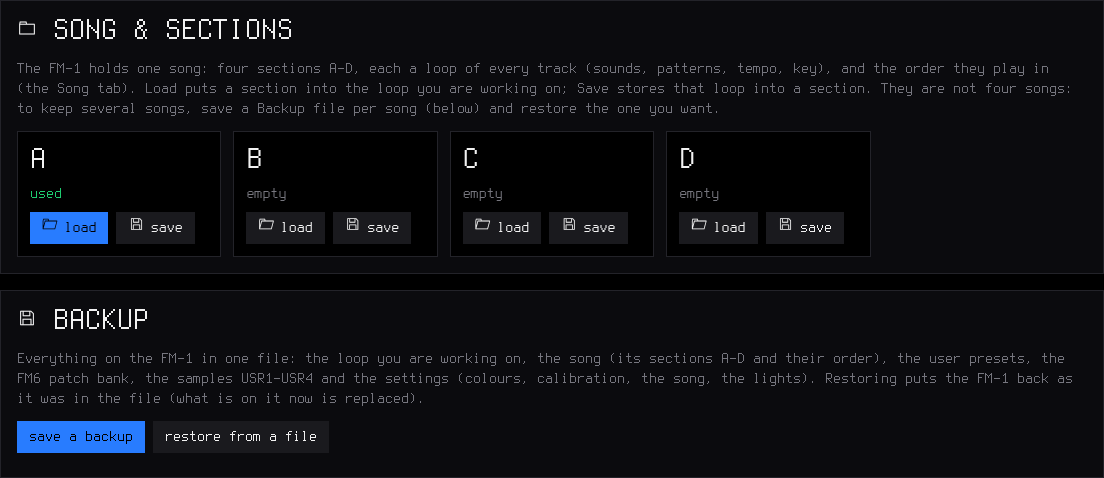
- Song & sections — the sections A–D, and Backup (one file per song): Save a backup writes everything on the FM-1 to one file (with the FM6 bank); Restore from a file puts it all back (stop playback first).
- Settings — global, master (DUST, DUCK, FILT, ROLL), drums.
The protocol is documented in web/EDITOR_PROTOCOL.md.
Compatibility
| Device | M-VAVE FM-1 (the official firmware can be put back at any time) |
| Installer and editor | Chrome or Edge on Windows, macOS or Linux (they use Web MIDI with SysEx) |
| Cable | a USB data cable, plugged directly (no hub) |
| USB audio | any computer that takes a class-compliant USB audio input (no driver) |
| MIDI IN jack | 3.5 mm TRS, through a TRS-to-DIN MIDI adapter (type A or B) |
| Not supported | Bluetooth MIDI; a USB keyboard plugged straight into the FM-1 |
Troubleshooting
The installer or the editor does not find the FM-1. Use Chrome or Edge, a data cable, no hub, and allow MIDI access. Close every other app or tab that uses MIDI (a DAW, M-UPGRADE, another editor tab), then reload the page.
An install stopped half-way. The FM-1 waits in update mode: press INSTALL again. If BoopBox no longer starts, hold OCT− alone while switching on (BoopBox USB RESCUE) and install again.
The black keys make no sound on a synth track. That track plays chords or the scale on the white keys (in chord mode the black keys change the chord: CHORD+): hold SEL (between FX and ENV) and set KNOB 1 CHORD to OFF and KNOB 3 KEYS to OFF. The drum track always uses the black keys.
Nothing plays from the MIDI IN jack. Try the other adapter type (A / B); check the keyboard's channel (1–3 synths, 10 drums, the others the selected track; 2.6: MIDI sets them).
The USB audio input does not show. Unplug the FM-1 and plug it back in (after an install the computer must find it again). On a Mac with macOS 15 or older, BoopBox up to 2.7.1 shows MIDI but no audio input (Apple's driver there read BoopBox's USB description badly): update to 2.7.2, then plug the FM-1 in again. With 2.6, also check that HOME menu → USB SERIAL is OFF (the default), then restart the FM-1. In Audacity: Transport → Rescan Audio Devices. On Windows: Sound settings → Recording → show disabled devices.
The USB recording is too quiet, or follows the volume knob. Set HOME menu → USB AUDIO to FULL, or turn MASTER up.
Recorded notes move to the grid. BoopBox quantises what you record to the steps of the track (its DIV: 1/4 … 1/32, triplets). In 2.7, set QUANT off on the REC screen (KNOB 4): your timing is kept as each step's nudge. Otherwise set DIV to 1/32, or hold the step and nudge it (KNOB 4); for groove, use SWING.
Notes fade out on a dense part. The processor is at its limit: BoopBox fades one voice at a time (never the bass or the lead) rather than glitching. Fewer held notes or a lighter engine help.
An FM6 sound changed after loading a project. A project keeps the track's patch slot (PTCH), not the patch itself: store a patch you edited in the bank (editor → FM6 → Store in bank) and set PTCH to it.
The lights or SYNC went back to OFF / INT. You went back to an earlier BoopBox, which does not keep them; set them again in 2.4.
Something else? Open an issue: what you did, what you expected, what happened, and the version shown in HOME menu → ABOUT.
Specifications
| Tracks | 3 synth parts (8 voices shared) + drums (16 sounds, 6 voices) |
| Sounds | 153 presets on 12 engines (browsed by kind, level-matched), 6-op FM with DX7 SysEx import and a 27-patch bank, 8 sampled sets (CC0), 4 slots for your own samples (USR1–USR4), 32 user presets |
| Polyphony | 8 voices shared across the synth tracks; per engine played alone: 8 (ANALOG, DIGITAL, PHASE, LOFI, SAMPLE, TRIO, WHEEL, NOISE), 6 (FM6), 4 (VOICE), 3 (GRAIN, PHYS — SYMP model 2); MONO / LEGATO play one note at a time; drums 6 |
| Drum kits | 37 (5 sampled, 32 synthesised, 16 sounds each), level-matched, plus your own: USR1–USR4 and USR3+4 (about 15 s) |
| Sequencer | 64 steps per track, own length and division each (1/32 to two bars); chords with a level and ratchet per note; drums with a level and ratchet per sound; ties, slide; per-step parameter locks (24 per track), micro timing (±½ step in 1/64) and fill conditions; swing 0 (straight) to 100 (MPC 75 %); one sample-accurate clock (no drift) |
| Recording | live, quantised as heard (latency-compensated), overdub; free take (the tempo follows you) or the tempo set; start on the first note or a one-bar count-in; 1, 2 or 4 bars |
| Performance | layers: punch-in FX, erase, note repeat, step entry, key / chords, mute / solo / fill / tap tempo, song sections and a quick chain of up to 8 |
| Effects | 27 punch-in effects; master DUST, DUCK, DJ filter, limiter; per track drive, slicer, sends to a stereo chorus, a tempo delay (dotted 1/8 and 1/16 too) and a stereo reverb |
| Memory | autosave, undo / redo, one song of 4 sections (more as backup files), 32 user presets, 27 FM6 patches, song of 4 sections × 16 steps × 1–64 bars, full backup / restore (editor) |
| Audio | 44.1 kHz, fixed-point DSP; USB audio input (the master output, 16-bit stereo at 44.1 or 48 kHz, class compliant) |
| MIDI | USB class-compliant in / out (the keys, or the sequencer too); TRS MIDI IN (3.5 mm); MIDI clock in (USB or TRS), clock only if you like (IN = CLOCK) |
| Lights | button backlight (3 levels), C keys / white keys, played notes |
| Update | over USB from the browser (SHA-256 and CRC checked), USB rescue, return to the official V15 |
Documentation
- GUIDE.md — the complete guide: every button, combination, layer, page, engine and editor page, with a one-page cheat sheet
- BOOPBOX.md — the manual (every page, layer, sound and kit) and the history of each version
- DEMARRAGE-RAPIDE-FR.md — guide de démarrage en français
- BUILDING.md — building, build options and tests
- web/EDITOR_PROTOCOL.md — the editor's SysEx protocol
- LICENSING.md — the licences of the code and the assets
Building and tests
See BUILDING.md. In short: the JieLi toolchain and three files of the AC79 SDK, then ./build.sh (Linux / macOS) or INSTALL-BOOPBOX.bat (Windows with WSL), which builds the firmware and serves the installer and the editor on http://localhost:8766.
tests/run_tests.sh runs the host test suite with no hardware: audio renders against golden hashes, CPU budgets, the sequencer's timing (no drift, swing, ratchets, rolls, the REC modes and the count-in, MIDI clock), the UI pages and layers, the knobs, flash storage, the update loader, MIDI and USB audio, and the web pages (editor, backup, CHOP, installer).
Contributing
- Bugs and ideas: open an issue — what you did, what you expected, what happened, and the version in HOME menu → ABOUT.
- Pull requests are welcome. Keep the style of the code around your change, add a host test when you can, and make sure
tests/run_tests.shpasses. Contributions are credited in the release notes and the manual. - By contributing you agree that your code is released under GPL-3.0, like the rest of BoopBox.
Credits and thanks
- SLOOP by isod89 — BoopBox is SLOOP renamed and carried on: everything below was credited by SLOOP and stays credited here.
- Felucca by Leo Kuroshita (@kurogedelic) / Hügelton Instruments — the engines, the sequencer, the editor, the installer, in 2.3 the USB audio input, the MIDI clock, the knob reading and many fixes, in 2.4 the FM6 engine and its DX7 patch editor (Felucca 1.0 / 1.0.1), and in 2.6 the INSERT effects, LFO 2 (SYNC / TRIG / POL), ENV SYNC, the ANALOG filter types, note LEN and step velocity, MIDI LEARN, the live drum mutes, the latched-arp fix (#191), the 1/4D delay and REV / ECHO THROW (Felucca 1.4 / 1.4.1 / 1.5 / 1.5.1), and in 2.7 the arp modes REPEAT, DNUP, UP+8, CONV, DIVG, PINKY, THUMB, WALK and CHORD, and ORD in the order you pressed (Felucca 1.4 / 1.5.1). Thank you.
- The Felucca community, who asked for those features first (Felucca discussions and issues): Wulgaren (insert effects with dry / wet, #78; the arp report, #191), etyrnal (the lo-fi bit effect, #177; envelopes in note values, #175), benjaminguerrer (LFO sync, #154), gospodindilly-ops (the ANALOG filter types, #104), Armstrong1980 (#178) and oMauNaProducer (#173) (note length, step velocity), lostfictions and planist79 (MIDI LEARN, #170).
- @renebohne — the played-note key lights (pull request #11) and, in 2.6, MIDI Program Change (Felucca pull request #179).
- ChanceTheMaker and keremimo — the TRS MIDI input fix (Felucca Salt) and contributions to the MIDI clock.
- andrerezemini (sloop-lab) — in 2.7 the sound on the FM-1's second core and 38 KB of RAM back (pull request #111), on the dual-core start of Charles Vestal (X0X) and keremimo (Melodee).
- juanjiant-bit (JIANT FM) — in 2.7 the progressive knob acceleration (KNOB ACCEL) and the LEVEL / PAN glide come from JIANT's.
- renebohne — in 2.7 MIDI CC 74 sweeps each engine's own cutoff or brightness, after his pull request #71 (Felucca 1.1.5's standard CC map).
- @ordenador (Mario Faúndez Vidal) — the web editor's local audio preview: the firmware's own engines and sequencer in the browser (WebAssembly), with the playable piano / pads and the inline sequence editing (pull request #120).
- Everyone who installed SLOOP, made music with it, commented, reported a bug or asked for a feature — most of each update comes from your messages: parameter locks, DX7 patches, dotted delays and longer steps (2.4); in 2.6 a MIDI channel per track, sustain and pitch bend, step entry from a MIDI keyboard, TEXTURE, the fixed crackles, the web editor bug with the same value on two tracks, and the MIDI learn backup. You asked, tested and reported them.
- Samples: Versilian Studios VSCO-2 CE and VCSL, Sonic Pi (all CC0). Font: Terminus and Terminus Bold (SIL OFL 1.1). Icons: Fukiai (MIT, Hügelton Instruments) in the web editor; the FM-1's parameter icons and the BoopBox logo are drawn by
tools/gen_icon_art.pyandtools/gen_logo.py(GPL-3.0). PHASE engine after CrispyZebra (GPL); VOICE after klattsch (MIT); FM6: msfa from Dexed by Google Inc. and Pascal Gauthier (Apache-2.0). - Interface ideas after Elektron's step entry and Akai's MPC (swing, note repeat, erase).
Licence
Code: GPL-3.0-only (see LICENSE, and LICENSING.md for the assets). No warranty. M-VAVE and FM-1 are trademarks of their owners; BoopBox is not affiliated with M-VAVE, Elektron or Akai. Drum kit names describe styles, not products.