README from GitHub, GPL-3.0
▶ Open the emulator · play Ravel in your browser
📖 Read the manual · PDF
⬇ Install the firmware on an FM-1 · download the .fwsc
Ravel
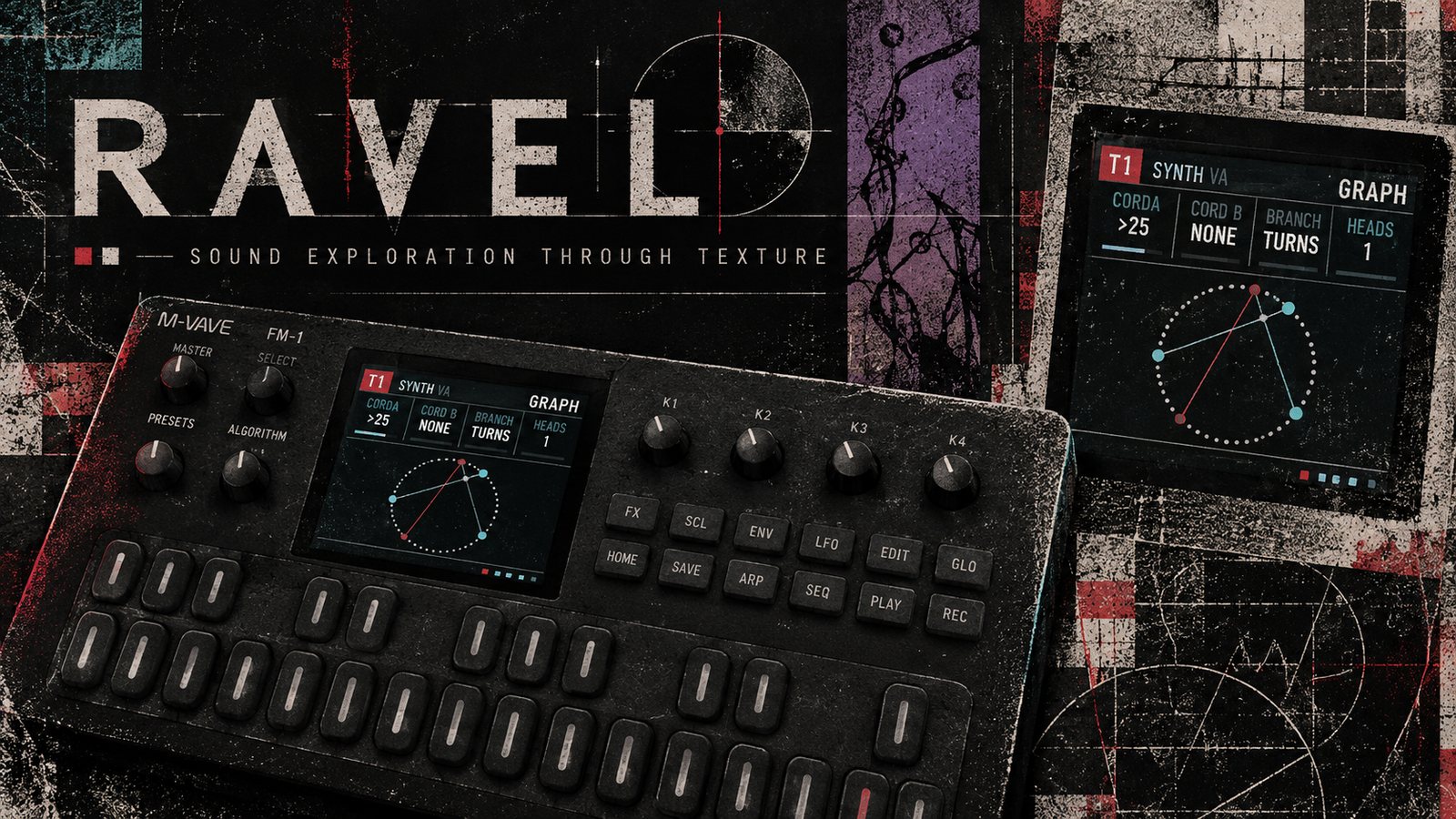
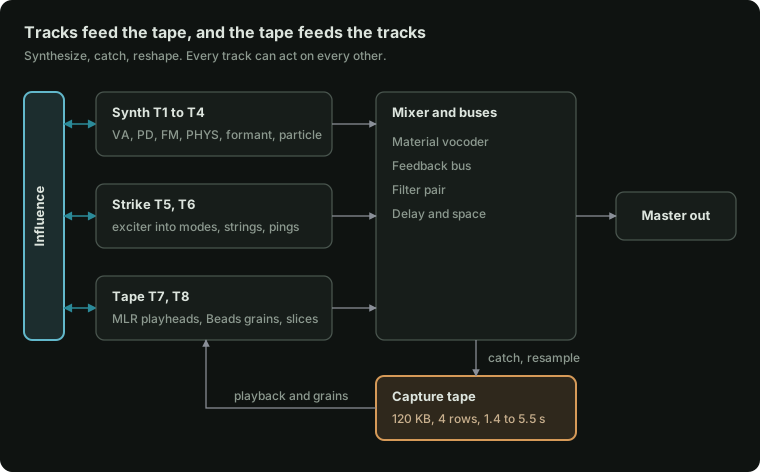
Ravel is a custom firmware for the M-VAVE FM-1 that turns the FM-1 into a pocket groovebox for sound design. It has 8 tracks that synthesize, catch what they play onto a shared tape, cut it up & rebuild it with tracks that can play, excite, and reshape one another
Status: playable in the emulator; the FM-1 firmware builds, but has not been run on an FM-1 yet. The whole instrument runs in the browser emulator and the desktop simulator, from the same C sources the firmware is built from. The FM-1 firmware is bare metal (no vendor SDK) on the open hardware layer of the Felucca family of community firmwares, and installs from a web installer over USB. Until it has been tried on hardware, treat it as experimental.
What it is
- Synth tracks (T1 to T4), eight engines: VA (saw to pulse, supersaw, sync, sub, noise, through-zero FM), CZ (a full Casio CZ: two lines, the eight CZ waves, 8-step DCO, DCW and DCA envelopes, ring and noise modulation, vibrato and a Juno-60 style chorus), FM (4 operators, 12 algorithms, a wave per operator), PHYS (string, bowed, blown, membrane), FORMANT (vowel filter bank or FOF grains), PARTICLE (pulsar emitters that pull into sync), CHIP (SID-style waves arpeggiating through offsets, then a decompose stage that crushes and breaks the sound apart), SQ (after the Ensoniq SQ-80: three oscillators on 8-bit waves, sync and AM, a CEM-style filter and the DOC chip's grit).
- Strike tracks (T5, T6): an exciter (click, noise, metal, FM burst, dust, rain, bow, breath, or EXT: another track's sound) strikes a body (ping filters, modal bars, a struck disc or coupled strings), with a transient layer, ring mod and a pitch drop.
- Tape tracks (T7, T8): no oscillator. They play the shared 120 KB capture tape as MLR playheads (four rows, jumps on the keys, rates from -2× to 4×), through the Beads grain engine, or as slices found in what was caught.
- Capture tape: records the master, one track, the buses or the audio input. Catch keeps what is on it, resample records a bar (or 2 or 4) onto row 1 on the downbeat, erosion and "dirty" half-rate µ-law for more time.
- Influence: an 8 × 8 grid where any track can modulate, trigger, excite, ring, jump the tape of, or clock any other.
- Articulation: onset, continuant and termination stages with curve, overshoot, a loop, a tail and Give (a spring that lets the level lag and bounce), two destinations, and a 256-shape envelope library that steps can recall.
- Sequencer: each track runs in STEPS or GRAPH mode. Steps: length, rate and direction, parameter locks, microtiming, ratchets with curves, conditions, chance. Graph (from Silt): cords set where a playhead goes next, two playheads walk the same graph, each playing notes, only the gate, or only the pitch (so rhythm and melody can take different paths), head 2 can play another track, and each head has a function generator (rise, fall, arch, decay, swell, or an LFO or dust) that moves its speed, times or plus the clock. Plus density arcs, a per-track note interval, scale quantizing, René-style clocking from LFOs or dust, and a two-oscillator master clock.
- Modulation: two LFOs, dust, an 8-slot matrix and 4 macros with 8 destinations each (curves and windows).
- Buses: a stereo delay (spread, wobble, freeze), a space reverb (motion, diffusion, low cut), a feedback bus (filter, comb, smear, shift, fold or crush, returning to the master or into a track), a filter pair (low, band or high pass each; series, parallel or feedback, with two LFOs), an 8-band vocoder (its body is dust, drops, noise, the tape or a track; attack, release, shift, width), and master drive with microcuts and punch-in effects on the keys. Each bus page shows the current track's send into it.
- Song: patterns A and B per track, 16 scenes, a 32-row arrangement, mute and solo, tap tempo, 8 project slots.
New here? Open the emulator (Opening it), load a demo, press Play, then read The five moves. Everything else is reference.
Contents
The manual
- Opening it
- The panel
- The five moves
- How the parts connect
- HOME: tracks and influence
- EDIT: the voice
- ENV: articulation
- LFO: modulation and macros
- FX: the buses
- SCL: scale
- ARP: the tape
- SEQ: steps and the graph
- GLO: song, scenes and clock
- SAVE: projects
- Hold layers (every button held)
- Recording
- Recipes, step by step
- Quick reference
- Questions people ask
On the FM-1: Installing · If the FM-1 will not start
For developers: What's here · Building · The FM-1 build · Licence
The manual
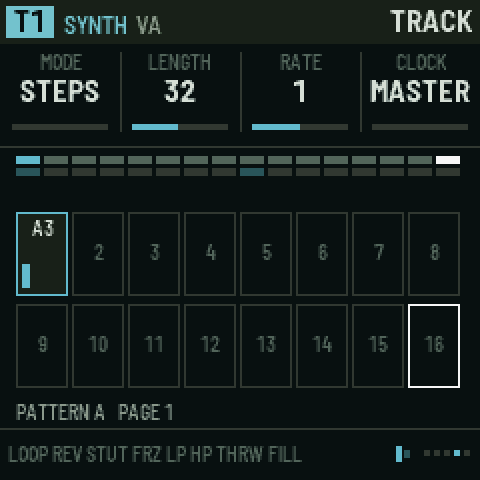
Everything below works the same in the browser emulator and on the FM-1. The pictures are the real screen, taken from the simulator.
1. Opening it
In a browser. Open ravel-emulator.html. It is one file, works offline and needs no install. Click anywhere or press a key once to start the sound; browsers stay silent until you do.
The emulator page has three parts:
- The left panel (the workbench) is a set of shortcuts:
- pick a demo and press Load;
- Play and Record;
- T1–T8 pick a track;
- Sound chooses the track's kind, engine and a preset;
- Page ← Back / Forward → steps through the section's pages (the same as turning SELECT, or the ← → keys);
- Go to jumps straight to a section;
- Catch and Resample for the tape;
- Audio in plays a file into the input;
- Output has a level meter and the volume.
- The FM-1 in the middle is the instrument itself. Everything in this manual is done there.
- The Controls guide and Eight tracks below are short reminders and a level meter for each track. Click a track card to select it; M mutes it.
Using the emulator's controls:
| To | Do this |
|---|---|
| Turn a knob or encoder | Drag it up or down, or scroll on it |
| Press a button | Click it |
| Hold a button (for the hold layers) | Right-click or shift-click it; it stays held (lit) until you click it again. Esc lets go of everything. |
| Play keys | Click or touch them, or use the computer keys A W S E D F T G Y H U J K O L P ; ' (A is middle C, the 5th white key) |
| Octave | [ and ] |
| Start or stop | Space |
| Pick track 1–8 | Number keys 1–8 |
| Turn SELECT (next or previous page) | ← / → arrow keys |
| Stop everything at once | Panic / stop all, top right |
The page has a safety limiter, so nothing can reach your speakers or interface at full scale. Volume starts at 70.
Projects you save in the emulator are kept in your browser, so they are still there next time on the same computer and browser.
On the FM-1. Install it with the web installer (see Installing on the FM-1). Everything works the same as in the emulator, with these differences:
- MASTER is the output volume (the emulator's Volume slider).
- No audio input. The FM-1's USB carries Ravel's sound to a computer (it shows up as an audio input named "Ravel FM-1" you can record), but nothing comes in. So the FM-1 hides the input's controls: the tape has no INPUT source, and the ROWS page has no IN GAIN or INPUT knob. The EXT exciter still works there, from other tracks.
- Saving pauses the sound for a moment, because the code runs from the same flash the project is written to.
- No Bluetooth.
2. The panel
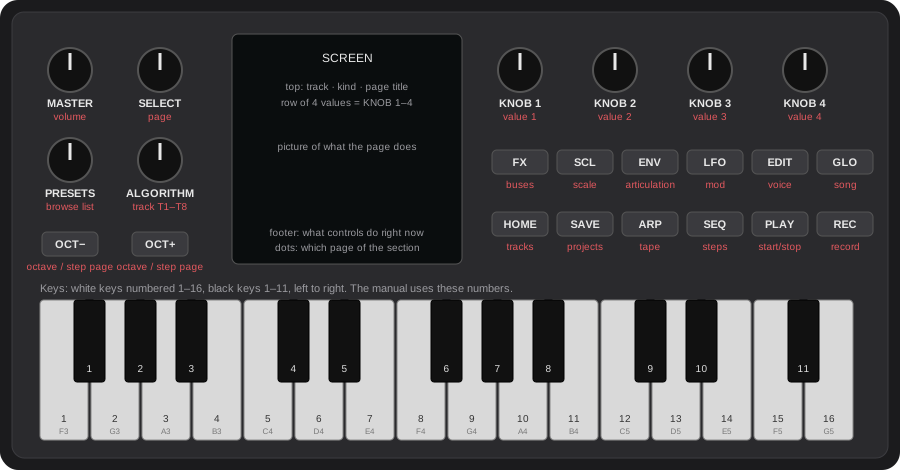
| Control | What it does in Ravel |
|---|---|
| MASTER | Output volume |
| SELECT | Moves to the next page (turn right) or back to the previous one (turn left) in the section you are in |
| ALGORITHM | Picks the track you are working on, T1 to T8. The keys play this track. |
| PRESETS | Browses the list that belongs to the page: sounds on most pages, patterns on SEQ, scenes on SONG, slots on SAVE, rows on TAPE, steps on GRAPH, routes on INFLUENCE. The footer tells you which. |
| KNOB 1–4 | Change the four values in the row at the top of the screen, left to right |
| OCT− / OCT+ | Move the keyboard down or up an octave. On SEQ pages they move between step pages (1–16, 17–32, …). |
| 10 section buttons | Each one opens a section (a group of pages). Tap it again for the section's next page. |
| PLAY | Starts and stops the sequencer |
| REC | Tap to arm recording on the current track; hold it for catch and resample |
| Keys | Play the current track, or act as steps, tape positions, scenes or switches depending on the page and on what you hold |
The ten sections:
| Button | Section | What lives there |
|---|---|---|
| HOME | Tracks | All eight tracks at a glance, and the influence grid |
| EDIT | Voice | The current track's sound: engine, source pages, pitch, filter, skin, insert, mix, sends |
| ENV | Articulation | How a note starts, holds and ends, and the 256-shape library |
| LFO | Mod | Mod matrix, LFO 1, LFO 2, dust, macros |
| FX | Buses | Delay, space, feedback, filter pair, vocoder, master |
| SCL | Scale | Root, scale, transpose, interval |
| ARP | Tape | Capture, rows, and how a tape track plays the tape |
| SEQ | Steps | Steps, step timing and shape, track settings, direction, graph and playheads |
| GLO | Song | Mixers, scenes, arrangement, density arcs, clock |
| SAVE | Projects | Save, load, demos, new project |
Section or layer? A quick tap (less than about half a second) opens the section. Holding a button and using keys or knobs while it is down turns it into a layer instead: SEQ held makes the keys steps, LFO held puts the macros on the knobs, and so on. When you use a button as a layer, letting go of it does not change the page. See Hold layers.
Reading the screen
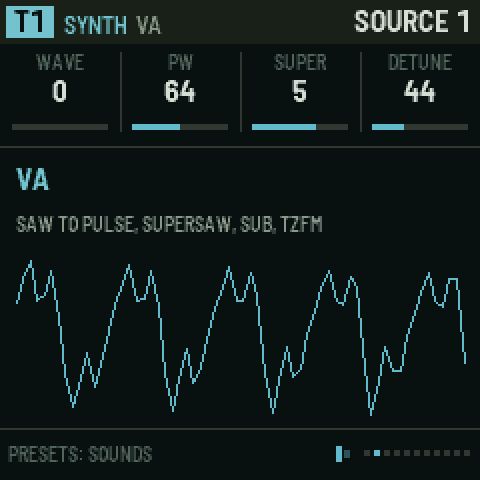
- Top bar:
- left: the track (T1–T8, coloured by kind: blue synth, orange strike, amber tape), its kind and engine;
- right: the page title.
- Value row: four names and values, which are always KNOB 1, 2, 3 and 4 in that order. A bar under each shows where it sits in its range; bipolar values have a centre mark. A value written as
-means that knob does nothing on this page. - Picture: what the page does, drawn live (a waveform, a filter curve, the step grid, the graph, the tape).
- Footer:
- left: what the controls do right now. It changes when you hold a button, so read it whenever you are unsure.
- right: small dots, one per page in the section, with the current one lit.
- Also shown: a play indicator while running, and a red dot when recording is armed.
Short messages ("CAUGHT", "PATTERN B", "SAVED TO 3") flash on the screen when something happens.
3. The five moves (how every page works)
Every page in Ravel works the same way:
- Press a section button to open the section.
- Turn SELECT (or tap the same button again) to walk its pages.
- Turn ALGORITHM to choose which track you are editing.
- Turn KNOB 1–4 to change the four values shown.
- Turn PRESETS to browse whatever the page holds.
Knobs speed up when you turn them quickly, so a fast turn crosses a whole range and a slow turn moves one step.
Pages appear and disappear. A section only shows the pages that apply to the current track:
- a VA synth has three SOURCE pages, FM has four;
- a tape track has no SOURCE pages but gets PLAYBACK, then MLR, BEADS or SLICES depending on its mode;
- the graph's HEAD pages only appear when the track is in GRAPH mode, and HEAD 2's pages only when head 2 is on.
So if a page seems to be "skipped", it is hidden because it does not apply to this track. Change the track or the setting and it comes back.
Greyed-out knobs. When a knob does nothing with the track set as it is, its name and value turn grey. For example, on a strike track with the PING body, DAMP, INHARM, GEOMTRY and MODES are grey, because a ping filter has none of those. The value is kept, so it is ready if you change the setup. So are ENGINE and VELO on strike and tape tracks (engines are for synth tracks; strike and tape take velocity as it comes), VOICES on a tape track (one playhead; a strike track offers MONO or 2), T DECAY until TRANS is up, RING F until RING is up, ORDER, RATE and SEED except with the DUST or RAIN exciter, and on PHYS, POSITN for BLOWN and MEMBRAN.
4. How the parts connect
Ravel has 8 tracks. Each track is one of three kinds, and any track can be any kind (HOME › TRACKS › KIND):
| Kind | What it is | Default tracks |
|---|---|---|
| SYNTH | An oscillator voice with eight engines: VA, CZ, FM, PHYS, FORMANT, PARTICLE, CHIP, SQ. Up to 4 voices. | T1–T4 |
| STRIKE | An exciter hitting a resonant body: drums, metal, wood, rain on glass | T5–T6 |
| TAPE | No oscillator. It plays the shared capture tape: MLR playheads, Beads grains, or slices. | T7–T8 |
How the sound flows:
- Each track makes sound. On synth and strike tracks the sound goes: source → filter → skin (drive, fold, bits) → insert effect → articulation (the amplitude envelope) → level and pan.
- The mixer adds the tracks together. Each track also sends some of its sound to the five buses (delay, space, feedback, filter pair, vocoder), and the buses return into the mix.
- The master applies drive and microcuts, then a safety limiter, then goes to the output.
- The capture tape is always listening. By default it hears the master, but it can hear one track, the buses or the audio input instead (ARP › CAPTURE › SOURCE). When you catch or resample, what it heard is kept, and the tape tracks play it back. That is the loop at the heart of Ravel: synthesize → catch → rebuild.
- Influence connects tracks to each other. One track's notes or audio can trigger, modulate, excite, ring, clock or jump the tape of another (HOME › INFLUENCE).
- The sequencer plays every track from its own pattern. The modulation (LFOs, dust, matrix, macros) moves parameters over time. Scenes and the arrangement switch patterns and states.
5. HOME: tracks and influence
TRACKS
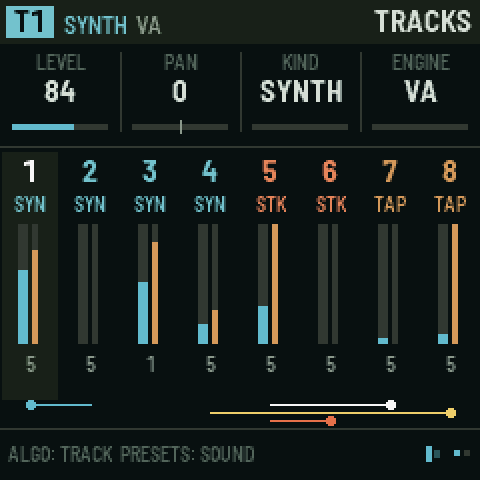
The overview shows all eight tracks:
- each track's number and kind;
- a live level meter;
- how many voices it is using;
- along the bottom, the influence routes drawn as lines.
The current track is highlighted.
| Knob | Value |
|---|---|
| 1 LEVEL | Track volume, 0–127 |
| 2 PAN | −64 left to +63 right |
| 3 KIND | SYNTH, STRIKE or TAPE. Changing it resets the track to that kind's defaults. |
| 4 ENGINE | For synth tracks: VA, CZ, FM, PHYS, FORMANT, PARTICLE, CHIP, SQ |
ALGORITHM picks the track; PRESETS loads a sound of the track's kind.
INFLUENCE
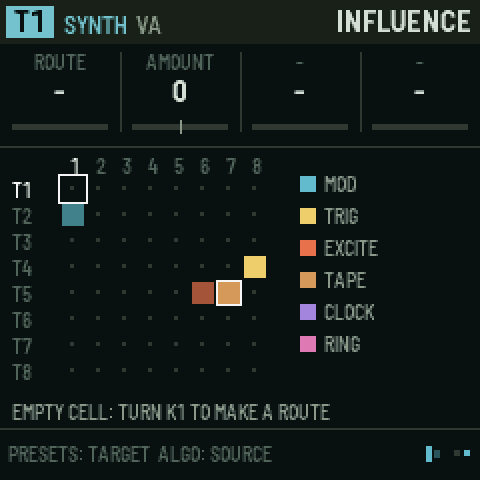
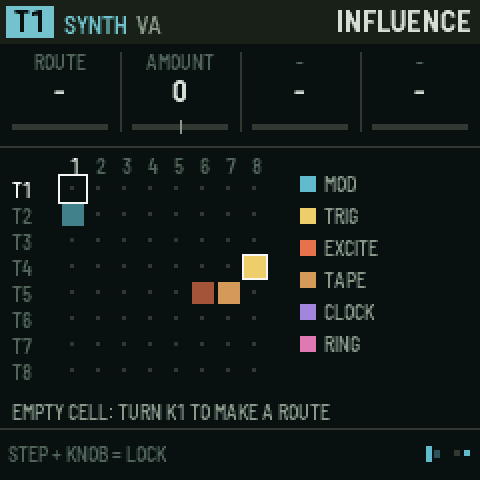
An 8 × 8 grid: rows are sources, columns are targets. Each filled cell is a route, coloured by type.
- Turn ALGORITHM to the source track (its row is highlighted).
- Turn PRESETS to the target column (the box moves along the row).
- Turn KNOB 1 (ROUTE) to choose what the route does. An empty cell says "TURN K1 TO MAKE A ROUTE".
- Set the other knobs. They change name to suit the route.
| Route | What happens | KNOB 2 | KNOB 3 | KNOB 4 |
|---|---|---|---|---|
| MOD | The source's envelope moves one of the target's parameters, every time the source plays | AMOUNT (±) | PARAM: which of the target's parameters | – |
| TRIG | Each note on the source also plays the target, with the same pitch | AMOUNT (below 0 plays the target softer) | DELAY: 0–16 steps later | CHANCE: 0–100 % |
| EXCITE | The source's audio feeds into the target's body or string (best into a strike or PHYS track) | AMOUNT | – | – |
| TAPE | Each source note jumps the target tape track's playhead | AMOUNT | JUMP TO: a position 0–15, or 16 = catch the tape | – |
| CLOCK | Each source note moves the target's sequencer one step (René-style: rhythm drives rhythm) | AMOUNT | – | – |
| RING | Ring modulates the target with the source's audio | AMOUNT | – | – |
To remove a route, turn KNOB 1 back to -.
A trigger chain never plays the same track twice in one pass, so routes can form loops safely (T1 triggers T2, which triggers T1).
6. EDIT: the voice
All pages here act on the current track (ALGORITHM). PRESETS browses sounds for the track's kind on every voice page; the sound's name flashes on screen.
| Page | KNOB 1 | KNOB 2 | KNOB 3 | KNOB 4 |
|---|---|---|---|---|
| SOUND | KIND | ENGINE | VOICES (mono, 2, 3, 4) | VELO: how much key velocity changes the level |
| SOURCE 1–4 | the engine's own controls, see below | |||
| PITCH | PITCH (±24 semitones) | FINE (±50 cents) | GLIDE | – |
| FILTER | FILTER type: LADDER, LOWPASS, BANDPASS, HIGHPASS, LPG, MS-20, SH-101, SQ-80 | CUTOFF (Hz) | RESO | KEYTRK: the cutoff follows the note |
| SKIN | DRIVE (saturation) | FOLD (wavefolding) | BITS (bit reduction) | DEREZ (sample-rate reduction) |
| SKIN 2 | BITMASK (digital grit) | VOCODER: this track's send into the vocoder bus | – | – |
| INSERT | INSERT effect: OFF, COMB, SHIFT, CRUSH, SMEAR | TUNE: on COMB its note (C4 at the middle, a semitone a step); on SHIFT the shift | AMOUNT | MIX |
| MIX | LEVEL | PAN | DELAY send | SPACE send |
| SENDS | FEEDBK send | PAIR send (filter pair) | VOCODER send | – |
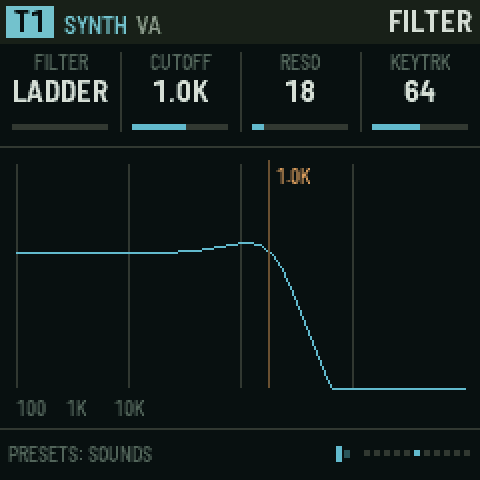
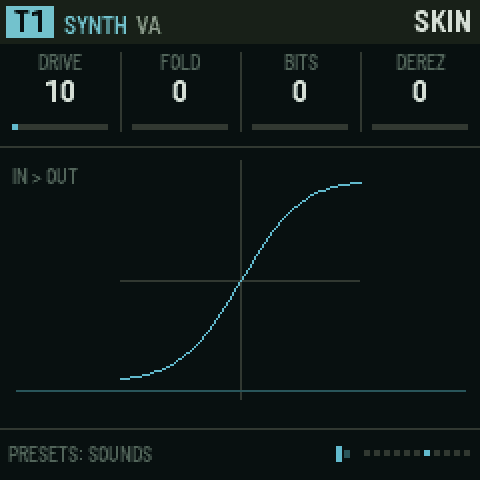
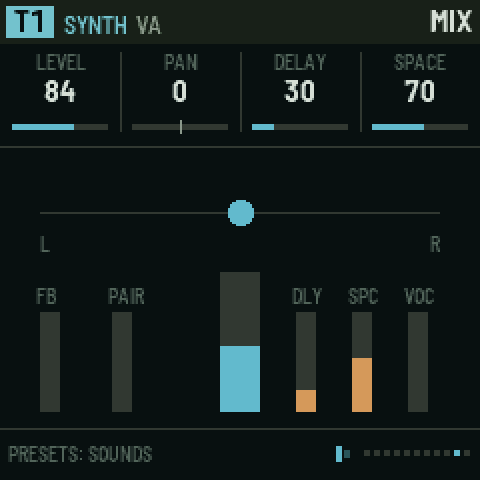
MS-20 is hot and dirty: a two-pole filter whose resonance runs through clipping diodes, with the input driven. Turned up, it barks, then screams. SH-101 is round and liquid: four smooth stages whose resonance sings rather than bites, and keeps its bass as it rises. SQ-80 is warm and a touch dark: four transistor-style stages (after the CEM3379 chip in the Ensoniq SQ-80) whose resonance whistles rather than screams, and thins the bass as it rises, as the SQ-80's does. All three are on synth tracks (all engines); try the 101 BASS and MS SCREAM presets, and any SQ preset. Picking the SQ engine sets the filter to SQ-80.
The filter belongs to synth voices. On strike and tape tracks the FILTER page's knobs are greyed out.
LPG is a low-pass gate: the filter closes as the note fades, so sounds get darker as they die away (good for plucks and Buchla-style bongos).
Changing ENGINE resets the SOURCE values to that engine's defaults. Use PRESETS to start from a finished sound instead.
The eight synth engines (SOURCE pages)
VA (virtual analog): the familiar subtractive oscillator, and more.
| SOURCE 1 | SOURCE 2 | SOURCE 3 |
|---|---|---|
| WAVE: saw through to pulse | SUB: sub-oscillator level | SYNC: hard-sync sweep |
| PW: pulse width | NOISE level | DRIFT: slow analog wander |
| SUPER: 1–7 stacked oscillators (supersaw) | TZFM: through-zero FM depth | |
| DETUNE: spread of the stack | FMRATIO: modulator ratio (1/2 to 7) |
CZ: a full Casio CZ (the CZ-101, 1000, 3000, 5000 and CZ-1 all share this voice). It works as the CZ's own sound chip does: a cosine read through a bent phase, where DCW is how bent it is (at 0 every wave is a sine). Each note plays one or two lines, and each line has two waves and three 8-step envelopes: DCO (pitch), DCW (waveform) and DCA (level). Ravel's filter, skin, inserts, LFOs and matrix all still work on top.
General settings, on the SOURCE pages:
| SOURCE 1 | SOURCE 2 (detune: line 2) | SOURCE 3 (vibrato) | SOURCE 4 |
|---|---|---|---|
| LINE: 1, 2, 1+1' (line 1 twice, the second detuned), 1+2' (both lines, line 2 detuned) | DETUNE: + or - | VIB WAV: TRI, SQUARE, UP, DOWN | DCW +-: shifts both lines' DCW; give it an LFO in the matrix to sweep the timbre (the CZ itself could not) |
| OCTAVE: -1, 0, +1 | DT OCT: 0–3 octaves | DELAY before it starts (0–99) | FOAM: takes the fundamental out, leaves the sidebands |
| MOD: OFF, RING (line 2 times line 1), NOISE (line 2's pitch kicked by noise) | DT NOTE: 0–11 semitones | RATE (0–99) | VEL DCW: how much a softer touch closes DCW (0–9, CZ-1 style) |
| CHORUS: OFF, I, II, I+II (Juno-60 style) | DT FINE: 0–60 (60 = a semitone) | DEPTH (0–99; 0 = none) | – |
Then, per line (LINE 1, LINE 2):
| KNOB 1 | KNOB 2 | KNOB 3 | KNOB 4 |
|---|---|---|---|
| WAVE 1: SAW, SQUARE, PULSE, DBL SIN, SAW PLS, RESO 1 (saw window), RESO 2 (triangle), RESO 3 (trapezoid) | WAVE 2: OFF, or a second wave | DCA KF: the level envelope runs faster on higher notes (0–9) | DCW KF: higher notes are duller (0–9) |
And the envelopes, DCO 1, DCW 1, DCA 1 (and DCO 2, DCW 2, DCA 2):
| PRESETS | KNOB 1 | KNOB 2 | KNOB 3 | KNOB 4 |
|---|---|---|---|---|
| the step, 1–8 | RATE: how fast the step moves (0–99) | LEVEL it moves to (0–99) | SUS: the step the envelope holds while the key is down (OFF, 1–8) | END: its last step (1–8) |
- How an envelope runs: from step 1, each step moves at its RATE to its LEVEL, then the next step starts. At the SUS step it waits while the key is held; when you let go it goes on from the step after SUS. It stops at END. Rates and levels follow the CZ's own curves: rate 99 is a few milliseconds, rate 0 almost forever; DCA levels are on the CZ's logarithmic scale.
- DCO levels: up to 63 the pitch rises in 6.25-cent steps (63 is almost 4 semitones); from 64 it jumps in 2-semitone steps (64 is 8 semitones, 99 is 78). The DCO envelope can only raise the pitch, as on the CZ.
- Two waves on a line alternate cycle by cycle, so the note sounds an octave lower with a mix of both characters (the CZ's "cascade"). Two RESO waves cannot be combined, as on the CZ.
- RESO waves are a sine whose frequency rises with DCW, restarting every cycle under a falling window: like sweeping a resonant filter, with no filter.
- High notes narrow DCW automatically, as the CZ does, so thin pulses stay audible.
- The DCA is the level envelope. On a CZ track the ARTICULATION pages' shape knobs are greyed out; ENV>CUT, the envelope's DESTINATIONS and the influence routes follow the DCA instead.
- The pictures: LINE pages draw the line's two cycles at its brightest DCW. Envelope pages draw the 8 steps, the SUS and END points, the step you are editing (white) and where the playing note is (amber dots).
- Presets: CZ BRASS, CZ BELL (ring-modulated lines a twelfth apart), CZ STRINGS, RESO SWEEP, CZ BASS, NOISE HIT and FOAM.
- Projects from before the CZ load with each CZ track set to a plain CZ tone.
FM: 4 operators.
| SOURCE 1 | SOURCE 2 | SOURCE 3 | SOURCE 4 |
|---|---|---|---|
ALGO: 12 routings (shown as 1>2>3>4 and so on; > means "modulates", + means "mixed") | RATIO3 | LEVEL4 | WAVE4 |
| FEEDBK: operator 1 feedback | RATIO4 | WAVE1 | MOD DEC: how fast the modulators fade (the classic FM "pluck") |
| RATIO1 | LEVEL2 | WAVE2 | TZFM: through-zero FM |
| RATIO2 | LEVEL3 | WAVE3 | VEL MOD: velocity brightens the sound |
Each operator can be SINE, TRI, SAW, SQUARE, HALF, ABS, QUART or BITS.
PHYS (physical modelling): a virtual instrument that you strike, bow or blow.
| SOURCE 1 | SOURCE 2 |
|---|---|
| MODEL: STRING (plucked), BOWED, BLOWN, MEMBRAN (drum skin) | EXCITE: how hard it is played: pluck strength, bow speed, breath |
| BRIGHT: brightness of the excitation | INHARM: detunes the overtones (metallic); on BOWED, lighter bow pressure (scratchier, airier) |
| DAMP: how quickly highs die | BODY: resonance of the body (not MEMBRAN) |
| POSITN: where it is plucked or bowed (STRING, BOWED) | DECAY |
BOWED and BLOWN keep sounding for as long as the key is held, like a violin or a clarinet. BLOWN speaks an octave lower in character (a clarinet's hollow, odd-harmonic tone) but plays the note you press.
FORMANT: vowels and voices.
| SOURCE 1 | SOURCE 2 |
|---|---|
| VOWEL: sweeps A-E-I-O-U | BREATH: air in the voice |
| SHIFT: moves the formants (smaller or bigger "throat") | GLOTTAL: the shape of the pulse |
| WIDTH of the formants | SPREAD: stereo or choir spread |
| MODE: FILTER (a filter bank on a pulse) or FOF (grain-based, more vocal) | VIBRATO |
PARTICLE: pulsars. Short bursts of a waveform at the note's pitch that can pull each other into sync.
| SOURCE 1 | SOURCE 2 |
|---|---|
| TABLE: SINE, GLASS, REED, VOICE, BELL, BITS, NOISE, DROP | COUPLE: how strongly the emitters pull into sync |
| DUTY: burst length (short = buzzy, long = tonal) | MASK: drop bursts at random |
| EMIT: 1–3 emitters | FORMANT: the burst's own pitch |
| RATIO between emitters | SCATTER: timing randomness |
CHIP: a glitchy chiptune voice, after the Syntakt's SY CHIP. A SID-style oscillator steps through the note you play and up to three offsets at RATE, so one voice plays a fast arpeggio, a chord or a "complex voice". A square sub oscillator sits under it, and a decompose stage after it reduces, crushes and breaks the sound apart.
| SOURCE 1 | SOURCE 2 | SOURCE 3 | SOURCE 4 (decompose) |
|---|---|---|---|
| WAVE: TRI, SAW, PULSE, NOISE (the SID's noise register), SAW&PUL (the SID's combined wave), RING (a ring-modulated triangle), PWM (the width sweeps by itself), KICK and SNARE (drum tables) | OF2: the arp's second note, in semitones | SUB: a square sub oscillator on the note you play (it does not follow the arp) | SRR: sample-rate reduction (aliasing, grit) |
| PW: pulse width (on RING, the ring partner's ratio; on PWM, how far it sweeps) | OF3: the third note | SUB OCT: the sub's octave, -3 to +1 | CRUSH: bits, 16 (clean) down to 1 |
| RATE: how fast the arp steps, 2–128 steps a second (classic chip arps are around 50) | OF4: the fourth note | SYNC: the main oscillator restarts with the sub (hard sync), so as the arp moves the notes, the timbre sweeps | DECOMP: how often the sound breaks |
| MODE: UP, DOWN, PINGPNG, RANDOM, ONCE (up through the notes, then stays) | STEPS: how many of the root, OF2, OF3 and OF4 the arp walks (1 = no arp) | OVER: overdrive | FRAG: the size of each piece, 1.5–46 ms |
- The arp: for a minor chord, set OF2 +3, OF3 +7, OF4 +12 and STEPS 4. Multiples of 12 jump octaves. RATE, MODE and the offsets grey out while STEPS is 1.
- Sync: with SYNC on and SUB OCT at -1, the sub holds the root while the arp's notes become synced, tearing timbres over it (the SYNC ARP preset). SUB OCT greys out while SUB is 0 and SYNC is off.
- Decompose: the voice keeps its last 46 ms. At the end of each fragment, DECOMP is the chance that the next one breaks: the last fragment repeats, plays backwards, drops out, has its bits flipped, or plays at double speed. FRAG greys out while DECOMP is 0.
- Presets: CHIP ARP, SID BASS (through the MS-20 filter), CHIP KICK, CHIP SNARE, DECOMPOSED and SYNC ARP.
SQ: after the Ensoniq SQ-80. Three oscillators play 8-bit single-cycle waves, osc 1 can hard-sync and amplitude-modulate osc 2, a second envelope moves the filter, the pitch and an attack layer, a delayed vibrato fades in, and GRIT dials in what made the SQ-80 sound the way it does: its DOC sound chip reading 8-bit waves without smoothing, at its own sample rate, into a coarse converter. The SQ-80's many parameters are folded into these sixteen. The waves are Ravel's own, built from harmonic recipes in the SQ's families; none come from Ensoniq's ROM.
| SOURCE 1 | SOURCE 2 | SOURCE 3 | SOURCE 4 |
|---|---|---|---|
| WAVE 1: the main oscillator's wave | SEMI 3: osc 3's interval, ±24 semitones | MOD: OFF, SYNC (osc 2 restarts with osc 1), AM (osc 1's level opens and closes osc 2), SYNC+AM | TRANS: osc 3 lifted by ENV 2's decay, for a struck, plucked or breathy onset |
| WAVE 2 | DETUNE: osc 2 up and osc 3 down, up to a quarter tone | E2 DEC: ENV 2's decay, 4 ms to about 6 s | VIBRATO: depth (fades in over half a second, like the SQ's delayed LFO) |
| WAVE 3 | LEVEL 2: osc 2's level | E2 SUS: where ENV 2 settles while the note is held | VIB RATE: 0.5 to 11 Hz |
| SEMI 2: osc 2's interval, ±24 semitones | LEVEL 3: osc 3's level | P ENV: pitch from ENV 2's decay, ±24 semitones | GRIT: 0 clean; to 64 the waves alias and lose their smoothing; to 127 the samples are held and the converter coarsens |
- The waves: SAW, SQUARE, PULSE, SINE, TRI, BELL, BASS, PIANO, EPIANO, VOICE1 (an "ah"), VOICE2 (an "oh"), ORGAN, REED, SYNTH1, SYNTH2, FORMT1 to FORMT3 (formant peaks, low to high), OCTAVE, DIGIT (bit logic, harsh), GLINT and SPIKE.
- The envelopes: the track's ADSR on the ENV page is the SQ's ENV 4, the level. ENV 2 is the filter's: FILTER's ENV amount follows it, not the level. Its decay alone drives P ENV and TRANS, so they fall away even while ENV 2 holds at E2 SUS.
- More movement: the LFO page's LFOs and the matrix reach every SOURCE knob, so wave levels, GRIT and the intervals can all be modulated, as the SQ-80's own modulators could.
- Greyed knobs: WAVE 2 and SEMI 2 grey out while LEVEL 2 is 0 and MOD is off; WAVE 3 and SEMI 3 while LEVEL 3 and TRANS are 0; VIB RATE while VIBRATO is 0.
- Presets: SQ PIANO, SQ VOX, SQ BELLS, SQ BASS, SQ SYNC, SQ PAD and SQ ORGAN.
Strike tracks (SOURCE pages)
A strike is an exciter (what hits) and a body (what rings).
| SOURCE 1 | SOURCE 2 | SOURCE 3 | SOURCE 4 |
|---|---|---|---|
| EXCITER: CLICK, NOISE, METAL, FM, DUST, RAIN, BOW, BLOW, EXT (only from outside) | DAMP | ORDER: how the modes are laid out | RING F: ring-mod frequency |
| BODY: PING (filters), MODAL (bars and bells), DISC (cymbals, plates), STRINGS (coupled strings) | INHARM: how un-harmonic the modes are | RATE: for DUST and RAIN, how often grains fall | RING amount |
| DECAY | GEOMTRY: the shape of the body | TRANS: level of the attack transient | P DROP: pitch drop at the hit (toms, kicks) |
| TONE: brightness | MODES: 2–8 resonances | T DECAY: length of the transient | SEED: a different random variation |
With EXT as the exciter, the track makes no strike of its own: the body rings only from what comes in from outside. That is another track's sound through an EXCITE route (HOME › INFLUENCE), the feedback bus returning into this track, or, in the emulator, a file under Audio in. If nothing is coming in, the SOURCE page says so, and you will hear only the attack layer and the inserts, the same on every note. The body's pitch still follows the notes, so a track exciting it through an EXCITE route rings at the note you play.
7. ENV: articulation
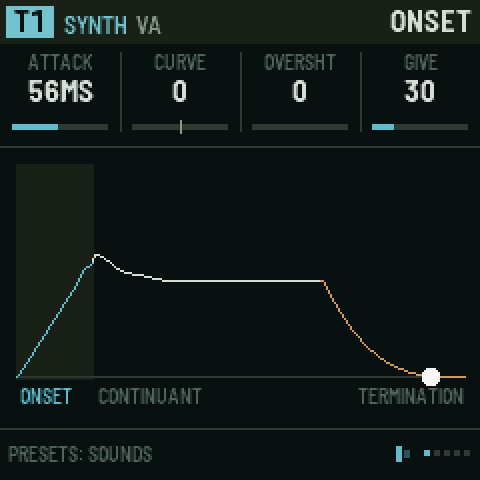
Ravel's envelope is in three stages, named after how speech is described: the onset (how a sound starts), the continuant (how it holds) and the termination (how it ends). The picture draws the shape as you turn the knobs.
| Page | KNOB 1 | KNOB 2 | KNOB 3 | KNOB 4 |
|---|---|---|---|---|
| ONSET | ATTACK time (0.5 ms to 8 s) | CURVE: − is a fast swell, + a slow one | OVERSHT: the attack overshoots and settles (a "bite") | GIVE: a spring in the level. It lags and bounces instead of moving straight. |
| CONTINUANT | DECAY time | SUSTAIN level | LOOP: repeats the attack and decay while held (a rhythmic flutter; higher is faster) | VELO: velocity sensitivity |
| TERMINATION | RELEASE time | TAIL: a quiet tail after the release (room for reverbs to bloom) | ENV>CUT: how much the envelope opens the filter (±) | GIVE (the same spring) |
| DESTINATIONS | DEST 1: any parameter of this track | AMOUNT 1 (±) | DEST 2 | AMOUNT 2 (±) |
DESTINATIONS lets the envelope move up to two more parameters, such as FM's LEVEL2 or CZ's DCW +-, so the timbre changes with the note.
LIBRARY
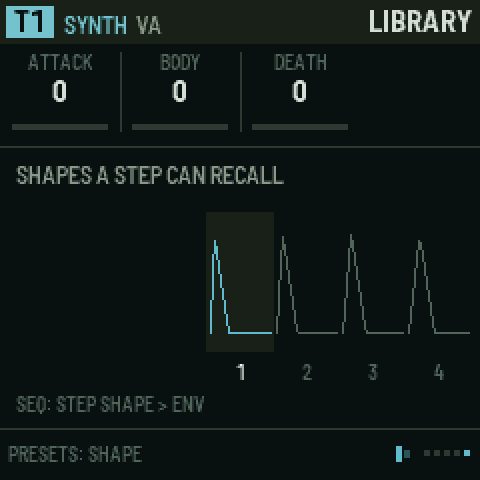
Ravel keeps 256 envelope shapes that any step can recall, so one pattern can mix short, long and swelling notes on the same track.
- PRESETS browses the shapes; the picture shows the chosen one in the middle with its neighbours.
- KNOB 1–3 edit the chosen shape: ATTACK (instant to slow swell), BODY (percussive to held), DEATH (cut short to long tail).
- Play the keys to hear the current track with that shape.
- To give a step a shape:
- go to SEQ › STEP SHAPE and set ENV to the shape's number (0 = the track's own envelope); or
- hold SEQ and ENV, hold the step's key, and turn KNOB 1.
8. LFO: modulation and macros
| Page | KNOB 1 | KNOB 2 | KNOB 3 | KNOB 4 | PRESETS |
|---|---|---|---|---|---|
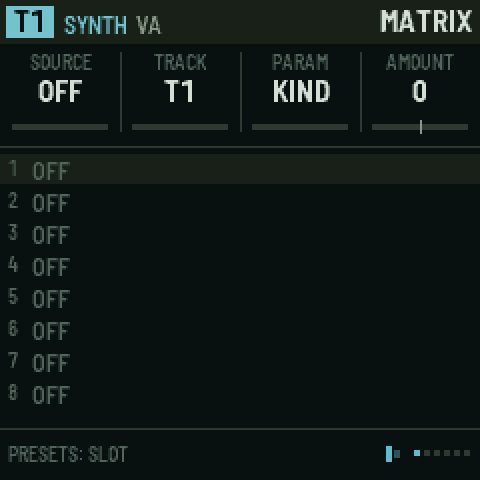
| MATRIX | SOURCE | TRACK (1–8, or the global one) | PARAM | AMOUNT (±) | slot 1–8 |
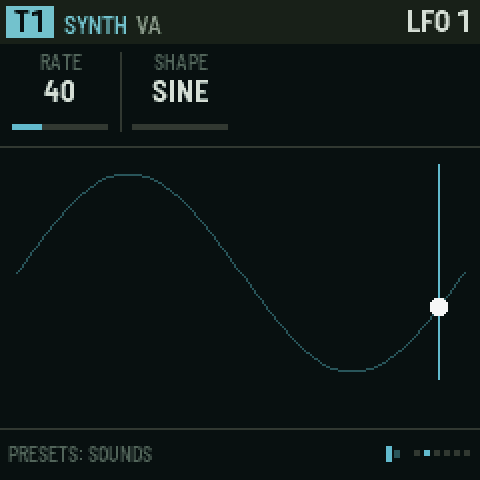
| LFO 1 | RATE | SHAPE: SINE, TRI, RAMP, SAW, SQUARE, S&H, DRIFT | – | – | – |
| LFO 2 | RATE | SHAPE | – | – | – |
| DUST | RATE: how often random spikes happen | DECAY: how long each spike lasts | – | – | – |
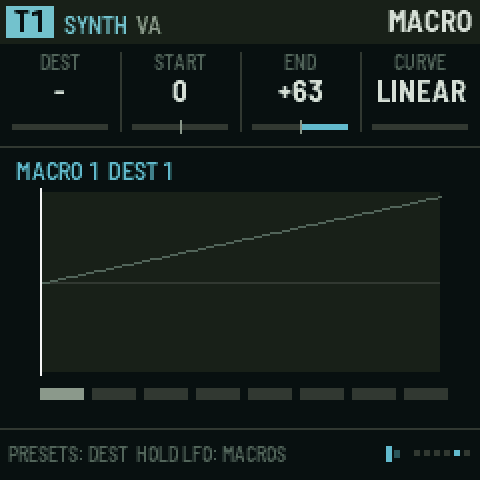
| MACRO | DEST: what this slot moves | START value (±) | END value (±) | CURVE: LINEAR, EXP, LOG, S | which macro and slot |
| MACRO WINDOW | FROM %: where on the macro's travel this slot starts moving | TO %: where it stops | MACRO 1 | MACRO 2 | which macro and slot |
Matrix sources:
- LFO1, LFO2;
- DUST: random impulses, like crackle;
- ENV and VELO: the target track's own envelope and velocity;
- MACRO1–4;
- CLOCK: a pulse on every clock tick;
- KEY: the note the target track is playing, centred on C4. At AMOUNT +63 the parameter follows the keyboard exactly, one semitone per key (see below);
- WHEEL: reserved for MIDI; nothing drives it in this version.
The matrix: 8 slots, each "this source moves that parameter by this much".
- Turn PRESETS to pick a slot.
- Turn KNOB 1 to pick the source.
- Turn KNOB 2 to pick the track.
- Turn KNOB 3 to pick the parameter (only parameters that can move smoothly are offered).
- Turn KNOB 4 to set the amount.
Key tracking with KEY. At AMOUNT +63, KEY moves these parameters by exactly one semitone a key: the INSERT TUNE of a COMB insert, CUTOFF, PITCH and FINE. Any other parameter moves one step a key. Smaller amounts track part of the way, and negative amounts turn the keyboard upside down. KEY reads the target track's newest note, so with several voices the comb follows the last key played.
Example: a strike track whose comb rings in tune with the keys.
- On T5's INSERT page (EDIT), set INSERT to COMB. Leave TUNE at C4, its default. AMOUNT sets how strongly the comb rings (try 90–127), and MIX how much of it you hear (try 127).
- Press LFO for the MATRIX page (not HOME › INFLUENCE: influence routes move a parameter by another track's envelope, not by the keys). Set SOURCE KEY, TRACK T5, PARAM TUNE, AMOUNT +63.
- Play: the comb now rings in unison with every key. Turn TUNE to C5 for an octave above, or G4 for a fifth.
The comb reaches down to about F3; notes below that stop there.
Macros: 4 macros, each moving up to 8 destinations at once. Each destination has its own start and end values, curve, and window (FROM % / TO %).
- The window lets one knob turn do several things in sequence. For example, macro 1 from 0 to 50 % opens a filter, and from 50 to 100 % adds feedback.
- PRESETS walks through 32 slots: macro 1's eight destinations, then macro 2's, and so on.
- To play the macros, hold LFO and turn KNOB 1–4: they are macros 1–4 on any page.
9. FX: the buses
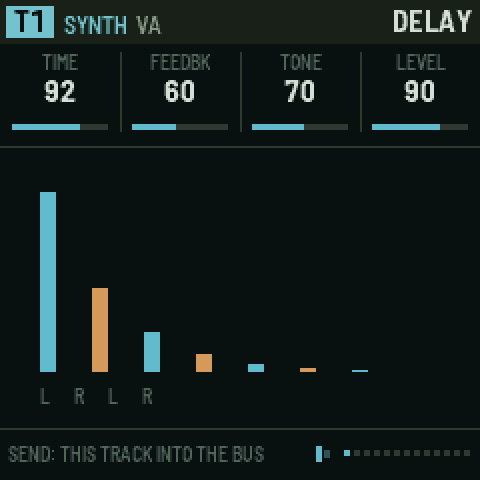
Each track can send part of its sound into five shared effects (buses). Their outputs go back into the mix.
How the sends work.
- On every FX page, one knob is called
T1 SEND(or T2, T3…): that is how much of the current track goes into this bus. - Turn ALGORITHM to set another track's send without leaving the page.
- The other knobs on the page set the bus itself, which is shared by every track.
- The same sends are also on EDIT › MIX and EDIT › SENDS.
| Page | KNOB 1 | KNOB 2 | KNOB 3 | KNOB 4 |
|---|---|---|---|---|
| DELAY | TIME: free below the middle, tempo-synced divisions above | FEEDBK | TONE: darker or brighter repeats | LEVEL |
| DELAY 2 | T SEND | SPREAD: stereo ping-pong width | WOBBLE: tape wow and flutter | FREEZE: ON holds the repeats forever |
| SPACE | SIZE | DAMP: darker tail | LEVEL | T SEND |
| SPACE 2 | MOTION: slow movement in the tail (chorus-like) | DIFFUSE: smooth wash vs. distinct echoes | LOW CUT: keeps the tail out of the bass | – |
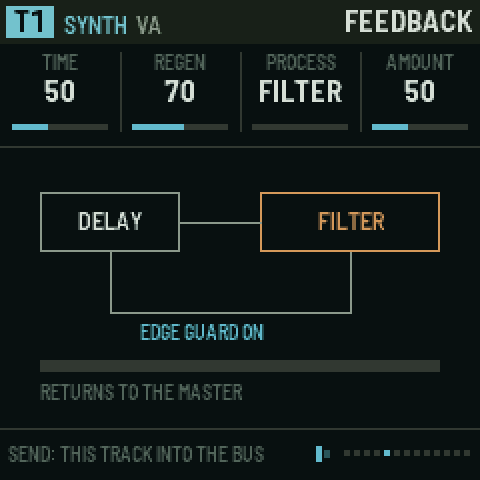
| FEEDBACK | TIME of the loop | REGEN: how much goes round again | PROCESS inside the loop: FILTER, COMB, SMEAR, SHIFT, FOLD, CRUSH | AMOUNT of the process |
| FEEDBACK 2 | TUNE of the process | CUTOFF of the loop's filter | EDGE: a guard that keeps the loop from running away | RETURN: to the MASTER, or into a track (T1–T8) |
| FEEDBACK 3 | LEVEL | T SEND | – | – |
| FILTER PAIR | ROUTING: SERIES, PARALLEL, FEEDBACK | FREQ 1 | FREQ 2 | RESO |
| PAIR 2 | TYPE 1: LOWPASS, BANDPASS, HIGHPASS | TYPE 2 | LEVEL | T SEND |
| PAIR LFOS | LFO 1 rate (moves filter 1) | LFO 2 rate (moves filter 2) | DEPTH | – |
| VOCODER | BODY: what gets shaped (DUST, DROPS, NOISE, TAPE, or a track T1–T8) | TILT: darker or brighter | LEVEL | T SEND |
| VOCODER 2 | ATTACK | RELEASE | SHIFT: moves the bands (±24 semitones) | NARROW: sharper, more resonant bands |
| MASTER | DRIVE: master saturation | CUT SIZE: length of a microcut | REPEATS: how many times a microcut repeats | CUT MIX |
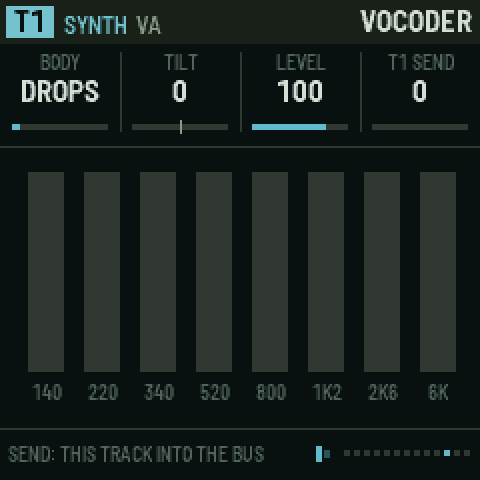
The vocoder works backwards from a normal one.
- The tracks you send into it are the voice: their spectrum is measured in 8 bands.
- The BODY is the material that gets shaped by that spectrum.
- So T1's melody can be played on dust crackle, water drops, the tape, or another track's sound.
- The body is levelled band by band, so a quiet track works as well as a loud one. How loud the vocoder is follows the voice: the SEND, how hard the voice is played, and LEVEL.
- If a body track is also playing in the mix, turn its LEVEL down to hear only the vocoded version.
The feedback bus is a delay loop with an effect inside. Each pass goes through the effect again, so a comb rises into a ringing pitch, a shift climbs or falls, and a fold grows harsher.
- Send it into a track (RETURN T1–T8) and the loop feeds back through that track's own filter and skin.
- If it gets too loud, turn down REGEN or turn EDGE on.
Microcuts (MASTER page) are slivers of the master output, looped, reversed or stuttered. Trigger them from steps (SEQ › STEP SHAPE › CUT) or with the FX punch-ins.
Punch-in effects: hold FX and press white keys 1–8:
| Key | 1 | 2 | 3 | 4 | 5 | 6 | 7 | 8 |
|---|---|---|---|---|---|---|---|---|
| Effect | LOOP (microcut) | REVERSE | STUTTER | FREEZE the delay | LOW PASS sweep | HIGH PASS sweep | THROW: everything into delay and space | FILL: steps set to FILL play |
The effects last while the key is held. Letting go of FX releases them all.
10. SCL: scale
| KNOB 1 | KNOB 2 | KNOB 3 | KNOB 4 |
|---|---|---|---|
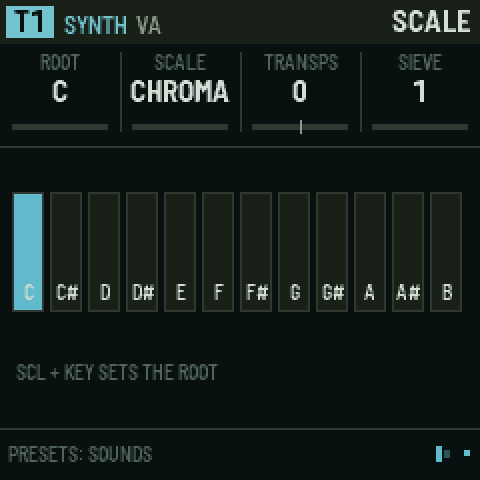
| ROOT: C to B | SCALE: CHROMA (off), MAJOR, MINOR, DORIAN, PHRYG, LYDIAN, MIXO, PENTA, MINPENT, WHOLE, HIRAJO, IWATO | TRANSPS: transposes everything that plays from steps (±24) | INTERVAL: this track plays only notes this many semitones apart from the root (1–12) |
- The keys fold into the scale (like Elektron's fold mode). With a scale set, every key plays: the lowest key plays the first scale note at or above F, and each key after it plays the next note of the scale, so the keyboard runs up through the scale across several octaves and no key is wrong or dead. With CHROMA the keys are chromatic again. Notes you record from the keys are recorded as played.
- The sequencer snaps each step's note to the nearest scale note (a note exactly between two goes down).
- INTERVAL (per track): a track with interval N only plays notes that are a multiple of N semitones from the root; other notes are skipped. INTERVAL 1 plays everything, 12 only the roots, 7 the root and the notes a fifth apart (stacked fifths: the fifth, the ninth…), 2 every other semitone. Copy one pattern to two tracks with different intervals and they split it between them.
- Set the root from the keys: hold SCL and press a key.
11. ARP: the tape
The tape is Ravel's memory: one short loop of audio that every tape track plays from.
- It is always listening to its source, a rolling recording of the last moment.
- When you catch, it stops listening and keeps what it heard. Now the tape tracks have something to play.
- ARP opens the TAPE section. If the current track is not a tape track, it jumps to the first tape track ("T7: THE TAPE TRACK").
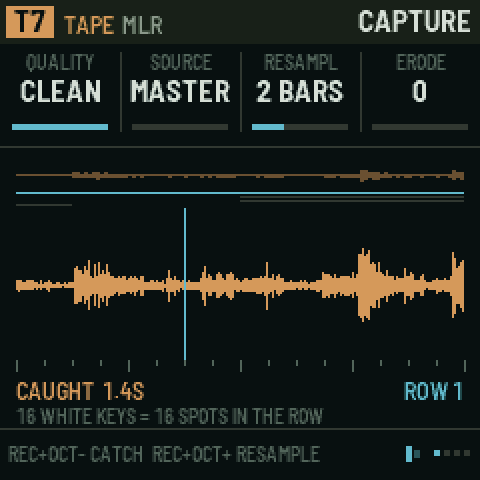
How long is the tape? About 1.4 s in CLEAN quality, more in TAPE (12-bit), and about 5.5 s in DIRTY (8-bit µ-law at half rate). Choose on the CAPTURE page.
Getting sound onto the tape
| To | Do this |
|---|---|
| Catch (keep what the tape just heard) | Hold REC, press OCT−. Or on any tape page, black key 9. Do it again to let the tape listen again ("LISTENING"). |
| Resample (record the next bars cleanly) | Hold REC, press OCT+. Or black key 10. On the next bar it records 1, 2, 4 or ½ bar (CAPTURE › RESAMPL) into row 1, then catches. |
| Catch from a pattern | An influence TAPE route with JUMP TO = 16 catches when the source track plays |
| Page | KNOB 1 | KNOB 2 | KNOB 3 | KNOB 4 | PRESETS |
|---|---|---|---|---|---|
| CAPTURE | QUALITY: DIRTY, TAPE, CLEAN | SOURCE: MASTER, T1–T8, BUSES, INPUT | RESAMPL: 1 BAR, 2 BARS, 4 BARS, 1/2 BAR | ERODE: the tape wears a little each pass | row |
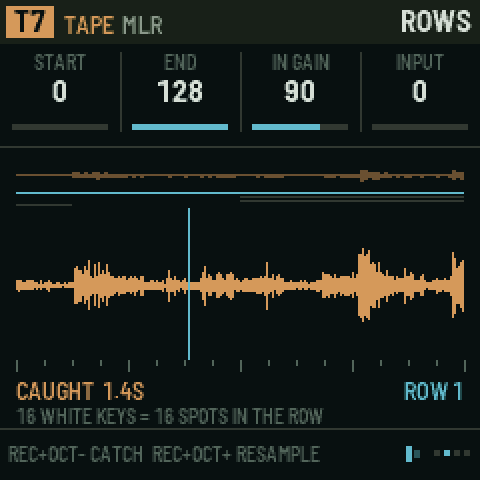
| ROWS | START of the row (0–127, in 128ths of the tape) | END of the row | IN GAIN: audio input level | INPUT: hear the input through the output | row 1–4 |
| PLAYBACK (tape tracks) | MODE: MLR, BEADS, SLICE | ROW it plays | RATE: −2× to 4× | HEAD 2: a second playhead (+¼, +½, +¾ of the row, or REV) | sounds |
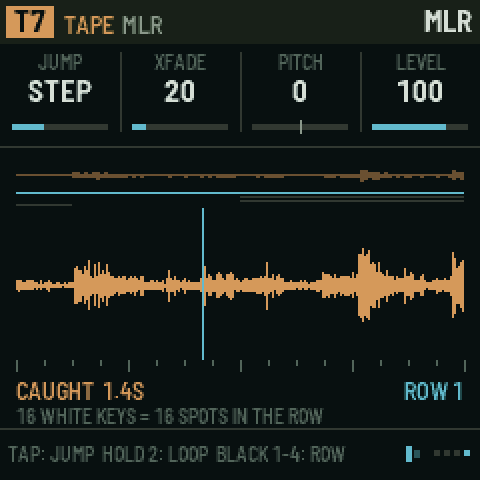
| MLR | JUMP: when a jump lands: NOW, STEP, BEAT, BAR | XFADE: smoothing at jumps | PITCH | LEVEL | sounds |
| BEADS | TIME: where in the row grains come from | SIZE of grains | SHAPE of grains | PITCH | sounds |
| BEADS 2 | DENSITY | FEEDBK | MIX | RANDOM | sounds |
| SLICES | SLICES: 4–32 | SENS: how easily a hit counts as a slice | PITCH | LEVEL | sounds |
Rows. The tape is divided into four rows, which are windows onto the tape. By default row 1 is the whole tape, rows 2 and 3 are its first and second halves, and row 4 is its first eighth. A tape track plays one row at a time.
The three ways a tape track plays
MLR (named after the monome app). The current row is laid across the 16 white keys.
| Key | Action |
|---|---|
| Tap a white key | The playhead jumps to that sixteenth of the row and plays on (while the sequencer runs, on the next step, beat or bar, set by JUMP; stopped, at once) |
| Hold two white keys | Loops the span between them. Let go to play on. |
| Black keys 1–4 | Switch to row 1, 2, 3 or 4 |
| Black key 5 | Reverse on/off |
| Black key 6 | Half speed (press again to slow further, down to ¼) |
| Black key 7 | Double speed (up to 4×) |
| Black key 8 | Hold / release: stop and start the playhead |
| PLAY (stopping) | Stops the loops too; tap a key to start one again |
| Black keys 9 / 10 | Catch / resample |
| From any other page | Hold ARP and press white keys to jump |
The picture shows the whole tape, the four rows (the current one bright), the playhead(s) and "CAUGHT 1.4S" or "LISTENING".
BEADS: the Mutable Instruments granular engine, reading the tape.
- Keys play pitched grain clouds. While the sequencer runs, the cloud also plays on its own; when you stop, it fades out within a fraction of a second, and only the keys play it.
- TIME scans through the row, SIZE and SHAPE set each grain, DENSITY sets how many, and RANDOM scatters them.
- FEEDBK and MIX turn it into a smeared, blooming texture.
SLICE: the row is cut where it hits (onsets).
- Keys play slices from left to right, and so do steps.
- SENS sets how many hits count; SLICES sets the maximum.
Steps on a tape track jump the playhead: the step's note picks the position. A pattern on T7 can therefore cut the loop up rhythmically, and recorded MLR jumps become these steps (see Recording).
Audio in.
- In the emulator, choose a file under Audio in; "Record it onto the tape" sets the tape's source to INPUT. The FM-1 has no audio input in Ravel.
- Set SOURCE to INPUT to catch it, or ring a strike body with it (EXCITER = EXT).
12. SEQ: steps and the graph
Every track has its own sequencer, with two patterns (A and B) of up to 64 steps.
- PRESETS switches pattern while on SEQ pages, and so do black keys 1 and 2.
- Black key 11 clears the pattern.
- Pattern changes while playing happen on the next bar.
The step keys
While you are on any SEQ page, or while you hold SEQ on any other page, the 16 white keys are steps.
| Action | Result |
|---|---|
| Tap a key | The step toggles on/off |
| Hold a key, turn a knob | Edits that step's value (on STEPS, STEP TIMING, STEP SHAPE, GRAPH) |
| Hold a key, turn a knob on a non-SEQ page (with SEQ held) | A parameter lock: that step plays with that value (cutoff, drive, a source value…). Up to two locks per step. |
| OCT− / OCT+ | Step page 1–16, 17–32, 33–48, 49–64 |
Editing a held empty step switches it on.
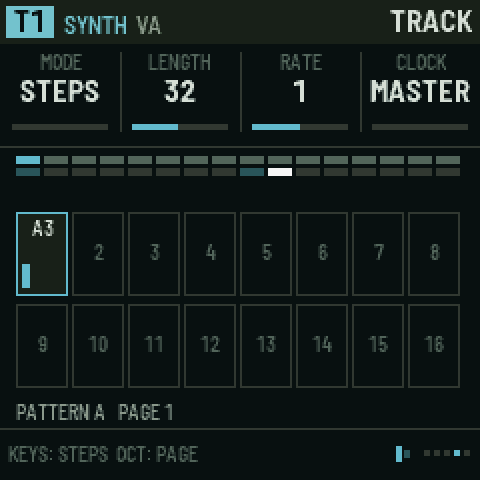
| Page | KNOB 1 | KNOB 2 | KNOB 3 | KNOB 4 |
|---|---|---|---|---|
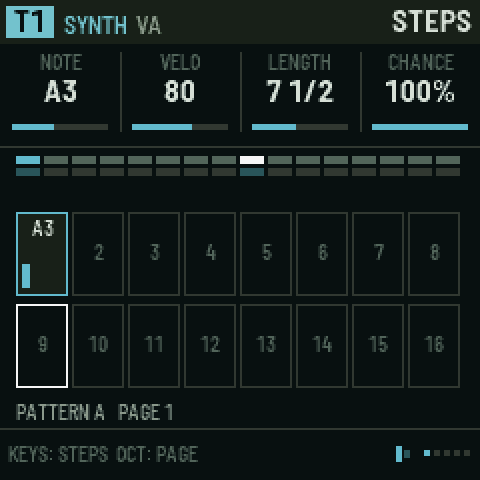
| STEPS | NOTE | VELO | LENGTH: in eighths of a step (8 = one step, "7 1/2") | CHANCE: 0–100 % that it plays |
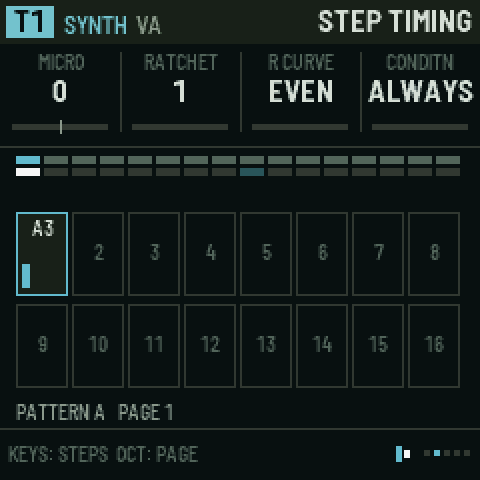
| STEP TIMING | MICRO: nudge −6 to +12 (in 24ths of a step) | RATCHET: 1–8 repeats within the step | R CURVE: EVEN, FASTER, SLOWER; "-F" versions fade out | CONDITN, see below |
| STEP SHAPE | ENV: library shape (0 = the track's own) | CUT: NONE, LOOP, REVERSE, STUTTER (a master microcut on this step) | TIE: ON holds the note until the track's next note starts | – |
| TRACK | MODE: STEPS or GRAPH | LENGTH: 1–64 | RATE: ¼× to 4× the master clock | CLOCK: MASTER, LFO1, LFO2, DUST |
| DIRECTION (steps mode) | FWD, REV, PINGPONG, SNAKE (rows of four, walked back and forth) | – | – | – |
Conditions (CONDITN) decide on which passes through the pattern a step plays:
- ALWAYS;
- FIRST (only the first time) and NOT 1ST;
- 1:2, 2:2 (first or second of every two passes);
- 1:3 … 3:3;
- 1:4 … 4:4;
- FILL (only while the FILL punch-in is held) and NO FILL.
CLOCK lets a track step by something other than the master clock:
- LFO1/LFO2 step on each LFO cycle;
- DUST steps at random;
- an influence CLOCK route steps on another track's notes.
All of these give rhythms that drift against the grid.
On the STEPS picture:
- the top strip is the whole pattern, with the playing step bright;
- the grid is the current page of 16;
- each box shows the note and a velocity bar;
- outlined boxes are where the playheads are.
GRAPH mode (Silt's sequencer)
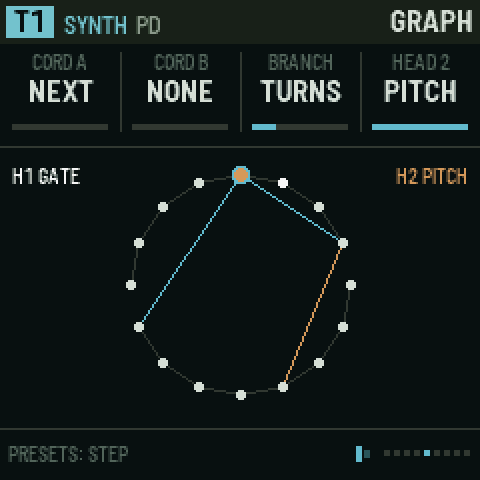
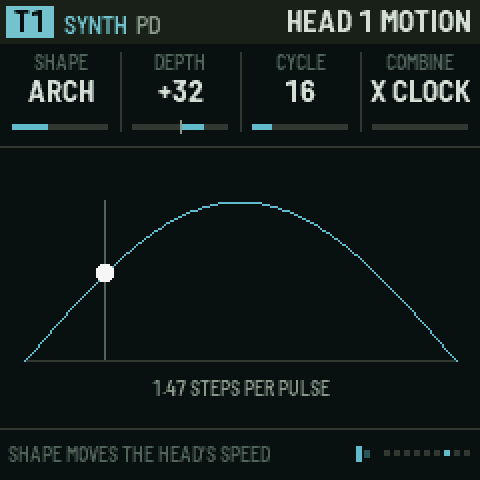
Set SEQ › TRACK › MODE to GRAPH. Now the steps sit in a circle, and each step has cords that say where a playhead goes next, instead of always moving to the following step. The pages after TRACK change to GRAPH, HEAD 1, HEAD 1 MOTION (and HEAD 2, HEAD 2 MOTION when head 2 is on).
GRAPH drives the same steps. It is not a second sequencer: the steps you set on the STEPS pages (which are on, their notes, velocity, length, locks, ratchets and the rest) are exactly what plays in GRAPH mode too. GRAPH only changes the order the playhead visits them, and adds a second playhead. Edit the steps on STEPS, STEP TIMING and STEP SHAPE in either mode; draw the cords on GRAPH.
| Page | KNOB 1 | KNOB 2 | KNOB 3 | KNOB 4 | PRESETS |
|---|---|---|---|---|---|
| GRAPH | CORD A: the step to go to next, 1 to LENGTH (NEXT = just the following step) | CORD B: a second choice (NONE = no branch) | BRANCH: how to choose between A and B | HEAD 2: OFF, NOTES, RHYTHM, MELODY | step to edit |
| HEAD 1 | TRANSP: head 1's transpose | – | – | – | – |
| HEAD 1 MOTION | SHAPE | DEPTH (±) | CYCLE: 2–64 steps | COMBINE: × CLOCK or + CLOCK | – |
| HEAD 2 | PLAYS: THIS track, or T1–T8 | H2 RATE | H2 START: the step it starts on (1 to LENGTH) | TRANSP | step |
| HEAD 2 MOTION | SHAPE | DEPTH | CYCLE | COMBINE | – |
Making a graph:
- Go to the GRAPH page.
- Pick a step with PRESETS, or hold its white key.
- Set CORD A (where it goes) and, if you want a branch, CORD B. The cords are drawn on the circle. A cord can only point at a step that exists (1 to the track's LENGTH). If you shorten LENGTH later, cords to steps past the end are ignored: they read NEXT or NONE until LENGTH grows again.
- Choose BRANCH, which decides between A and B at a fork:
- CHANCE: a coin toss;
- TURNS: alternate each visit;
- LFO1/LFO2: by the LFO's sign;
- MOTION: by the head's function generator (above half way takes B).
Two playheads walk the same graph at once.
- Head 1 plays this track.
- Head 2 is off until you choose what it does with HEAD 2 on the GRAPH page. It has its own rate and start step, and can play another track (HEAD 2 › PLAYS).
HEAD 2 chooses how the two heads share the work. Head 1 always takes the other half, so no setting leaves the track silent:
| HEAD 2 | Head 2 | Head 1 |
|---|---|---|
| OFF | – | plays the steps it visits |
| NOTES | plays the steps it visits too: two voices on one graph | plays the steps it visits |
| MELODY | picks the notes, plays nothing itself | plays the rhythm, with head 2's latest note |
| RHYTHM | plays the rhythm, with head 1's latest note | picks the notes, plays nothing itself |
With MELODY or RHYTHM, rhythm and melody walk two different paths at two different speeds, so they never quite line up the same way twice. The picture shows each head's job at the top (H1 and H2).
MOTION (Silt's function generators) moves a head's speed as it travels.
- SHAPE:
- RISE, FALL, ARCH, DECAY or SWELL, traced once every CYCLE steps;
- or LFO 1, LFO 2 or DUST, followed live.
- DEPTH sets how far it pushes; negative reverses the effect.
- COMBINE sets how it meets the clock:
- × CLOCK multiplies or divides the clock (up to two octaves faster or slower), so it accelerates and decelerates musically;
- + CLOCK adds to the clock's rate (from slowing to a near halt up to racing).
- The MOTION picture draws the shape, where the head is on it, and its current speed in steps per pulse.
13. GLO: song, scenes and clock
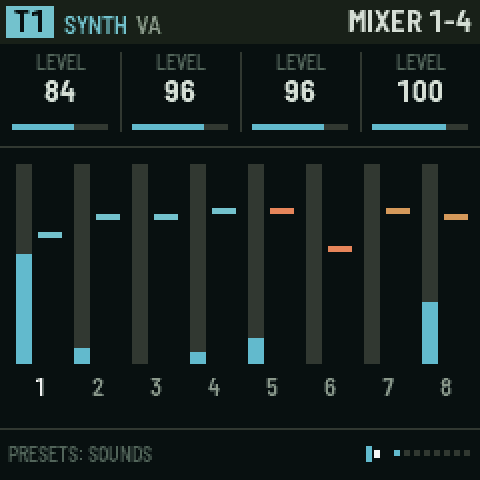
| Page | KNOB 1 | KNOB 2 | KNOB 3 | KNOB 4 | PRESETS |
|---|---|---|---|---|---|
| MIXER 1-4 | T1 LEVEL | T2 LEVEL | T3 LEVEL | T4 LEVEL | – |
| MIXER 5-8 | T5 LEVEL | T6 LEVEL | T7 LEVEL | T8 LEVEL | – |
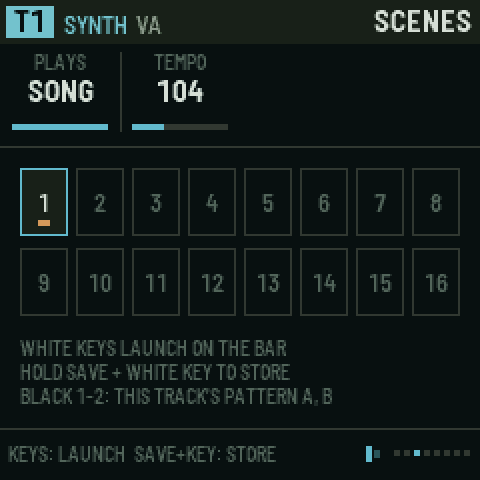
| SCENES | PLAYS: PATTERN (you launch) or SONG (the arrangement runs) | TEMPO | – | – | scene |
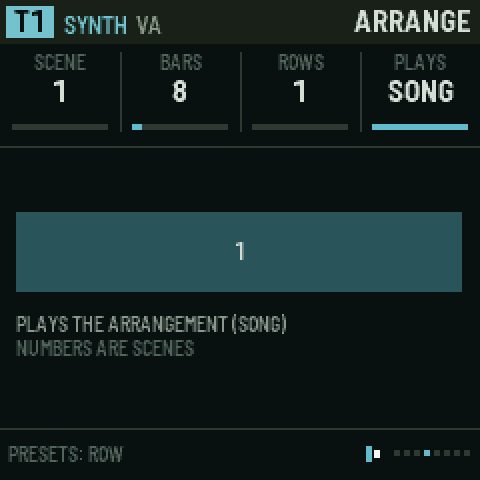
| ARRANGE | SCENE for this row | BARS it lasts (1–64) | ROWS: how many rows the song has | PLAYS (as above) | row |
| ARCS | DENSITY of this bar (0–100 %) for the current track | – | – | – | bar 1–16 |
| CLOCK | TEMPO (30–240) | SWING | B DOES: how oscillator B bends the clock | DEPTH of that bending | – |
| CLOCK B | A SHAPE: the main clock's wave | B RATE | B SHAPE | THRESH: where a pulse fires | – |
| CLOCK FEEL | TEMPO IS: LOCKED (keeps the average tempo) or FREE (drifts) | QUANTZE: pulls microtiming back to the grid (0–100 %) | – | – | – |
Scenes are snapshots of every track's pattern (A/B), levels, influence routes, mutes and macros.
- Store: hold SAVE and press a white key (1–16).
- Launch: on the SCENES page, press a white key. It changes on the next bar. Black keys 1–2 there switch the current track's pattern.
Arrangement: a list of up to 32 rows, each "play scene S for B bars".
- Set ROWS to the number of rows the song needs.
- Pick each row with PRESETS and set its SCENE and BARS.
- Set PLAYS to SONG and press PLAY.
Density arcs. For each track, draw 16 bars of density.
- At 100 % every step plays. Lower values thin the part out, off-beats first and downbeats last.
- One pattern can then breathe across a phrase without writing new patterns.
- Pick the bar with PRESETS and the track with ALGORITHM.
The clock (after Silt's two-oscillator clock).
-
Oscillator A is the tempo. B DOES lets a second, slower oscillator bend it:
B DOES Effect STEADY No bending RATE Speeds up and slows down SHAPE Changes the swing-like shape PHASE Pushes and pulls the pulses SUM Adds the waves AND, OR, XOR Logic rhythms between the two -
With DEPTH at 0 the clock is straight.
-
TEMPO IS: FREE lets it drift like an old drum machine.
-
Tap tempo: hold GLO and tap black key 1.
-
Mute and solo: hold GLO and press white keys 1–8 to mute tracks 1–8, or 9–16 to solo tracks 1–8.
14. SAVE: projects
-
Press SAVE to open the page.
-
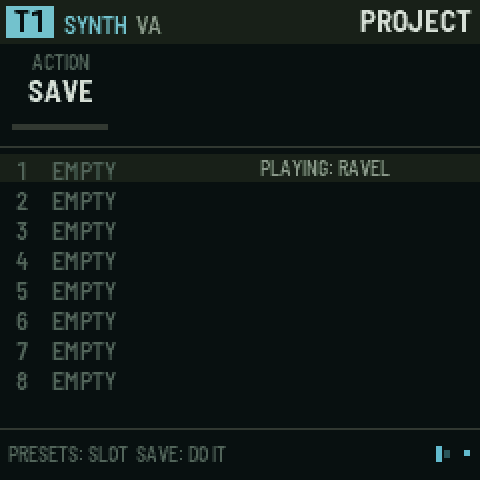
Turn PRESETS to choose a slot (1–8). The picture shows which slots are used and their names.
-
Turn KNOB 1 (ACTION):
Action What it does SAVE Saves the project to the slot LOAD Loads the slot DEMO 1 The Ravel demo DEMO 2 Dust DEMO 3 The graph demo INIT A new, blank project -
Press SAVE once: the footer says "PRESS SAVE AGAIN TO CONFIRM".
-
Press SAVE again to do it.
Ravel starts on a blank project every time it is switched on (or the emulator is opened). Saved projects stay in their slots: load one with LOAD.
A project holds everything: all eight tracks and their patterns, influence, modulation, buses, scenes, the arrangement, arcs and the envelope library. It does not hold the tape audio. Catch or resample again after loading.
15. Hold layers
Hold a button (in the emulator: right-click or shift-click to latch it) and the keys or knobs do something else. The footer always shows the layer's hint.
| Hold | Then | Does |
|---|---|---|
| SEQ | white keys | Steps, from any page. Hold a step and turn a knob to lock that value on that step. |
| SEQ + ENV | hold a step, turn KNOB 1 | The step's library shape |
| LFO | KNOB 1–4 | Macros 1–4 |
| FX | white keys 1–8 | Punch-ins: loop, reverse, stutter, freeze, low pass, high pass, throw, fill |
| ARP | white keys | Jump the tape track's playhead from any page |
| GLO | white keys 1–8 / 9–16, black 1 | Mute / solo, tap tempo |
| SAVE | white key | Store scene 1–16 |
| SCL | any key | Set the root |
| REC | OCT− / OCT+ | Catch / resample |
16. Recording
- Choose the track with ALGORITHM.
- Tap REC. "RECORDING ARMED" flashes and a red dot appears in the footer.
- Press PLAY.
- Now, while it plays:
- notes you play are written into the steps, with their timing kept as microtiming;
- knobs you turn are written as parameter locks on the playing step;
- on a tape track in MLR, jumps you make are written as jump steps.
- Tap REC again to stop recording.
Turning ALGORITHM while armed moves recording to the new track.
17. Recipes, step by step
Make a first sound
- Turn ALGORITHM to T1.
- Press EDIT (SOUND page). Turn KNOB 2 to CZ.
- Turn PRESETS to hear the CZ sounds (CZ BRASS, CZ BELL, CZ STRINGS…); play the keys.
- Turn SELECT to DCW 1. Turn PRESETS to step 1 and turn KNOB 2 (LEVEL) up to make the attack brighter.
- SELECT to DCA 1. On step 1, turn KNOB 1 (RATE) down for a slow swell.
Write a beat
- Turn ALGORITHM to T5 (strike).
- Press SEQ. Tap white keys 1, 5, 9, 13. Press PLAY.
- Hold key 13 and turn KNOB 2 (VELO) down for a softer hit.
- SELECT to STEP TIMING. Hold key 9 and turn KNOB 2 (RATCHET) to 3 for a roll.
- To lock a sound change on one step:
- Press EDIT, SELECT to SOURCE 1.
- Hold SEQ, hold key 5, turn KNOB 4 (TONE).
- Let go. Only step 5 is brighter.
Catch and cut up a loop (MLR)
- Get something playing (load DEMO 1, press PLAY).
- Hold REC, press OCT+ (resample). At the next bar, a bar is recorded into row 1.
- Press ARP, which jumps to T7, a tape track. SELECT to PLAYBACK and set MODE to MLR.
- Tap white keys to jump around the loop. Hold two keys to loop between them.
- Press black 5 for reverse, 6 for half speed.
- Tap REC, then jump around while it plays. Your jumps become a pattern.
Turn the tape into a cloud (Beads)
- With something caught, ALGORITHM to T8. Press ARP, SELECT to PLAYBACK, MODE = BEADS.
- SELECT to BEADS. Turn SIZE up, DENSITY up (BEADS 2) and RANDOM up a little.
- Play keys: pitched clouds of the loop.
Two-headed graph melody
- ALGORITHM to T1. SEQ, switch some steps on with different NOTEs (hold a key, turn KNOB 1).
- SELECT to TRACK, MODE = GRAPH.
- GRAPH page: pick step 4 with PRESETS, set CORD A = 1 (it loops back), CORD B = 8 (or branches ahead), BRANCH = TURNS.
- HEAD 1: ROLE = GATE, HEAD 2 = PITCH.
- HEAD 2: H2 RATE = 2/3, H2 START = 5.
- HEAD 1 MOTION: SHAPE = ARCH, DEPTH = +32, CYCLE = 16. The rhythm speeds up and slows down over 16 steps while the melody walks its own path.
Put reverb on just one track
- ALGORITHM to the track. Press FX, SELECT to SPACE.
- KNOB 4 (
T3 SEND, for example) up. The other tracks' sends stay where they were. - SPACE 2: raise MOTION for a moving tail and LOW CUT to keep it out of the bass.
One track plays another
- ALGORITHM to T5 (the source). Press HOME, SELECT to INFLUENCE.
- PRESETS to column 2, T2 (the target). KNOB 1 = TRIG, KNOB 3 (DELAY) = 2, KNOB 4 (CHANCE) = 60.
- Now 60 % of T5's hits also play T2 two steps later.
Save your work
- SAVE, PRESETS to a slot, KNOB 1 = SAVE.
- Press SAVE, then SAVE again.
18. Quick reference
| I want to… | Press / turn |
|---|---|
| Pick a track | ALGORITHM (emulator: 1–8) |
| Next page | SELECT, or tap the section button again |
| Change a sound | PRESETS on any EDIT page |
| Start / stop | PLAY (emulator: Space) |
| Turn steps on | SEQ, tap white keys |
| Edit one step | Hold its key, turn knobs |
| Lock a value on a step | Hold SEQ + step, turn a knob on any page |
| Pattern A / B | Black key 1 / 2 on SEQ, or PRESETS |
| Catch the tape | Hold REC + OCT− |
| Resample a bar | Hold REC + OCT+ |
| Jump the tape from anywhere | Hold ARP + white key |
| Mute / solo | Hold GLO + white 1–8 / 9–16 |
| Tap tempo | Hold GLO + black 1 |
| Store a scene | Hold SAVE + white key |
| Launch a scene | GLO › SCENES, white key |
| Play macros | Hold LFO, turn KNOB 1–4 |
| Punch-in effects | Hold FX + white 1–8 |
| Record | Tap REC, then PLAY |
| Save | SAVE, choose slot and action, SAVE twice |
19. Questions people ask
A page I saw before is gone.
- It only shows when it applies. SOURCE 3 and 4 depend on the engine. MLR, BEADS and SLICES depend on the tape mode. The graph's HEAD pages appear only in GRAPH mode, HEAD 2's only when head 2 is on.
- Holding LFO does not change pages: it puts the macros on the knobs.
The FX page changes a value for every track.
- Only the knob named T_ SEND is per track. Everything else on a bus page is the shared effect.
The tape track is silent.
- The tape has to hold something: catch (REC + OCT−) or resample (REC + OCT+).
- In MLR, tap a white key on the TAPE page to start the playhead (black 8 starts and stops it).
- Check its LEVEL and that the row is not tiny (ROWS page).
The graph doesn't seem to do anything.
- Check SEQ › TRACK › MODE is GRAPH.
- Steps need to be on (tap them).
- With no cords, each step just goes to the next one, so it sounds like a normal sequence until you add cords or branches.
Something got loud or stuck.
- Press Panic / stop all (emulator), or stop and start.
- High FEEDBACK REGEN and delay FEEDBK can build up; the master limiter stops it reaching your speakers.
Installing on the FM-1
Ravel has not been tested on FM-1 hardware yet. Installing it is at your own risk.
- Open Ravel's site (the repository's GitHub Pages: the emulator) in Chrome or Edge on a computer, and press Install on FM-1 at the top.
- Connect the FM-1, switched on, directly to the computer with a USB data cable.
- Press Install, allow MIDI when the browser asks, and wait until it says it is done. Don't unplug part way. The FM-1 restarts into Ravel.
From the command line instead (pip3 install mido python-rtmidi): python3 tools/fm1_install.py Ravel-FM1.fwsc. The .fwsc is on the site (firmware/Ravel-FM1.fwsc) and on the repository's releases.
The installer works from M-VAVE's own firmware, from Ravel, and from the other community firmwares. To go back, the same page writes M-VAVE's own FM-1 firmware (which you download from M-VAVE) back over the same cable; M-VAVE's own updater, M-UPGRADE, works too.
If the FM-1 will not start
- Hold OCT− and OCT+ for 5 seconds while Ravel runs: the FM-1 goes into its update mode, and the installer can write any firmware.
- Safe mode: if Ravel crashes twice while starting, it starts in a safe mode instead: no sound, USB on, so the web installer can reach it. PLAY tries Ravel again.
- Calibration: hold OCT− and OCT+ while switching on to teach Ravel which button and knob is which, if the panel seems mixed up.
- Last resort: if nothing shows on the screen but the FM-1 appears on USB in the chip's update mode,
tools/fm1_rescue.sh(from X0X) puts M-VAVE's firmware back from a Mac. Beyond that, recovery needs the FM-1-transporter.
What's here
| Path | What |
|---|---|
firmware/app/ | Ravel: the engine (rv_engine.c), synth engines (rv_synth.c), strike (rv_strike.c), tape (rv_tape.c), buses (rv_bus.c), sequencer (rv_seq.c), modulation and clock (rv_mod.c), parameters, presets, projects, and the interface (rv_ui.c, rv_gfx.c). Portable C99, single-precision float, no C library. |
firmware/fm1/ | The FM-1 side, bare metal: Felucca's hardware layer (hal/), start-up and memory map, the update loader (loader/), and in src/: USB, LCD, storage, the update entry, the panel map, Ravel's platform (plat_fm1.c) and the boot, audio interrupt and main loop (main_fm1.c) |
core/beads/ | Beads' grain engine rewritten in integer C (MIT, see core/beads/LICENSE-beads) |
host/ | The simulator: the whole app on a desktop, driven by scripts, writing screenshots and WAV files |
web/emu/ | The browser emulator: the same code compiled to WebAssembly, on a drawn FM-1 panel |
tests/beads/ | Renders 13 scenarios through the original Beads and the port, and compares them |
tests/scenarios/ | Simulator scripts that play the firmware and check it (tour.rvl visits every page; manual.rvl takes the manual's screenshots) |
docs/ | The signal-flow diagram, and docs/manual/: the panel drawing and the screenshots used in this manual |
tools/ | The FM-1 build (build_fm1.py, fm1pkg_make.py), the installer and rescue tools, the site assembler (make_site.py), toolchain and SDK-file downloads, font and table generators |
web/installer/ | The web installer (Web MIDI), from Felucca and X0X |
tests/fm1/ | Felucca's update-path tests, run against Ravel's package |
Building
The simulator (any Unix with a C compiler, and Python with Pillow):
sh host/build_host.sh
./build/host/ravel_host tests/scenarios/tour.rvl build/out    # screenshots and audio in build/out
The browser emulator (clang with the wasm32 target and wasm-ld; no emscripten):
sh web/emu/build.sh          # web/emu/ravel.wasm
node web/emu/test.mjs        # smoke test
python3 web/emu/bundle.py    # build/web/ravel-emulator.html, one file to open in a browser
The FM-1 firmware, on Linux x86-64 (JieLi's clang for the AC791N; on a Mac, X0X's build runs it in Docker):
sh tools/get_toolchain.sh ~/.jieli                     # JieLi's Linux toolchain
sh tools/get_ac79_files.sh ~/ac79                      # three files of JieLi's AC79 SDK the package contains
JIELI_TOOLCHAIN=~/.jieli/toolchain AC79_SDK=~/ac79 python3 tools/build_fm1.py [--release 0.3]
build_fm1.py builds Felucca's update loader and the app (the platform at -Os, the instrument and Beads at -O2), checks the image (entry point, no calls from RAM code into flash, no ROM references, no double-precision code, register access only in hal/, the RAM and pool budgets) and packages build/fm1/Ravel-FM1.fwsc. A release build's identity is FM-1_96 and the version as two digits each (0.3 is FM-1_96000300).
The site (what the Pages workflow publishes): python3 tools/make_site.py _site build/web/ravel-emulator.html build/fm1/Ravel-FM1.fwsc VERSION.
Publishing: every push to main rebuilds the site (enable it once under Settings → Pages → Source: GitHub Actions); pushing a tag such as v0.3 also makes a release with the firmware and the emulator.
The Beads comparison:
cd tests/beads
make fetch    # clones the original Beads and stmlib for the reference
make test
The FM-1 build
Ravel runs bare metal on the FM-1's JieLi AC791N, on the open hardware layer that Felucca wrote and X0X carried on: no vendor SDK, no RTOS. A 10 kHz timer scans the keys, encoders and LEDs and runs USB; the codec's DMA interrupt asks Ravel for 512 frames at a time (two calls of 256), and the main loop draws the interface about 30 times a second.
- Flash: the app is about 200 KB of the 568 KB app slot.
- RAM: the platform uses about 45 KB of the 96 KB main RAM; the instrument's state (the 120 KB tape, voices, buses) about 280 KB of the 336 KB pool.
- Storage: eight project slots of 32 KB in the flash's data area; the panel calibration beside them.
- USB: MIDI, and USB audio to the computer (Ravel's output, recordable). MIDI in on the TRS jack too. Ravel does not act on incoming MIDI yet.
- Not checked on hardware: everything. In particular the CPU load of a dense project (the render runs inside the DMA's deadline; an overrun drops a block).
- Not in this version: Bluetooth, audio input, tape punch-in.
- Beads on the FM-1: grain mode only (no delay mode, which the delay bus covers), reading the shared tape. The emulator and simulator use the same options.
Licence
GPL-3.0 only (see LICENSE). The FM-1 platform layer, loader, installer and tools are Felucca's and X0X's (GPL-3.0). The Beads port keeps Mutable Instruments' MIT licence. A firmware package also contains three files of JieLi's AC79 SDK (Apache-2.0). The CZ engine is a port of MAME's uPD933 emulation (BSD-3-Clause). Third-party code is listed in THIRD_PARTY.md.
Credits
- Mutable Instruments (Émilie Gillet) for Beads.
- Felucca by Leo Kuroshita (@kurogedelic), Hügelton Instruments: the FM-1's open hardware layer, USB, storage, update loader and web installer that Ravel runs on.
- X0X, a Felucca fork, for the platform as Ravel takes it, the simulator's design, its PNG writer and the build, install and rescue tools.
- The authors of JIANT, SLOOP and sloopDX, and everyone who mapped the FM-1.
- Ensoniq's SQ-80, the instrument the SQ engine is modelled on, and the SQ8L plugin by Siegfried Kullmann, which showed how much of the SQ-80's character is in its digital path (no code or waves are taken from either).
- Devin Acker and MAME, whose uPD933 emulation shows how the Casio CZ's sound chip works (the CZ engine follows it; BSD-3-Clause, see
THIRD_PARTY.md).