README from GitHub, MIT
Chord Display
A Schwung audio FX for the Ableton Move that shows the chord being played, by the pads or by a clip, on any track, with its roman numeral in the Set's key.
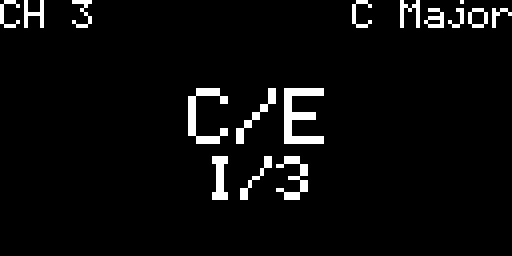
C major with E in the bass, in a C Major Set. Drawn by the module's own page code at 4x; Move's screen is 128x64.
No settings to tune: one Channel setting, and the display keeps the last chord until the next one. A single note, or two notes that are not a power chord, clears it.
Setup
- Load Chord Display as an audio FX on any Schwung slot. It leaves the audio and the slot's MIDI untouched.
- Set each Move track's MIDI Out to a channel (Shift + Track) so Schwung sees its notes.
- Pick Channel:
- Auto (default): the slot's own receive channel. If the slot listens to All, everything is read.
- 1-16: that channel only. Put the module on the bass track's slot and pick the chord track's channel to see its chords while you edit the bass.
- Omni: every channel.
- Open the slot in Schwung: the chord is on the first page.
It does not draw over Move's own screen; you see the chord on its page in the Schwung editor.
How it reads
- Audio FX receive the notes of every channel with their channel number, which is why this is an audio FX and not a MIDI FX.
- Pad presses on Move's own surface can reach audio FX as pad numbers (68-99) on channel 1. Prefer a channel other than 1 for the chord track.
- Inversions show a slash in both rows: the bass note in the name (
C/E), its scale degree in the key in the numeral (I/3). A bass outside the scale is named from its place in the chord:D/F#in C Major isII/#4. - The numeral uses the Set's root note and scale, read from Move. Notes outside the scale get
bor#. Unknown scales use chromatic numerals; with no key, only the name is shown. - The chord and its numeral each get a row, in two fixed sizes (the numeral is smaller); long names never shrink or wrap.
Build and test
node --test test/chords.test.mjs                                          # naming, numerals, layout
cc -Isrc/dsp -o /tmp/dsp_test test/dsp_test.c -ldl && /tmp/dsp_test       # note latching, channels
cc -Isrc/dsp -o /tmp/dsp_clock_test test/dsp_clock_test.c -ldl && /tmp/dsp_clock_test   # the real clock
./scripts/build.sh                                                        # Docker, writes dist/chord-display-module.tar.gz
Needs Schwung 1.6.2 or newer, tested on 1.7.3: 1.6.0 added move_info.h (the key) and 1.6.2 lets the chord page come first.
Credits
- Schwung (MIT, Charles Vestal): the three host headers in
src/dspare copied unchanged, and the host docs and source are what this module is built against. - schwung-ducker (MIT, Charles Vestal): the build script, Dockerfile, release workflow and the audio FX entry points are adapted from it. Ducker also showed that an audio FX hears every MIDI channel.
- ChordDex (MIT, dony01001): the idea of naming a chord by matching the held notes against a table of chord shapes, preferring the reading rooted on the bass note and showing the bass as a slash (
C/E). The chord table, scoring and code here are written from scratch; no code was copied. - Chordism and Impressive Chords were looked at for comparison; nothing was taken from them.
Copied and adapted parts are listed with their license in THIRD_PARTY_LICENSES.md.
AI disclosure
This module was written with the help of AI: Claude (Anthropic; models Claude Opus 5.5 and Claude Sonnet 5.5). The author reviews the results and directs the project.