README from GitHub, MIT

FM-1 Relay
One tempo. One transport. Every FM-1 on the same downbeat.
A MIDI clock master for up to four M-VAVE FM-1s, whatever open-source firmware they run. Use it in the browser, install it as an app, or run it natively on iPad.
▶ Open the web app · iPad app · Releases
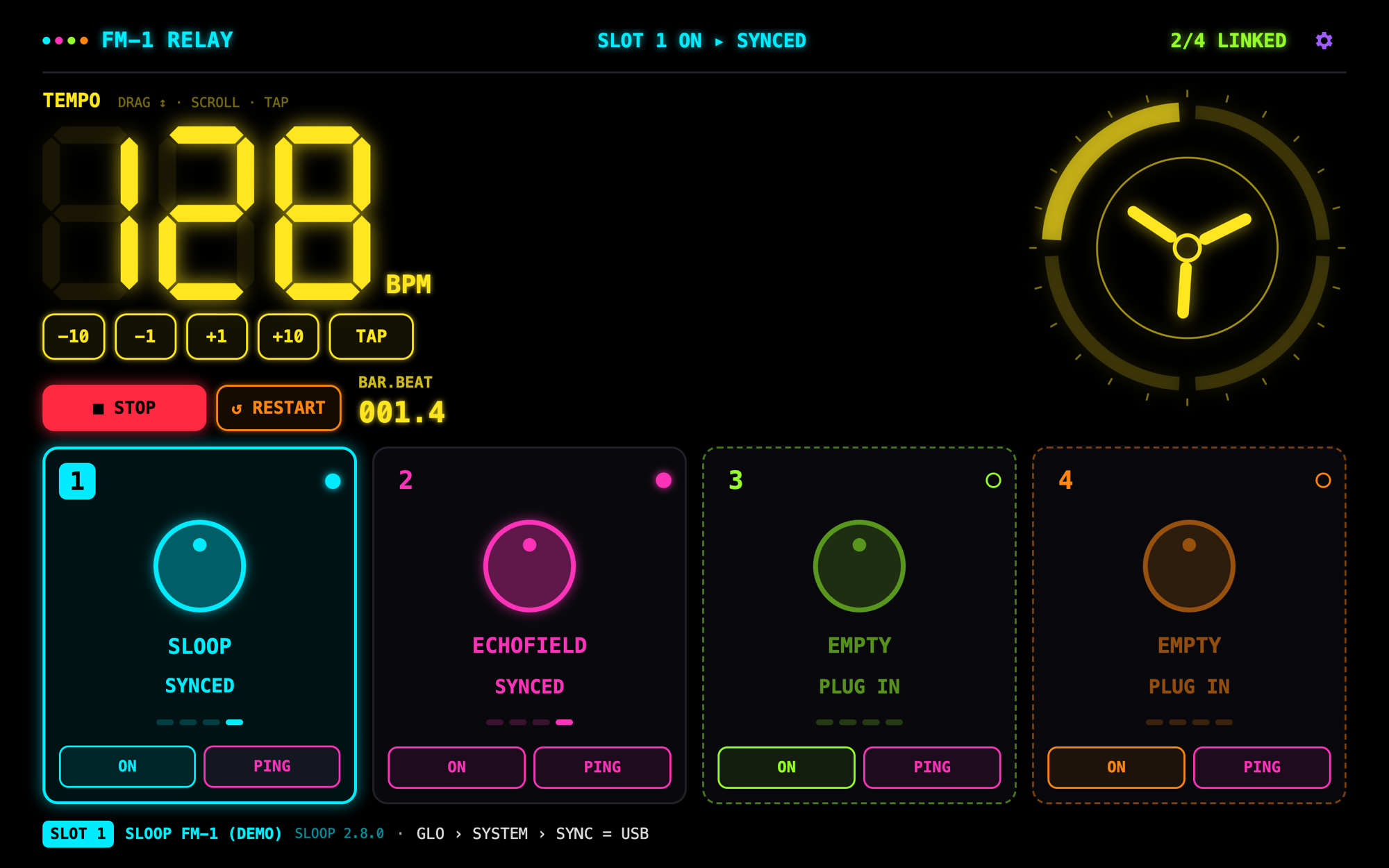
What it does
Plug your FM-1s into a computer (with a USB hub for more than one), open the relay, and press PLAY. Every unit gets the same 24 PPQN MIDI clock and starts on the same tick.
- Four slots, hot-plug. Each FM-1 takes the next free slot when you plug it in, and keeps it.
- Knows the firmware. It recognises SLOOP, Felucca, Skiff, JIANT, X0X and ECHOFIELD from the port name or an FL-protocol INFO reply, and tells you the exact menu setting each one needs to follow USB clock.
- Late join, in phase. A unit switched on or plugged in during playback waits for the next bar (or beat) and starts exactly in step with the others.
- Tight timing. Every clock byte is scheduled a few milliseconds ahead with Web MIDI timestamps, driven from a worker thread, so the clock stays steady while the UI is busy or the tab is in the background.
- ECHOFIELD support, including versions from before clock support: START / STOP also go out as CC 104, and its delay time follows the tempo (1/16 to 1/2) by CC 85.
- Tempo your way. Drag the big digits, scroll on them, tap tempo, use the ±1 / ±10 keys or the keyboard.
- PING a slot and that unit plays a short note, so you know which FM-1 is which.
- Installable and offline. Install it from the browser and it runs in its own window, without a network.
- Demo units. No hardware at hand? A virtual SLOOP and ECHOFIELD let you try everything.
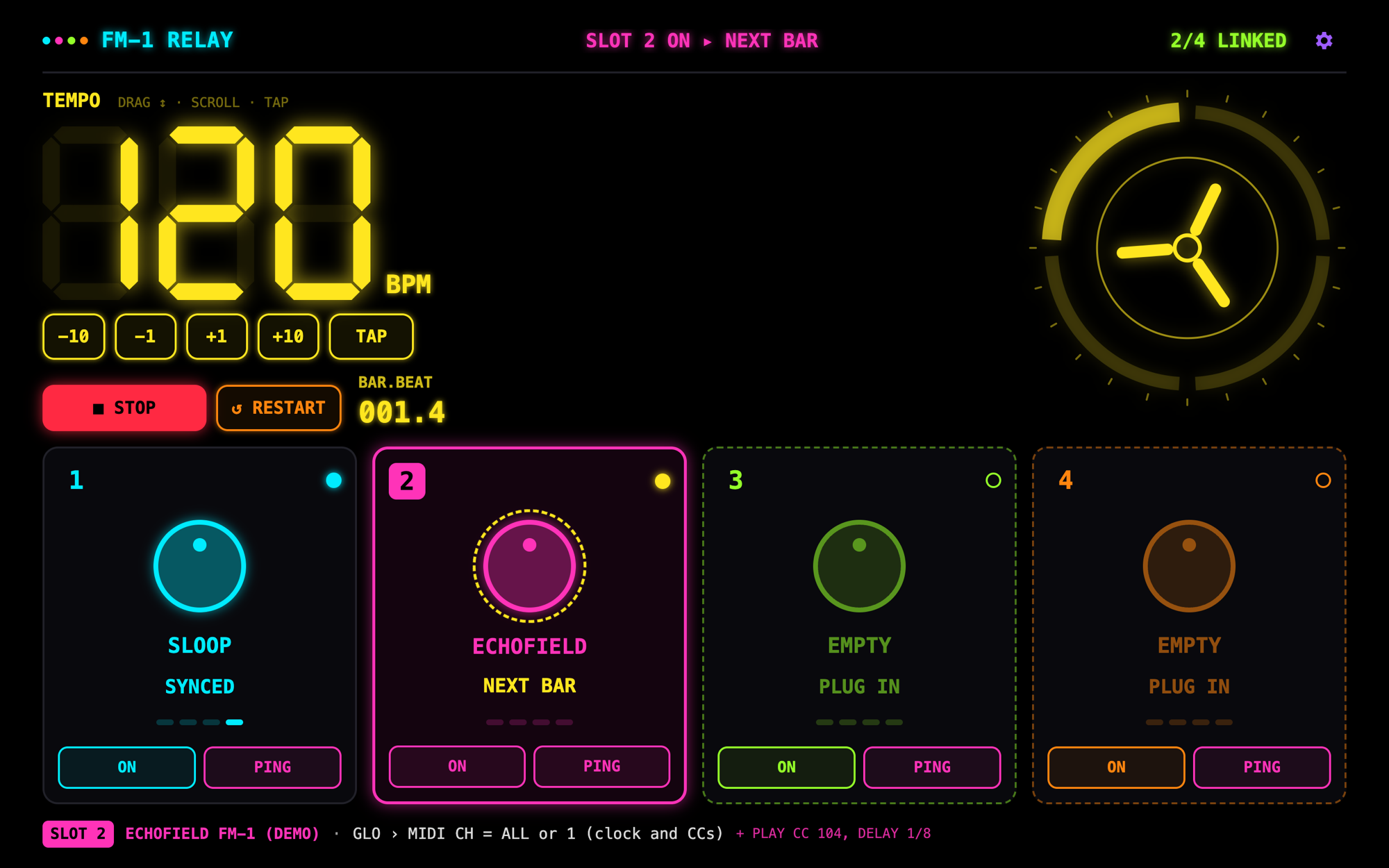 Late join: slot 2 was switched on mid-bar and waits for the downbeat. |
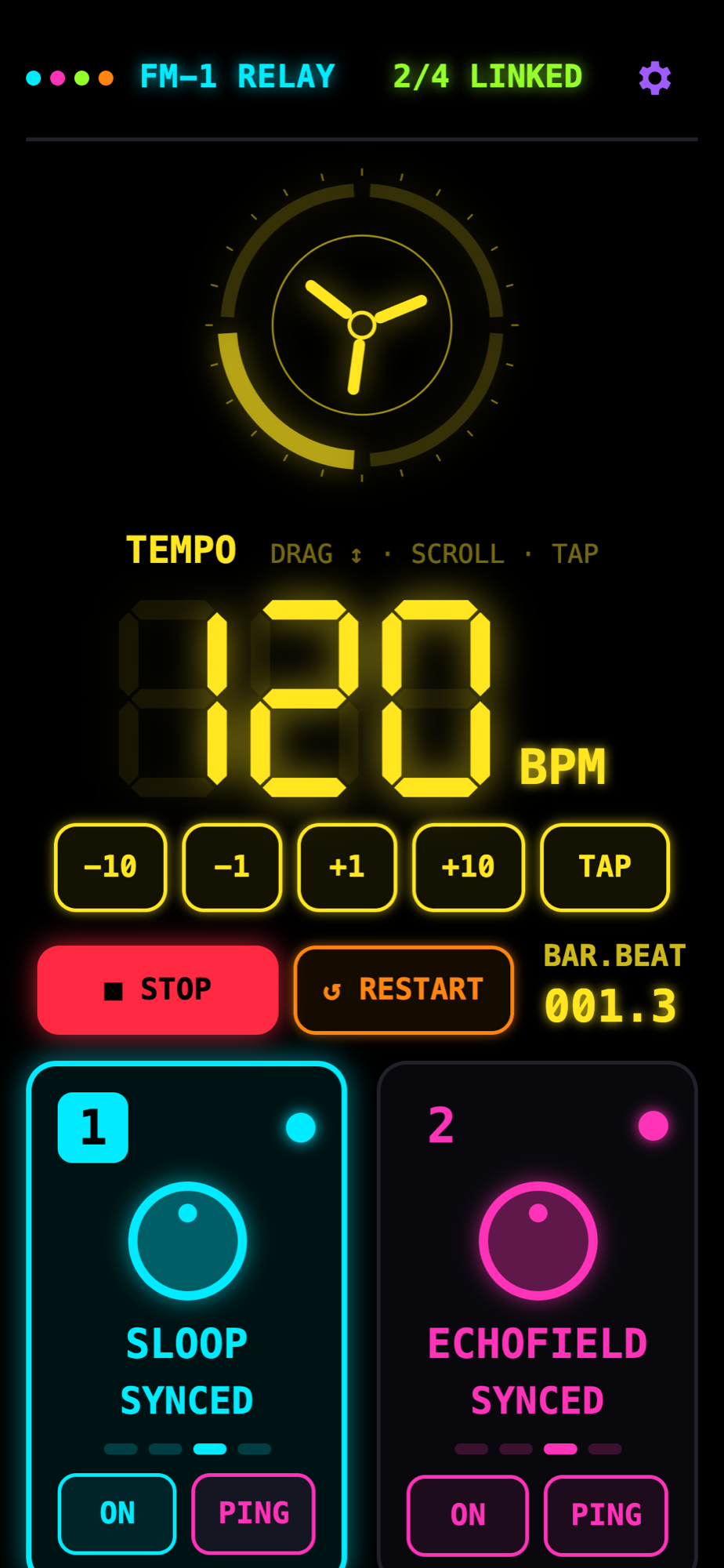 Any screen: it works on Android phones and tablets too. |
Quick start
- Open https://philip-bos.github.io/fm1-relay/ in Chrome, Edge, Opera or Firefox, on a computer or on Android.
- Press CONNECT MIDI and allow access. Allow SysEx too: the relay then reads each unit's firmware and version.
- Plug in your FM-1s. Each one appears in a slot. Set what the line at the bottom says on each unit (for example GLO › SYSTEM › SYNC = USB on SLOOP).
- Press PLAY (or Space).
No FM-1 nearby? Press TRY DEMO UNITS, or open ?demo.
[!NOTE] Safari and every browser on iPhone and iPad have no Web MIDI. On iPad, use the native iPad app.
Wiring
computer / Android ──► USB hub ──► FM-1 #1
                                ├─► FM-1 #2
                                ├─► FM-1 #3
                                └─► FM-1 #4
With three or four FM-1s, use a powered hub.
Firmware settings
| Firmware | Set on the FM-1 | Detected by |
|---|---|---|
| SLOOP | GLO › SYSTEM › SYNC = USB | port name, INFO |
| Felucca | MENU › CLOCK › CLK = USB | port name, INFO |
| Skiff | MENU › MIDI › CLOCK = USB | port name, INFO |
| JIANT | GLO › GLOBAL › CLOCK = USB | port name, INFO |
| X0X | nothing: it follows clock by itself | port name |
| ECHOFIELD | GLO › MIDI CH = ALL or 1 | port name |
| Other Felucca forks | set the clock source to USB | INFO |
| Official firmware, others | set the clock source to USB | — |
Each firmware name links to its project, where its manual documents the setting.
Controls
| Space | Play / stop all linked units together |
| R | Restart: stop all, then start all from bar 1 |
| T | Tap tempo |
| ↑ ↓ (with Shift: ±10) | Tempo, 20–300 BPM. You can also drag or scroll on the digits. |
| 1–4 | Select a slot. The bottom line shows what to set on it. |
| O | Selected slot's clock on / off. Switched on during playback, it joins at the next bar. |
| P | Ping the selected slot |
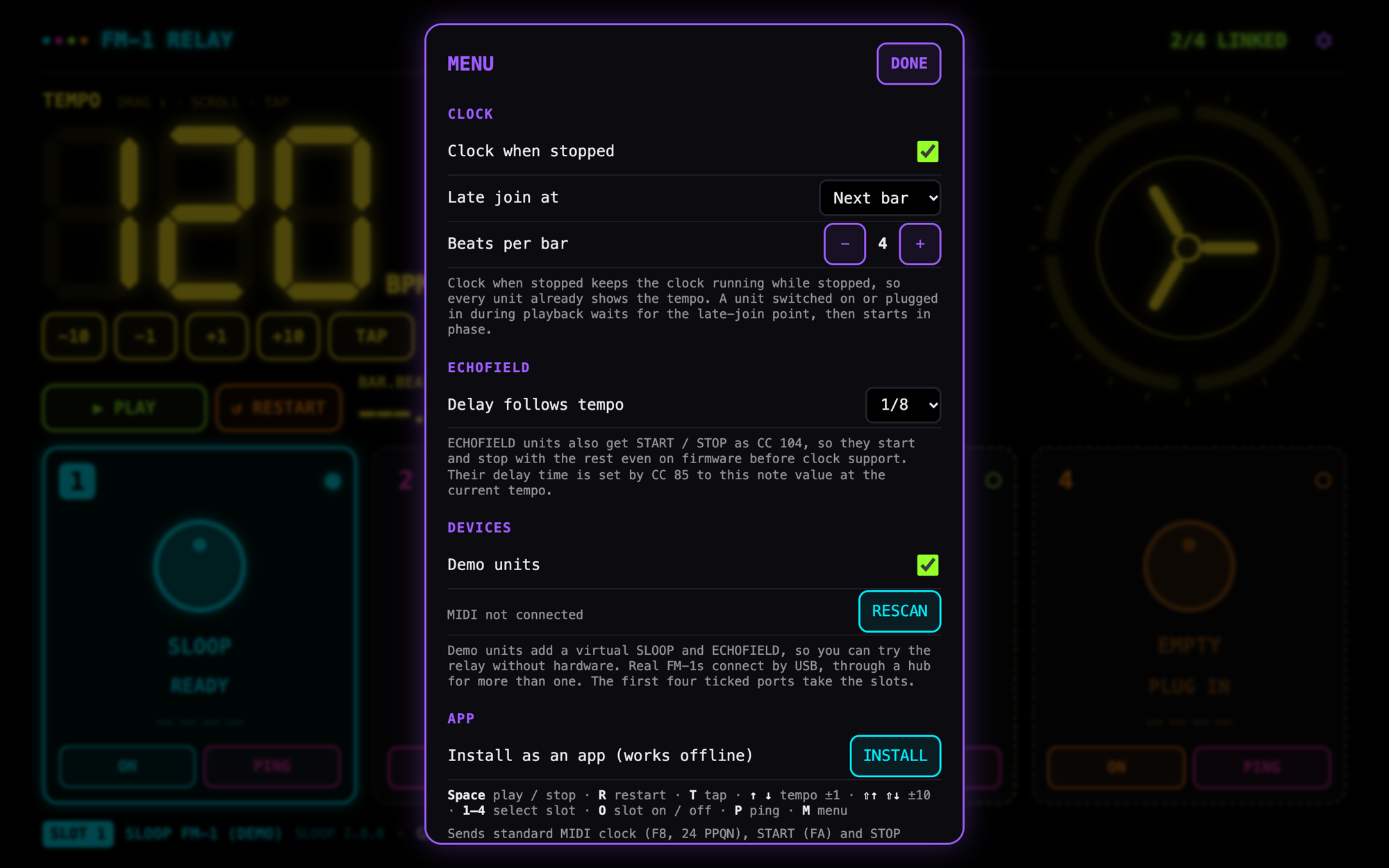
| M | Menu: clock when stopped, late-join point (bar / beat / now), beats per bar, ECHOFIELD delay, MIDI ports, demo units, install |
The menu
Web or iPad
| Where | Best for | |
|---|---|---|
| FM-1 Relay (web) | relay/ · open it | Any computer or Android device. Installable, works offline. |
| FM-1 Relay for iPad | ipad/ | A native SwiftUI + CoreMIDI app. Keeps running in the background and with the screen locked. |
Both apps share their design and behaviour: the same clock engine, firmware table, slots and late join. They differ only where the platforms do.
Run it locally
Everything is plain HTML, CSS and ES modules. There are no dependencies and no build step.
git clone https://github.com/Philip-Bos/fm1-relay.git
cd fm1-relay
npm start
Then open http://localhost:4173/relay/?demo.
Web MIDI needs a secure context, and localhost counts as one. Any static server works (python3 -m http.server 4173).
To host your own copy, fork the repository and set Settings › Pages › Source to GitHub Actions. The
Pages workflow publishes relay/ at the site root.
npm test # node --test: clock engine and firmware detection
How the relay works
| File | Does |
|---|---|
relay/js/clock.js | The clock engine: 24 PPQN F8, FA / FC, late join, ECHOFIELD CCs. Pure and unit-tested. |
relay/js/timer-worker.js | A worker heartbeat that keeps scheduling steady in background tabs |
relay/js/midi.js | Web MIDI access, port choice, hot-plug, SysEx replies, demo units |
relay/js/firmware.js | Firmware detection, setup lines, ping notes, the ECHOFIELD map |
relay/js/main.js | Slots, transport, settings (saved in localStorage) and the UI |
relay/js/draw.js | The beat-ring reel and the seven-segment digits |
relay/sw.js | Offline cache for the installed app |
Each file mirrors one in ipad/FM1Relay.
Contributing
Bug reports, firmware reports and pull requests are welcome. Testing with your own firmware helps most. See CONTRIBUTING.md.
Licence
MIT. FM-1 Relay is a community project. It is not affiliated with M-VAVE or with the firmware authors. The firmwares are separate projects under their own licences, mostly GPL-3.0. This repository contains none of their code. It uses their published MIDI and SysEx interfaces.