README from GitHub, MPL-2.0
TRIO
A jazz trio in your M-VAVE FM-1. You play the chords; a walking bass and a drummer play along with you. Both are small neural networks running on the FM-1's own chip: no computer, no internet. By Reytian.
中文说明 · Try it in the browser · Install · Manual · Releases (with two demo videos)
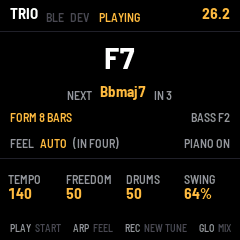
- It hears your chords. A network names each chord from the notes you hold: seven kinds on twelve roots. A chord played a little before its beat counts for that beat.
- It learns the tune. Once the chords come round, TRIO knows the form (8, 12, 32 bars...) and walks toward each change before it comes. Stop playing and the band keeps going round the form; play something new and it follows you.
- It walks. A recurrent network picks the bass's note on each beat, and its pickups, from the chord, the next chord and its own last notes. It learned from FiloBass's 48 transcribed lines by professional bassists.
- It swings. A second recurrent network plays the kit on swung triplets, half a bar ahead: ride, snare, kick, hi-hat, cross-stick, toms and crash. It learned from JazzSAMBA's drum takes.
- In two, then four. The head in two, then walking in four once the form has come round, or either all the way.
- It learns your line. Press EDIT and play the bass yourself for a chorus or two: the FM-1 fine-tunes the bass network's last layer on your line, in about a second, and from then on the bass walks more the way you do.
Status: 0.1.1. It installs and runs on the FM-1. It was developed and tested in fm1-base's host simulator and browser emulator, which run the same code; the networks' timing on the chip is estimated from instruction counts and hasn't been measured on the device yet. Reports are welcome in the issues.
Install
You need an M-VAVE FM-1, a USB cable, and Chrome or Edge.
- Connect the FM-1 to the computer by USB.
- Open https://reytian.github.io/fm1-trio/install/ in Chrome or Edge and press Install. Allow MIDI when the browser asks. Don't unplug the cable while it writes (about a minute). The FM-1 then restarts into TRIO.
To try TRIO first without an FM-1, open the emulator: the same code, with sound, played with a MIDI keyboard on the computer or the computer's keys.
From a terminal instead: download trio-0.1.1.fwsc from the releases,
then, in a clone of this repository, run python3 base/tools/fm1_install.py trio-0.1.1.fwsc (it needs
pip install mido python-rtmidi).
To go back to M-VAVE's own firmware, use the installer page's last section. Installing is at your own risk.
Newer FM-1s. Units sold since autumn 2026 (mostly AliExpress) carry another flash chip, the UC25HQ80 (ID 0xB36014). TRIO knows it from 0.1.1. On such a unit 0.1 kept its saves in RAM, gone at power-off, and refused every update, so nothing could be installed over it. The FM-1 itself is fine, but installing again won't help: the hub's rescue page shows how to put a firmware back through the chip's download mode. 0.1.1 hasn't been tried on such a unit yet; reports are welcome.
Play
- Press PLAY. The band counts a bar in.
- Play a chord with its root as the lowest note: for example C, E♭, G, B♭ for Cm7. Play each new chord a little before its bar, up to an eighth note early, as a pianist does: the bass then lands on it with you.
- Keep going round the tune. Once the chords come round again, the screen says FORM 8 BARS (or however long the tune is), and NEXT shows what comes next.
- Stop playing, and the band keeps going round the form. Play a different chord, and it follows you.
- Press PLAY again to stop.
The FM-1's keys play the chords; OCT− and OCT+ move them. A MIDI keyboard or a digital piano works too, over USB, the TRS jack or Bluetooth (SEL's page). The manual has the details: app/docs/MANUAL.md.
Teach the bass your line
- Play the tune round until the screen says FORM, then let go. The band keeps the form going.
- Press EDIT. TRIO's bass stops, and you are the bass: play single notes from E1 to G3. On the FM-1's keys, press OCT− twice first. Your notes sound on the upright.
- Walk a chorus or two, a note a beat. Press EDIT again (or STOP). TRIO learns your line in about a second.
- From then on the bass walks more the way you do. FREEDOM (K2) sets how closely: at 0 it plays your line almost note for note on the same chords. SAVE keeps what it learned; hold EDIT for 1.5 seconds to forget it.
Controls
| Control | What it does |
|---|---|
| PLAY (or SEQ) | Start (a bar's count-in) and stop |
| K1 · K2 · K3 · K4 | Tempo · Freedom (how adventurous the bass is) · Drums (how much the drummer plays) · Swing |
| ARP | The feel: AUTO (in two, then in four), TWO, FOUR |
| REC | A new tune: TRIO forgets the form |
| EDIT | Teach the bass your line; held 1.5 s, it forgets what it learned |
| GLO | The mix page: piano, bass, drums, room; PRESET there: TRIO's piano sound on or off |
| SEL | Bluetooth: connect a Bluetooth MIDI keyboard or piano |
| OCT− · OCT+ | The keys an octave down or up |
| SAVE | Keep the settings and what the bass learned |
How it works
| Network | What it does | Size |
|---|---|---|
| CHORD | Names the chord from the notes you hold, 25 ms after the last one | 3-layer perceptron |
| HARM | Guesses the next chord and when it comes, until the form is known | GRU, 48 units |
| BASS | Picks each beat's note and whether to add a pickup, 40 ms before the beat | GRU, 96 units |
| DRUM | Plays the kit 12 steps a bar, half a bar ahead | GRU, 64 units |
About 110,000 weights in all, stored as 8-bit numbers; the networks run in the main loop, one step at a time (a bass step is about 3 ms), and the audio interrupt plays their decisions on time. Teaching the bass fine-tunes only the bass network's output layer (36 rows of 96 weights) on the FM-1, with the rest frozen. The design and the measurements, in Chinese: docs/DESIGN.md.
Build and test
TRIO is an fm1-base firmware: fm1-base is a git submodule in base/.
git clone --recursive https://github.com/Reytian/fm1-trio
./build.sh                    # app/build/trio.fwsc (the JieLi toolchain; in Docker on macOS)
./build.sh --host             # the host simulator: app/build/host/trio_host
./build.sh --web              # the browser emulator: app/build/emu/ (Emscripten)
tests/run_tests.sh            # every test (needs only a C compiler and Python with Pillow)
The build needs a Python 3 with Pillow (PYTHON=... picks one), the JieLi toolchain and JieLi's AC79 SDK. For
details, see fm1-base's README. To install a build, run python3 base/tools/fm1_install.py app/build/trio.fwsc.
| Path | What |
|---|---|
app/app.c, app/app.h | The screen, the controls, the settings |
app/dsp/trio.c | The engine: listening, the form, the band's decisions, the transport, teaching the bass |
app/dsp/trio_nn.c, trio_nn.h | The four networks in C (8-bit weights, float arithmetic), and the bass's learning |
app/dsp/trio_w.h | The weights (written by tools/trio_train.py) |
app/dsp/voice.c | The sound: FM electric piano, upright bass (additive, from measurements), drum kit, room |
app/dsp/bass_tab.h | The upright's partials, measured in FiloBass's recordings (written by tools/bass_measure.py) |
app/tests/ | Host simulator scenarios (band.txt, teach.txt and screens.txt are generated by tools/make_scenarios.py) |
tests/host/ | The networks against PyTorch's numbers (nn_test.c); the bass's learning against its PyTorch reference (ft_test.c); the engine offline, with statistics (trio_render.c), and with a walking line taught (teach_test.c); the bass note by note, to compare with real notes (bass_notes.c) |
tools/ | The training data (trio_data.py), the training (trio_train.py), the reference for the learning on the FM-1 and its settings (trio_finetune.py), the walking-bass model behind the synthetic lines (walking_model.py), the bass's sound measured (bass_measure.py), the simulator scenarios (make_scenarios.py), the demo videos (demo_video.py) |
docs/DATA.md | The datasets: where they are, their licences, how to train again |
Licence and credits
TRIO is by Reytian, under the MPL-2.0 (see LICENSE). Built on fm1-base by Charles Vestal, and felucca-bsp by Leo Kuroshita, Hügelton Instruments. The networks learned from FiloBass (CC BY 4.0) and JazzSAMBA. See CREDITS.md.
M-VAVE and FM-1 are trademarks of their owners. TRIO is not affiliated with M-VAVE.
中文说明
TRIO:FM-1 上的爵士乐队。 你弹和弦,FM-1 自己芯片上跑的小神经网络配上 walking bass 和爵士鼓。不需要电脑, 也不用联网。
安装
需要一台 M-VAVE FM-1、一根 USB 线、Chrome 或 Edge 浏览器。
- 用 USB 线把 FM-1 接到电脑。
- 用 Chrome 或 Edge 打开 https://reytian.github.io/fm1-trio/install/,按 Install。浏览器问 MIDI 权限时 选允许。写入大约一分钟,期间不要拔线。写完 FM-1 会自动重启进入 TRIO。
没有 FM-1 也可以先在浏览器里试:模拟器跑的是同一份代码,有声音,可以用 电脑上的 MIDI 键盘或电脑键盘弹。
想换回 M-VAVE 原厂固件:安装页最下面一节。安装风险自负。
弹
- 按 PLAY,乐队先数一小节。
- 弹和弦,根音放在最低,比如 Cm7 弹 C、E♭、G、B♭。每个新和弦比小节线早一点弹(最多早一个八分音符), 像钢琴手那样,贝斯就能和你同时落到新和弦上。
- 接着往下弹。和弦转回来以后,屏幕显示 FORM 8 BARS(曲子多长就显示多少),NEXT 显示下一个和弦。
- 你停手,乐队照着记住的曲式继续;弹一个不一样的和弦,乐队就跟着你。
- 再按 PLAY 停。
FM-1 自己的键盘可以弹和弦,OCT− 和 OCT+ 移八度。MIDI 键盘或电钢也行:USB、TRS 口或蓝牙(SEL 页面)。
教贝斯(EDIT)
- 先把曲子弹一两遍,屏幕出现 FORM 以后松手,乐队照着曲式继续。
- 按 EDIT:TRIO 的贝斯不弹了,你来当贝斯手。弹 E1 到 G3 的单音(用 FM-1 键盘的话先按两次 OCT−),声音是 低音提琴。
- 走一两遍,每拍一个音。再按 EDIT(或 STOP),大约一秒学完。
- 之后贝斯会更像你。FREEDOM(K2)决定跟得多紧:调到 0,同样的和弦上几乎照着你教的弹。SAVE 保存学到的; 按住 EDIT 1.5 秒就忘掉,回到训练好的样子。
按键一览
| 按键 | 作用 |
|---|---|
| PLAY(或 SEQ) | 开始(先数一小节)、停 |
| K1 · K2 · K3 · K4 | 速度 · FREEDOM(贝斯有多大胆)· DRUMS(鼓手打多少)· SWING |
| ARP | 律动:AUTO(先 two-feel 再 four-feel)、TWO、FOUR |
| REC | 换一首曲子:忘掉曲式 |
| EDIT | 教贝斯;按住 1.5 秒忘掉学到的 |
| GLO | 混音页:钢琴、贝斯、鼓、房间;这一页的 PRESET 开关 TRIO 的钢琴声 |
| SEL | 蓝牙:连蓝牙 MIDI 键盘或电钢 |
| OCT− · OCT+ | 键盘移八度 |
| SAVE | 保存设置和贝斯学到的东西 |
现状
0.1.1。可以装在 FM-1 上运行;开发和测试主要在 fm1-base 的模拟器里完成(和 FM-1 跑的是同一份代码), 网络在芯片上的实际耗时是按指令数估的,还没在实机上量。设计和测量见 docs/DESIGN.md(中文)。 有问题欢迎在 issues 里报告。
新批次的 FM-1。 2026 年秋天以后卖出的机器(大多来自速卖通)换了一颗闪存芯片 UC25HQ80(ID 0xB36014)。TRIO 从 0.1.1 起认识它。在这种机器上,0.1 的保存只留在内存里,关机就没了,而且拒绝一切更新,什么固件都装不上去。机器本身没坏, 但反复重装没有用:按 The Firmware Hub 的救援页,通过芯片的下载模式写入 固件。0.1.1 还没有在这种机器上试过,欢迎反馈。