README from GitHub, GPL-3.0
MPC Sample
A web and desktop app for managing Akai MPC sample projects and building drum kits. Load your existing MPC kits, preview samples on a familiar pad layout, rearrange and customize your pads, then export the result as a ready-to-use .xpj project file — drop it straight onto your MPC hardware or SD card and your kit is ready to play.
Runs as a browser app or as a packaged macOS desktop app (Electron). The desktop build adds native file dialogs for opening and saving .xpj files and direct SD card workflow support.
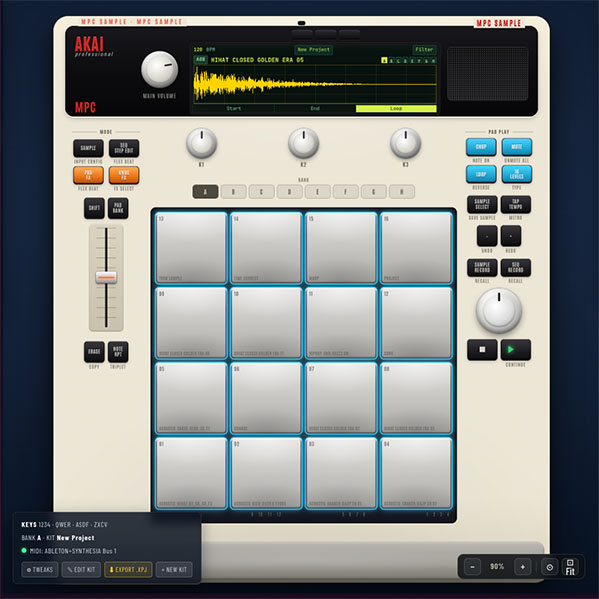
For a live demo visit mpcsample.app
Requirements
- Node.js >= 18
- npm
Setup
git clone <repo-url>
cd mpcsample
npm install
Running
Browser only (Vite, port 4404):
npm run dev
Full Electron desktop app (renderer on port 4406):
npm run electron:dev
Package a distributable (macOS):
npm run electron:dist
macOS Note
The app is not code-signed or notarized. macOS Gatekeeper will block it from opening after download. There are two ways to get past this.
Easiest — right-click to open (one-time)
- Right-click (or Control-click) MPC Sample.app
- Choose Open from the context menu
- Click Open in the dialog that appears
macOS remembers this decision; the app opens normally from then on.
Via Terminal — remove the quarantine flag
If the right-click method doesn't work, or if you prefer the command line, remove the quarantine extended attribute directly.
On the .app after dragging it to /Applications:
xattr -dr com.apple.quarantine "/Applications/MPC Sample.app"
On a freshly extracted .app before moving it:
xattr -cr "MPC Sample.app"
Run either command once; no further steps are needed.
Disclaimer
MPC Sample.app is an independent, community-built tool and is not affiliated with, endorsed by, or sponsored by inMusic Brands, Inc. or its subsidiaries. "MPC" and "Akai Professional" are registered trademarks of inMusic Brands, Inc. All trademarks are the property of their respective owners.