README from GitHub, MIT
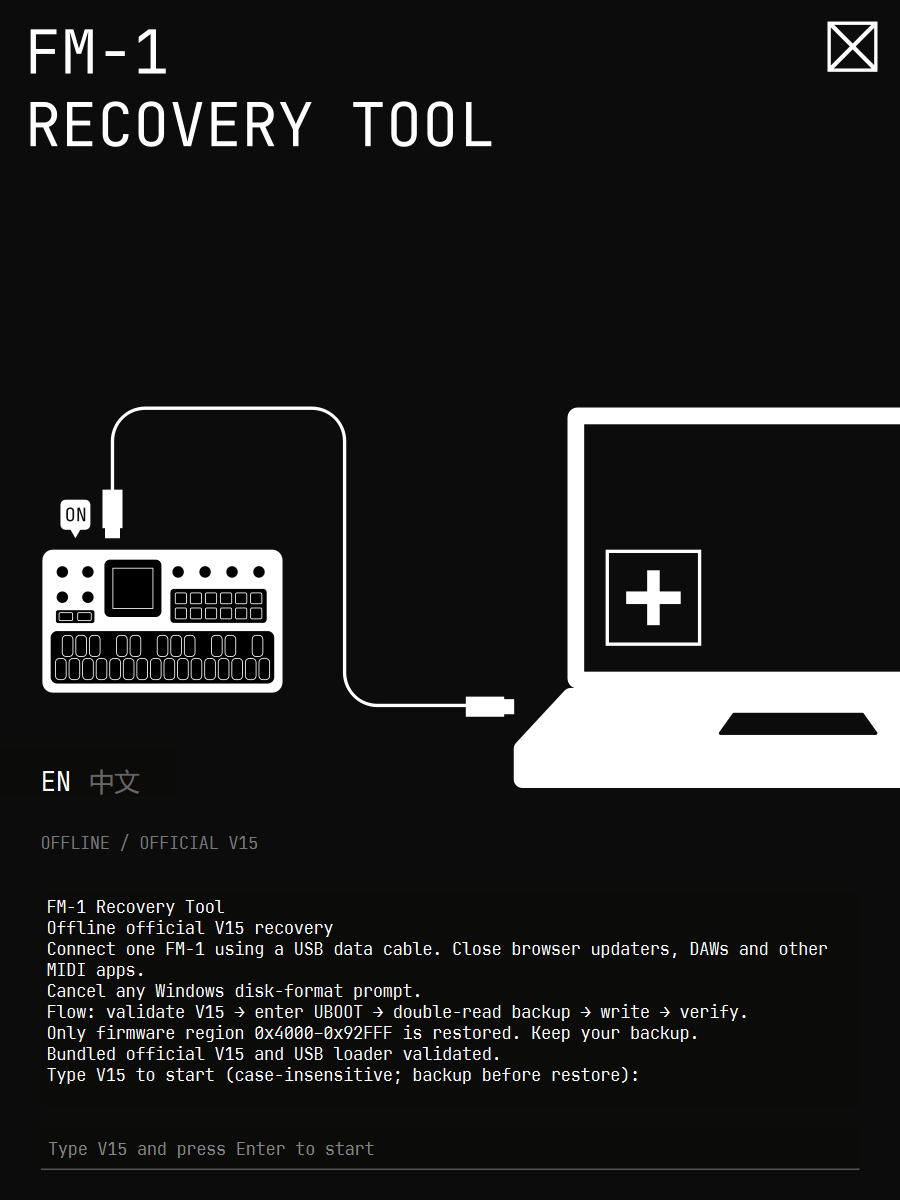
FM-1 Recovery Tool
FM-1 Windows x64 本地离线恢复官方 V15。非官方工具,与 M-VAVE 无隶属关系。
FM-1 Offline official V15 recovery for Windows x64. Unofficial; not affiliated with M-VAVE.
使用 / Usage
-
将
FM-1 Recovery Tool.exe放在可写文件夹,只连接一台 FM-1,使用 USB 数据线直连。关闭网页升级工具、DAW 和其他 MIDI 程序。Put the EXE in a writable folder. Connect one FM-1 directly with a USB data cable. Close browser updaters, DAWs and other MIDI apps.
-
双击 EXE,允许管理员权限;直接进入 GUI,点击 EN 或中文即可切换,不再显示语言选择菜单。Windows 提示格式化磁盘时,选择取消。
Double-click the EXE and allow administrator access. The GUI opens directly; click EN or 中文 to switch without a language-selection menu. Cancel any Windows disk-format prompt.
-
等待终端显示校验通过,在最底部输入栏输入
V15或v15,回车。程序先备份,再恢复。写入期间不要断电、拔线或关闭窗口。Wait for validation in the terminal, then type
V15orv15in the bottom input field and press Enter. A backup is required before restoring. Do not power off, unplug or close the window during writing. -
显示验证成功后,拔 USB、关机、等待 5 秒,再开机。
After verification succeeds, unplug USB, power off, wait five seconds, then power on.
自动流程 / Automatic workflow
校验内置 V15 → 检测 UBOOT(必要时直接发送 MIDI SysEx F0 22 24 35 7D F7)→ 核对 WL82 → 等待 5 秒 → 上传 RAM loader → 等待 1 秒 → 核对芯片 key 0x980F 和 Flash ID 0x856014 → 两次完整读取 1 MiB、比较并保存备份 → 只恢复 0x4000–0x92FFF → 逐字节回读验证。
Validate bundled V15 → detect UBOOT (send MIDI SysEx F0 22 24 35 7D F7 if needed) → confirm WL82 → wait five seconds → upload RAM loader → wait one second → check chip key 0x980F and flash ID 0x856014 → read the full 1 MiB twice, compare and save → restore only 0x4000–0x92FFF → verify every byte.
启动阶段发生 USB 传输错误:关闭旧连接,等待 10 秒,重新扫描并重试一次。固件已经相同则备份后跳过重复写入。回读不一致时后端最多重写一次。不会因启动成功而额外刷写第二遍。
On a startup USB transport error, close the connection, wait ten seconds, rescan and retry once. If firmware already matches, skip writing after backup. A read-back mismatch allows one rewrite. Successful startup does not trigger an extra flash cycle.
备份及故障 / Backups and failures
完整备份位于 EXE 旁 backups,日志在 logs。请保留;备份包含设备上的歌曲和音色。文件名含 dryrun 的备份仅为模拟。
Full backups are in backups beside the EXE; logs are in logs. Keep them. Backups include on-device songs and sounds. Files marked dryrun are simulated.
启动或备份阶段失败时,本次尚未擦写固件,可检查线缆、直连端口后重试。写入或验证阶段失败时,不要断电或拔线,保留备份和日志并再次运行恢复。
If startup or backup fails, no firmware erase/write has started in that run; check the cable/direct USB port and retry. If writing or verification fails, do not power off or unplug; keep backups and logs and rerun recovery.
恢复只改固件,不清空设置。若 V15 音色异常,可在设备上尝试 System > Reset Patches。若既无 MIDI 响应也不出现 UBOOT,软件无法继续,可能需要 Transporter 硬件恢复。
Recovery changes firmware, not settings. If V15 patches behave incorrectly, try System > Reset Patches on the device. If neither MIDI nor UBOOT is available, software cannot proceed; Transporter hardware recovery may be needed.
离线与自测 / Offline operation and self-test
EXE 内置 Python、MIDI/USB 库、loader 和 V15,无需另装 Python、pip 或 Git。运行流程不下载文件,Python 网络连接及解析已禁用;使用 Windows 自带 PowerShell 和 USB 驱动。控制台使用所选语言,完整技术诊断保存在日志文件中。
The EXE bundles Python, MIDI/USB libraries, loader and V15. No Python, pip or Git installation is required. Recovery downloads nothing; Python network connections and DNS resolution are blocked. Windows PowerShell and built-in USB drivers are used. The console uses the selected language; full technical diagnostics are retained in log files.
在 PowerShell 中运行以下命令,仅模拟,不访问真实设备、不要求管理员权限:
Run in PowerShell to simulate without real hardware or administrator access:
& '.\FM-1 Recovery Tool.exe' --demo
此前的自动重试版已由用户报告真机恢复成功。本次语言及名称修改已做模拟测试,未由开发代理执行真机刷写。Windows 11 x64 构建;其他系统版本未实测。
The user reported successful real-device recovery with the preceding startup-retry version. This naming/language revision was simulated; the development agent performed no real-device writes. Built on Windows 11 x64; other OS versions have not been tested.
源码构建 / Build from source
源码包包含内置固件和固定版本后端,不包含用户的设备备份、日志或虚拟环境。首次准备构建环境需要联网下载 Python 包;生成的 EXE 使用时离线。
The source package includes bundled firmware and pinned backends, but no user device backups, logs or virtual environment. Initial build preparation needs internet access for Python packages; the resulting EXE runs offline.
使用 Windows x64、Python 3.14(本次为 3.14.1):
Use Windows x64 and Python 3.14 (this build used 3.14.1):
python -m venv .venv
.\.venv\Scripts\python.exe -m pip install -r build-requirements.txt
.\.venv\Scripts\python.exe -m pip install -r gui-requirements.txt
.\.venv\Scripts\python.exe -m unittest test_boot_key test_read_failure -q
.\.venv\Scripts\python.exe verify_gui.py
.\.venv\Scripts\python.exe -m PyInstaller --noconfirm FM1-V15-Offline.spec
.\.venv\Scripts\python.exe -m PyInstaller --noconfirm --distpath gui-dist FM1-GUI.spec
& '.\gui-dist\FM-1 Recovery Tool.exe' --demo
若依赖没有匹配的二进制 wheel,可能需要 Microsoft C++ Build Tools。源码包的底层库版本标记 .fm1-unbrick-commit 必须保留。
If matching dependency wheels are unavailable, Microsoft C++ Build Tools may be required. Keep the backend .fm1-unbrick-commit version marker.
致谢与来源 / Credits and provenance
- 社区恢复教程 / Community recovery guide — u/acrawf1,及教程中致谢的 u/International-Soup24: https://www.reddit.com/r/MVaveFM1/s/lUaXiCsOk8
- 恢复后端 / Recovery backend — Quixotic7 and MvaveFM1Unbricker contributors, MIT:
https://github.com/Quixotic7/MvaveFM1Unbricker
Base commit:
707470a521d49c9791b373ff522653dd41dd6f4a. - 底层协议及 WL82 loader 来源 / Low-level protocol and WL82 loader source — kagaimiq, jl-uboot-tool:
https://github.com/kagaimiq/jl-uboot-tool
Commit:
adb3f18889e88ac512ce0a3c4d8cc3d3cb30696a. - 网页 bootloader 指令参考 / Browser boot-key reference — The Firmware Hub: https://thefirmwarehub.com/
- 官方 V15 固件来源 / Official V15 firmware source — M-VAVE:
https://github.com/m-vave/fm1_open
内置文件为用户提供的
FM-1_015.fwsc,未修改 / Bundled file: user-suppliedFM-1_015.fwsc, unchanged. File SHA-256:db1642b2b6fa5c2cccb11ffd13878068bb28601678d3644049f99dc40e7edb8a. Firmware-region SHA-256:6edf3c37fb5bbbc33607c89375ee024d5477c17914d72221c8c68e58a8255686.
保留的上游许可证见 licenses 和 upstream。本项目代码许可证不替代固件或第三方二进制各自的授权。
GUI uses unmodified dynamically loaded PySide6 / Qt 6.12 libraries under LGPLv3; license texts are retained. Source for Qt and PySide6: https://code.qt.io/cgit/qt/ and https://code.qt.io/cgit/pyside/pyside-setup.git/ (6.12.0). This source package and build scripts allow rebuilding with replacement Qt libraries; reverse engineering for debugging modifications to those libraries is permitted under their license. SprayMindsMono is a modified JetBrains Mono font under SIL OFL 1.1; the supplied font README and OFL text are included. The vector artwork was supplied by the user; its rights remain with its owner.
Retained upstream licenses are in licenses and upstream. The project code license does not replace the permissions applicable to firmware or third-party binaries.
本地修改 / Local changes: output-only boot key without identity handshake; offline network guard; bilingual operator prompts; case-insensitive V15 confirmation; startup settling delays and one transport retry; contextual read-error logging; PyInstaller single-file packaging.