README from GitHub, GPL-3.0
Caravel
Multi-engine synthesizer firmware for the M-VAVE FM-1, version 0.11.0.
Web installer · Browser emulator · Web editor
Troubleshooting & FAQ — USB detection, switching firmware, stock-return error -5, UBOOT and recovery tools.
Tutorials: Random Morph and Morph Journey · STASIS: HOLD, ADD, BLEND · HOME, Pair Morph, macros and saving · all tutorials
Caravel is a fork of Felucca 1.6.1 by Leo Kuroshita (@kurogedelic) and Hügelton Instruments, continued independently by bonszaimusic now that Felucca's active development has ended. 0.1.0 is the first version under this name. Caravel is not affiliated with, endorsed or supported by Hügelton Instruments or M-VAVE, and "Felucca" and "Hügelton Instruments" are those authors' names, used here only to say where the code comes from. See NOTICE, LICENSING.md and CREDITS.md.
Watch and listen
 SEM & HADES Sound showcase (recorded before the Caravel rename) |
 DRONE Lyra-inspired DRONE engine demo |
More videos: BonszaiMusic on YouTube.
Tutorials
Every screenshot comes from the actual firmware renderer. Start with the one that matches what you want to do:
| Tutorial | What you learn |
|---|---|
| Random Morph and Morph Journey | Save sounds into S1–S4, morph between them, and let a journey chain the morphs hands-free (0.9.0; reference) |
| STASIS: HOLD, ADD and BLEND | Capture a texture, build on it, move into a new one · four-page PDF · sound examples · performance setup download |
| HOME, Pair Morph, macros and saving | Build a performance surface, pair two engines, map macros, save the whole performance · six-page PDF quickstart |
| Browser emulator | Try any of them without a device |
Caravel 0.11.0 — ENSEMBLE in stereo
Download 0.11.0 firmware, installer, emulator and source · What changed and what is tested · ENSEMBLE guide
- ENSEMBLE is stereo: SPRD is its width (six taps, three left and three right); the factory pads load with a width, the mono presets stay mono; MONO, LEGATO and SPRD 0 are the 0.10.1 sound bit for bit. The mono sum is about 2 to 3.5 dB lower and a wide pad's reverb return is lower: raise REV or LEVEL.
- Pair Morph: a member may have SPRD above 0 on any engine (no more
SPREAD OFF). - Back up first. No project-format change; a stereo pad plays mono on 0.10.1 (the width stays stored). Host-tested and run in a local container; the maintainer reports having checked everything on an FM-1 with a release-candidate test build (rc3; no per-item findings are recorded).
Caravel 0.10.1 — fix release
Download 0.10.1 firmware, installer, emulator and source · What changed and what is tested
- ENSEMBLE fix: the three taps' slow LFOs now run 120 degrees apart, as documented (in 0.10.0 they moved together); all fourteen presets sound slightly different and PROFILE A was set again. Compared in host renders only.
- Fix: in RANDOM the ship on the sea chart no longer sails between the snapshots because a journey runs on another track; the selected slot follows only the selected track's journey. Reproduced and fixed on the host; not tried on an FM-1 before publication. No project-format change.
Caravel 0.10.0 — the ENSEMBLE engine
Download 0.10.0 firmware, installer, emulator and source · What changed and what is tested · ENSEMBLE guide
- ENSEMBLE (ENSEMB): a string / choir / dark-pad engine with a built-in three-tap ensemble, eight controls (REG, MORPH, TONE, DRIFT, ENS, RATE, TEXT, MIX), fourteen factory presets and five Pair Morph layer recipes with piano, bells, electric piano and a DRONE bed.
- Back up first. No project-format change; a project that uses ENSEMBLE shows as an empty slot in 0.9.0 (nothing is deleted).
- Tested on the host and in the complete validation; a first informal test build was installed on an FM-1 by the maintainer (it led to two fixes; the released build differs by them); no judgement of how ENSEMBLE or the presets sound has been recorded. The presets differ as measured signals.
Caravel 0.9.0 — Random Morph and Journey per track
Download 0.9.0 firmware, installer, emulator and source · What changed and what is tested · Tutorial · Reference
- Per track: every track has its own four snapshot slots (its own HOME controls, up to 32 targets), its own morph engine and its own journey with its own BARS, DEPTH, SCOPE, SHAPE, WAIT and direction. Morphs and journeys of different tracks run side by side; a RANDOM morph holds only its own track's journey; a control two tracks move belongs to the track that started last; SCOPE ALL makes the RANDOM keys act on every track. A track whose HOME pins more than 32 targets cannot start a RANDOM morph.
- JOURNEY bank right after RANDOM (BANK: RANDOM, JOURNEY, STASIS, PAIR, LIVE). Small boxes show what each track does. JOURNEY SETUP (hold BANK there): SCOPE THIS / ALL, TRANSP FREE / CONT / START (CONT and START follow the sequencer's bars, Stop freezes a leg, an external clock moves it).
- The SAX sample set is retired to free flash: SAX now plays PIANO. About 25 KB of the app slot are free again.
- Back up first: projects use a new format (3). Everything from earlier versions loads (0.7.1 to 0.8.0 are migrated, at most 32 targets per slot, more are dropped with a message). 0.8.0 does not read a project saved by 0.9.0: the slot shows as empty there.
- The OVERWRITE? dialog of a project SAVE no longer flickers while a morph or journey runs; RANDOM moves the FX filter only between -70 and +70.
- Tested on the host, in CI and in the complete validation, with a simulated external MIDI clock; tried by the maintainer on an FM-1 only as a pre-release build before one fix (a first informal trial, not a systematic acceptance), and not verified with a controller, a real external clock or long runs.
Caravel 0.8.0 — Morph Journey
Download 0.8.0 · What changed and what is tested
- The first Morph Journey: a fifth ACTION bank with PLAY / PAUSE, direction, NEXT and WAIT, four project-wide snapshot slots with owner labels, A4 hold in RANDOM's SETUP deletes a slot, settings saved with each project, and a learned MIDI CC wins over a running morph for every target.
Caravel 0.7.2 — candidate fix for the stock return (-5)
Download 0.7.2 firmware, installer, emulator and source · What changed and what is tested
- Return to official V15: the updater now checks that the official package's boot area is valid instead of requiring it to equal your unit's. If you got Update Failed -5 on 0.7.1 or earlier, update to 0.7.2 and try again. This is a candidate fix: it is tested on the host and on one FM-1, not yet on a unit that showed -5. Back up first and see the FAQ.
- Two small fixes from Felucca: a divide by zero when the BPM is briefly 0, and FM6 operators with AMS other than 0 (imported voices only; factory voices are unchanged).
- No project-format, audio-engine or USB changes; 0.7.1 projects load as before.
Caravel 0.7.1 — keep your performance snapshots
Download 0.7.1 firmware, installer, emulator and source · Installation, snapshots and compatibility
- S1–S4 Random Morph parameter snapshots are saved with each performance project, including scope and pinned targets. Project load, RESTORE LAST and USB backups restore them; legacy projects start with empty slots.
- Save A–D to keep your slots. A4 short selects S1–S4, A4 held captures, A3 morphs to the selected slot and A2 freezes/resumes. Saving during playback stays RAM-only until STOP commits it.
- The installer verifies the exact package size, SHA-256, product, layout and app/loader CRC before install or resume. USB/recovery help is linked in the FAQ.
- New project files need 0.7.1 or later. Back up before upgrading or rolling back. Extremely dense, incompressible projects are rejected before writing with
PROJECT TOO LARGE / NOT SAVED.
STASIS captured audio, active morph motion and RETURN origins remain volatile. Automated tests and physical FM-1 acceptance are distinct; see the release guide for validation scope.
Caravel 0.7.0 — smoother audio and visible performance automation
Download 0.7.0 firmware, installer, emulator and source · Release details and installation
- Run hot DRONE, SEM, HADES, STASIS and HALL DSP from checked executable RAM. The owner reports no audible crackle and indicated load at most about 70% with the rc6 test setup; this is not a controlled speedup measurement.
- Group STASIS GRAIN/LAYER on one view and place CHORUS before REVERB; retain reverse/scan/capture continuity fixes.
- Keep independent Random Morph RETURN origins for each track/HOME row. Show HOME macro and Pair automation in SEQ > AUTOMATION and make its PLAY switch apply to both event stores. Pair recordings belong to member A.
- In 0.7.0 the four S1–S4 Random Morph snapshots were still volatile and saving a project kept the current sound, not the snapshot slots. Since 0.7.1 the slots are saved with each project (below); captured STASIS audio is still not stored.
The 0.6.0 STASIS tutorials and sound examples below remain useful for the shared controls.
Caravel 0.6.0 - Hold a sound. Build a texture.
STASIS tutorials · Listen to the examples · Four-page PDF guide · Changelog
Download the STASIS performance setup — the HOME project from the feature Short, with two paired SEM tracks, a driven Drone, MIDI notes and English/German play guides. Load the starting project, then follow the individual moves.
Play a chord, hold its texture, and keep performing over it. STASIS captures the internal REV send and turns it into a slowly moving stereo wash. The captured sound can stay while you change instruments or play something new.
- HOLD: freeze recently played sound. STR brings the texture forward; MOTN moves reflections, filters and reverb damping without sweeping playback speed.
- ADD: mix a new captured sound into the held texture. Choose its share with AMT, then press OCT+. Repeat to build a combined layer with bounded gain.
- BLEND: transition into a new captured texture over 1-30 seconds, then hold the destination. OCT+ cancels WAIT or returns MIX smoothly to the original.
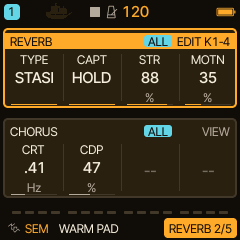
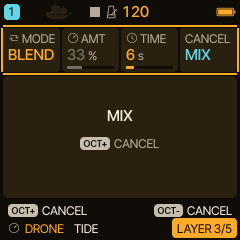
0.6.0 profile: HALL and STASIS; ROOM, SPRING and the SLICE engine are omitted. The separate SLICER track effect remains. Old projects using omitted features offer CANCEL / TEST with explicit substitutions, protect their source slot, and can be saved as a separate copy. Ordinary tempo DELAY is suspended while STASIS is active. Captured audio is volatile RAM and is not stored in projects.
The original sound examples use the actual native firmware DSP and are labelled as renders, not FM-1 recordings. Automated target, audio, MIDI, UI/storage, web, ASan/UBSan and ThreadSanitizer checks gate publication. Actual FM-1 worst-case load and long-term stability remain separate hardware checks.
Performance controls retained from 0.5.0
Illustrated tutorials · PDF quickstart · Try the browser emulator
Deep HADES bass. Drifting DRONE atmospheres. Warm SEM pads. Shimmering FM bells. Now explore what happens between them.
Caravel brings hands-on live sound design to your M-VAVE FM-1. Pair two engines, shape their sounds together and turn a single gesture into a dramatic transformation.
- 🎚️ Pair Morph — explore the space between engines. Play two engines from the same notes and blend between their sounds in real time. Find a beautiful halfway point—or take the audience on the whole journey.
- 🎛️ Custom HOME — build your own performance surface. Bring your favourite controls together, with large active values and preset names that stay visible.
- ✨ Assignable macros — make one knob move your sound. Map up to four parameters to each of four macros per track. Open the filter and bring in the reverb together, with the combinations and amounts you choose.
Build the sound. Find the unexpected. Play the transformation.
Free and open source for the M-VAVE FM-1.

Illustrated tutorials · PDF quickstart · Try the browser emulator
A look at the screen
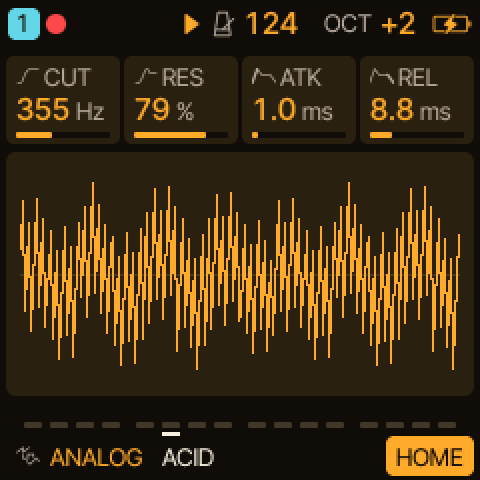 HOME |
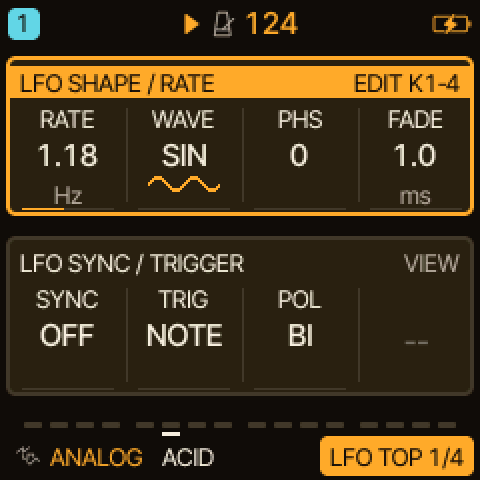 LFO: two groups, one framed |
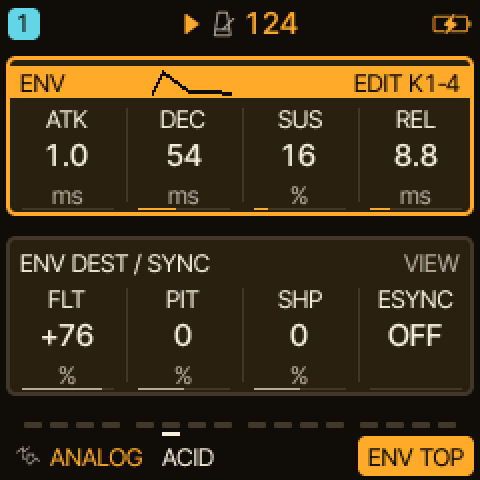 ENV with its pictogram |
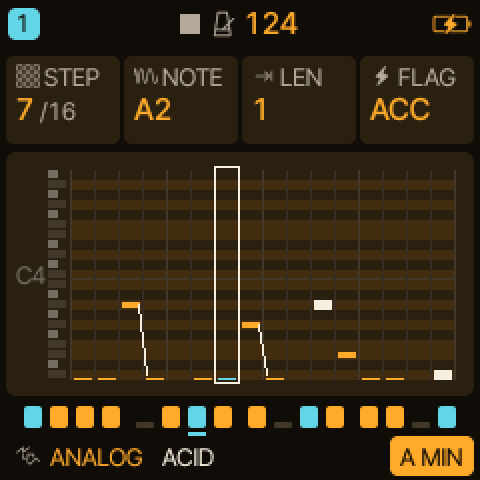 STEP and piano roll |
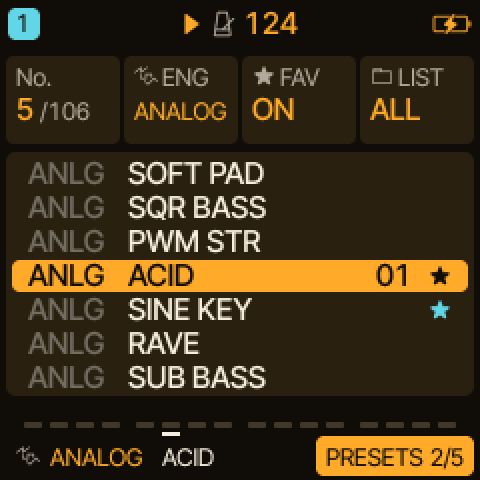 PRESETS |
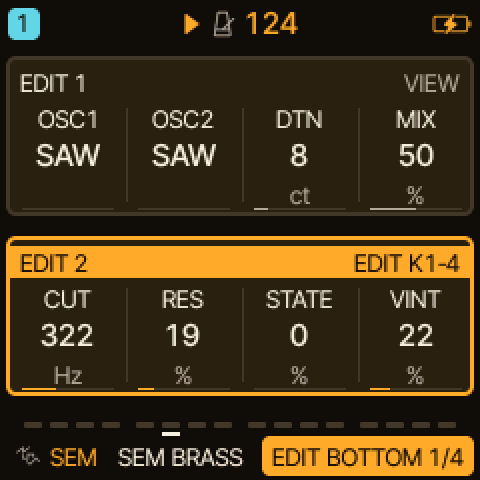 SEM: oscillators and filter |
The screens are drawn by the firmware's own drawing code (AMBER palette, 240 x 240 shown at 2x). MENU > COLOR has more palettes:

Engines at a glance
| Engine | Good for |
|---|---|
| ANALOG | classic subtractive leads, basses, pads, plucks |
| SEM | warm pads, brass, strings, notch sweeps |
| HADES | basses, sub layers, dark leads |
| DRONE (experimental) | evolving drones, beds, bells, slow textures |
| PHASE | bright, glassy and organ-like tones, bells |
| LOFI | chiptune, 8-bit arps, bytebeat |
| TRIO | fat basses, sync and ring-mod leads |
| WHEEL | tonewheel organ |
| FM6 | electric pianos, bells, FM basses and pads |
| PHYS | mallets, plucks, hand drums, metallic textures |
| VOICE | sung vowels, choirs, vocal leads |
| SAMPLE, GRAIN | instrument samples and your own, granular clouds |
| DRUM (with DRUM-X) | drum kits and percussion |
| NOISE | wind, rain, risers, effects |
What each engine is and how its controls work: Engines at a glance. Tips for good sounds with SEM, HADES and DRONE: Tips and tricks.
What Caravel adds to Felucca
The focus is usability and the sound experience:
- Two parameter groups on one screen (LFO, LFO2, ENV, ARP, VOICE, EDIT 1/2, LANES, the FX pages): the active group is framed and marked EDIT K1-4, a tag says whether a group is for ALL tracks or the track (T1..T4), SELECT steps through the groups, and the footer shows a numbered view ("LFO TOP 1/3"). SLICER, SCL and CHORD put a picture of their settings below their group, and every page frames the cards KNOB 1-4 edit. SELECT starts on PAGE; in the menu it walks the rows.
- FILTER (0.3.0): one bipolar knob per track on the INSERT 2 page, LP to the left, HP to the right, OFF in the middle; the last stage of the track's chain on every engine, so the sends take the filtered sound (docs/track-filter.md).
- LATCH (CHORD page): notes of the keys, the chord keys and MIDI IN keep sounding after release, per track (docs/latch.md). FX HOLD: a factory preset load keeps the track's sends and INSERT instead of replacing them.
- Clearer sequencing: EDIT opens the EDIT pages everywhere; the cursor step is cleared with SEQ held + F5 (CLEAR STEP, one undo). Euclid, DOUBLE/HALF, conditional steps and external-clock start and resync are inherited and extended.
- Deeper modulation: an independent LFO2 and the MOD matrix (SLEW, S&H sources, MORPH and PHS FB destinations).
- More sound sources: SEM, HADES, DRONE (experimental), DRUM-X, MORPH on ANALOG, PHASE and LOFI, BYTE/FLOAT waves in LOFI.
- Per-track voice reservations (MENU > VOICES) and a MORE page for SPREAD, MORPH and PHS FB.
The full list is in CHANGELOG.md; how the features work is in docs/.
Compatibility with Felucca
Caravel 0.1.0 changed names and text, not storage, and 0.2.0 keeps all formats too (LATCH and FX HOLD use unused slots): settings, projects, presets, the .fwsc package markers and the editor's
file formats are the ones of Felucca 1.6.1 and its Custom additions, so Felucca data opens in Caravel. Projects that use
Caravel-only parameters need Caravel or newer. 0.3.0 adds one track parameter (the FILTER): it opens everything saved before with the filter OFF, but 0.2.0
and 0.1.0 cannot open a project saved by 0.3.0 (user presets still load there, without the filter): see docs/track-filter.md. The web editor and installer accept devices named Felucca as well as Caravel.
Identifiers in the source (FELUCCA_*, felucca.c, the firmware/engines/ submodule) keep their names.
Installing
USB test IDs: the current firmware uses 1209:0001 (running) and 1209:0002 (loader).
They are not allocated to Caravel or universally unique. The pid.codes policy permits private / in-house testing only and
forbids their use on devices that will be redistributed, sold or manufactured, even if given away for free.
Do not use them outside test environments. General deployment needs suitable IDs or written authorization / clarification;
firmware-only downloads and end-user reflashing need policy clarification, not an assumption that free use is allowed.
See NOTICE and the policies for 0001 and 0002.
Installing custom firmware is at your own risk, without warranty to the extent permitted by law; a failed update can leave the
FM-1 unusable or need a Transporter for attempted recovery. M-VAVE's updater or the installer's Return to official V15 can
attempt an official firmware reinstall, not guarantee factory condition, data restoration, warranty coverage or recoverability.
Keep the official package and backups of your data. Non-excludable statutory rights and liability are unaffected.
Use the web installer for browser-based updates, or
tools/fm1_install.py to install a package from a terminal. How to install a specific release, check it, and go back: Installing Caravel. The web tools are in web/ and are built into the site by
web/make_site.py (BUILDING.md).
- Build: BUILDING.md; clone with the engines' submodule:
git clone --recurse-submodules https://github.com/bonszaimusic/caravel.git - Documentation of what Caravel adds: docs/; engines: docs/engines
- Sequencer documentation: live parts, recording and FX automation
- Felucca's manual describes the features Caravel inherits, but not Caravel's additions: Installation · Controls · Menu · Engines · Features
What it is
Fifteen engines with factory presets, four tracks (8 voices shared), a 64-step sequencer (chords, ties, chance, conditions, ratchets, nudge, locks, automation, live and step recording), SEQ TOOLS, songs, effects, a MOD matrix, MIDI (USB and TRS, per-track channels, MIDI LEARN) and USB audio.
Inherited from Felucca
What the base brings with it, as of Felucca 1.6.1 and 1.6:
New in 1.6.1
- MENU > LARGE keeps one size per knob (#251): a value no longer jumps between sizes as you turn the knob
- Updates check the package's size on the FM-1: a package made for another device is refused before anything is erased
- Second core (beta), off by default: MENU > SYSTEM > 2ND CORE > ON (BETA), then restart: the FM-1's second core renders some of the parts, same sound, more headroom (#247)
- Felucca-Engines: Felucca 1.6.1 moved ANALOG, LOFI, TRIO, WHEEL and NOISE to
their own MIT repository (a git submodule here).
Caravel uses its TRIO, WHEEL, NOISE and shared DSP, but local GPL-3.0-only, JIANT-derived ANALOG and LOFI variants in
firmware/src/; the unchanged submodule variants remain MIT. Felucca itself stays GPL-3.0-only.
New in 1.6
- Your own UI colours: COLOR has an eleventh value, CUSTOM, set in the web editor with a live preview on the FM-1
- The SEQ piano roll follows the play position when the pattern is longer than one screen
- Conditional steps (1:2 … 4:4, FILL), EUCLID, DOUBLE and HALF, a MIDI channel per track, PHASE FOLD, three more drum kits and humanize in the MOD matrix (1.5.5 and 1.5.6 were never released: 1.6 carries them)
- ⚠ A project with conditional steps does not open on 1.5 or 1.5.1; projects saved by 1.4 or later do not open on 1.1.5.x
All changes and what to know before going back: Release notes · Upgrading from 1.1.5.
Support and contributing
Please report what you find in this repository's Issues (reproducible bugs, one per issue), not to Hügelton Instruments or M-VAVE. Pull requests are welcome: see CONTRIBUTING.md. Caravel is GPLv3 and you are free to fork it.
AI disclaimer
Caravel-specific changes to Felucca were developed with AI coding agents (code, tests and documentation). Direction, design decisions and acceptance are the maintainer's. The original public Felucca history through 1.6.1 is unchanged and is the work of its authors. The initial Caravel changes are recorded as one baseline snapshot rather than as their individual development commits.
Credits and licence
Free software: GPL-3.0-only, the Hügelton Sample Pack and local JIANT-derived ANALOG / LOFI variants included.
The unchanged Felucca-Engines submodule (firmware/engines/) remains MIT;
Caravel uses its TRIO, WHEEL, NOISE and shared DSP. Bundled fonts and ported DSP keep their own licences
(LICENSES/, LICENSING.md). Thanks to everyone whose work and contributions are in it: CREDITS.md.
M-VAVE and FM-1 are trademarks of their respective owners. Caravel is not affiliated with or endorsed by them or by Hügelton Instruments.
Copyright (C) 2026 bonszaimusic (Caravel and its changes to Felucca)
Copyright (C) 2026 Leo Kuroshita (@kurogedelic), Hügelton Instruments (Felucca 1.6.1, the base of this work)