README from GitHub, MIT
FM-1 Emulator
An offline desktop emulator for the M-VAVE FM-1. Run FM-1 firmware with no hardware: choose a firmware, press Start, and play with your keyboard, mouse, or a MIDI controller.
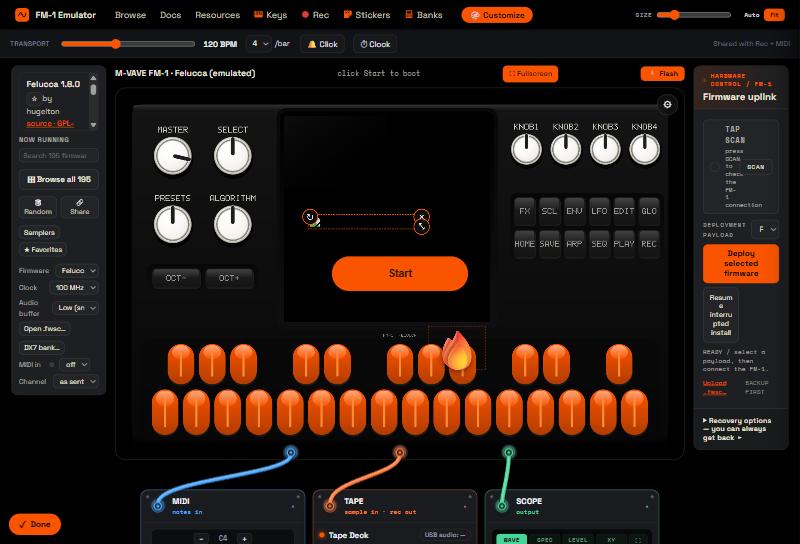
Download
Get the latest build for your system from the Releases page.
| OS | File |
|---|---|
| Windows | FM-1-Emulator-Setup-*.exe (installer) or *-portable.exe (no install) |
| macOS | *-arm64.dmg (Apple Silicon) · *-x64.dmg (Intel) |
| Linux | *.AppImage or *.deb |
First launch
The builds aren't code-signed, so your OS shows a one-time warning the first time. It's safe — here's how to get past it:
- macOS — right-click (or Control-click) the app → Open → Open. (A double-click only shows
a Cancel button; right-clicking gives you the Open button.) If it says "damaged", run in
Terminal:
xattr -dr com.apple.quarantine "/Applications/FM-1 Emulator.app"thencodesign --force --deep --sign - "/Applications/FM-1 Emulator.app". - Windows — if SmartScreen appears, click More info → Run anyway.
- Linux — the
.debis easiest. For the AppImage, if it won't start:sudo apt install libfuse2(Ubuntu 24.04:libfuse2t64), and on Ubuntu 24.04 run with--no-sandboxif you hit a sandbox error.
Full per-platform detail: Installation & first run.
Features
- 115 open-source firmwares bundled — runs fully offline
- Load your own — drag any
.fwsconto the window - Play with the computer keyboard, mouse, or a USB MIDI controller
- Customize panel colors and add image decals; decorate the case with stickers
- Firmware recovery (Windows) — back up, restore, and reinstall your FM-1; a flash is never a dead end
Recovery & safety
The emulator runs firmware purely in software — it cannot harm your computer or your FM-1. The only risk is flashing real hardware, and the app is built so you can always recover: back up the unit's flash in one click, resume an interrupted install, or restore with the bundled M-Flasher (Windows). See Hardware flashing & recovery.
Help
- Installation & first run — the unsigned-app warning on Windows, macOS, and Linux
- Troubleshooting — no sound, MIDI not detected, a firmware won't boot, settings not saving
- Firmware — switching firmware and loading your own
.fwsc - Hardware flashing & recovery — for a real FM-1 unit
Firmware & licensing
Only firmwares published under a clear open-source license are bundled (all 115 are GPL-3.0),
redistributed unchanged with credit — see THIRD-PARTY.md. The M-VAVE stock
firmware and firmwares without a stated license are not bundled; load any .fwsc yourself to run it.
Build from source
Requires Node.js 18+.
git clone https://github.com/briksquared/fm1-emulator.git
cd fm1-emulator
npm install
npm start            # run it
npm run dist:win     # or dist:mac / dist:linux to package
Release builds for all three platforms are produced by GitHub Actions on each tag.
Credits
A fork of fm1-emu by Joakim Eriksson (MIT), which provides the Rust→WebAssembly emulation engine. Firmware by the authors listed in THIRD-PARTY.md.
License
MIT. See NOTICE.md for the fork, bundled-firmware, and trademark notices. Unofficial — not affiliated with, authorized by, or endorsed by M-VAVE. See DISCLAIMER.md.