README from GitHub, GPL-3.0
felucca-vst
felucca-vst turns firmware for the M-VAVE FM-1 into a plugin instrument you can load in a DAW. It works with Felucca and with firmwares built on it, such as GHOULBOX. It builds:
| macOS (Apple silicon and Intel) | Windows (x64) | Linux (x86-64) | |
|---|---|---|---|
| VST3 | ✓ | ✓ | ✓ |
| Audio Unit | ✓ | ||
| LV2 | ✓ | ||
| Standalone app | ✓ | ✓ | ✓ |
Any Felucca-based firmware should work, as long as it keeps Felucca's browser emulator (see Other firmwares). The plugin takes the firmware's own name. Built from GHOULBOX 2.1, it shows up in your DAW as GHOULBOX by felucca-vst; built from Felucca itself, as Felucca. The examples below use GHOULBOX, the default firmware folder.
The plugin runs the firmware's own code. Nothing is re-implemented. The engines, sequencer, effects, menus and
screen are all the firmware's C sources. They are compiled the same way the firmware's browser emulator compiles them
(web/emu/felucca_web.c), but natively instead of to WebAssembly. A new firmware release gives you a new plugin:
pull it and rebuild.
Contents
Building and installing
Every platform follows the same steps:
- Get this project and the firmware's source next to each other.
- Install the build tools.
- Run the build script. With the install option, it also copies the plugin where DAWs look.
- Rescan plugins in your DAW.
The first build downloads JUCE (the plugin framework) and takes 5–15 minutes. Later builds are faster.
1. Get the sources
By default the build expects the firmware in a sibling folder:
some-folder/
├── felucca-vst/                     ← this project
└── ghoulbox-fm1-dungeon-synth/      ← the firmware (or any Felucca-based firmware)
git clone https://github.com/jasonpersinger/ghoulbox-fm1-dungeon-synth    # GHOULBOX
# or: git clone https://github.com/hugelton/Felucca                       # Felucca (then use --firmware ../Felucca)
To use a firmware somewhere else, see Build options.
macOS
Works on Apple silicon (M1–M4) and Intel, macOS 11 or later.
Tools. In Terminal:
xcode-select --install                # Apple's compilers, if you don't have them
brew install cmake ninja              # (Homebrew: https://brew.sh)
pip3 install Pillow fonttools         # used by the firmware's build to make its fonts, icons and tables
Build and install. Run this from the folder that holds both projects:
./felucca-vst/build.sh --install
This puts:
- the VST3 in
~/Library/Audio/Plug-Ins/VST3/ - the AU in
~/Library/Audio/Plug-Ins/Components/
The script ad-hoc signs both, because Apple silicon only loads signed code. It also restarts macOS's Audio Unit
registry so Logic and GarageBand see the new AU. Add --universal to build one plugin that runs on both Apple
silicon and Intel.
Check the AU (optional):
auval -v aumu Gfm1 Fmop # Gfm1: GHOULBOX's code; a Felucca build is Ffm1
It should end with AU VALIDATION SUCCEEDED.
Windows
Works on Windows 10 and 11, 64-bit.
Tools.
- Visual Studio 2022 or later. The free Community edition is fine. In the Visual Studio Installer, select:
- the Desktop development with C++ workload
- under Individual components, C++ Clang tools for Windows. This includes MSBuild support for LLVM (clang-cl) toolset. It's needed because the firmware is written in GNU C, which Microsoft's own compiler can't build.
- Git, CMake and Python. In PowerShell:
Open a new PowerShell window afterwards so they're on your PATH. Visual Studio also comes with a CMake, which you can use from a Developer PowerShell for VS.winget install Git.Git winget install Kitware.CMake winget install Python.Python.3.12 - Pillow and fontTools:
py -m pip install Pillow fonttools
Build and install. Run this from the folder that holds both projects:
powershell -ExecutionPolicy Bypass -File .\felucca-vst\build.ps1 -Install
-Install copies the VST3 into C:\Program Files\Common Files\VST3\. Windows asks once for administrator rights
for that copy.
To avoid the administrator prompt, use -Install -UserFolder instead. That installs into
%LOCALAPPDATA%\Programs\Common\VST3\, the per-user VST3 folder. Not every DAW scans that folder, so you may need
to add it in the DAW's plugin settings.
At runtime, each plugin instance writes a private copy of the firmware module (fm1core-….dll, about 1 MB) to
your temp folder. The copy is deleted when the instance closes, and any copies left by a crash are cleaned up the
next time the plugin starts. If your antivirus questions those files, that's what they are.
Linux
Works on x86-64. These steps are tested on Ubuntu 24.04; other distributions need the same packages under their own names.
Tools:
sudo apt install build-essential cmake ninja-build git python3-pil python3-fonttools \
  libasound2-dev libfreetype-dev libfontconfig1-dev libx11-dev libxcomposite-dev libxcursor-dev \
  libxext-dev libxinerama-dev libxrandr-dev libxrender-dev libxi-dev libgl1-mesa-dev libegl-dev
On Fedora, use dnf install with the -devel packages of the same libraries. On Arch, pacman -S the base
packages (they include headers).
Build and install. Run this from the folder that holds both projects:
./felucca-vst/build.sh --install
This puts:
- the VST3 in
~/.vst3/ - the LV2 in
~/.lv2/
Where the plugin files go
The build writes everything to felucca-vst/build/FeluccaVST_artefacts/Release/. The install options copy from there.
To install by hand, copy the whole bundle folder: a .vst3, .component or .lv2 is a folder, not a single
file. The files are named after the firmware; the table shows a GHOULBOX build.
| Platform | Format | Built file | Install into |
|---|---|---|---|
| macOS | VST3 | VST3/GHOULBOX.vst3 | ~/Library/Audio/Plug-Ins/VST3/ (you only), or /Library/Audio/Plug-Ins/VST3/ (all users) |
| macOS | AU | AU/GHOULBOX.component | ~/Library/Audio/Plug-Ins/Components/, or /Library/Audio/Plug-Ins/Components/ |
| macOS | App | Standalone/GHOULBOX.app | /Applications/ (or run it from anywhere) |
| Windows | VST3 | VST3\GHOULBOX.vst3 | C:\Program Files\Common Files\VST3\, or %LOCALAPPDATA%\Programs\Common\VST3\ |
| Windows | App | Standalone\GHOULBOX.exe | anywhere |
| Linux | VST3 | VST3/GHOULBOX.vst3 | ~/.vst3/ (you only), or /usr/lib/vst3/ (all users) |
| Linux | LV2 | LV2/GHOULBOX.lv2 | ~/.lv2/, or /usr/lib/lv2/ |
| Linux | App | Standalone/GHOULBOX | anywhere |
On macOS, if you copy a build that was downloaded rather than built on that Mac (for example from the GitHub workflow), clear the quarantine flag first or macOS will refuse to load it:
xattr -dr com.apple.quarantine ~/Library/Audio/Plug-Ins/VST3/GHOULBOX.vst3 ~/Library/Audio/Plug-Ins/Components/GHOULBOX.component
Loading it in your DAW
After installing, have the DAW rescan its plugins. Restarting the DAW usually does it. Look for the firmware's name, e.g. GHOULBOX (vendor felucca-vst), among the instruments.
| DAW | Rescan | Add the instrument |
|---|---|---|
| REAPER (all platforms) | Options → Preferences → Plug-ins → VST → Re-scan (check the VST paths include the install folder) | Insert → Virtual instrument on new track… → GHOULBOX (VST3i) |
| Ableton Live | Settings → Plug-Ins → turn on Use VST3 Plug-in System Folders → Rescan | Browser → Plug-Ins → VST3 → felucca-vst |
| Bitwig Studio | Settings → Locations → Plug-ins (scans automatically) | Browser → Instruments → GHOULBOX |
| Logic Pro / GarageBand (macOS, AU) | automatic; if it's missing, Logic → Settings → Plug-in Manager → Reset & Rescan Selection | Instrument slot → AU Instruments → felucca-vst |
| FL Studio (Windows/macOS) | Options → Manage plugins → Find installed plugins | Plugin database → Installed → Generators |
| Cubase / Nuendo | automatic at startup (Studio → VST Plug-in Manager to check) | Add Instrument Track → GHOULBOX |
| Ardour (Linux) | Window → Plugin Manager → Rescan (LV2 needs no scan) | Add Track/Bus → Instrument → GHOULBOX |
To play it from a MIDI keyboard, record-arm the instrument's track and turn on input monitoring, as for any software instrument. For the computer keyboard, see Using it.
Updating, rebuilding, uninstalling
- A new firmware release.
git pullin the firmware's folder, then run the build script again with its install option. Restart the DAW: DAWs only reload a plugin's code on restart. Your DAW projects keep their FM-1 state across updates, as long as the firmware can read its own older projects (GHOULBOX and Felucca can). - Starting over. Delete
felucca-vst/build/and build again. - Uninstalling. Delete the bundles from the folders in the table above.
Build options
build.sh (macOS, Linux):
| Option | Meaning |
|---|---|
--install | Copy the plugins into your user plugin folders (see above). |
--firmware DIR | Build another firmware tree. The default is ../ghoulbox-fm1-dungeon-synth. |
--universal | macOS: one build for Apple silicon and Intel. |
-- <cmake args> | Passed through to CMake. |
BUILD_DIR=… | Environment variable: build somewhere other than ./build. |
build.ps1 (Windows):
| Option | Meaning |
|---|---|
-Install | Copy the VST3 into C:\Program Files\Common Files\VST3. Asks for administrator rights. |
-UserFolder | With -Install: copy into %LOCALAPPDATA%\Programs\Common\VST3 instead. |
-Firmware DIR | Build another firmware tree. |
-BuildDir DIR | Build somewhere other than .\build. |
Or use CMake directly. On Windows add -A x64 -T ClangCL.
cmake -B build -DCMAKE_BUILD_TYPE=Release -DFM1_FIRMWARE_DIR=../ghoulbox-fm1-dungeon-synth
cmake --build build --config Release --parallel
| CMake variable | Default | |
|---|---|---|
FM1_FIRMWARE_DIR | ../ghoulbox-fm1-dungeon-synth | the firmware's source tree |
FM1_FIRMWARE_NAME | found in the firmware: a <NAME>_VERSION beside FELUCCA_VERSION (GHOULBOX), else Felucca | the firmware's name |
FM1_PLUGIN_NAME / FM1_PRODUCT_NAME | the firmware's name / the same, letters and digits | the name in the DAW / on disk |
FM1_PLUGIN_CODE | the name's initial + fm1 (GHOULBOX: Gfm1) | four characters: with the vendor code Fmop, the plugin's identity in DAWs |
FM1_MANUFACTURER | felucca-vst | the vendor shown in DAWs |
FM1_JUCE_DIR | (download JUCE FM1_JUCE_TAG, 9.0.4) | use a local JUCE checkout instead |
FM1_COPY_AFTER_BUILD | OFF | let JUCE copy the plugins into the system folders after each build |
FM1_BUILD_TESTS | ON | build the test programs |
Builds on GitHub. The workflow .github/workflows/build.yml builds and tests macOS (universal), Windows and
Linux, and keeps the zipped plugins as artifacts. It runs on every push. You can also run it by hand from the
Actions tab to choose another firmware repository or branch.
Using it
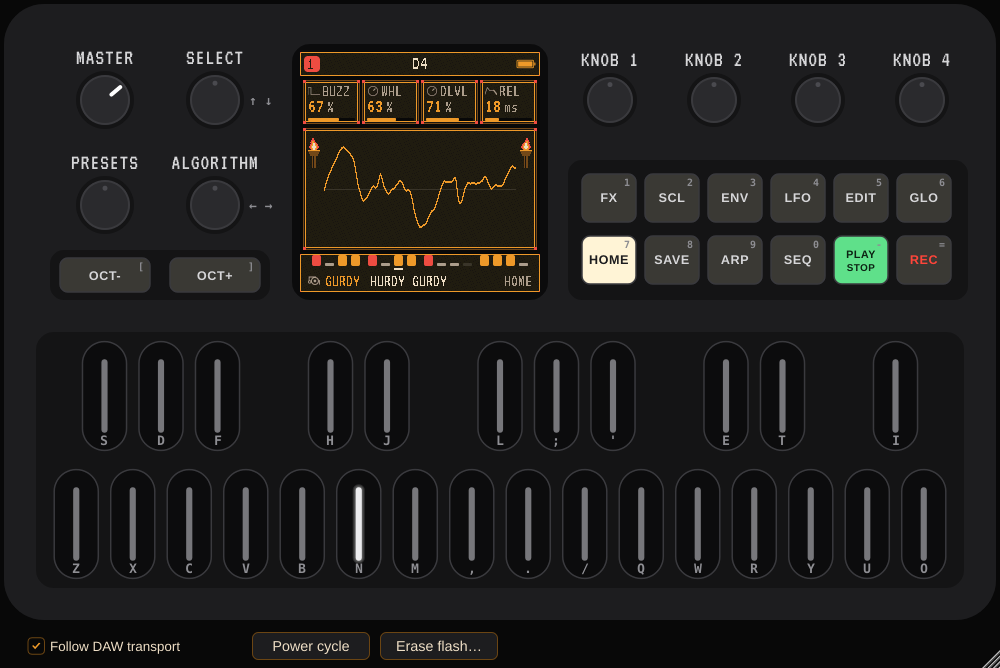
The window is the FM-1, drawn as the web emulator draws it. You can drag it to any size.
Playing the panel
- Click a key or button to press it. Shift-click or right-click a button to latch it, which is how you hold GLO and press a key.
- Drag a knob up or down, or scroll over it.
- With the window focused, the computer keyboard plays it the same way as the web emulator: the keys printed on
the panel.
- Z…/ and S…' are F3–A♯4, and Q…O are B4–G5.
- 1…= are the twelve buttons, and [ and ] are OCT.
- The arrow keys turn SELECT and ALGORITHM.
- Many DAWs keep these keys for themselves. In REAPER, turn on Send all keyboard input to plug-in in the FX window's menu.
MIDI from the DAW goes in as USB-MIDI does on the hardware:
- Channels 1–4 play tracks 1–4. MENU > ROUT can change this.
- The firmware's CC map applies (level, pan, envelope, sends, the four engine knobs, LFO, effects, filter). See the firmware's guide (GHOULBOX: chapter 20).
- Use the DAW's CC lanes to automate the sound.
Follow DAW transport (in the bar under the panel, also a plugin parameter, on by default):
- While the DAW plays, the FM-1's CLOCK is set to USB and it gets MIDI clock from the DAW's transport. Its sequencer, arpeggiator and tempo follow the DAW, starting on the next bar line so patterns line up with bars. Stopping the DAW stops it, and a loop or locate restarts it on a bar line.
- While the DAW is stopped, CLOCK is INT, so PLAY on the panel works on its own.
- Turn the option off and the FM-1's own CLOCK setting decides. It still gets the DAW's clock whenever the DAW plays.
Saving. The DAW project stores each instance's whole FM-1: the music as it is now, plus its flash (saved projects, user presets, settings). Every instance is a separate FM-1 with its own flash. To move music between instances, save and load it with the FM-1's own SAVE page, or use the DAW's preset feature.
The bar under the panel
- Power cycle switches this FM-1 off and on. Its flash stays; with RESTORE LAST on, the music comes back.
- Erase flash… makes it a new FM-1 (after a confirmation).
Master is the MASTER pot. It's also a plugin parameter, so the DAW can automate it.
Latency. The plugin reports 4 ms, plus 2.3 ms when the DAW doesn't run at 44.1 kHz. DAWs compensate for it.
How it works
core/fm1_core.cincludes the firmware'sweb/emu/felucca_web.cunchanged. That file is the real firmware sources against a simulated FM-1: clock, I2S audio interrupt, panel, LEDs, screen, flash. The plugin compiles it as a small shared library.fm1_core.cadds a few calls that a DAW needs and a web page doesn't:- running the device clock one millisecond at a time
- the MIDI input ring's free space
- MIDI clock and transport messages
- the CLOCK setting
- On Windows,
core/win/stands in for the few POSIX names the firmware's host build mentions; the plugin never calls them.core/fm1core.deflists the library's exports. - The firmware keeps the whole device in global variables, so one loaded copy of that library is one FM-1. The
library is embedded in the plugin binary (
cmake/CoreBlob.S.in; on Windows, a resource fromcmake/CoreBlob.rc.in), and each plugin instance loads its own private copy. Linux uses an in-memory file (memfd); macOS uses a temporary file that is deleted once loaded; Windows uses a uniquely named temporary DLL, deleted when the instance closes. Instances share nothing, and Power cycle really is a fresh boot. - The device clock follows the DAW's timeline exactly. Host sample S is device millisecond S / rate, so MIDI reaches the firmware stamped to the millisecond. Its clock-tempo measurement depends on that. The device runs at the FM-1's 44.1 kHz. At other host rates the output goes through a windowed-sinc resampler.
- The device only runs when the DAW asks for audio. When the DAW isn't processing (some hosts pause idle instruments), the open window keeps it running in real time so the screen and panel stay alive.
Tests
The test programs are in the build folder. Visual Studio and Xcode builds put them in build/Release/.
build/core_isolation            # the plugin's loader: separate copies are separate FM-1s, and a new copy starts fresh
build/fm1_processor_test        # DAW clock sync, panel input, state save/load, power cycle, two threads, CPU cost
python3 tests/host_test.py build/FeluccaVST_artefacts/Release/VST3/GHOULBOX.vst3   # in a real VST3 host
host_test.pyneedspip3 install pedalboard mido.build/fm1_processor_test --snapshot panel.pngdraws the plugin window to an image.- What has been run: everything above, on Linux. On Windows, the firmware library and the plugin's loader were
cross-compiled with clang and passed
core_isolationunder Wine. The GitHub workflow builds and tests all three platforms.
Other firmwares
A Felucca-based firmware works if it has Felucca's web/emu/felucca_web.c and the firmware's header generator
(tools/build.py --gen-only, or an already generated build/gen/). Point the build at it:
./felucca-vst/build.sh --firmware ../some-fork --install
On Windows: .\felucca-vst\build.ps1 -Firmware ..\some-fork -Install.
The plugin takes the firmware's name and a code made from it (see Build options), so plugins built from different firmwares can sit side by side in one DAW. Two firmwares whose names start with the same letter would get the same code. In that case, give one its own name and code:
./felucca-vst/build.sh --firmware ../some-fork -- -DFM1_PLUGIN_NAME="Some Fork" -DFM1_PLUGIN_CODE=Sfk1
Use a separate build folder per firmware (BUILD_DIR=build-somefork ./felucca-vst/build.sh …, or -BuildDir on
Windows), or delete build/ when switching.
core/fm1_core.c also uses a few of the firmware's internal names: midi_enqueue and the MIDI ring, song.g[G_CLOCK]
and G_BPM, and ui.force. A fork that renamed them needs those lines adjusted. On Windows, a fork that adds new
web_* exports the plugin should use also needs them listed in core/fm1core.def.
Not emulated
These are the same as the web emulator:
- USB audio, MIDI out, the editor, firmware updates and the serial console
- TRS MIDI
- the battery
- the user sample slots (there's no way to fill them here)
The FM-1's own limits also apply. The tempo from MIDI clock is a whole BPM between 40 and 240, and the firmware reads its MIDI input once per 2.9 ms audio block, as on the hardware.
Licence
GPL-3.0-only, the same as the firmware (LICENSE). The plugin is built with JUCE, used under
the AGPLv3. If you distribute builds, the combined work's source must be offered under those terms. The VT323 font
(resources/) is under the SIL Open Font License.
M-VAVE and FM-1 are trademarks of their respective owners. This project is not affiliated with or endorsed by them, or by the firmware's authors.