README from GitHub, MPL-2.0
fm1-radio: an internet radio for the FM-1
fm1-radio turns the M-VAVE FM-1 into a pocket internet radio. It joins a 2.4 GHz WiFi network, plays stations from around the world from Radio Garden's map, and lets you play the radio with punch-in effects on the keys.
It is a proof of concept: it works, and the rough edges are listed at the end.
Release 1.3 is a pre-release: install it from https://charlesvestal.github.io/fm1-radio/install/ (Chrome or Edge, the FM-1 on USB); the manual is there too. 1.1 fixed what made 1.0 withdrawn (WiFi dropping while the places loaded, the heap running out overnight or after WiFi went off and on, a loud buzz on plain AAC stations) and added favorites and a small synth; 1.2 joins WiFi more reliably on a weak signal, joins hidden networks, and keeps WiFi up while an HTTPS station connects; 1.3 joins with the same address every time, so a router sees one FM-1, not a new one at each install. If your FM-1 crashes or won't stay on your WiFi, please send the installer page's "Report a problem".
- Try it in your browser (no FM-1 needed; it plays the stations, effects and all, through Radio's own decoders;
Radio Garden's lists come through a small proxy,
app/web/proxy/, as its site answers no other): https://charlesvestal.github.io/fm1-radio/emu/
Licensing
The source is free software under MPL-2.0. Radio is built on fm1-base,
the MPL platform for FM-1 firmware (from Felucca, with its author's permission), so the firmware may link JieLi's
WiFi libraries, which are Apache-2.0, and the firmware file may be shared. For where each part of the code comes
from, see LICENSING.md.
Building
What you need
-
macOS or Linux, with Python 3.
-
Pillow with libraqm (the build draws its fonts with it). Homebrew's Python has both:
brew install python pillow. Use that Python to run the build. -
mido and python-rtmidi, to install and to talk to the FM-1:
pip3 install mido python-rtmidi. -
Docker or podman. JieLi's toolchain runs on Linux x86-64 only, so on a Mac the build runs each tool in a
linux/amd64container. With podman, put adockerscript that runsexec podman "$@"first on your PATH. On Linux x86-64 no container is needed. -
JieLi's Linux toolchain:
base/tools/get_toolchain.sh # installs to ~/.jieli/toolchain -
The JieLi AC79 SDK (Apache-2.0), version 1.2.1. The build takes JieLi's libraries, lwIP's sources and three boot files from it. None of those are in this repository.
git clone --depth 1 --branch AC79NN_SDK_V1.2.1_2023-12-13 \
    https://gitee.com/Jieli-Tech/fw-AC79_AIoT_SDK.git ~/fw-AC79_AIoT_SDK
Build and install
git submodule update --init --recursive          # fm1-base in base/
PYTHON=/opt/homebrew/bin/python3 ./build.sh
python3 base/tools/fm1_install.py app/build/radio.fwsc --yes      # the FM-1 plugged in over USB
The build makes app/build/radio.fwsc and checks the image and RAM sizes. ./build.sh --host builds the
host simulator instead (app/build/host/radio_host), with a stand-in network.
To go back to M-VAVE's firmware, use the web installer's "Back to the stock firmware" on https://charlesvestal.github.io/fm1-radio/install/. An FM-1 that fails to start twice starts in a safe mode with USB on, and holding OCT− and OCT+ for 5 seconds starts update mode.
The places
Radio fetches Radio Garden's list of places itself, the first time it has WiFi: about 12,900 places in 228 countries,
names only. It reads the 1.9 MB list a few times (a minute or so each, paced so the WiFi keeps up) and keeps the
table in the FM-1's data flash, where it stays: Home shows the time left, and it happens only once.
python3 app/tools/radio_ctl.py places fetches them again. Nothing of Radio Garden's is in the firmware or in
this repository.
The stations aren't kept either. When you choose a place, the FM-1 asks Radio Garden for its stations, and plays a station through Radio Garden's link to its stream.
Using it
First start: join a network
The FM-1 joins 2.4 GHz networks only, open or WPA2 with a password. It can't see 5 GHz networks.
With no network saved, the FM-1 starts on the list of networks around it, already scanning: turn SELECT to yours and press PLAY, then type its password (steps 4 and 5 below).
From a computer, with the FM-1 plugged in:
python3 base/tools/fm1_remote.py wifi join "NETWORK" "PASSWORD".
On the FM-1 itself:
- Press GLO for the WiFi page.
- Press PLAY to turn WiFi on, then SEL to see the networks around you.
- Turn SELECT to a network.
- For an open network or one you've saved, press PLAY to join. Otherwise press SAVE to type its password.
- Type the password on the keys and press PLAY to save it and join. HOME cancels.
For a hidden network, choose Other... (at the top while it scans, at the bottom after), type the network's name and press PLAY, then its password (none for an open network) and PLAY again.
The keys type left to right, every key in turn, black ones too: the first 26 are a to z, and the last key deletes.
- Hold OCT− and press a key for a capital.
- Hold OCT+ and press a key for the digits 0 to 9 and then
space ! @ # $ % & * - _ . , ? + / :.
The screen shows a small keyboard with what each key types.
The FM-1 keeps six networks, the most recent first. With networks saved, it turns WiFi on at start, scans, and joins
the strongest saved network it hears (hearing none, it tries each saved one in turn). To forget one, list them with python3 base/tools/fm1_remote.py wifi saved, then
wifi forget N.
Listening
| Control | What it does |
|---|---|
| PLAY | Play or stop. |
| KNOB 1 | Continent. |
| KNOB 2 | Country. |
| KNOB 3 | Place: a city or town, A to Z. |
| KNOB 4 or SELECT | Station in the place. |
| MASTER | Volume. |
| FX | Tap tempo for the effects. |
| SEL | Browse the list of continents, countries, places and stations. |
| SAVE | Favorites. |
| ARP | The synth: the keys play notes over the radio. |
| GLO | The WiFi page, and back. |
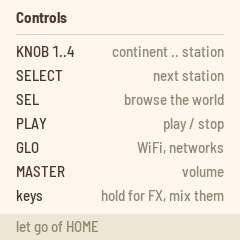
| Hold HOME | The controls, on the screen. |
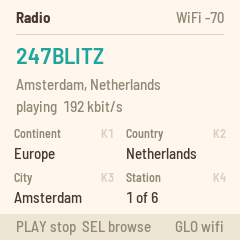
The knobs work as a dial: turn them, and the radio tunes once you stop. A new place takes a second or two: the FM-1 asks Radio Garden for its stations (up to 100, as Radio Garden orders them) and plays the first. The screen shows the station, its place and country, and whether it is playing or buffering. A station that drops out is reconnected by itself.
The FM-1 plays MP3 and AAC streams, HE-AAC ("AAC+") included. An HE-AAC v2 stream plays in mono. A few stations can't play at all (HLS, AAC in an MP4 container, Ogg), and some are offline. The screen says so ("can't play HLS", "station offline"): turn KNOB 4 to the next one.
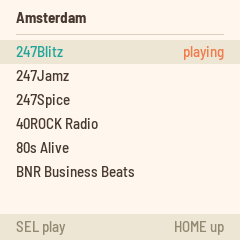
In the browser, turn SELECT to move, press SEL to open a place or to play a station, and press HOME to go up a level.
The FM-1 remembers the station and whether it was playing, and picks up there at the next start.
Favorites
Press SAVE for your favorites, up to 16. The list's top row adds the station playing. Turn SELECT to move, press SEL to play a favorite, and REC to delete it. HOME (or SAVE) goes back. The favorites are kept in the FM-1's flash, apart from everything else; another firmware that uses the same flash (LOOM-8's samples, for one) erases them.
The synth
Press ARP to play the keys: a 4-voice synth over whatever the radio plays (or on its own).
| Control | What it does |
|---|---|
| KNOB 1 | The wave: sine, triangle, saw, square, and everything between. |
| KNOB 2 | Filter: a low-pass, 80 Hz to 12 kHz. |
| KNOB 3 | Attack: 1 ms to 2 s. |
| KNOB 4 | Release: 5 ms to 3 s. |
| SELECT | The synth's level against the radio. |
| OCT- / OCT+ | Octaves, two each way. |
| HOME or ARP | Back to the radio (the keys are the effects again). |
Its settings are kept, a few seconds after a change.
Recording over USB
Plugged into a computer, the FM-1 is also a USB sound card, "RADIO FM-1" (stereo, 44.1 kHz): record the radio, the effects and the synth as you hear them (after MASTER) in any audio app.
Punch-in effects
While the radio plays, the 16 white keys light up. Hold a white key for its effect, and let go to stop it. Hold several to mix them. The screen shows what is held, and a held key's light goes out.
| White key | Effect |
|---|---|
| 1 | Low-pass filter |
| 2 | High-pass filter |
| 3 | Telephone: a narrow, driven band |
| 4 | Bitcrush |
| 5 | Stutter, 1/8: repeats the last eighth note |
| 6 | Stutter, 1/16 |
| 7 | Stutter, 1/32 |
| 8 | Stutter, 1/64 |
| 9 | Tape stop |
| 10 | Reverse |
| 11 | Chop, 1/8: open for the first half of each eighth note, from your press |
| 12 | Chop, 1/16 |
| 13 | Ring modulator |
| 14 | Half speed |
| 15 | Mute |
| 16 | Lo-fi |
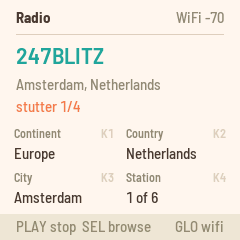
The stutters, tape stop, reverse and half speed play back the last quarter second, in mono. Only one of them plays at a time: with two held, the lower key wins. The filters, crushers, ring modulator, chops and mute work on top of them.
Tap tempo. The stutters and chops follow a tempo, 120 BPM at start. Tap FX on Home in time with the music to set it: the last four taps count, and a pause of two seconds starts a new count. The screen shows the tempo for two seconds, and the FX light flashes on the beat. The history holds about a quarter second, so below about 108 BPM the 1/8 stutter plays a 1/16 instead.
Debugging over USB
app/tools/radio_ctl.py drives the radio over USB-MIDI:
| Command | What it does |
|---|---|
dump | The place, the station, the stream, the decoder and how often the main loop goes round. |
radio | As PLAY: play or stop. |
turn K D | As turning knob K+1 (0 to 3) by D. |
fx N | As holding white key N (1 to 16); fx 0 lets go. |
bpm N | Set the tap tempo (41 to 167). |
url URL | Play the stream at URL, http:// or https://, until the next tune. |
rginfo | The places table the FM-1 fetched. |
fm1-base's base/tools/fm1_remote.py does the rest: WiFi (wifi status, wifi join, wifi saved...), the last
crash and the radio's log (log), and the buttons, keys and knobs as a player would press and turn them.
After a crash, the installer page's "Report a problem" reads the same crash record and log in Chrome or Edge, ready to copy. Don't switch the FM-1 off first: the record survives a restart, not switching off.
HTTPS and certificates
The FM-1 plays https:// streams as well as plain http:// ones, and asks Radio Garden (HTTPS
only) for each place's stations, with
BearSSL's TLS client:
- TLS 1.2;
- ECDHE key exchange on P-256;
- AES-GCM;
- RSA or ECDSA server keys.
That covers what streaming servers offer.
It does not check certificates. The FM-1 has no root certificates and no clock, so it uses the server's key as sent and doesn't verify who signed it. The connection is encrypted, but someone on your network who wanted to could pose as the station or as Radio Garden, and send you other audio or another list. For a radio this is a small risk. Checking certificates would take BearSSL's checker, a set of root certificates and the date from network time, about 35–45 KB of flash, more than the 6 KB now free.
Known limits
- 2.4 GHz WiFi only. MP3 and AAC streams; HE-AAC v2 plays in mono (its parametric stereo would need about 30 KB more RAM than is left), and HLS, MP4 and Ogg streams don't play.
- A place shows up to 100 stations.
- Server certificates aren't checked (see above).
- fm1-base raises the supplies to M-VAVE's own levels at start (VDC14 1.60 V, SYSVDD 1.38 V). At the boot loader's, flash reads failed under WiFi load and the FM-1 crashed.
- The MP3 decoder has crashed twice, both times around a change of station, and the FM-1 restarted. It hasn't happened on demand since; the crash record keeps the next one (see above).
- RAM is full (see below).
Where the space goes
The FM-1 has no external RAM, so WiFi has to fit in the chip's own memory beside the radio. The figures are from the build of October 2026 on fm1-base, rounded.
- Flash: the image is 576 KB of the 581 KB app slot, about 6 KB free. WiFi is about 299 KB of it (JieLi's
driver 146 KB, the WPA supplicant 77 KB, lwIP 51 KB, the RF layer, crypto, the shim and its glue 25 KB), HTTPS
(BearSSL and the TLS glue) 36 KB, the AAC decoder about 85 KB, and the radio, minimp3, the pages, the fonts and the
platform the rest (the places are in the data flash, fetched by the FM-1: about 125 KB). The large font fm1-base
draws its splash with is left out (
APP_BIG_FONT FONT_M: 20 KB). - RAM:
.dataand.bssuse 126.8 KB of 128 KB (fm1-base's WiFi memory map). WiFi's driver, RF layer, lwIP and the shim's 14-task table are about 100 KB of it. - The pool: 307 KB of 311 KB: most of the heap (248 KB), lwIP's packet buffers (28 KB), the screen's drawing buffer (240 × 48 pixels, 23 KB). The heap's other 24 KB is in RAM; its 272 KB also hold the WiFi tasks' stacks (4 to 8 KB each, as each task starts).
While a station plays, the radio takes the stream buffer (20 KB), the decoded audio (18 KB), the effects' history (12 KB) and the decoder: 11 KB for MP3, 89 KB for AAC with HE-AAC's SBR. With WiFi, WPA, lwIP and an HTTPS stream's 16.7 KB record buffer, the heap holds about 177 KB on an MP3 station and 254 KB on an HE-AAC one, of 272 KB; a background scan of the WiFi library's (on a weak link) takes about 10 KB more, and keeps it.
History
The repository began as fm1-ble, which got JieLi's BLE stack running on a small cooperative OS shim inside a
Felucca firmware, as BLE MIDI. The notes in notes/ are from that work. The radio then reused the shim for JieLi's
WiFi libraries. In October 2026 the shim, the WiFi glue and the platform moved into fm1-base, and Radio became an
app on it (app/), under MPL-2.0.
Credits
- fm1-base, from Felucca by Leo Kuroshita (Hügelton Instruments): the platform (MPL-2.0, with his permission).
- minimp3 by lieff: the MP3 decoder (CC0).
- PacketVideo's AAC decoder, from Android 4.1.2 (Apache-2.0): the AAC decoder.
- BearSSL by Thomas Pornin: the TLS client (MIT).
- The JieLi AC79 SDK (Apache-2.0): the WiFi libraries, lwIP and the radio's tuning constants.
- Radio Garden: the stations. Radio Garden isn't affiliated with this project.
- SomaFM: the stream used while building it.
"M-VAVE" and "FM-1" are trademarks of their owners; fm1-radio is independent firmware, not affiliated with or supported by them.