README from GitHub, GPL-3.0
OB-Xd for Schwung
Virtual analog synthesizer module based on OB-Xd by Filatov Vadim (reales).
Emulates the classic Oberheim OB-X with polyphonic voices, analog-modeled filters, and rich modulation.
Features
- 6-voice polyphonic (balanced for Move's ARM CPU)
- Saw and pulse oscillators with BLEP anti-aliasing
- 4-pole resonant filter with envelope modulation
- LFO with sine, square, and S&H waveforms
- Full ADSR envelopes for amplitude and filter
- Per-voice analog variation (filter/glide/envelope drift, level, pan) — the full OB-Xd "Voice Variation" set
- Works standalone or as a sound generator in Signal Chain patches
- Graphical Remote UI — an OB-Xd-styled web panel in Schwung Manager (
http://move.local:7700/remote-ui) with knobs, switches, and the preset browser, mirroring the classic faceplate
Prerequisites
- Schwung installed on your Ableton Move
- SSH access enabled: http://move.local/development/ssh
Install
Via Module Store (Recommended)
- Launch Schwung on your Move
- Select Module Store from the main menu
- Navigate to Sound Generators → OB-Xd
- Select Install
Quick Install (pre-built)
curl -L https://raw.githubusercontent.com/charlesvestal/schwung-obxd/main/obxd-module.tar.gz | \
  ssh ableton@move.local 'mkdir -p /data/UserData/schwung/modules/sound_generators && tar -xz -C /data/UserData/schwung/modules/sound_generators/'
Build from Source
Requires Docker (recommended) or ARM64 cross-compiler.
git clone https://github.com/charlesvestal/schwung-obxd
cd schwung-obxd
./scripts/build.sh
./scripts/install.sh
This also installs chain presets for using OB-Xd with arpeggiators and effects.
Controls
| Control | Function |
|---|---|
| Up/Down | Octave transpose (-2 to +2) |
| Jog wheel | Browse presets / navigate menus |
| Knobs 1-8 | Adjust parameters for current category |
In Shadow UI / Signal Chain, parameters are organized into navigable categories. The same categories drive the on-device menu, the auto-generated chain UI, and the graphical Remote UI.
Parameters (74 total)
Every parameter from the original OB-Xd engine is exposed, except economy
mode, which this fork forces permanently ON (CPU economy is always enabled).
Global
volume, tune, octave, voice_count, legato, portamento, unison, unison_det, as_played*
Oscillator 1
osc1_saw, osc1_pulse, osc1_pitch, osc1_mix
Oscillator 2
osc2_saw, osc2_pulse, osc2_pitch, osc2_mix, osc2_detune, osc2_sync, osc_quantize
Osc Common
pw, pw_env, pw_env_both*, pw_ofs, noise, xmod, brightness
Filter
cutoff, resonance, filter_env, key_follow, multimode, bandpass, fourpole, self_osc, fenv_inv
Filter Envelope
f_attack, f_decay, f_sustain, f_release, vel_filter
Amp Envelope
attack, decay, sustain, release, vel_amp
LFO
lfo_rate, lfo_sin, lfo_square, lfo_sh, lfo_sync, lfo_amt1, lfo_amt2
LFO Destinations
lfo_osc1, lfo_osc2, lfo_filter, lfo_pw1, lfo_pw2*
Pitch Mod
env_pitch, env_pitch_both, bend_range, bend_osc2*, vibrato
Voice Variation
filter_var, porta_var, env_var, level_var, pan_1 … pan_8
* = toggle (on/off)
Remote UI
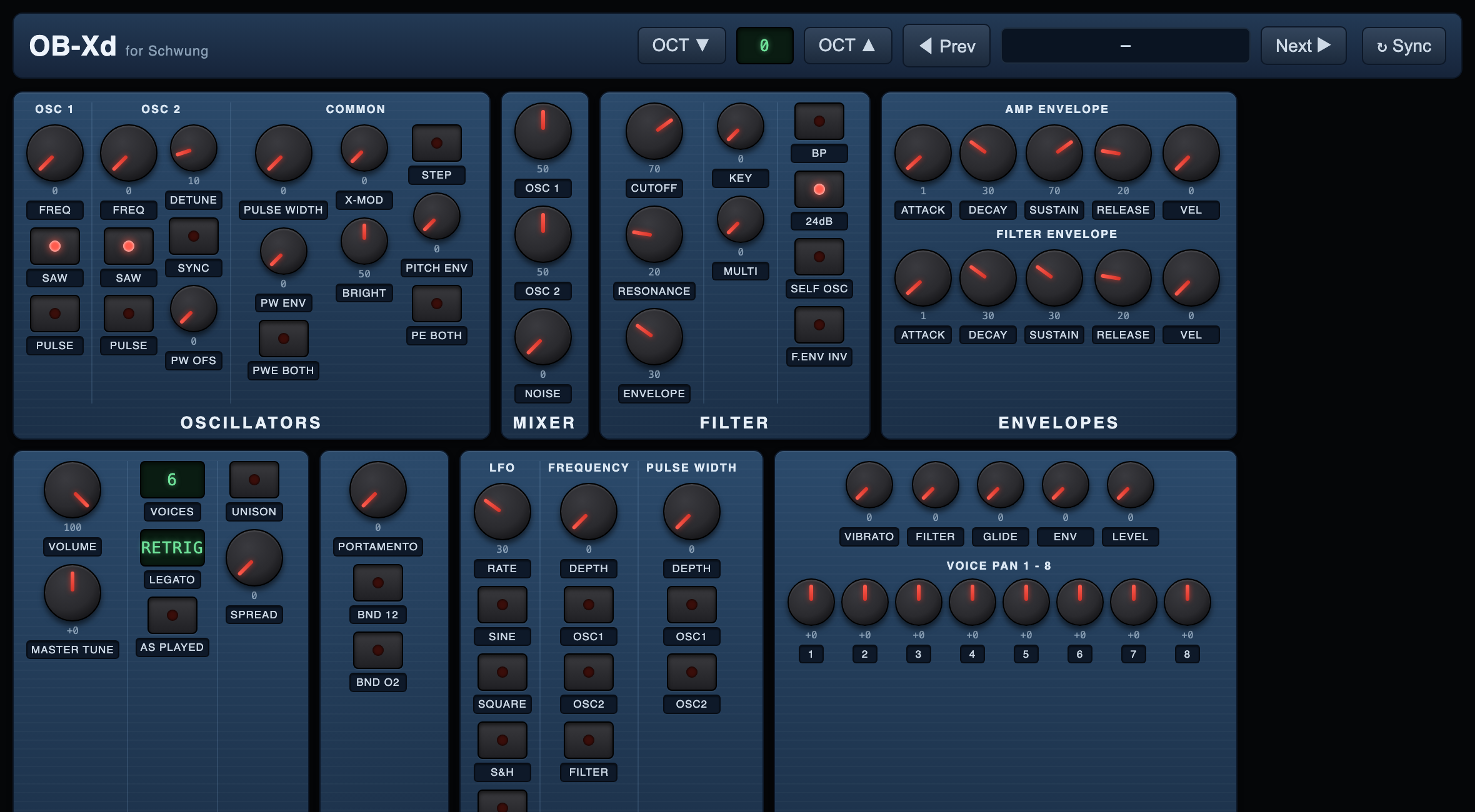
Open Schwung Manager at http://move.local:7700/remote-ui while OB-Xd is loaded in a slot.
The module ships a custom web_ui.html styled after the classic OB-Xd faceplate
(Global · Control · Modulation · Oscillators · Mixer · Filter · Envelopes · Voice Variation).
Drag knobs (hold Shift for fine control, double-click to reset), click the LED switches,
step through presets, and shift the octave — all changes sync bidirectionally with the
hardware in real time.
Troubleshooting
No sound:
- Check that voices are playing (polyphony count shows in display)
- Try changing preset - some presets may have low volume
- Ensure MIDI is routed correctly if using external controller
Harsh/clipping sound:
- Lower the filter resonance - OB-Xd can self-oscillate at high resonance
- Reduce the cutoff frequency
- Lower unison detune if enabled
CPU usage high:
- Reduce unison (each unison voice doubles CPU load)
- Use fewer simultaneous notes
License
GPL-3.0 - See LICENSE
Based on OB-Xd by Filatov Vadim, which is also GPL licensed.
AI Assistance Disclaimer
This module is part of Schwung and was developed with AI assistance, including Claude, Codex, and other AI assistants.
All architecture, implementation, and release decisions are reviewed by human maintainers.
AI-assisted content may still contain errors, so please validate functionality, security, and license compatibility before production use.