README from GitHub, GPL-3.0
ROM-1 for the M-VAVE FM-1
ROM-1 turns the M-VAVE FM-1 into a sixteen-part sound module, as the rack modules of the nineties were: a part for each MIDI channel, each playing a preset of the sounds you put on it, with a filter, envelopes, reverb and chorus. It plays .sf2 files: choose them in the browser, and they are converted there to fit the FM-1 with the best quality that fits, then put on it over USB. The keys play the part on the screen; MIDI over USB or the TRS jack plays all sixteen at once. It comes with starter sounds of its own: a General MIDI handful and a drum kit.
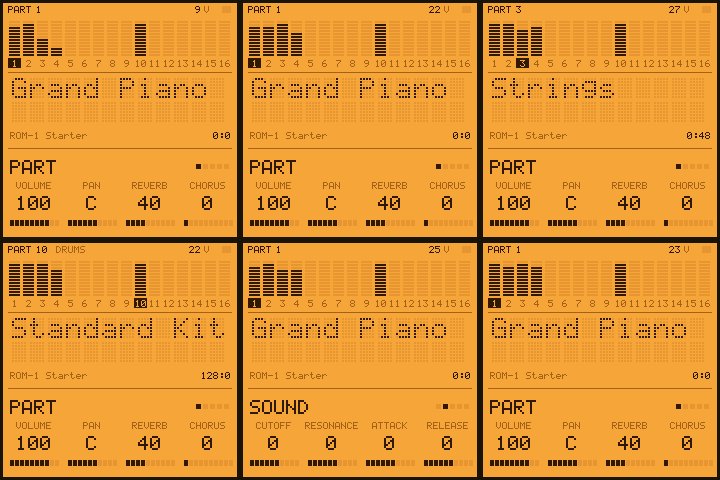
| Try it in the browser | The same code the FM-1 runs: the starter sounds, or your .sf2 files. No FM-1 needed. |
| Your sounds | Choose .sf2 files and presets; they are converted in the browser and put on the FM-1 with ROM-1. |
| Install it | ROM-1 with its starter sounds, from Chrome or Edge, the FM-1 on USB. |
| Read the manual | Getting started, then every knob, page and MIDI message, and what fits. |
| Download | The firmware file (rom1-X.Y.Z.fwsc) of every release, and its source. |
What fits
ROM-1 keeps about 740 KB of sounds: about 468 KB inside the firmware and 276 KB in the FM-1's data area. The converter keeps each sample 16-bit where there is room; when there is not, it steps the biggest down first: to 4-bit ADPCM, then to lower sample rates (32, 22, 16, 11, 8 kHz), as much as needed and no more. The fonts go in in the order you give them, so that whole fonts sit in the firmware first.
- Game-console and chiptune fonts (SNES, GBA, Genesis, NES, Game Boy rips) are small and usually fit whole, several at once: four SNES soundtracks' fonts (151 presets) fit together at a mix of 16-bit and 4-bit.
- General MIDI sets of a few megabytes fit whole at reduced quality, or pick the presets you need.
- Big fonts (tens or hundreds of megabytes, long multisampled pianos, rendered pads): pick a few presets. The page shows how full it is and at what quality, as you tick them.
Each font gets a bank number in the order you give them: bank select (CC 0) picks the font, program change its preset, and channel 10 plays the font's drum kit.
In short
| Keys · OCT− OCT+ | Play the part on the screen (F3 to G5) · the octave |
| ALGORITHM · PRESETS · SELECT | The part (1–16, MIDI channels 1–16) · its preset (GLO held: the next font) · the page |
| Knobs 1–4 | The page's values: PART volume, pan, reverb, chorus · SOUND cutoff, resonance, attack, release · EFFECTS reverb kind, time, level, chorus · SETUP velocity, transpose, keys out, lights |
| HOME · ENV / LFO · FX · SEQ | The PART, SOUND, EFFECTS and BANK pages (GLO held long: SETUP) |
| PLAY · ARP · REC | A phrase on the part · hold (the sustain pedal) · all notes off |
| SEL · EDIT · SAVE | Mute (GLO: solo) · the part's knobs back (GLO: a GM reset) · save the settings now |
Hold any button for a second and a card says what it does.
Installing, and going back
- With your sounds: the Your sounds page (Chrome or Edge, a
USB data cable) installs ROM-1 with them in one go. From the command line:
pip3 install mido python-rtmidi, thenpython3 tools/rom1_load.py --package rom1-X.Y.Z.fwsc FONT.sf2 .... - With the starter sounds: the web installer, or
python3 tools/fm1_install.py rom1-X.Y.Z.fwscwith the file from the latest release. - Going back: the installer's "Back to the stock firmware" puts M-VAVE's firmware back, as does M-VAVE's own updater, M-UPGRADE. Any other FM-1 firmware installs over ROM-1 as it would over the stock one.
- Other firmwares' saved work: the sounds that do not fit in the firmware go to the FM-1's data area, where some firmwares keep their samples, patterns or songs; putting your sounds on replaces what another firmware kept there. ROM-1's settings live in the FM-1's settings memory.
Installing other firmware is at your own risk, though it's hard to get stuck: an FM-1 that fails to start twice comes up in a safe mode the installer can reach, and the manual's Troubleshooting covers the rest.
MIDI
Sixteen parts, one for each channel, over USB and the TRS MIDI input alike. Notes and velocity; pitch bend and its range (RPN 0), fine and coarse tuning (RPN 1, 2); modulation (CC 1) and channel pressure for vibrato; volume (7), pan (10), expression (11), sustain (64), resonance (71), release (72), attack (73), cutoff (74), reverb (91) and chorus (93) sends; bank select (0, 32) and program change; all sound off (120), reset controllers (121), all notes off (123); General MIDI's and GS's resets. With KEYS OUT on, the keys go out over USB too.
Status
ROM-1 is young (0.x). It has been measured on an FM-1: the engine renders 128 frames at a time (2.9 ms at 44.1 kHz), about 63 µs a voice. Sixteen parts each starting a note every 30 ms, stealing voices all the while, take 70 % of the FM-1's time on average and at most 2.5 ms of a render's 2.9; none is late. A voice cap starts at 28 voices and follows the render time: up to 32 while there is room, down at once when a render runs long. The data area's part of a bank goes over USB at about 34 KB a second (280 KB in 8.3 s), checked as it lands. Feedback on how it sounds is what helps most now.
Ideas and problems
- Something you'd like: a feature request.
- Something wrong: a bug report (the version is on the BANK page, and on the screen when the FM-1 starts).
Make it your own
Fork it, change it, release your own: CONTRIBUTING.md says where things are, how to give
your version its own name and identity, and how to send changes back. Every push is built and tested on
GitHub; a tag vX.Y.Z makes a release, and the site (emulator, installer, your sounds, manual) follows it.
tests/run_tests.sh                                   # the tests: the converter, the engine, the app in a simulator
./build.sh                                           # build/rom1.fwsc, with the starter sounds (see BUILDING.md)
python3 tools/rom1_load.py FONT.sf2                  # your sounds: converted, installed, the rest sent over USB
Credits
ROM-1 is built on SEQ-4, CRT-4, LCD-4 and IND-1, themselves built on AMB-1 by Charles Vestal: the frame, screen, simulator and emulator. The platform (hardware layer, USB, update loader, storage, installer) is Felucca's by Leo Kuroshita (Hügelton Instruments), by way of X0X, FoMni, AMB-1, IND-1, LCD-4, CRT-4 and SEQ-4. The engine, the converter and the starter sounds are ROM-1's own. The idea of running FM-1 firmware in the browser comes from Groove OS. GPL-3.0-only; see LICENSING.md.
The .sf2 files you put on ROM-1 are not part of it: their samples belong to whoever made them, and their licenses say what you may do with them. M-VAVE and FM-1 are trademarks of their owners. ROM-1 is not affiliated with M-VAVE, Charles Vestal or Hügelton Instruments.