README from GitHub, MIT
TinyScratch
A generative auto-scratcher for the Ableton Move (a Schwung sound generator). Press a pad and it writes a new turntable scratch for your sample, plays it in time with your song, and lets you keep the ones you like.
Install
Install TinyScratch.tar.gz from the releases page with Schwung's module manager
(Install Custom Module, From GitHub URL, fleshinachair/TinyScratch), then load TinyScratch in a track slot as a sound generator.
It comes with two samples, Ahhh and Fresssh, and three clips for each.
Getting started
-
Open the Pads screen: touch dial 1 and press the jog wheel (Back leaves it).
row (from the top) pads 1 and 2 clips 1 to 14, then Generate (orange) and Auto (green) 3 the eight samples: Ahhh, Fresssh, User 1 to 6 4 the fader (red), or cues when no clip is playing -
Generate: press Generate for a new clip; press it again for another. Clips follow the transport, so press play if nothing sounds.
-
Keep: tap an empty clip pad while a generated clip plays. Auto plays your kept clips one after another.
-
Delete: hold a clip pad for 1.5 s.
-
Pages: each sample has four pages of 14 clips; < and > turn the page.
-
Your own sample: hold an empty User pad and make a sound into the Move's input (up to 10 s), or use Load Sample to pick a
.wav. Hold a User pad for 1.5 s to remove it. Short, noisy, aggressive sounds scratch best.
Playing
- The clip plays while the transport runs. Hold a red pad to cut the sound, like a crossfader.
- With the transport stopped, hold a red pad to play the clip until you let go.
- Cue pads: with no clip playing (tap Auto again to stop), the red pads drop the needle on the sample's words or hits.
- Jog wheel right zooms into the clip; left zooms back out. Notes from C3 up also cut the sound in.
Dials
The jog wheel moves between the pages: the picture, Main, Playback, Pad Play and Waveform. On the Pads screen the eight dials are Style, Length, Drag, Humanise, Groove, Echo, Forwards and Finish.
Main (what Generate makes next; a kept clip never changes):
| dial | |
|---|---|
| Style | one of the styles below |
| Length | 1, 2 or 4 bars |
| Forwards | how often the record is let go through the word |
| Finish | how often a clip ends by playing the whole sample through |
| Echo | how often a bar has an echo scratch (a stab repeated, quieter each time) |
| Groove | how far Improv keeps to a drum pattern, leaving room for a beat. Thin on its own, good over a song |
Playback (how a clip plays, not the clip itself):
| dial | |
|---|---|
| Swing | straight to hard swing |
| Humanise | loose timing and cuts, different every pass |
| Bite | saturation, for an edge that cuts through a mix |
| Clip Depth / Offset | how far the clip moves along the sample, and where |
| Drag | how quickly the playhead follows: low is digital, high is more like a record |
| Gain | -24 to +12 dB |
| Vinyl | sounds more like a record under a needle: slow moves get quieter, with faint hiss and crackle |
Pad Play: Note Gate, Vel to Vol, Cue Pads and Taste Log.
Taste Log is for a future feature that learns what you like. Nothing uses it yet, and it never leaves your Move. It writes a line to
taste_log.csv in the module folder when you keep, skip or delete a clip (the clip's settings and some measurements, no audio). Turn it
off on Pad Play, or delete the file to clear it.
Styles
| style | |
|---|---|
| Flow | Improv (the default): a two-bar improvised phrase, then a variation, moving like a real DJ's hand |
| Snap | Improv as it was in 1.1: faster flicks, punchier |
| Freestyle | Improv with longer, looser sounds, like a DJ scratching on their own |
| Baby | back and forth, no fader |
| Cuts | pushed forward, fader shut on the way back |
| Military | cuts and rubs in a marching rhythm |
| Scribble | a fast vibrating rub on one spot |
| Stab | a short, quick push |
| Chirp | a quick baby with a click at each turn |
| Transform | a slow stroke with the fader tapped open in rhythm |
| Flare | a baby with clicks in the middle of each stroke |
| Crab | three or four fast clicks in one push |
| Orbit | a smooth, round 2-click flare |
| Drag | slow, low strokes |
| Tear | pushed, stopped, pushed again, then the same backwards |
| Stutter | the start of a word pushed in time, then the whole word let go: "f-f-f-fight". Best on speech |
Generate makes a recipe (sample, style, seed, length and dials), so a clip can always be made again. Kept clips are saved exactly, so they
sound the same whatever later versions do. Clips are stored in recipes.txt and kept.bin in the module folder.
Samples
Ahhh and Fresssh are the classic scratch sounds from "Change the Beat" (Fab 5 Freddy, 1982), described as public domain (see
samples/CREDITS.txt). User 1 to 6 start empty.
- Recordings are trimmed, faded and levelled, and saved as
user1.wavtouser6.wavinsamples/. - You can also copy
.wavfiles (16-bit, up to 10 s) intosamples/: they fill the free User slots. - Long samples (over 1.2 s) are scratched the way a DJ works a phrase: each bar starts on one of its words or hits.
The Remote UI
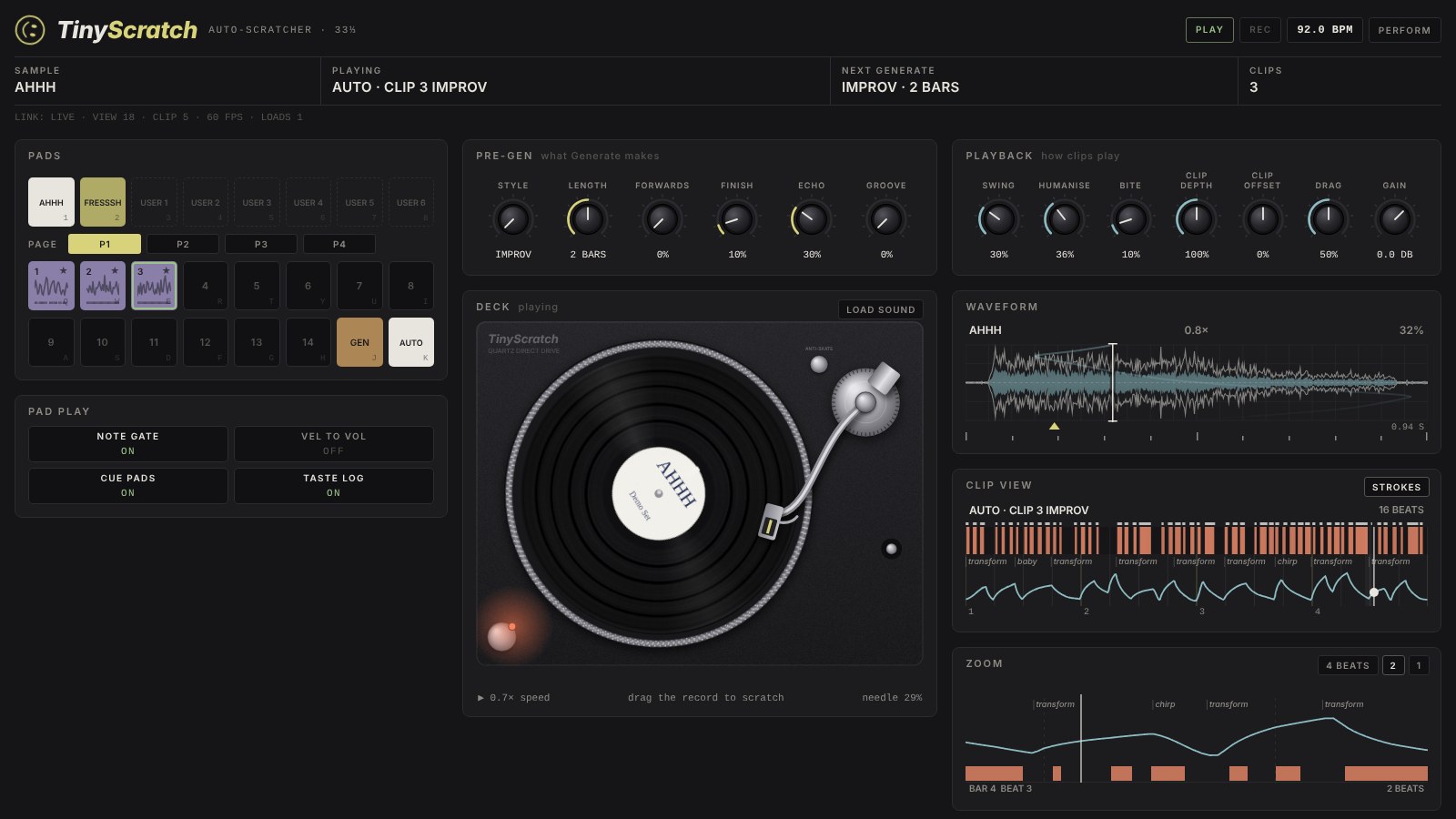
With TinyScratch in a track's synth slot, open http://move.local:7700/remote-ui on the same network:
- A turntable that turns with the scratch. Grab the record to scratch it by hand.
- Big versions of the waveform, clip view and zoom, with each stroke named (baby, chirp, flare...).
- The pads (also on the keyboard: 1 to 8 samples, Q to I and A to H clips, Space Generate, K Auto) and all the dials.
- Drop a sound on the deck to load it into a User slot.
- Drop a whole song to pick up to six spots from it, preview them, and send them to User slots.
- PERFORM shows just the deck, the pads and the zoom.
Credits
The look and workflow are inspired by the Live Scratcher module by Andrew Norris. TinyScratch is an independent project, written from scratch. Its styles follow the Turntablist Transcription Methodology (TTM) and the research of Kjetil Falkenberg Hansen and Roberto Bresin (KTH), and its strokes are modelled on a recorded performance from ScratchML.
Licence
The code is released under the MIT licence. The samples are described in samples/CREDITS.txt. Clips imported from a Live
Pack (tools/import_clips.py) are someone else's work and are not covered.
Development
scripts/test.sh           all tests: engine and plugin (with sanitisers), the screens, and the Remote UI in a browser
scripts/build.sh          aarch64 dsp.so and build/TinyScratch.tar.gz
scripts/install_move.sh   build, copy to the Move over SSH, verify, restart
scripts/build_demo.sh     the Remote UI as a standalone page playing a recording of the engine
tools/import_clips.py     clips from an Ableton Live Pack you own, into local/clips.bin
module.json is generated from the plugin's parameter table (scripts/gen_manifest.sh). help.json is the on-device help.