README from GitHub, GPL-3.0
FM-1 Mobile
The M-VAVE FM-1 on your phone: real FM-1 firmwares, their own C code compiled to WebAssembly, behind a touch panel laid out like the instrument. Pick X0X, Felucca, SLOOP, FiMba-1, Melodee, AMB-1 or HYP-1 in the main menu; More contains GHOULBOX, ChoralRoot (Orchid-style), MAKU, experimental Jazz Box, MIN-1, Tonitor, DUB-1, KAWA, Caravel and FRASIL; add the page to your home screen, and it works offline.
▶ Open it: https://hb3p8.github.io/fm1-mobile-emu/
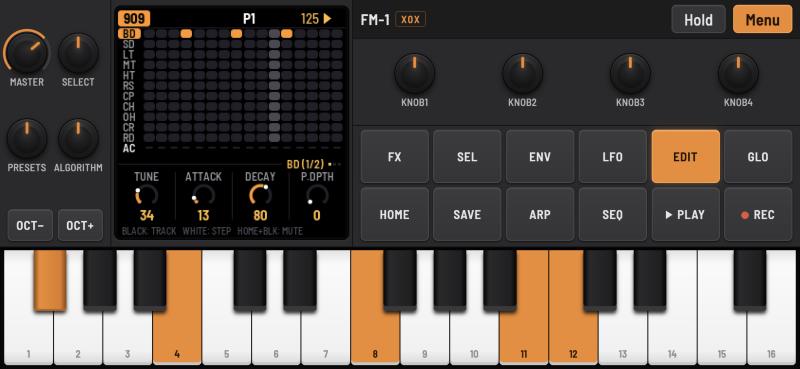
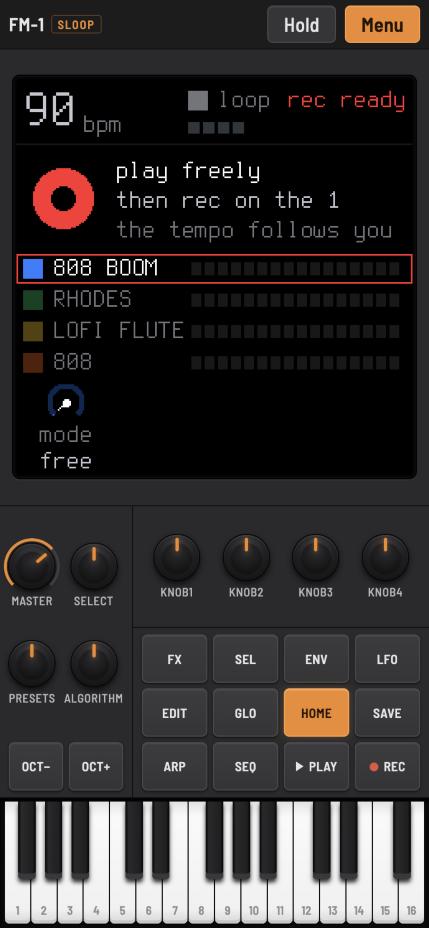
This is a fan project. It is not affiliated with M-VAVE or with the firmwares' authors; M-VAVE and FM-1 are trademarks of their owners.
The firmwares
| Firmware | What it is | By |
|---|---|---|
| X0X 1.1.0 | Drum machine and acid bass line: 909 and 808 drums, a 303, breaks (your own loops too) | Charles Vestal |
| Felucca 1.7.0 | Multi-engine synthesizer: thirteen engines, four tracks, a 64-step sequencer | Leo Kuroshita, Hügelton Instruments |
| SLOOP 2.8.3 | Live groovebox: three synths and a drum machine, song mode, physical models | isod89, after Felucca |
| FiMba-1 0.6.1 (pre-release) | A kalimba: modelled tines on a body, thumb-roll chords, mbira patterns | Adam Sowers |
| Melodee 1.5.1 | Multi-engine synthesizer: CZ-1, FM6, Prophet, microtonal scales and sequencing | keremimo |
| AMB-1 1.3 | Generative ambient voices, bells on tape loops and a gliding bass | Charles Vestal |
| HYP-1 1.5.54 | Hypnotic techno and acid with generative voices and sequenced drums | RedtailWorks |
| More | ||
| GHOULBOX 2.4 | Dungeon synth with cathedral reverb and hurdy-gurdy | Jason Persinger |
| ChoralRoot 0.27 | Orchid-style chord instrument: roots, chord shapes, bass and looper | Quixotic7 |
| MAKU 1.0 | An always-on ambience machine with random worlds and saved favourites | okumurari |
| Jazz Box (experimental) | Experimental and work in progress. Jazz harmony, walking bass, drums and live piano keys | hb3p8, after Reytian’s MIN-1 |
| MIN-1 0.2.1 | A minimalist ensemble with live chords, four models and twenty pieces | Reytian |
| Tonitor 68 | Electroacoustic textures: eight sound engines, six tracks and free loopers | Nuno Zimas |
| DUB-1 1.3.0 | Generative dub techno with tape echo, chord stabs and sub bass | sbegueria |
| KAWA 0.6 (beta) | Six-track chiptune and IDM tracker with song chains and 32 live effects | Omnipotard (Guizmoh) | | Caravel 0.6.0 (beta) | Multi-engine synthesis, pair morphing, performance macros and ambient voices | BonszaiMusic, after Felucca | | FRASIL 2.0.1 | Layered drones, FM glints, bass sequencing, shimmer and freeze | Styves Goupil |
Each firmware's manual is linked from the menu. All except Jazz Box have screenshot previews from the FM-1 Firmware Hub; the images are kept locally for offline use, with original URLs and checksums in screenshots/sources.json. Jazz Box’s preview is rendered from its pinned firmware source. Release tags, dates and pre-release status are recorded in firmware/releases.json. HYP-1, Tonitor and KAWA have no release tags: its current published build version and exact source commit are pinned there. Their saved work (patterns, projects, settings) stays in the browser, separately for each, and survives switching between them.
Using it
Open the link in Safari or Chrome on the phone. The firmware starts at once; the first touch anywhere starts the sound (browsers allow sound only after a user's action). On an iPhone it plays with the silent switch on.
- Install: Share > Add to Home Screen (iOS) or Install app (Android). From the home screen it runs full screen and offline. When a new version is published it is fetched in the background at the next launch with a connection, and taken over at once if you have not touched the page yet, otherwise offered as Menu > Update ready.
- Panel: as on the FM-1. MASTER, SELECT, PRESETS and ALGORITHM in a 2×2 block over OCT− / OCT+ (left of the screen in landscape), KNOB1–4 over the twelve function buttons, the 27 keys below. Rotating the phone changes only the layout; the firmware keeps running.
- Knobs: drag up or down. Keys: several fingers at once, and glide across them.
- Hold: latches the buttons you tap until you tap them again, for the FM-1's button combinations with one finger (SEL + another button). On a computer, Shift + click does the same.
- Menu: the sound (pause / resume), screen smoothing (xBR, off by default), the firmware, your loops (X0X), help, erasing the current firmware's saved work, the manual and the sources.
- Computer keyboard: Space PLAY, Enter REC, Shift SEL, Esc HOME, Z / X OCT− / OCT+, Q–I and A–K the white keys, 1–0 and − the black ones, ↑ / ↓ SELECT.
The screen is the firmware's 240 × 240 frame drawn by the GPU at the display's own pixels: sharp square pixels, at a whole multiple when that costs at most a tenth of the size (on an iPhone XR from the home screen: 2× in landscape, 3× in portrait). Menu > Screen smoothing switches to xBR, the edge-directed filter of retro game emulators.
How it works
Each firmware is built from its own source with its host simulator: the whole FM-1 application (UI, sequencer, sound engines, storage) against a simulated FM-1 instead of the hardware. It runs in an AudioWorklet: rendering audio advances the device's clock, which runs the firmware's audio interrupt and main loop exactly as on the instrument. Around 30 times a second the worklet sends the screen and the LEDs to the page; the page sends the buttons, keys and knobs back.
| Part | Files |
|---|---|
| Panel, layout, input | index.html, style.css, panel.js, mobile.js, and X0X's own page script (input, screen, storage), taken from its checkout by assemble.py |
| Screen | screen.js: WebGL, nearest pixels or xBR level 2 (Hyllian) |
| Firmware choice and start-up | firmwares.js (the list), power.js (loading, sound, saved work) |
| Firmware builds | firmware/sources.txt (pinned commits), firmware/build.sh, firmware/sloop_web.c, firmware/flash-worklet.js |
| Offline | sw.js: the service worker; assemble.py writes its file list and a version hash |
| The site | dist/: what GitHub Pages serves, made by assemble.py and committed |
Two kinds of firmware build exist. X0X, FiMba-1, AMB-1, HYP-1, MIN-1, DUB-1, KAWA, FRASIL and Jazz Box keep numbered save objects, kept in localStorage, and come with their own worklet. Felucca, SLOOP, Melodee, GHOULBOX, MAKU, Tonitor and Caravel write a simulated 1 MiB NOR flash; firmware/flash-worklet.js sends the page every changed 4 KiB sector, kept in IndexedDB. SLOOP has no browser build of its own: firmware/sloop_web.c is Felucca's (web/emu/felucca_web.c) fitted to SLOOP's sources, without changing any of them. Melodee similarly uses firmware/melodee_web.c: the real DSP, UI and NOR persistence, with its supported one-core audio path. It does not emulate the second hardware CPU, PLL clock switching or USB audio. MAKU uses its own browser build, with a fresh world seed each launch. ChoralRoot uses its own source simulator (tools/emu/web/emu_web.c), with its LEDs and staged flash adapted to the shared worklet and the same per-firmware sector storage. HYP-1 uses its own AMB-1-derived source build. AMB-1 1.3 uses its own fm1-base source simulator (including the pinned base and BSP submodules). Tonitor uses firmware/tonitor_web.c, adapted from its host harness: the original DSP, panel, graphics, sound generation and session storage, with audio-driven timing and simulated NOR flash. MIN-1 and DUB-1 use their upstream browser source builds and separate save stores. KAWA 0.6 beta uses its own browser simulator through firmware/kawa_web.c and firmware/kawa-worklet.js: the real tracker, project slots, autosave and settings, with control mapping and framebuffer conversion for the shared panel. As in the original, the first key closes its boot page. Its separate sample-import page is not included. Caravel uses its upstream browser build with the single-core configuration; it has a separate save store from Felucca. FRASIL uses its upstream fm1-base browser simulator, including the pinned recursive dependencies, and saves its settings and scenes in a separate store. The emulator cannot load FM-1 .fwsc update packages, which hold machine code for the instrument's processor.
Jazz Box uses its own MIN-1-derived C firmware and worklet, with a separate save store; no standalone Jazz Box web page or form editor is included in this collection. Its reproducible source snapshot is pinned on this repository’s jazz-box-source branch. The existing emulator panel, input, rendering and storage code is shared unchanged.
Building
You need Git, Emscripten (emcc), and Python 3 with Pillow and fontTools; Pillow needs its text layout (raqm), which on macOS comes with brew install fribidi.
git clone git@github.com:hb3p8/fm1-mobile-emu.git && cd fm1-mobile-emu
python3 -m venv firmware/.venv
firmware/.venv/bin/pip install Pillow fonttools
firmware/build.sh            # clones the pinned firmwares into firmware/checkouts/ and builds them into firmware/out/
python3 assemble.py          # writes dist/: the page, the firmwares, sw.js, the source archives
python3 -m http.server 4180 --directory dist --bind 127.0.0.1
Open http://localhost:4180. Sound needs a secure page, so a phone on the same Wi-Fi cannot use a plain http://192.168… address; use the published site, or a tunnel to this server (for example cloudflared tunnel --url http://localhost:4180).
firmware/build.sh x0x felucca builds only those. The builds are reproducible: the same commits give the same .wasm files and the same source archives byte for byte, so only real changes show up in Git. firmware/.venv/bin/python make_icons.py redraws the PNG icons after a change to icon.svg.
Updating a firmware
- Find the commit to use in the firmware's repository (usually its latest release) and put it in
firmware/sources.txt. firmware/build.sh <id>: moves the checkout to that commit, regenerates its tables, fonts and samples, and builds it. It prints the version it found (from the firmware's own sources).python3 assemble.py.node firmware/smoke.mjsverifies the shipped worklets and WebAssembly: boot, screens, audio, input and saved work restore. Try it locally: start it, play, save something, reload and check it is still there. A firmware that changes its storage format can ignore or reset older saved work; its release notes say so.- Commit everything, including
dist/, and push. GitHub Pages publishes it, and installed copies pick it up at their next launch with a connection.
What can need attention:
- X0X:
assemble.pyreuses parts of X0X's page script (web/emu/index.html) and edits a few of its lines; it stops with "upstream changed: …" when one of them has moved. Update the matchingtail.replace(...)line. - SLOOP:
firmware/sloop_web.cfollows SLOOP'sfirmware/src/felucca.c(the order of the sources),main.c(the boot steps and the main loop) and the hardware functions they call. When a new SLOOP adds a source file, a boot step or a hardware call,build.sh sloopfails to compile or the screen stays dark: compare those files with the previous commit and mirror the change, as Felucca's ownweb/emu/felucca_web.cdoes for Felucca. - Felucca, FiMba-1: their browser builds are their own (
web/emu/build.sh); if one changes the exports the worklets use (web_*), compare withfirmware/flash-worklet.jsor the firmware's ownworklet.js. - Generated headers:
build.shregenerates them whenever the commit changes; to force it, delete the checkout'sbuild/directory.
Adding a firmware
It needs a browser build of its own source: a host simulator compiled to a standalone .wasm with the X0X-style exports (web_render, web_buttons, web_keys, web_enc, web_master, web_fb, web_lit_buttons, web_store* …) or the Felucca-style ones (web_nor*, web_screen, web_flash_writes_count …). Then add a line to firmware/sources.txt, a case to firmware/build.sh, an entry to firmwares.js (name, kind, files, MASTER range) and its files to FW_FILES in assemble.py.
Publishing
.github/workflows/pages.yml publishes the committed dist/ to GitHub Pages on every push to main (Settings > Pages > Source: GitHub Actions). All paths are relative, so the site works from any folder.
Licence and credits
GPL-3.0-only (LICENSE) for this app. Each firmware retains its upstream licence and notices; AMB-1 1.3, FRASIL and fm1-base are MPL-2.0, and the other included firmwares are GPL-3.0. All corresponding source and dependency notices are included in their archives. dist/source.tar.gz is this app's source; dist/src/<firmware>.tar.gz holds each firmware's source tree exactly as built, and both are linked from the menu.
- Firmwares: X0X by Charles Vestal, Felucca by Leo Kuroshita / Hügelton Instruments, SLOOP by isod89, FiMba-1 by Adam Sowers; see each source tree's
LICENSING.mdfor the parts they build on. - The browser emulator design (the device clock driven by the audio worklet) is X0X's, after an idea by Groove OS; the Felucca-family worklet and
sloop_web.cfollow Felucca's browser build. - Screen filter: xBR level 2 by Hyllian (MIT). The look follows AudioKit Synth One. Font: Barlow Semi Condensed (SIL OFL 1.1).