README from GitHub, MIT
Digitakt II Sample Editing Pack
Four tools for working with samples on Digitakt II:
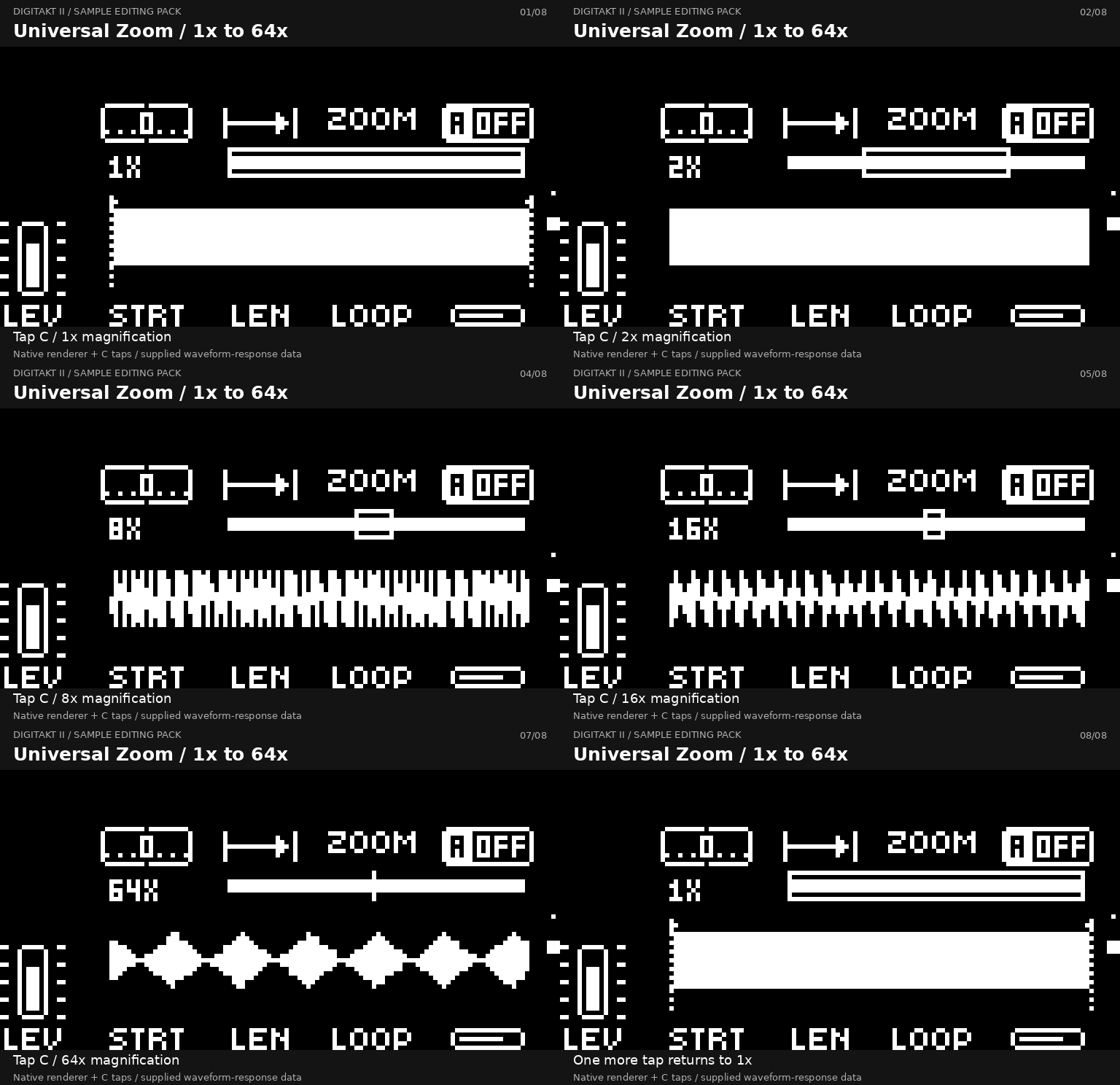
- Universal Zoom — zoom in up to 64×, pan across the waveform and reset the view.
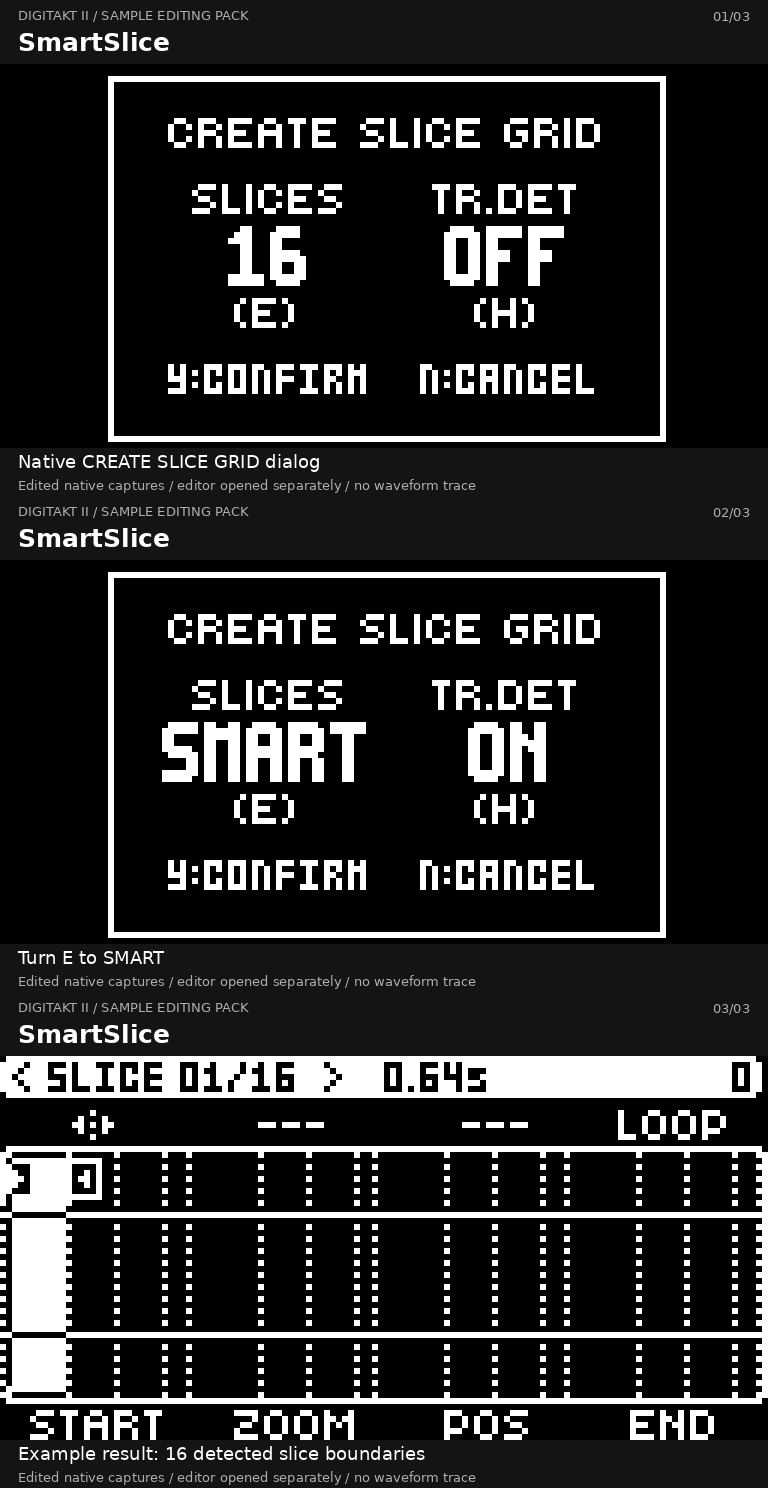
- SmartSlice — find slice points automatically in the SLICE machine.
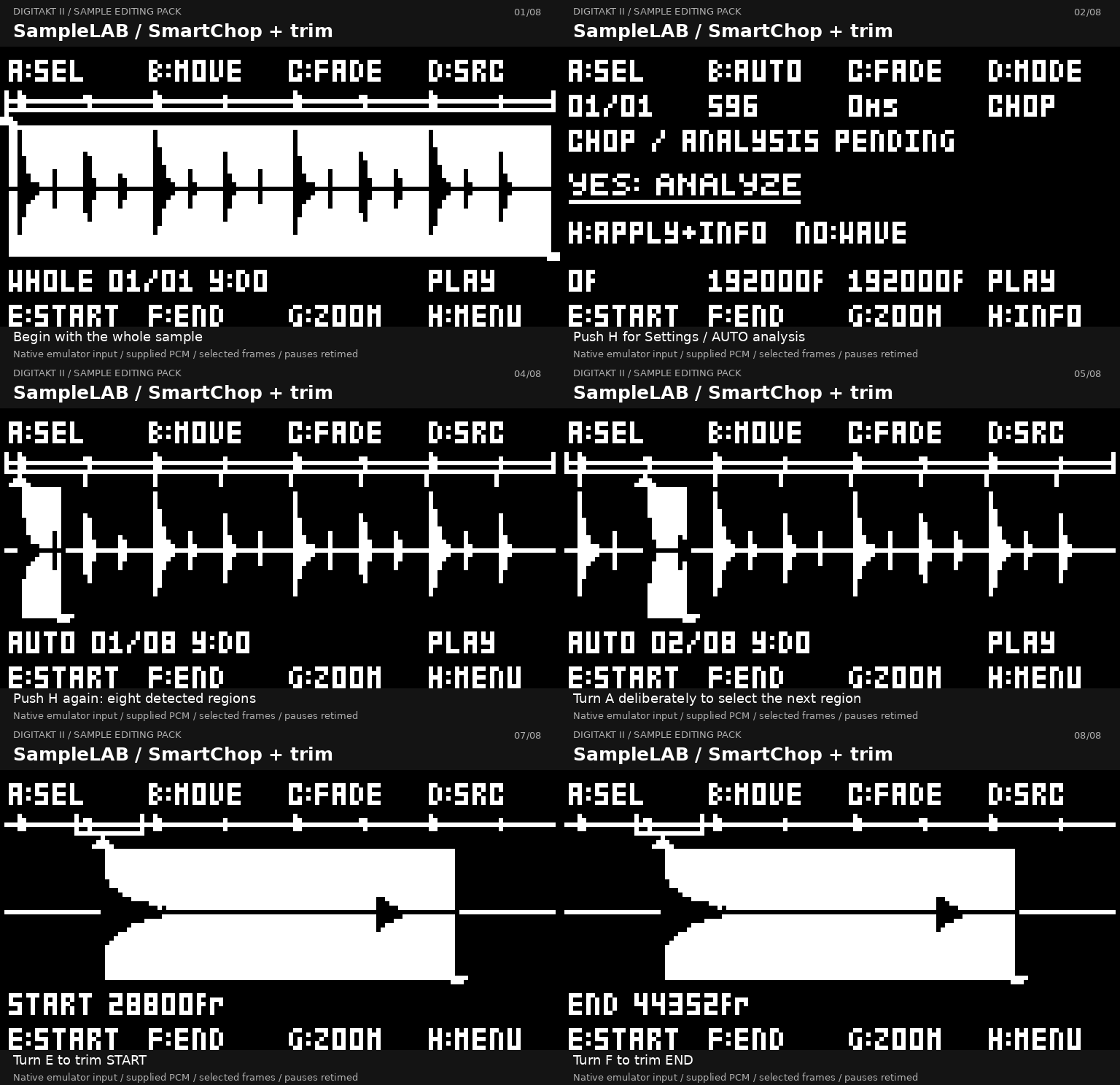
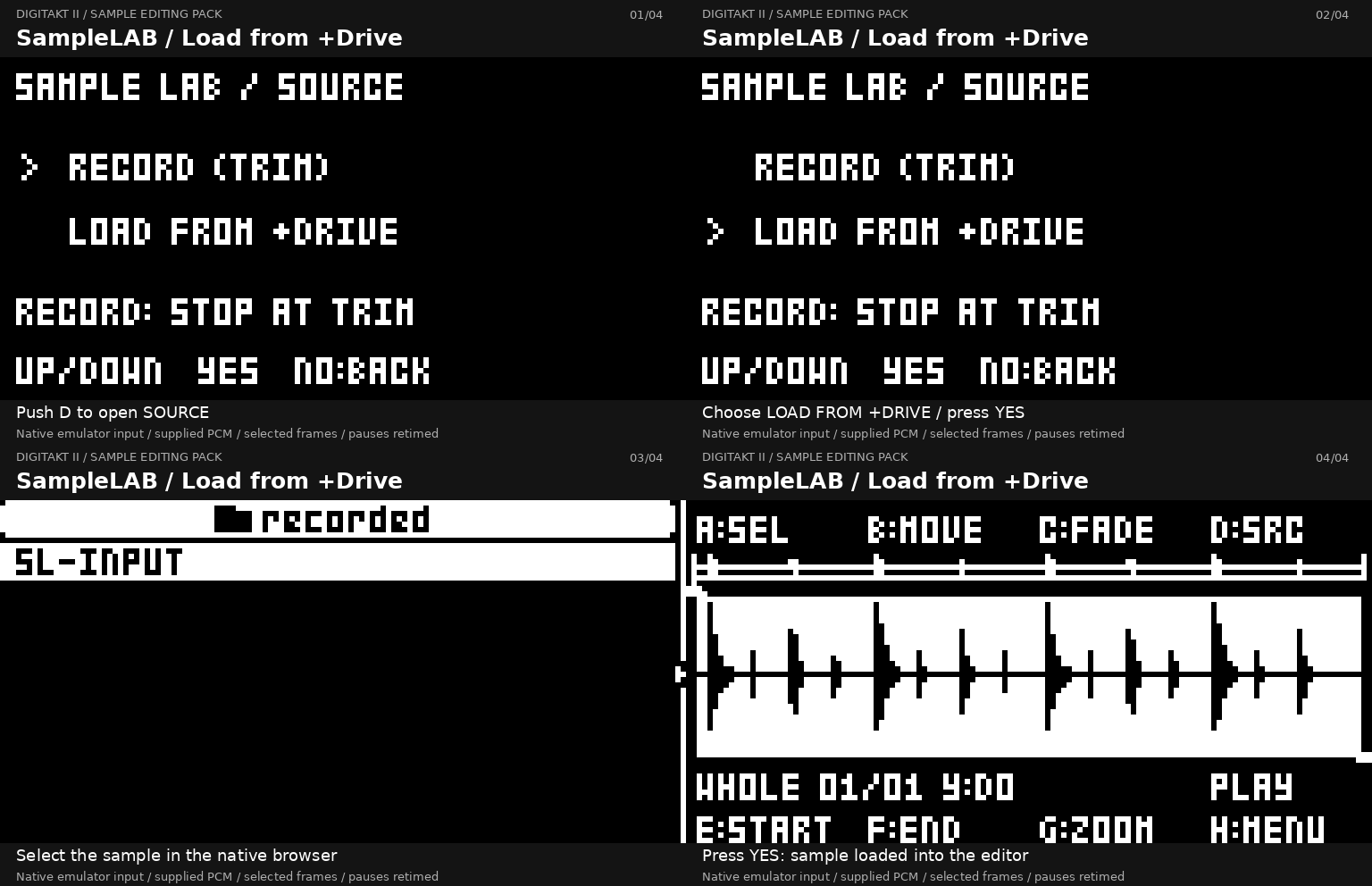
- SampleLAB — load or record a sample, chop, trim, audition and save edited copies.
- CFADE — blend the loop wrap in SLICE playback for smoother loops.
Download the Windows builder · Read the HOW-TO
For Digitakt II with official stock OS 1.17. The builder runs on Windows x64 (tested on Windows 11). You supply your own stock firmware file; no Elektron firmware is included. The application is unsigned, so Windows may display a publisher warning.
Download and install
- Download and extract the Windows package, then open DT2-Sample-Editing-Builder.exe.
- Select your official Digitakt II OS 1.17
.syxfile. - Choose a new output filename, click Build Sample Editing Pack, and wait for the success message.
- Back up your projects, Sounds and samples. Install the generated
.syxusing Elektron Transfer and Elektron's update instructions.
The builder creates a file; it does not connect to or update your instrument. Keep your official stock firmware for recovery. Once installed, start with SampleLAB loading and editing or SmartSlice.
See it in action
SmartSlice — choose SMART and create slice points
SampleLAB — chop a sample, select a region and trim it
Universal Zoom — from overview to fine detail
SampleLAB — load a sample from +Drive
Help and credits
- HOW-TO: controls, shortcuts and saving
- Windows package instructions
- Technical notes, checksums and source
By Kári / karigardarsson, derived from digikit by Em D - https://github.com/ElekLabs/digikit. The pack uses its AGPL-3.0-or-later license, DigiKit NOTICE and third-party notices. The repository's root MIT license does not replace those terms. This is an unofficial modification, not affiliated with Elektron.
Older editions
The earlier All-in-One and Déjà Vu/Zoom editions are separate packages. Their downloads, instructions, credits and release history are preserved below.
All-in-One and Déjà Vu/Zoom documentation archive
Digitakt II All-in-One
v0.3.0 Community Beta — OS 1.17
Download the Windows builder, matching source and notices · HOW TO: Plaits, Musical WAVE, Déjà Vu, Zoom/Pan · Installation · Recovery · Known issues
25 optimized Plaits model selections and four DX7 banks from Tyler Neely/spacejam, Kári's graphical Plaits UI2.1, Musical WAVE V4/Déjà Vu and One-Shot Zoom V11. Original Elektron animation retained, followed by legal credits.
Supply your own official OS1.17. No Elektron firmware is distributed; the offline Windows builder never connects to or flashes hardware. The complete corresponding source is the explicitly named release asset, not GitHub's automatically generated source archive of this research repository.
Experimental/as-is: recurring Plaits trigger click remains. Earlier Plaits25/DX7 hardware behavior is confirmed; the exact upper-label-fix plus credits image is NOT hardware-tested. No guaranteed support, requested features, maintenance schedule or future OS compatibility. Community contributions welcome. Read the recovery prerequisites before installing.
This All-in-One edition derives from digikit by Em D - https://github.com/ElekLabs/digikit and is supplied under AGPL-3.0-or-later plus DigiKit NOTICE and applicable per-file MIT/runtime licenses. Original Plaits: Emilie Gillet/Mutable Instruments. Earlier releases and this repository's separately authored MIT materials keep their existing licenses. See the release's source/license package; the repository's root MIT file does not replace upstream AGPL obligations.
Current development source checkpoint (not a release update)
Reviewed All-in-One source and validation for candidate
bbc534fae45fd4044625edba07c12d4be8b24d8997ccab313e6af0dfccd43626:
native Settings > System > Credits/About with no additional boot delay,
SY FANG, TWIN/FUSE Repair4/polish, existing Plaits25 graphics, Musical WAVE and
Zoom. Exact candidate hardware acceptance remains unverified. No firmware,
unfinished CHIMERA/ARP implementation or personal machine paths are included.
The downloadable v0.3.0 builder and release assets above remain unchanged.
Earlier Déjà Vu / Zoom editions — v0.1/v0.2 only
The older builder and output hashes below are not the v0.3.0 All-in-One. Use the links above for v0.3.0 (OS1.17 only).
Digitakt II Déjà Vu + ONESHOT Zoom
An unofficial Digitakt II OS 1.17 and OS 1.16 modification that adds two random-loop LFO waveforms:
- DV-F (WAVE 7): a free-running random loop.
- DV-T (WAVE 8): a random loop whose read position resets when the track triggers. Retriggering does not erase the stored loop.
DV-F and DV-T are available on all three LFOs. Stock WAVE 0–6 remain on their original firmware paths.
Windows beta
The v0.2.0 Beta release provides a portable Windows x64 builder. It contains no Elektron firmware. You supply the official Digitakt II OS 1.17 or OS 1.16 .syx; the builder detects the exact version by SHA-256 and offers only compatible editions.
Download builder → Select official stock OS → Build → Install via Elektron Transfer
No Python, Git, WSL, terminal, internet connection, or administrator rights are needed. The application never connects to the instrument and never flashes firmware.
- Device: Digitakt II only
- Recommended base: official OS 1.17
- Also supported: official OS 1.16
- OS 1.17 stock/output SHA-256:
26c22f6652625ac2cfd47f7ee970d388ed8b6427dae3563c0a6a2f2d334350d5/cd553ef6e84d60401b8ac3abc3492b61343ba8a6ac720cf019e15b613cd67b2e - OS 1.17 Déjà Vu + Zoom output SHA-256:
6163640ce056b2266b57a9b0d3d8b568c6423ac1dfe8c9d079b03519e3bfebd4 - OS 1.16 stock/output SHA-256:
278541e466edcd77d6b3e018a91fb90185932d3c7de224dd3e68294dddf3a9ec/d9fe67b3778ce5d31aaaa807e6e43ac1929d0f36a10c393adc0a8c590c547835
The Windows executable is unsigned. Windows SmartScreen may show an unrecognized-app warning.
Get the required stock OS
The builder accepts these exact official stock files:
- Recommended:
Digitakt_II_OS1.17.syx, SHA-25626c22f6652625ac2cfd47f7ee970d388ed8b6427dae3563c0a6a2f2d334350d5 - Supported:
Digitakt_II_OS1.16.syx, SHA-256278541e466edcd77d6b3e018a91fb90185932d3c7de224dd3e68294dddf3a9ec
- Open Elektron Support & Downloads — Digitakt II.
- Under Updates, download the official Digitakt II OS 1.17 distribution ZIP and extract
Digitakt_II_OS1.17.syx. - OS 1.16 remains supported when its exact official file is available.
- Before selecting either file, confirm its SHA-256 above. Modified and other-version files are rejected.
Controls
MODE selects a loop length of 2, 4, 8, 16, or 32 steps.
SPH controls the random loop:
- 0: generate a new random value when each step is visited.
- 64: lock the stored values and their order.
- 127: retain the stored values while reordering them.
- Intermediate values blend probabilistically toward the corresponding endpoint behavior.
Existing SPD, MULT, FADE, DEP, and DEST processing remains on the stock paths.
ONESHOT Zoom
The OS 1.17 combined edition adds real waveform detail to the ONESHOT SRC waveform page. Press encoder C to cycle 1x, 2x, 3.75x, and 1x. Turn C to pan while zoomed. Zoom depends on Déjà Vu's runtime allocation and is therefore not offered as a standalone edition.
Hardware status
The exact OS 1.16 and OS 1.17 V5.1 outputs have both been generated by the Windows builder and tested on a physical Digitakt II. For OS 1.17, initial testing confirmed normal boot, DV-F modulation, DV-T modulation and retrigger, and normal operation with no problems observed. This is initial hardware validation, not exhaustive long-term regression. Across the two tested builds:
- Normal boot completed.
- DV-F and DV-T appeared on the LFO pages.
- Both custom waveforms produced modulation.
- DV-T repeating and retrigger behavior was observed.
- Stock LFO waveforms remained functional.
Offline verification also covers exact package identity, six-section decode, HMAC/checksums, stock WAVE 0–6 differential behavior, native ColdFire routing, and Sound-object conversion.
The following areas remain incomplete or limited:
- Broad MIDI, sequencer, transport, and synchronization regression.
- Real Sound/Pattern/Project save, reload, and power-cycle persistence.
- Long-duration stability across a wider set of projects.
- Compatibility with every setup, project, or future OS version.
Install and recover
Read installation and stock recovery before using the generated firmware. Keep a known-good official stock OS file and a physical MIDI interface available.
Elektron's normal update instructions are available at How to update your device. The startup-menu recovery route is documented at How to update via SysEx transfer.
Repository contents
- windows-builder/: Windows GUI builder source, tests, frozen V5.1 patch data, and pinned MIT-licensed container tooling.
- src/dv/: deterministic host model and native phase-input adapter.
- coldfire/: ColdFire DV, routing, trampoline, and startup-allocation source.
- tests/: standard-library host tests.
- research/: byte-backed findings and evidence reports.
- tools/midisniff.py: passive SysEx capture and envelope decoder; it does not transmit.
No official Elektron firmware, extracted firmware section, emulator snapshot, generated firmware, sample library, or credential is stored in this repository.
Credits & acknowledgements
- Mutable Instruments — Marbles inspired the Déjà Vu random-loop concept. No Marbles code is included here.
- Bezronczek — Syntakt Firmware Workbench provided the DV-F/DV-T behavioral reference. Its MIT-licensed implementation informed the behavior; Digitakt II uses its own native ColdFire implementation adapted to the Digitakt II LFO architecture.
- ElekLabs — digikit (AGPL-3.0) provided reverse-engineering and emulation infrastructure during research and development. For the earlier v0.1/v0.2 editions it is development tooling, not bundled in their Windows application. The v0.3 All-in-One builder DOES include DigiKit native tooling and source, with its AGPL/NOTICE obligations as described above.
- mischa85 — elektron-firmware-tool provides the MIT-licensed firmware-container handling, compression, and repacking code used by the builder. Its pinned source and license notice are included under
windows-builder/vendor/elektron-firmware-tool/.
See third-party notices for the redistribution boundaries and attribution details. These acknowledgements do not imply collaboration, approval, or endorsement by any named project, author, or company.
Evidence levels
| Level | Meaning |
|---|---|
| SOURCE/STATIC | Addresses and control flow derived from byte-level inspection. |
| HOST | Deterministic host model or test result. |
| SYNTHETIC UNICORN | Isolated guest-memory execution with controlled inputs. |
| NATURAL EMULATED | Observed during bounded emulated firmware execution. |
| HARDWARE | Observed on a physical Digitakt II. |
This project is unofficial and is not affiliated with or endorsed by Elektron. Elektron and Digitakt are trademarks of their respective owners.