README from GitHub, GPL-3.0
DUMBMIDI
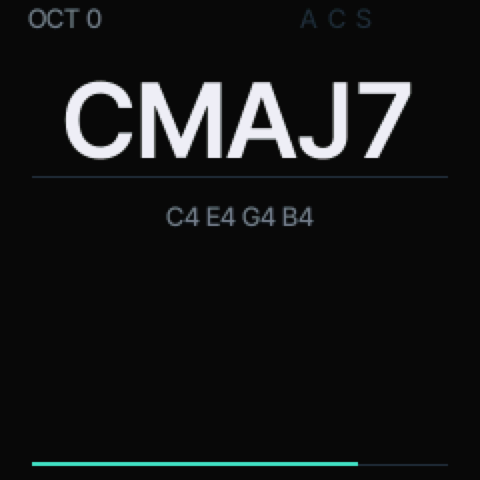
A MIDI controller firmware for the M-VAVE SMK-37 (Pro, Elite, MKE-P37) and the FM-1: full-size note/chord display, control mapping on the screen, BLE MIDI + USB MIDI out, and a colour protocol that paints the pads (or the FM-1's key LEDs) from MIDI in.
This is a firmware-only project: there is no web emulator or flasher. Get the packages from mutant.cloud (Install), or build them below.
Build
./fm1 build
Everything runs in Docker (the konsumer/foma-toolchain image), nothing else to install. The build writes four
packages:
| File | Unit | Package identity |
|---|---|---|
build/dumbmidi-1.0.0.fwsc | FM-1 | FM-1_957 |
build/dumbmidi-smk37-1.0.0.fwsc | SMK-37 Pro | SMK-37 Pro_990 |
build/dumbmidi-smk37-elite-1.0.0.fwsc | SMK-37 Elite | SMK-37 Elite_990 |
build/dumbmidi-smk37-mke-1.0.0.fwsc | MKE-P37 | MKE-P37_990 |
The model name is part of the package: the stock updater only accepts a unit's own package. Use the file that matches the label on your keyboard.
Read this before flashing an SMK-37: unofficial firmware, flashed at your own risk. Back up the unit's flash
first (the fm1-to-smk37 kit's jl-uboot-tool procedure): it holds the factory key/pad calibration. This firmware
never writes the calibration (the app's flash allow-list and the RAM flash driver both refuse it), but a full backup
is the only real safety net. Going back: install the matching stock package from the Firmware Hub.
Play
The main page is deliberately sparse: the chord the held notes make (CMAJ7, C#MIN7/F, ...) in large
anti-aliased Inter Tight, the note names beneath it in small sans type, the octave and the modes that are on at the
top, and the last note's velocity as one thin line at the bottom. A knob or fader move puts its CCnn value at
the right for a moment. There is no logo and no page title; the menus are elsewhere.
Hold notes on the keybed, the pads, or feed notes in over USB/BLE MIDI — all of them make the chord. OCT- / OCT+
transpose the keybed an octave at a time (-24..+24 semitones, kept across power cycles). HOME returns to this page
from anywhere. HOME+REC is the panic (all notes off, LEDs dark).
Controls
| Control | SMK-37 | FM-1 |
|---|---|---|
| keys | 37, velocity | 27, fixed velocity (100) |
| pads | 16, velocity, RGB | — (pads' colours go to the key LEDs) |
| knobs | 8, in banks A/B (KNOB BANK) | 4, in banks A/B |
| faders | 4, in banks A/B (FADER BANK) | — |
| wheels | pitch + mod | — |
| pedal | jack, sustain-style switch | — |
| function keys | ARP, CHORD, SCALE, PATCH, GLOBE, BT/SAVE | ARP, EDIT, SEL, HOME, GLO, SAVE |
| menu keys | </> pages and rows; K1 scrolls MAP | K1..K4 edit values |
On the main page all 8 knobs (FM-1: 4) are MIDI controls. In MAP, K1 scrolls the rows. In a submenu or EDIT,
K1–K4 are the four values on the cards; OCT+ is OK, OCT- is back. On the main page OCT-/OCT+ transpose the keybed. The buttons that do
something on the current page glow dimly; solid means the mode is on.
The original labels:
- PATCH — home (the note/chord page).
- GLOBE — the MAP page (control mapping) and back.
<>— the main pages (PERFORM → ARP → CHORD → SCALE → SPLIT) or the rows of MAP/EDIT.- KNOB BANK / FADER BANK — bank A/B; the LEDs show B.
- ARP / SCALE / CHORD — open that mode's submenu. K1–K4 set its values (ARP: rate, pattern, octaves, BPM;
SCALE: on/off, root, type; CHORD: on/off). Press the same button again inside the submenu, or
OCT+(OK), to switch the mode on/off. Keys still play on those pages, so you hear the change. - CHORD with keys held learns their shape before it opens the submenu.
- Pad 1 on the ARP page is the beat lamp: it pulses on each quarter note and sets tap tempo when tapped.
- SPLIT (the
</>page after SCALE) — K1 on/off, K2 split note, K3 lower channel, K4 upper channel. Keys below the split note go out on the lower channel, the rest on the upper; chord memory, scale and arp apply inside each zone. - BT — BLE MIDI on/off (solid = on, dim = off). USB MIDI is unaffected.
Settings save themselves: after 2.5 s without a change (a stream of colour messages keeps it waiting until it stops). On the FM-1 the SAVE button also writes immediately.
Mappable buttons (every other labelled button keeps its job): PARA, NOTE REPEAT, FX, SEQ, PLAY, REC on the SMK-37; FX, ENV, LFO, SEQ, PLAY, REC on the FM-1.
Map a control on the screen
GLO (GLOBE) opens MAP: one row per control, with what it sends.
- Turn
SELECT(or</>on the SMK) to a control. SEL(SCALE) orEDIT(CHORD) opens EDIT.KNOB 1sets the type:CC,NOTE,PC,PITCH.KNOB 2sets the number (CC#, note, program),KNOB 3the channel,KNOB 4the mode (MOM/TOGfor buttons,ABS/RELfor knobs).EDITresets that control to its default;SEL/</>moves to the next control.- Changes save themselves after a couple of seconds of no changes.
GLOgoes back.
Defaults: every control sends on channel 1. Keys play the keybed's notes (lowest key C3 on the SMK, F3 on the FM-1), pads notes 36-51, knobs CC 21-28 (bank A) and 31-38 (bank B), faders CC 7/11/91/93 (A) and 71/74/72/73 (B), buttons CC 41-46, the pitch wheel pitch bend, the mod wheel CC 1, the pedal CC 64. Each control's channel is editable in EDIT; SPLIT has its own lower/upper channels.
Arpeggiator, chord memory, scale
- ARP holds the keys you press and plays them in UP / DOWN / UPDOWN / RANDOM at 1/4, 1/8, 1/16, 1/8T or
1/16T, 1–4 octaves, 40–240 BPM (70% gate). Its page (press ARP, hold it, or
</>) edits rate, pattern, octaves and BPM. - CHORD stores the shape of the chord held when you press it (up to 8 notes, intervals from the lowest). In
chord mode one key plays that shape transposed; the page shows the shape or
CUSTOM. - SCALE snaps played notes to the nearest note of a scale (root + major, minor, dorian, phrygian, lydian, mixolydian, locrian, two pentatonics, blues). Its page edits root and type.
- The arp plays the chord-and-scale result, so chord memory + arp gives arpeggiated chords. The big display always names what the keys are holding.
Colours from MIDI in
Send on channel 16 over USB or BLE. The SMK's 16 pads show the colour; on the FM-1 the same 16 slots light the white keys (F3 G3 A3 B3 C4 ... G5). Local hits flash white and return to their assigned colour.
| Message | Meaning |
|---|---|
Note On 36..51, velocity 1..127 | pad 0..15 gets the colour at that point of the hue wheel |
| Note On (same notes), velocity 0 | that pad goes dark |
CC 20..35, value 1..127 | the same colour by hue, value 0 = dark |
CC 16, value | brightness, 0..127 |
CC 17, value 0 | all pads dark |
Colours are saved after the stream goes quiet for 2.5 s (a continuously changing stream never writes the flash).
MIDI out
Every mapped message goes out over USB MIDI and BLE MIDI at once. The unit advertises as a BLE MIDI device after
power-on (the header shows BLE when the stack is up). Note messages use the velocities of the SMK's keys and pads;
the FM-1's keys have none.
The BLE MIDI stack is the FM-1's (Bluetooth MIDI on Felucca's platform, see LICENSING.md); it is built and shipped for the SMK-37 too, which has the same radio, but it has not been tested on an SMK-37 here. USB MIDI is unaffected if a unit refuses the BLE start-up.
Develop
Only Docker is needed:
./fm1 build    # the four packages
./fm1 fmt      # clang-format + ruff
./fm1 shell    # a shell in the toolchain container
./fm1 clean
The app is src/main.c, the chord naming src/chord.h, the mapping table and its MIDI encoding src/mapping.h.
platform/fm1.h documents every platform call; platform/fm1.c is the board-aware plumbing (SMK-37: keybed,
pads, faders, wheels, pedal, flash map, update path). The rules of the chip (no float, no 64-bit division) are in
foma's README.
Host tests, no chip needed:
tests/run.sh # chord/mapping unit tests + both boards' screens rendered to build/host-*.ppm
Licence
GPL-3.0-only. Credits and third-party parts: LICENSING.md.