README from GitHub, GPL-3.0
MerthSloop firmware and MerthSloop Mobile for Android live on the
merthsloopbranch. Original Android work uses the Unlicense, with retained third-party obligations described in Android licensing.

A live groovebox firmware for the M-VAVE FM-1 — for any style.
Free and open source (GPL-3.0), based on Felucca by Leo Kuroshita / Hügelton Instruments.
Upstream browser installer · Complete guide · Manual · Guide en français · Web editor · Releases · Report a bug
MerthSloop turns the FM-1 into a four-track groovebox you play live: three synths and a drum machine with 16 sounds on the white keys, twelve synthesis engines, 200 sounds, 37 drum kits, your own samples, a song mode you play with your hands, USB audio, MIDI in on the jack and MIDI clock — and now physical models (guitars, sitar, bells, hand drums), a noise engine, six-operator FM with DX7 patches, parameter locks, micro timing, fills, a quick chain of sections and the sequencer to MIDI out. House, techno, hip-hop, trap, drum & bass, amapiano, synthwave, lo-fi, ambient, chiptune — it does not pick a style for you. Start from your own playing or optional native drum grooves and musical sequence starters.
Status: beta. Please report what you find. Projects, presets, samples and settings are kept during updates; see Going back before downgrading.
Upstream song, sample and settings formats are the compatibility baseline. Older experimental MerthSloop formats are not migrated.
Contents
- MerthSloop firmware and the one-minute workflow
- Visualizers added in this fork
- MerthSloop Mobile for Android
- Upstream capabilities
- Screenshots
- Features
- Install
- Your first beat in 60 seconds
- The controls
- The menu: settings of the FM-1
- MIDI and USB audio
- The web editor
- Compatibility
- Troubleshooting
- Specifications
- Documentation
- Building and tests
- Contributing
- Credits and thanks
- Licence
MerthSloop firmware
This fork keeps SLOOP's synth engines and adds ways to build and perform a complete loop quickly on the FM-1. No phone is required for these firmware features.
Read the illustrated MerthSloop feature guide for the full branch additions, physical controls and fresh firmware screenshots.
MerthSloop builds on upstream SLOOP and Felucca. Firmware versions use upstream
major.minor.revision followed by our independent build number; see branding and version policy.
A clearer instrument display
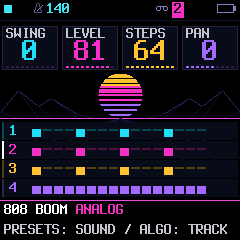
The native interface has four knob cards, a four-track overview, clearer page and
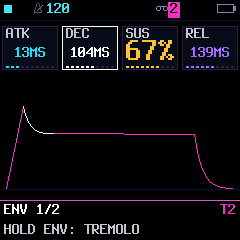
track/global labels, persistent action hints, and diagrams for envelopes,
modulation, filters and delay. NEON adds cyan, magenta, amber and violet accents:
hold HOME → SCREEN → COLOR → NEON. Existing saved palettes remain selected.
PAGE HELP in SCREEN explains the current page. Our playing and editing
shortcuts stay the same; native groove and sequence browsers show their controls
and preview/apply state directly. HOME’s scene corners show active master filter strength, LOFI character, and ducked synth tracks (D13 means tracks 1 and 3). The tags disappear when their effect is off.
HOME shows the engine beside the preset in the track color. The striped sun and horizon glow pulse gently with the beat while playback runs; sparse stars twinkle and a wireframe highlight advances on beats.
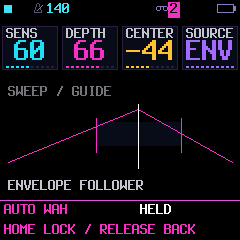
| Four-track overview | Envelope editing | Envelope wah |
|---|---|---|
 |  |  |
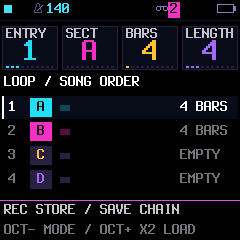
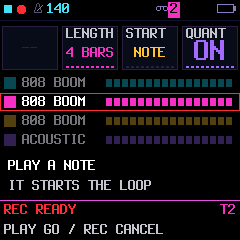
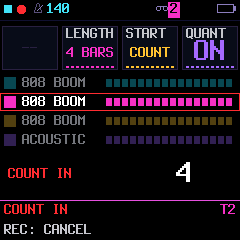
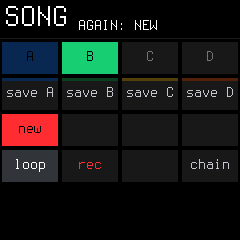
SONG, record-ready and count-in share the same knob-card layout and palette. Running free takes keep a large timer, with matching header and footer spacing.
| Song order | Recording | Count-in |
|---|---|---|
 |  |  |
Settings include compact section tabs and contextual page help. Parameter summaries retain complete values, and About includes fork attribution and source/license credits. Held pages wait 350 ms before appearing, so ordinary page taps are less likely to flash a performance panel; using a held key or knob opens it immediately. Common drawing calls share code while retaining the same pixels and palette; storage sharing and startup-only data packing leave more flash for features. See the UI refresh gallery and design and screen-by-screen polish audit. These are actual firmware framebuffer captures; older screenshots elsewhere may show the previous presentation of the same controls.
Native note editing and LOFI characters
GLO → DUCK pumps synth tracks from KICK, SNARE, both, or ANY drum hit. Set depth, a synced recovery division and SNAP, RAMP or HOLD shape. Higher depth holds deeper dips longer; held FX + KNOB 3 remains the quick depth control. Settings save with the project and resume after power-on. On each synth track, FX → FILTER → knob 2 DUCK includes or excludes that track; drums remain unducked. These switches save with projects and sections.
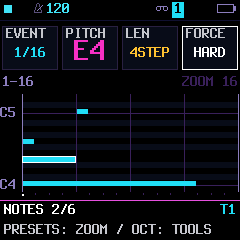
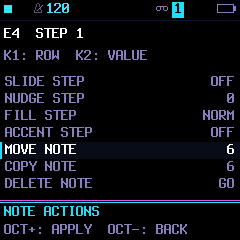
SEQ → NOTES selects one note within a chord and edits its pitch, sustain and strength. PRESETS zooms STEP/NOTES to 8, 16, 32 or 64 steps. NOTE ACTIONS adds selected-note move/copy/delete plus explicitly shared step timing, slide, accent and fill controls. The drum grid adds HIT ACTIONS for individual hit editing. Existing OCT-held tie/rest, octave and move brushes remain available.
FX → DLY TYPE → REV plays overlapping fragments backward, using the existing delay buffer. TIME sets the synced window (up to about 0.74 seconds); feedback builds reversing echoes. REV LEAD, REV GLASS, REV STR, REV HAZE, REV REED, REV METAL, REV HARP and REV CHOIR in the sound browser offer swelling attacks with short cutoffs—reverse-style synthesis rather than reversed samples.
SYN VIOLIN adds a bowed ANALOG string lead with filtered noise and delayed vibrato. GB RAZOR, NES SPARK, MD CRYSTAL and MD PICK add more console-inspired textures in the CHIP browser category. New sound guide.
Vacation sound collection: twelve extra sounds span space pads and starry keys, acoustic-style plucks and dusk organ, arcade bass/bells/leads, and strange glass/organ/robot textures. Browse the themed sound guide.
Horror-film voices: NIGHT PAD, SLASH STR, HEX CHOIR and DREAD BELL add unstable pads, sharp strings, ghostly vowels and metallic bell textures. Find them in SAVE → SOUNDS under PAD, INST and FX. Horror sound guide.
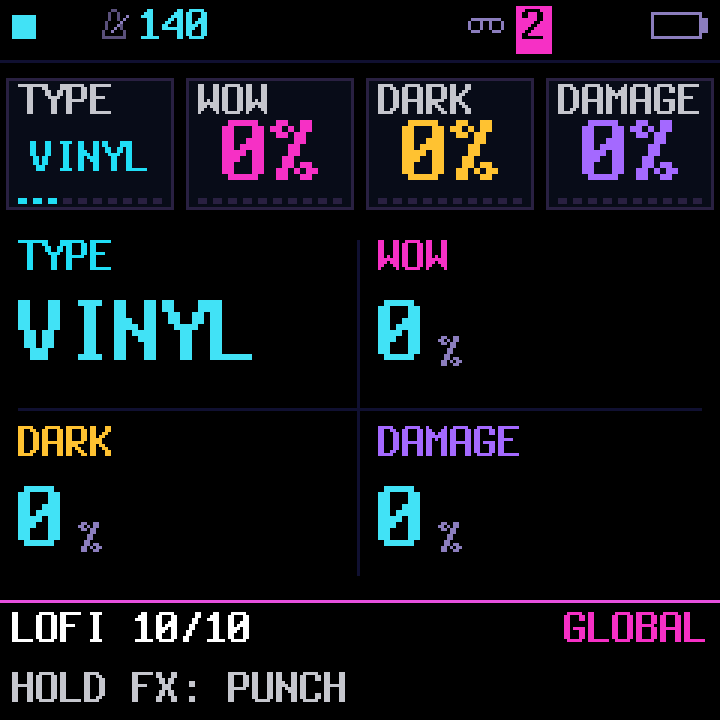
FX → LOFI selects OFF, Vinyl, Tape, VHS, CD or Radio, with three controls tailored to the character. Vinyl has stronger irregular wow and sparse clicks/pops; Tape adds flutter, darkening and drive; VHS adds warble and damage; CD uses short captured-fragment stutters. Radio narrows the mix to a receiver band with drift, hiss and crackling static; its controls become audible well before their upper range. CD is a microstutter character, not a phrase-length delay. Settings save with projects and sections; all three amounts at zero bypass the effect. The LOFI punch temporarily intensifies the selected character. If TYPE is OFF it uses Vinyl, then returns to dry on release. Saved settings never change. LOFI TYPE starts at and defaults to OFF: it fades to dry without changing the three stored amounts. Selecting a character restores those amounts; LOFI punch remains momentary over OFF and returns to dry on release. OFF is saved with the project and section. Its inactive controls show the retained WOW/DARK/DAMAGE amounts.
On the drum track, FX page 1 provides LEVEL / PAN / DELAY / REVERB, and page 2 provides its filter. INSERT 2 groups MIX, TYPE and the first two insert controls. MIDI CC11 expression and CC0 bank selection extend external-controller support without replacing saved track levels.
MENU → FX adds FILTER RESO for synth and drum track filters and PUNCH FADE for effect entry/exit. You can also hold FX and turn SELECT to adjust fade. HALF/DOUBLE remain immediate; the LOFI punch fades its temporary boost without changing your saved sound. MENU → SEQ controls automatic step advance and drum browsing preview. Noise-based drums respond to TUNE by shifting their filter brightness.
| Selected-note editor | Note actions | LOFI characters |
|---|---|---|
 |  |  |
Delay characters
FX → DLY TYPE adds DIGI, TAPE, CRUSH and DUB. DIGI is the original digital delay; TAPE softly compresses each repeat, and CRUSH adds a grainy, reduced-resolution echo. DUB gives stronger saturated, bass-trimmed echoes with TONE filtering the first repeat as well as feedback. Knob 1 selects TYPE. DIGI offers TIME / FDBK / MIX; TAPE and DUB offer DRIVE / TONE / MIX; CRUSH offers BITS / RATE / MIX. RATE runs from about 2.8 to 44 kHz; higher settings are cleaner. The preceding DLY page keeps TIME / FDBK / COLR / MIX for every type. This is a global delay shared by track sends; the dry instruments stay unchanged. The type saves with projects and sections.
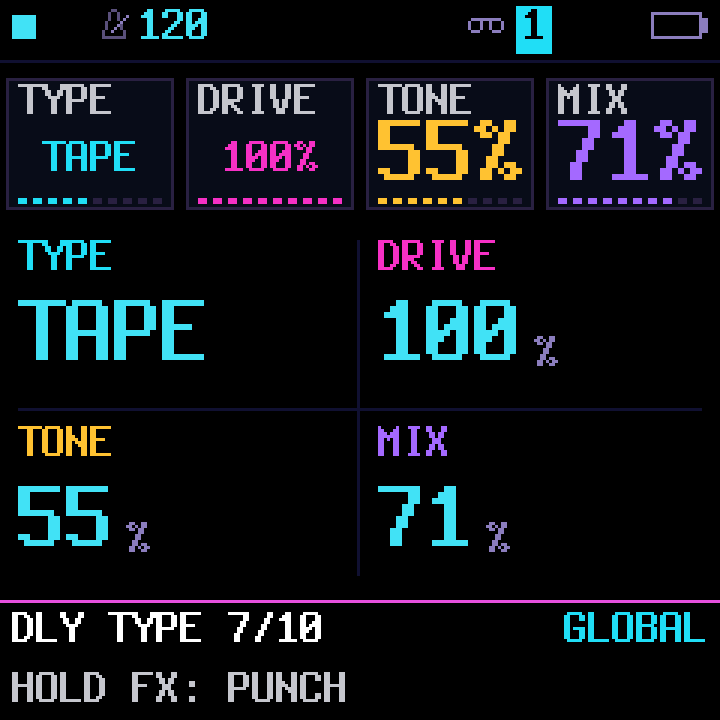
STEP and NOTES show PRESETS: ZOOM / OCT: TOOLS in their footer. Turn PRESETS left to zoom in or right to zoom out.
The one-minute workflow
- With playback stopped, select the drum track, open its GROOVE page, and choose a beat. OCT− auditions it without replacing your pattern; OCT+ applies it. Hold OCT+ for 700 ms or press it twice to confirm replacing existing material.
- Select a synth track, then tap SEQ through STEP → NOTES → NOTE ACTIONS → PATTERN → RECORD → SEQUENCES. Choose POP FOUR, your root and scale, and ARP NOTES for an editable I–V–vi–IV arpeggio. Listen, then apply.
- Select another synth and apply the same starter in BASS mode. The browser remembers your key, scale, octave and other choices across tracks until power-off. You now have drums, harmony and bass ready to develop with your own melody, sound design and performance.
The libraries are starting points: applying creates ordinary editable sequencer steps. Your selected sounds and tempo stay intact. Preview first, and use EDIT + OCT− to undo a replacement.
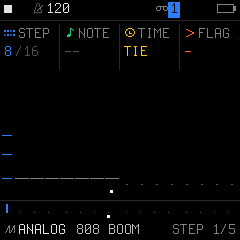
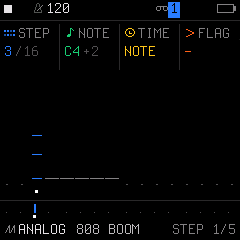
| Sweep following ties | Move the onset into its own ties | Start a new working project |
|---|---|---|
 |  |  |
The illustrated guide includes before-and-after views for ties, rests and note movement, plus chord latch and song-load recovery controls.
| Native drum grooves | Musical sequence starters | Rhythm shaping |
|---|---|---|
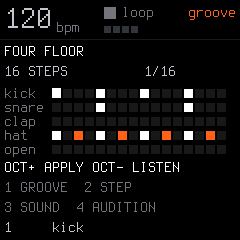 | 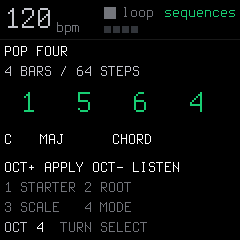 | 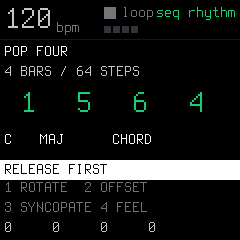 |
Actual firmware framebuffer captures from the host UI harness.
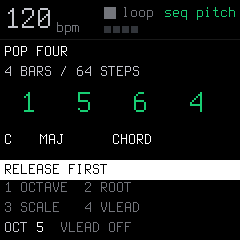
Turn the SELECT knob twice inside SEQUENCES to reach seq pitch. Knob 1 sets octave and knob 4 VLEAD. Changing browser pages keeps audition playing.
What this fork adds to upstream SLOOP
These are the implemented MerthSloop additions; the upstream engine, preset and base groovebox features are described separately below.
- Persistent scale lights: hold physical SEL and press OCT+ to toggle a dim keyboard guide matching the selected synth's SEL-page ROOT/SCALE. It replaces ordinary keyboard backlighting, so off-scale keys stay dark unless played. It pauses while SEL CHORD is on, then returns when CHORD is off. It follows key/scale changes, survives reboot, and leaves drum/step/FX controls clear. CHR lights every pitch class; it does not change the sound or quantize notes.
- 32 drum grooves: four-on-the-floor, breaks, a four-bar Amen, funk, broken house, Afro clave, electro, boom bap, one drop, dub step, trip hop, trap rolls, tresillo, 6/8 feel, waltz and sparse ambient beats. Preview on the FM-1 using your current kit, then apply with complete pattern/metadata undo.
- 27 musical starters: standard progressions alongside soul sevenths, Dorian pockets, funk, offbeat stabs, gospel, disco, garage, Latin turns, rising/descending movement and Lydian colors. Choose CHORD, lower-root BASS, or ARP NOTES, which cycles chord tones at each attack (ORIGINAL adds eighth-note pulses while retaining starter syncopations). Turn PRESET to choose RHY independently: ORIGINAL or 17 named rhythms, from sparse bars to funk, offbeats and sixteenths. Rotate/offset/syncopate/feel modify that rhythm. A CHR track starts the browser in Major; its pitch page controls octave and optional voice leading independently of the physical OCT buttons.
- Rhythm shaping: rotate a pattern, offset drum lanes, move eligible attacks off the beat with syncopation, and add microtiming feel. Preview auditions the shaped result before replacement.
- Fast ties and rests: on STEP, select the starting note/chord, hold OCT+, and sweep knob 1 clockwise to tie each following step. Hold OCT− instead to paint rests. The starting step stays intact; painting stops at the pattern's end. Backtracking moves without erasing, and the whole gesture has one undo.
- Overlapping note sustains: a note can keep ringing while another attacks on the same POLY track. Hold OCT+, choose ALL or a source pitch with knob 4, then extend it using knob 1. Release OCT+ and use LEN to shorten the selection, or tap EDIT to delete it and its continuations. Existing attacks and other voices stay intact; full steps and same-pitch retriggers are protected. Controls and current limits.
- Recording and timing correction: RECORD-page SNAP records to eighths or quarters while keeping the playback DIV intact. On STEP, hold either OCT button: knob 2 shifts whole octaves and knob 3 moves a note/chord by whole steps with its timing, conditions and locks. Moving into its own ties keeps the original end; other moves shift the complete tie chain. Occupied destinations are protected and gestures support undo/redo.
- Playable latch: hold ARP or physical SEL (labelled SCL in SLOOP) for 700 ms while holding notes to toggle latch without stopping your playing. It works with chord mode and manually played arpeggios. Non-CHROM chord modifiers toggle on latched chords; CHROM allows literal black-key roots.
- Chord inversions and spread: open SEL → VOICING for INVERT / SPREAD / VLEAD / STRUM. Rotate voices up or down, or choose CLOSE, OPEN and WIDE spacing without adding voices. DIAD in SEL CHORD plays just the root and scale-aware third; it is also available in LOFI ARP. STRUM reaches ±1,000 ms between chord notes: 1 ms steps through 60 ms, then 20 ms steps. Keep turning beyond 1,000 ms for tempo-synced 1/32, 16T, 1/16, 8T, 1/8 and 1/4 spacing; UP/DN keeps the picking direction. Settings belong to the track, survive sound changes and save with sections/projects. Held or latched notes keep ringing until the next chord. Controls and examples.
- Octave hold handoff: while holding an ordinary keyboard note, change octave and press its newly lit key before releasing the original. It stays sustained without a fresh attack; releasing the last holder ends it. Held pitches light their current-octave keys even with NOTES display off.
- Whole-pattern pitch tools: hold EDIT and turn knob 4 to shift a synth pattern by octaves, or knob 3 for semitones. Numeric shift/transpose/octave readouts follow the last gesture and undo/redo; uniform pitch bounds preserve chord intervals.
- Scale-aware keyboard grids and MIDI: synth EDIT shows key-signature guides with physical-key hints (E minor: F♯; C minor: E♭, A♭, B♭) while playing/erase behavior stays unchanged. SEL shows actual mapped pitches. Set KEYS = WHITE to play successive scale degrees. Optional HOME menu → MIDI SCALE → KEYBOARD applies that pitch mapping to incoming USB/TRS MIDI; default OFF keeps literal pitches. Held notes retain their original note-off mapping when settings change. See scale/MIDI grid guide.
- Live vibrato and tremolo: hold LFO for vibrato or ENV for tremolo on the selected synth only. Waveform panels show a live phase marker, pitch cents / volume percentage and a compact scale guide. They offer free Hz / depth / waveform / beat sync on knobs 1–4; release restores the previous screen and sound. Hold LFO/ENV + tap HOME to lock the panel and effect after release; HOME unlocks, and STOP/panic or track changes clear it. Knob 4 selects OFF or a division through triplets and two bars; turning knob 1 returns to free Hz. Quick taps open the normal pages, and saved patch settings stay intact. MIDI CC1 and Android Perform's momentary strip also provide vibrato; STOP/panic clears modulation.
| Scale-aware SEL grid | Vibrato waveform | Tremolo envelope |
|---|---|---|
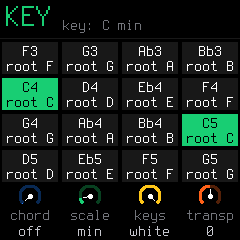 | 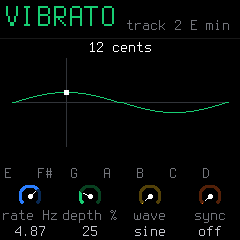 | 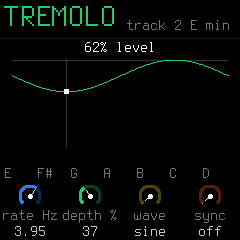 |
Fresh renders from production firmware code in the host UI/audio harness.
- Track auto-wah and auto-pan: hold ENV+FX for wah or LFO+FX for pan on the selected synth. Wah uses a vocal-range resonant band-pass sweep with a triangle LFO (free Hz or beat divisions) or follows the track’s own signal; pan offers waveform, depth and beat sync. Hold the combo + tap HOME to lock it until HOME/STOP/panic/track change. Keyboard playing and scale lights stay intact. These live effects leave saved parameters unchanged; see controls.
| Track envelope wah | Track auto-pan |
|---|---|
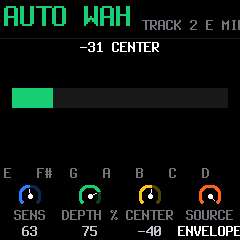 | 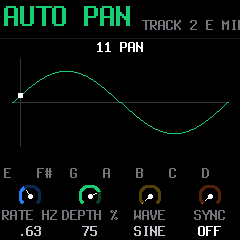 |
Fresh production UI/audio harness renders.
- More chord and arp choices: SUS2, ADD9, 6TH, SHELL, OCTAVE and explicit major/minor/seventh/diminished/augmented qualities; CONV, SHUF, ROOTALT, DNUP, UPDNREP, DIVG, WALK and PULSE arpeggios. See the playing guide for ordering, latch and sequencer input.
- Chord latch and literal roots: SCL page 2 knob 4 exposes LATCH. In non-CHROM chord mode, modifier presses update the sounding latched chord immediately and remain toggled until pressed again. KEYS/QNT CHROM allows every piano key, including black keys, to be a literal chord root; the other keyboard modes keep their modifier controls.
- Sequencer-fed arpeggios: ARP 2 ORD SNOTE/SPLAY lets sequenced chords feed the arpeggiator, including sustained tie chains. Live and sequence input remain independent.
- Expressive arpeggios: incoming and sequenced velocity/accent survives arp modes, octave expansion, ties and latch across audio, MIDI output and recording. Overlapping live/sequence pitches use the stronger current velocity; PULSE merges octave collisions rather than doubling attacks. Physical keyboard attacks retain their fixed velocity.
- Shared starter voice leading: optional VLEAD uses the live chord inversion policy for generated CHORD/ARP NOTES sequences, anchored deterministically so Preview and Apply match. BASS stays on roots. This does not add semantic chord tracking or harmony-following tracks.
- Undo accidental song loads: while stopped, EDIT + OCT− restores the project preceding the latest saved-slot load, section selection or working-project backup restore; OCT+ redoes it. This history is held in RAM and subsequent sequence edits or recording supersede it.
- New project from SAVE: the SAVE-held song menu includes NEW, with confirmation while stopped, so starting over does not require overwriting a saved slot.
- Remote performance controls: the phone can trigger held/next-bar fills and the negotiated punch-effect bank. Leases, panel priority, STOP and disconnect cleanup prevent abandoned remote controls from sticking.
- Companion protocol and safe exchange: hardware octave reporting, FM6/native-pattern editing, sample backup/upload/readback and persistent FM6 base-voice bank saving support the Android workstation below. INFO 16 retains upstream SYN kit commands 72–76 and LIVE 77; remote performance uses 86. Companion commands 87–89 are retired, so groove/starter selection remains on the FM-1. Android negotiates capabilities rather than assuming support from the version. Atomic live hardware scene switching remains future work.
- Faithful live recording: overlapping POLY notes end at their own releases; mono/legato/unison transitions preserve the recorded envelope handoff. Independent ties still support sustained notes under later attacks. Untouched factory/user arps follow a new preset; your edited arp stays. HOME identifies the A–D section currently playing.
- More LOFI experiments: TAPE combines cassette wobble, flutter and wear in one character; SMPLR blends old-digital rate reduction, bit crushing and compensated drive from subtle grit to heavy destruction. DUST KEYS, WORN PAD, TOY BELL and DUST BASS add four editable instrument presets in the LOFI bank. Controls and details.
- More console and worn-digital presets: NES REED, NES BUBBLE, GB MALLET, GB VOX, MD BASS and MD BRASS expand the CHIP sound-browser category; WORN EP and DUST ORGAN join LOFI. They use the existing engines and remain fully editable. Sounds and browsing.
- Usable chip pitch sweeps: the LOFI engine's MOTN → SWP smoothly sets a bounded attack pitch drop, from subtle dips to almost two octaves. Long notes settle instead of falling to the pitch floor; held-note edits glide to the new depth.
- Shared motion shapes: LFO → DRIFT → MODE offers RAND, SIN, TRI, SAW and SQR for direct sound movement or TARGET: MORPH. Both share cycle controls and waveform evaluation with the existing control LFOs and their plots. Shape changes fade through zero. Architecture and controls.
- Drum playback refinements: upstream's kick-preserving allocator retains drum body in busy grooves, while tuned 808, 606 and VINTAGE snares have fuller tails with softer transients. Kit order, stored user sounds and mixer levels stay the same. Changes and measurements.
- Tap-toggle drones and movement: on LFO → DRONE, choose static DRONE or scale-aware MOVE with knob 1. DRONE 2 provides octave limits, HOME and GRAV. Use POLY and sufficient ENV sustain; STOP clears the notes. Runtime controls reset at power-off. BLOOM was removed in .118 to make room for tempo-synced strum; richer ambient generation is available in MerthSloop Mobile. Drone controls.
- Slow ambient motion: LFO → DRIFT adds independent smooth random movement to each synth track’s tone, shape, pan, or a combination of them, over 1–160 seconds or the same tempo-synced divisions as DRONE. Amount and OFF fade smoothly; a live meter shows the movement, and LOFI tone wanders darker as well as brighter. The original sound stays editable. STILL WATER, WIDE SKY and DUSK add sustained progression starters. LFO → DRONE → MOVE can slowly replace one drone pitch at a time within the track’s scale; timed or tempo-synced cycles, chance (including a 101% legal-move search) and scale-step range control the wandering, with a live cycle bar. DRONE 2 → LO OCT / HI OCT bounds the whole pitch walk (defaults C3–B5); RANGE still sets each jump. Both features are runtime-only and reset at power-on. Controls and design.
- On-device sound explorer: SAVE → SOUNDS filters presets by character, favourites, user slots or factory engine. Audition with knob 1 or PRESETS while your part plays; knob 3 right keeps the sound, left restores your previous edits. Leaving without KEEP also restores it. Controls · Screenshot.
- Track sound morphing: EDIT → MORPH keeps A/B sound states per synth track. Store two variations and choose ALL, SOUND, FILTER, ENV, LFO or MIX. Sweep between them while notes keep playing, use EDIT → MORPH GO for a timed/tempo A→B or B→A transition that stays at its destination, or choose DRIFT → TARGET: MORPH for timed or tempo-synced movement around the manual blend. Automatic movement preserves the base sound and parameter locks; SOUND/ALL automatic sample/patch/model sources must match. Synced morph screenshot. A/B captures, the manual blend, scope and duration save with each section and the working project, and restore after shutdown. Controls · Screenshot.
- More room for drone layers: HOME → AUDIO → VOICE BUDGET offers the default 8 / 12 or experimental 10 / 15 through 16 / 24 shared admission. Stolen POLY drone pitches can recover when a slot and budget are free, without generating extra MIDI notes. The budget is saved with device preferences; engine caps and CPU shedding remain. Controls and qualification.
- Track sustain: ENV → SUSTAIN offers PEDAL, PIANO, STRINGS and LOFI tails beneath new attacks, with half-second to 32-second/HOLD decay, DAMP and AMOUNT. PIANO fades treble faster, STRINGS darkens gently, and LOFI adds released-tail sample-and-hold grit. New attacks stay clean; ties and played MIDI/recording gates stay intact. Use POLY for overlapping voicings. Runtime-only. Controls and implementation.
- More room for development: shared temporary/effect state and lossless startup packing recover flash and RAM while preserving sound data and direct playback access. Measured results. Engine optimizations also remove redundant calculations while preserving sound and timing. Engine audit integration.
- More playable instruments: fourteen extra factory sounds under CHIP and INST: NES-inspired pulse, pluck and triangle; Game Boy-inspired wave bass, hollow lead, organ and arpeggio; violin, clarinet, oboe, bassoon, harpsichord and oud. These reuse existing engines and remain fully editable. Preset pack.
- Compact firmware storage: packed bold fonts and a lossless factory-drum dictionary leave more room for instruments and workflows. Factory drum sounds keep their exact parameters; only a new hit decodes its sound. Repeated interface text is packed and restored once at startup, with no playback decoding. Startup shows the firmware title instead of the bitmap splash.
- Track settings stay put: changing instruments preserves POLY/MONO/LEGATO/UNISON, glide amount/mode, note priority/allocation, drive, chorus, delay/reverb sends, insert, slicer and track filter. On a normal FX page, press OCT− and OCT+ together to reset the selected track’s effects; playing preferences stay intact. Song loads still restore the saved song.
- Swing eighth-note grooves: hold HOME → TIMING → SWING GRID → 1/8, then use SWING8 on TRACKS. HALF TIME hats and sequenced eighth-note arps can shuffle on a 1/16 pattern; STEP retains the existing swing mode. Controls and screenshots.
- Eleven chord modifiers: every black key has a distinct gesture, including sus2/sus4, ninth/thirteenth, explicit major/minor sevenths, both inversion directions and open voicing. Hold them or toggle them over a latched chord/arp; SEL shows the physical-key guide.
- Adjustable scale lights: choose DIM/LOW/MID/HIGH in the main menu’s LIGHTS section; played notes stay bright. SEL shows the normal key guide with CHORD off and a black-key modifier legend with CHORD on.
- Edit without stopping the groove: adjust note pitch/length, move a mistimed note, use note actions, and undo/redo pattern edits during playback. Progression LIVE supports running transport, draft changes for the next chord, page navigation, and switching sustained chords to arp output.
- Write your own progression: choose CUSTOM in SEQUENCES, then turn SELECT to the CUSTOM page. Set 1–8 chord positions and their scale degrees, with adjustable duration. Use the same rhythm, voicing, preview and CHORD/BASS/ARP NOTES controls; applied notes save with the song.
- Perform progressions live: SEQUENCES → PERFORM maps your progression across all sixteen white keys, repeating each group another octave higher. Black keys use the ordinary chord modifiers; HOLD makes them toggles. Play sustained chords with ARP OFF or rhythmic output with ARP ON, alongside the other tracks, and record the result as editable notes.
- Layer starter sequences: in SEQUENCES, turn ALGORITHM to ADD instead of REPLACE. Existing timing, locks and fill survive; duplicates are skipped and a fifth distinct note rejects the operation without changing the track. EDIT undo/redo covers the complete change.
- Three additional visualizers: Note Trails, Groove and Song Journey show pitches, timing and song order. Seven styles are available, including Oscilloscope, Spectrum, Spectrogram and VU Meters; see the complete gallery.
Note Trails shows played/held notes rather than released voices or delay tails, and displays the master punch GATE rhythm by cutting trails during its fully wet closed phase.
Hold LFO or ENV, then tap OCT+ to copy a vibrato/tremolo punch-in into the track's saved shared LFO. Its rate, waveform, sync and destination depth carry with the project; vibrato depth rounds to the normal PIT steps. LOFI → MOTN → ARP also offers all SEL chord shapes alongside its original chip arpeggios. The STEP move brush can merge a mistimed note into an existing chord, preserving destination timing and dynamics, with a four-note limit and complete undo/redo.
| Locked vibrato | Locked tremolo |
|---|---|
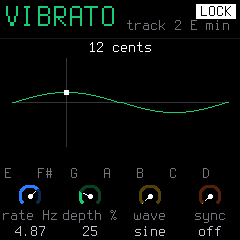 | 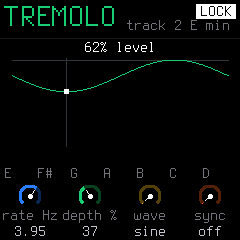 |
Production-code framebuffer renders. Hold LFO/ENV, tap HOME, then release; HOME unlocks.
Visualizers added in this fork
On TRACKS, tap HOME to open the visualizer; turn SELECT to change style. Tap HOME or a page button to leave. Playing, transport and held control layers still work.
| Note Trails | Groove | Song Journey |
|---|---|---|
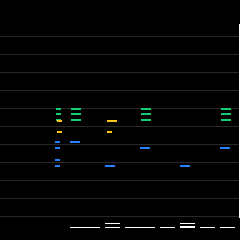 | 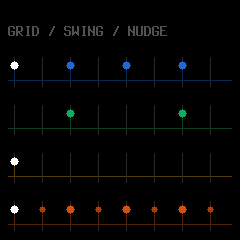 | 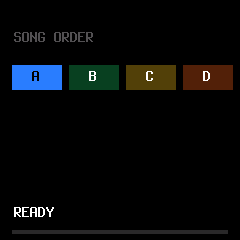 |
| Played/held notes, with drums below. | Swing, nudges, hit levels and ratchets. | Song or quick-chain order and remaining bars. |
Framebuffer captures from the production UI/audio harness. See the complete seven-style gallery for the retained upstream styles, controls and capture details.
To install this fork, build its firmware and local browser installer with build-sloop.ps1; see building for prerequisites. The upstream browser installer linked above installs upstream SLOOP. See the guide, musical starters, drum grooves and rhythm shaping for the controls and limits.
Automatic GitHub Pages hosting is configured for pushes to merthsloop; enable GitHub Actions as the repository's Pages source to activate it. The workflow publishes the built installer/editor in docs, checking the firmware version and package hash first. See Pages deployment.
MerthSloop Mobile for Android
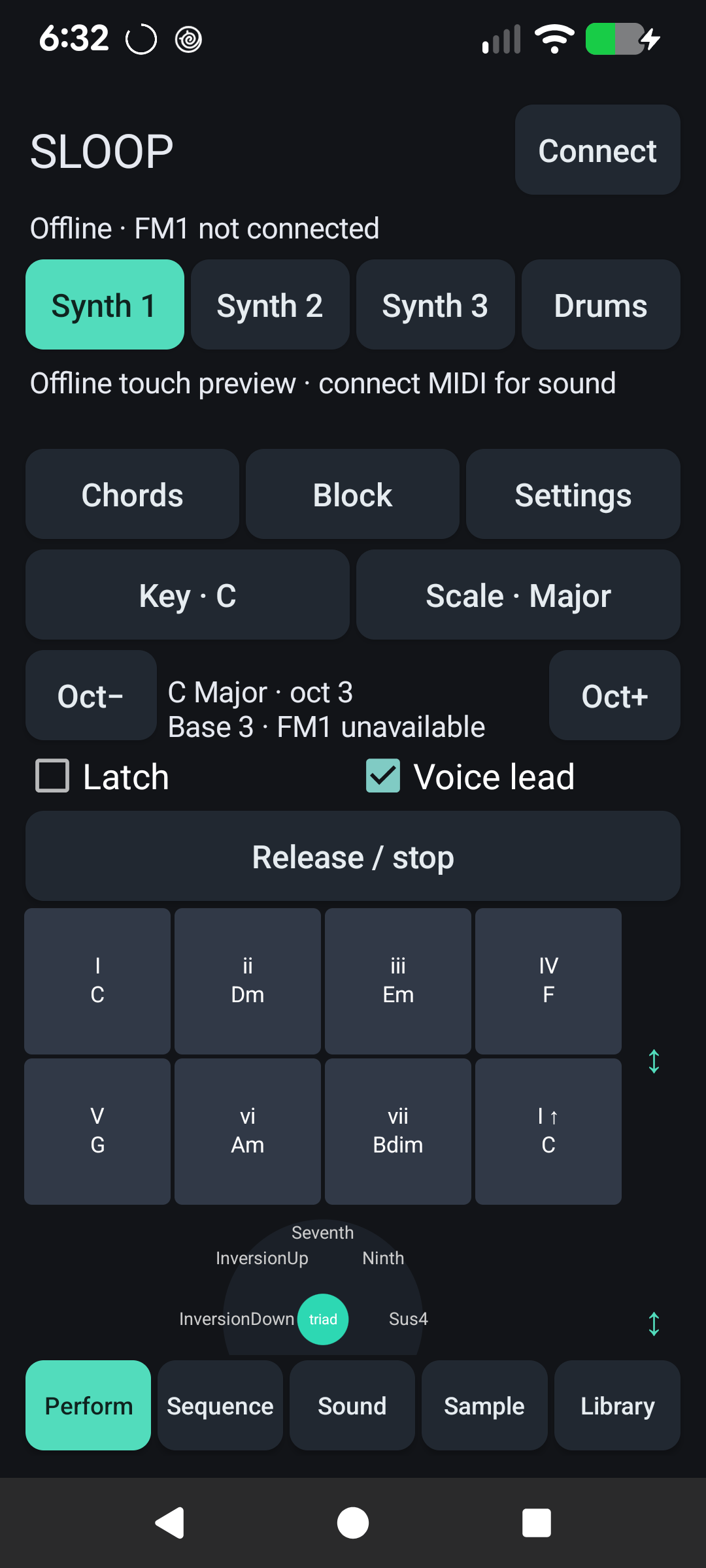
Bring the FM-1 and your phone: MerthSloop Mobile is a C#/.NET Android companion for touch performance, sequencing, sound editing, sampling and session management over USB. Connect using a USB data cable and a phone that supports USB host mode. The track buttons choose negotiated MIDI channels; use FM1 IN=NOTES for per-track routing, or the app's Use track MIDI routing helper. Generic MIDI mode also drives other MIDI receivers.
Import MIDI files: in Sequence, choose Import MIDI file…, select a source part and destination track, then audition it. Import into the editable app pattern with undo, or review the FM1 conversion and explicitly replace its track with verified readback. Hardware conversion uses the track's current DIV and active length and reports quantization, truncated notes and chord limits before sending. Format 0/1 musical-time MIDI is supported; tempo changes, controllers and patch changes are not imported.
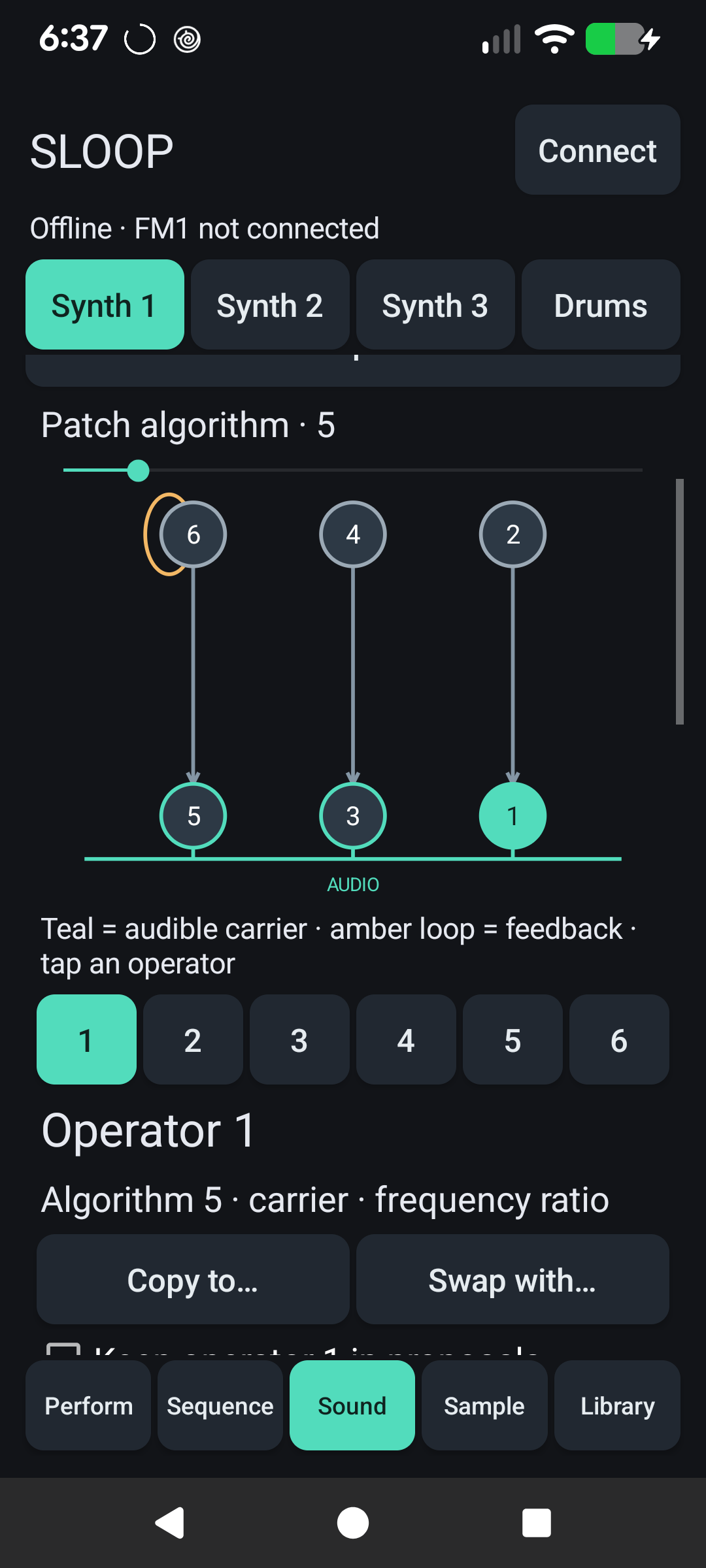
| Perform | FM6 sound editing |
|---|---|
 |  |
| Piano roll | Sampling and chopping |
|---|---|
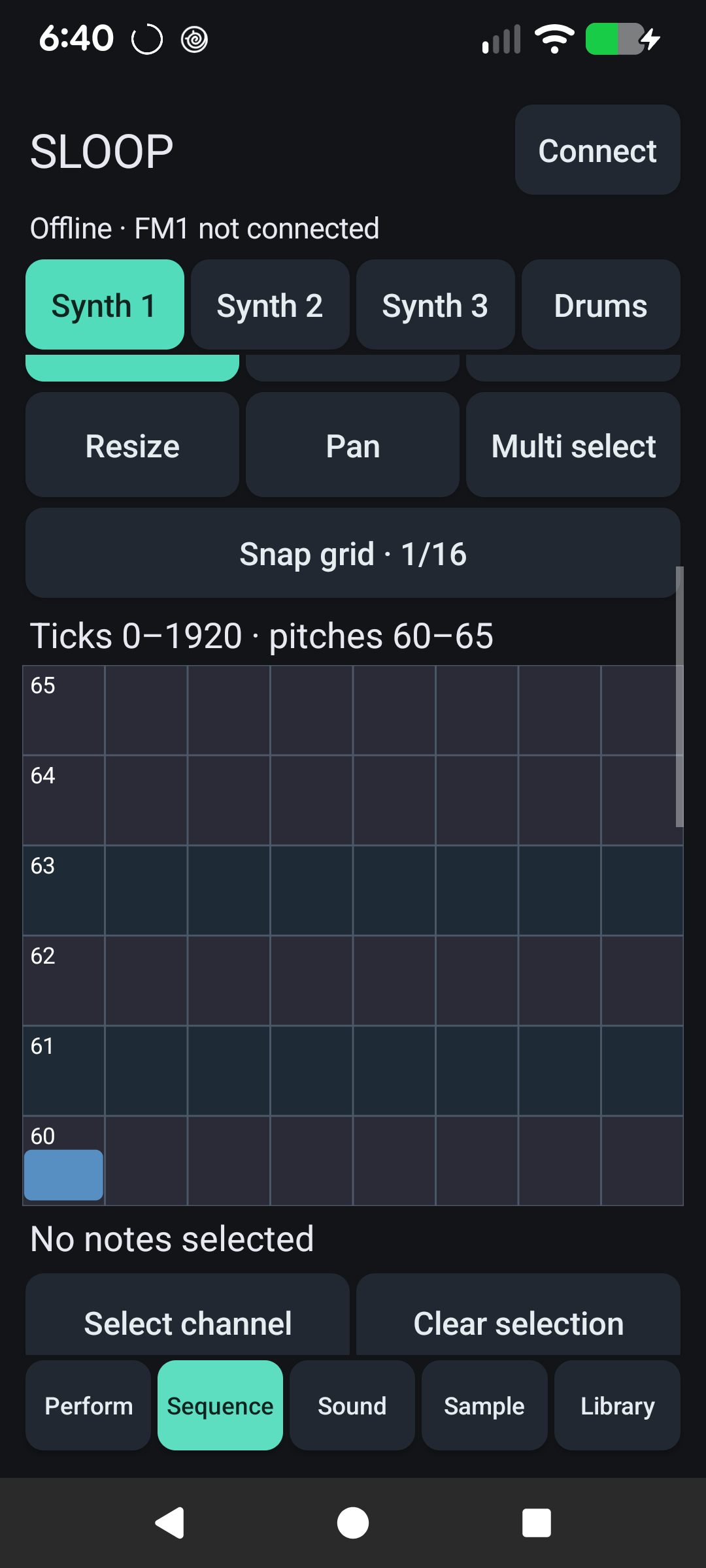 | 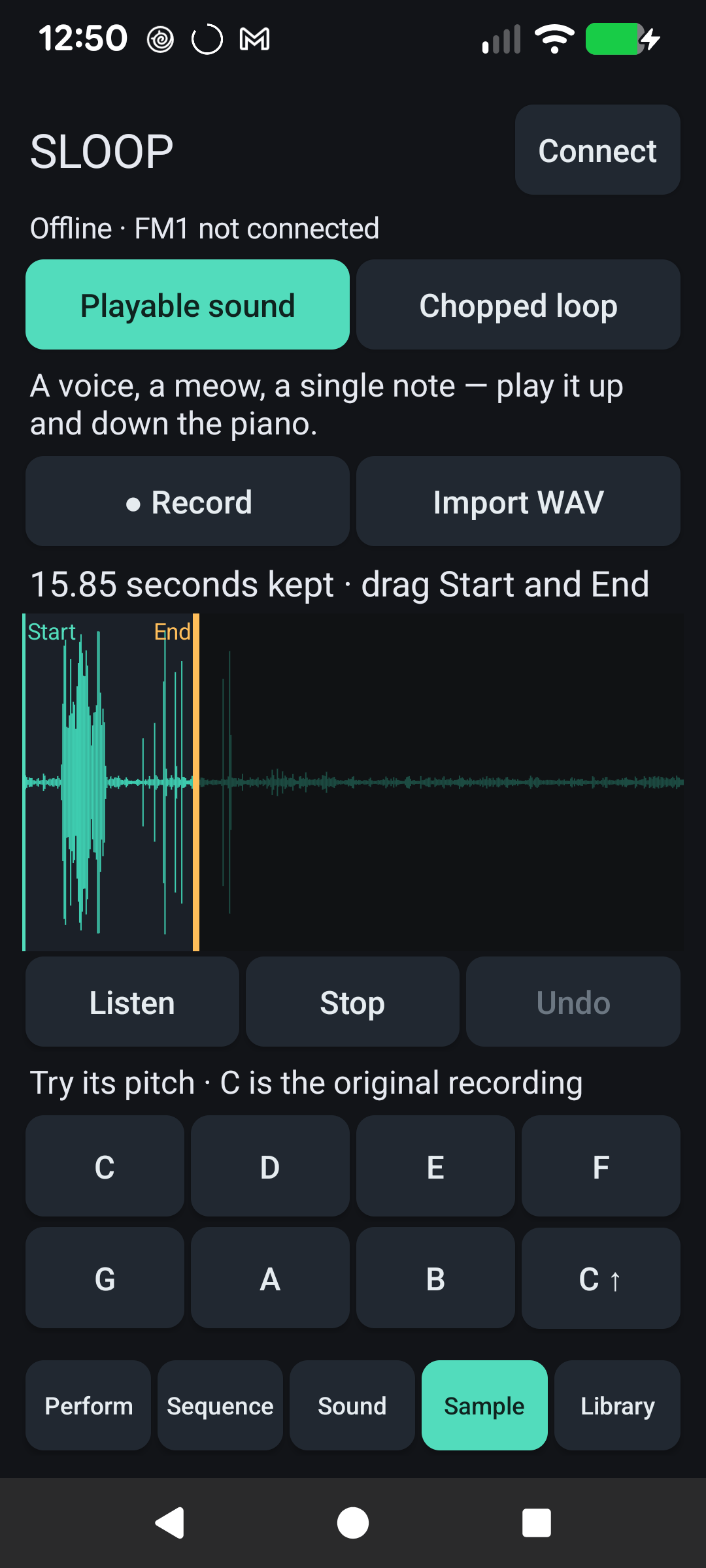 |
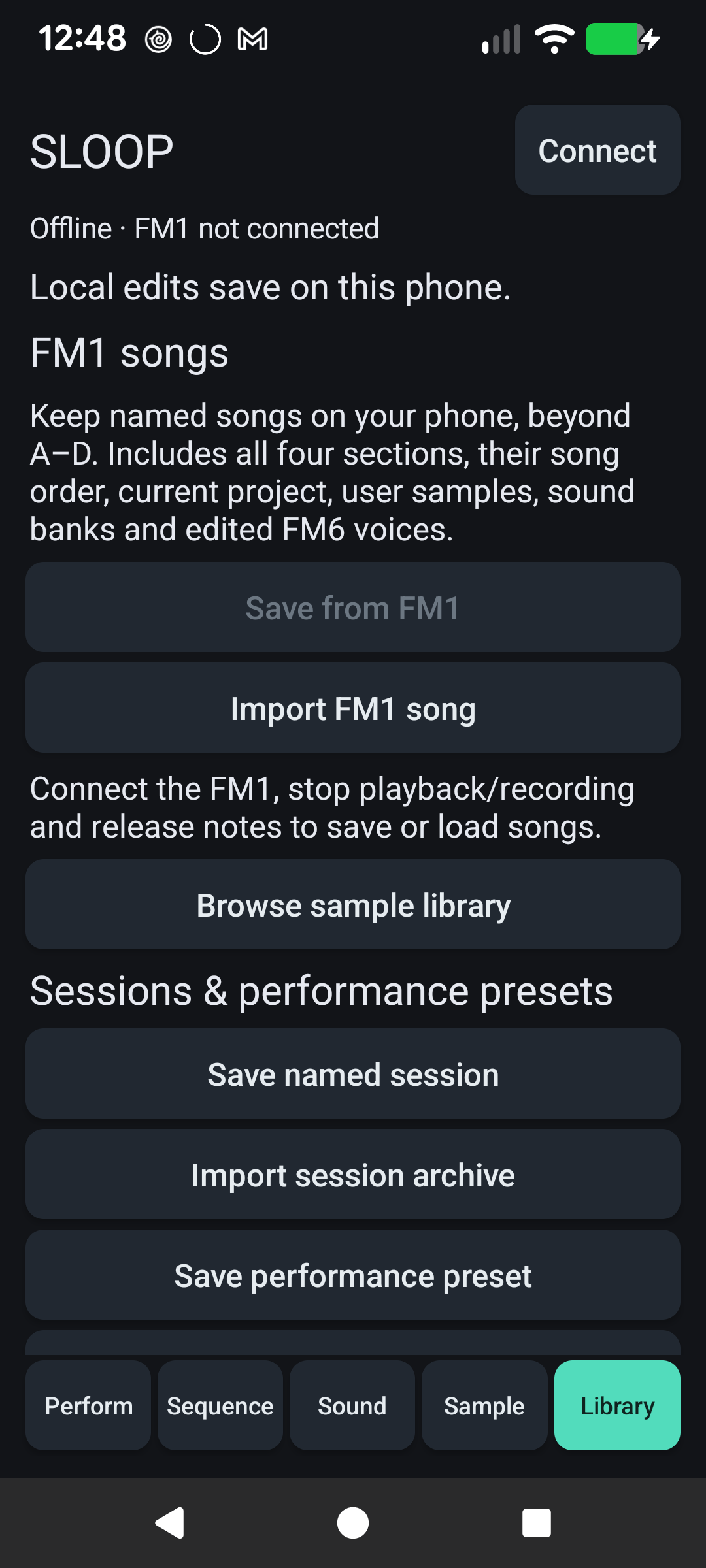
Captures from the connected Pixel. The phone is connected to the PC for screenshots, so the FM-1 connection is shown offline.
Chord mode offers 8/15/22 scale-aware pads, Thickness with up to two extra upper-octave layers, and two voicing choices: Smooth voicing minimizes movement; Part writing favors independent voices, avoids parallel fifths/octaves where possible, and prefers leading-tone/seventh resolutions. Explicit inversions and selected octaves take priority. FM1 polyphony limits still apply to dense chords.
The companion also offers external MIDI device/output-port input in Perform (literal keys or bounded scale-root chords, sustain and lifecycle cleanup). FM1 arp output preserves incoming/sequenced velocities. See the current feature status and release evidence.
Perform also offers an Accessible pads section with named buttons that play brief notes or chords and release automatically. Hardware gesture buttons support bounded accessible activation too, alongside their normal touch controls.
The app has five workspaces:
| Playable sound | FM1 song library |
|---|---|
|  |
| Workspace | What you can do |
|---|---|
| Perform | Eight scale-degree chord pads including I ↑, a HiChord-style quality joystick, keyboard, scale grid, drums, ribbon and an XY MIDI CC macro. Play block chords, strums, arps or repeats; control key, scale, octave, voice leading and latch directly. Capture a performance into a loop. |
| Sequence | Draw, select, move, resize and quantize notes in a touch piano roll with multi-note edits and undo. Exchange native FM-1 patterns, loop MIDI, browse drum grooves, arrange scenes and add stepped CC automation. Generate, edit, save and exchange composition drafts. |
| Sound | Manually edit FM6 algorithms, operators and envelopes; copy/swap operators and exchange SysEx. Try offline sound recipes and reviewed prompt edits, audition a patch against the original, and save a base voice to the hardware bank with verified readback. |
| Sample | Choose Playable sound for a meow, voice or single note, or Chopped loop for a song phrase. Record/import, drag Start and End, listen, choose 4/8/16 chops if wanted, then Send to FM1 and choose slot/synth. Preparation and fitting happen automatically, with backup and verified readback. Advanced editor retains detailed pitch/gain, transient/tap chopping and export. |
| Library | Save from FM1 keeps named hardware songs beyond A–D, including sections, song order, samples, sound banks and edited FM6 voices. Load onto FM1 first saves a recovery song; import/export portable song archives. Also save phone sessions, performance presets and composition drafts, and browse/reuse samples across sessions. |
Prompts currently use bounded offline procedural recipes and edit rules. They produce notes, synth settings or reviewable edits; no audio-generation service or local language model is included. The app's MIDI performances use the connected instrument for sound, and USB sample preview can use the FM-1's audio output.
| Prompt an edit | Review the proposed change |
|---|---|
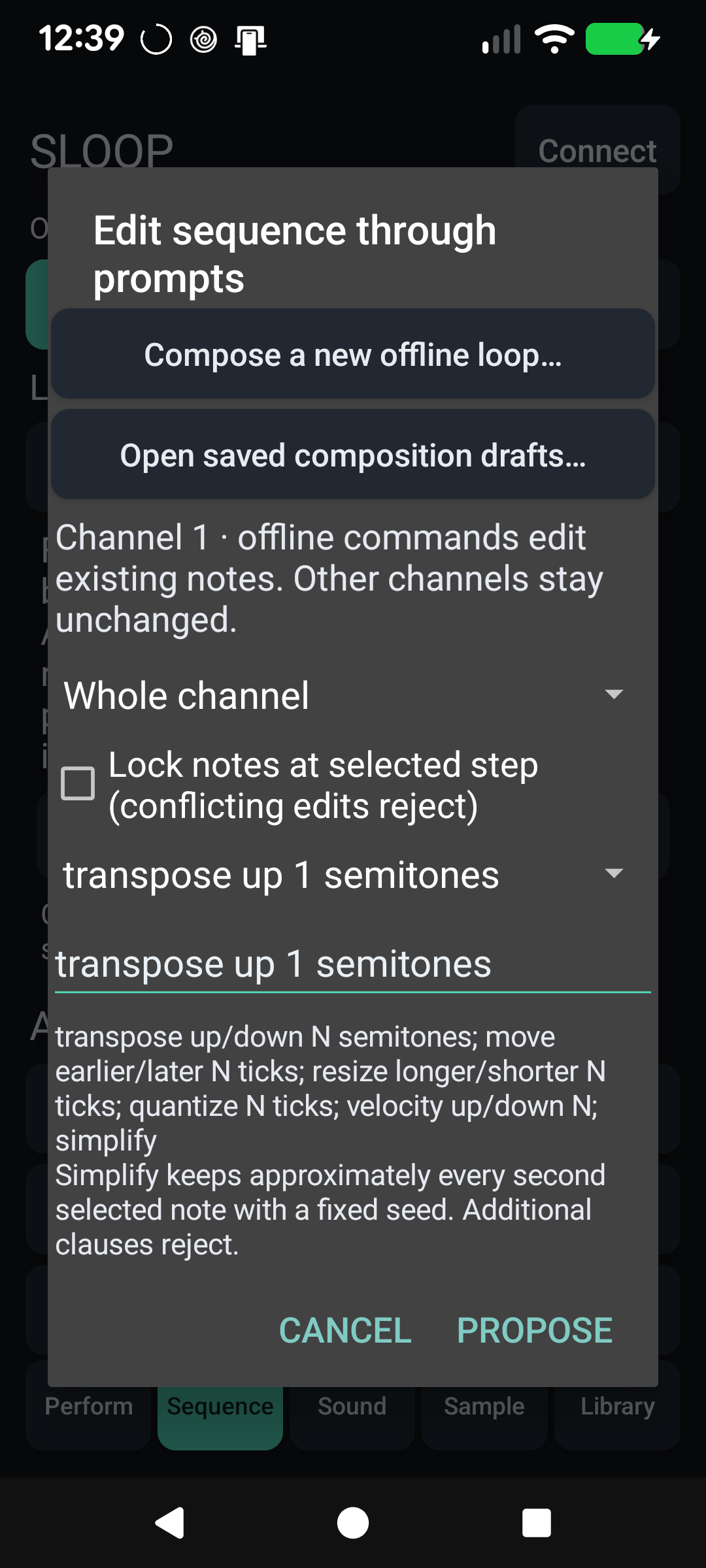 | 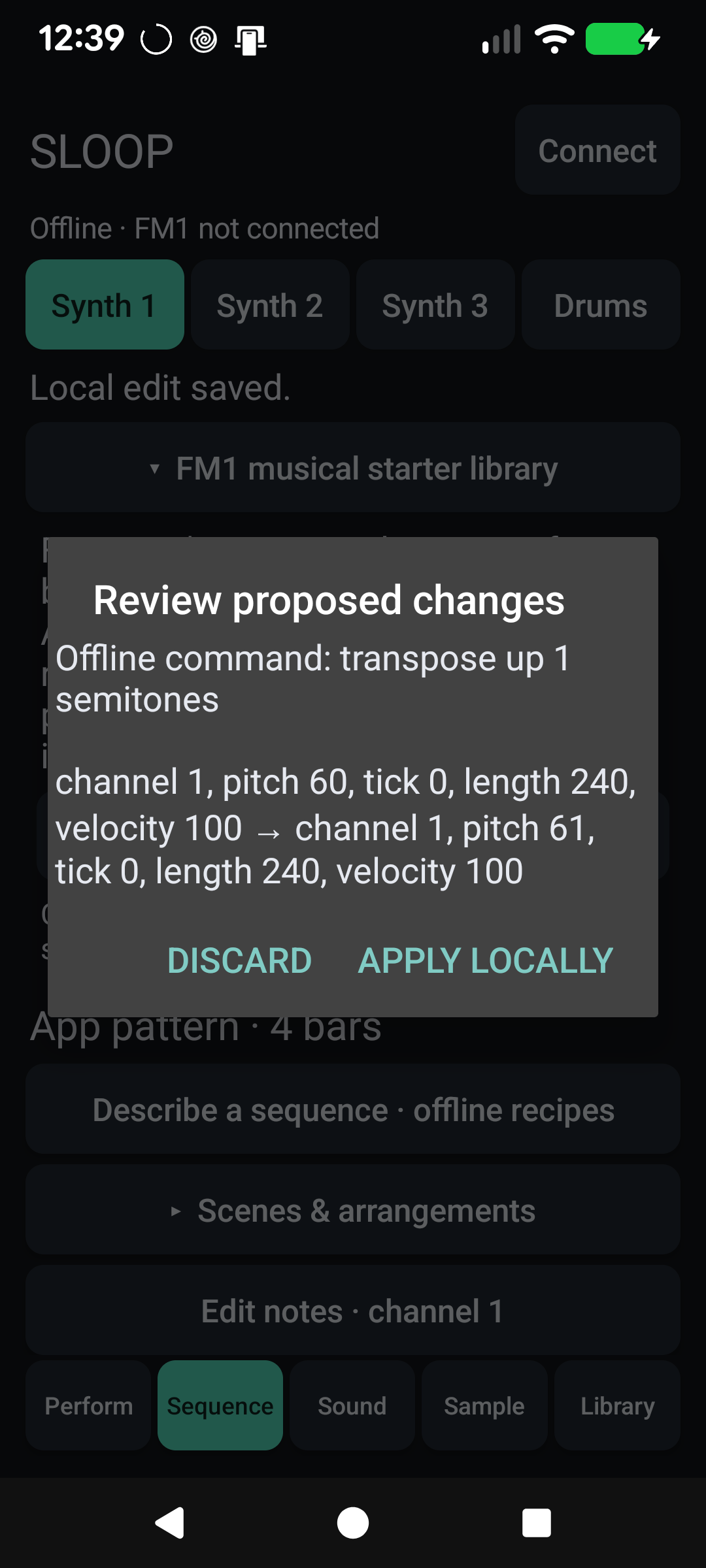 |
Fresh connected-phone captures. This proposal was discarded after capture. In Sequence, Describe a sequence · offline recipes opens these controls. See the phone library and prompt walkthrough for groove entry and prompt screenshots too.
Offline generator sessions: Gens offers fifteen musical generator families and a four-track rack with shared clock, key, scale and progression, per-lane mute/velocity levels, and saved whole sessions. Capture the actual generated MIDI, replay it through the FM1, or export it as a standard MIDI file. See the generator guide for controls and clock setup.
Android is the current target. Windows/iOS, controller CC forwarding, time stretching, combined USR3+4 uploads and atomic live hardware scene switching remain future work. See the current status for the full implemented/future split.
Build and install from android/src using .NET 10 and the Android workload; Install-Phone.ps1 builds, installs and launches on an authorized USB-debugging phone. The design index and verification record document the architecture and checks. Original Android work uses the Unlicense; retained GPL/Apache components keep their obligations, including when distributing the combined app. See Android licensing. Firmware remains GPL.
Upstream capabilities
SLOOP supplies the groovebox foundation: twelve synth engines including PHYS, NOISE and six-operator FM, factory sounds, sampled and synthesised drum kits, DX7 patch exchange, parameter locks, microtiming, fills, song chains, MIDI and USB audio. The features below describe the current controls; the manual retains upstream history and deeper reference material.
The integrated upstream features include dual-core audio, more arp modes and keyboard HOLD, per-drum tune/decay, favorites, sample loops with release tails, unquantized recording over held notes, MIDI remote controls and clock output, themes, adjustable knob acceleration and USB recording-rate selection. Our grooves, custom progressions, note editing, live modulation, visualizers and Android workflows remain available alongside them.
Performance, sound and MIDI controls
- Transport HALF: momentary half tempo with unchanged note pitch and saved BPM (internal clock only).
- Punch combinations: one existing effect plus LOW/HIGH/PHONE and GATE, with held-key fallback; HALF is independent.
- Six reverb types: FX → REVERB → TYPE selects the original STEREO, a wider dual-path SPRING, tight ROOM, dense bright PLATE, spacious HALL, or a dense muted DARK tail. They share the existing reverb memory; each track keeps its own send.
- Upstream reliability fixes: early OCT− USB rescue, better Windows update-loader discovery, macOS USB-audio compatibility, faster encoder tracking and steadier external-clock tempo estimation are retained alongside the custom UI and editing tools.
- 27 punch-in effects: eleven more on the black keys (hold FX): KILL LOW / MID / HIGH, REWIND, DOUBLE TIME, FLANGER, AUTO-PAN, FREEZE, LOOP 8T, LOFI, FADE OUT.
- From Felucca (Leo Kuroshita): an INSERT effect on every track (SOFT, HARD, FOLD, FUZZ, CRUSH, PHASR, FLANG, CHOR, with dry / wet), LFO 2 (tempo SYNC, TRIG NOTE / FREE, POL BI / UNI), ENV SYNC (attack, decay and release as note values), the ANALOG filter as LP, BP or HP, a note's LEN in steps and each step's velocity, MIDI LEARN (GLO + F#3), and the latched-arp fix (#191).
- TEXTURE: a looping bed under the mix (vinyl, tape, rain, wind, radio, room tone or your own sample), breathing slowly with the tempo, without taking a track (GLO → TEXTURE).
- Live drum mutes: EDIT + a black key, then the sounds' keys.
- Sustain pedal and pitch bend from a MIDI keyboard (the bend's range: GLO → MIDI 2).
- Each track on its own MIDI channel (GLO → MIDI: CH1, CH2, CH3, OTHER), in and out, for an external sequencer (drums 10, bass 2, pad 11, lead 8…). Thanks to the viewer who asked!
- Step entry from a MIDI keyboard: on the STEP page, the notes your keyboard plays write the step, as the FM-1's keys do.
- Program Change, 1/4D delay, REV / ECHO THROW (FX + OCT− / OCT+).
- Erase a saved loop: SAVE → PROJECT → ERASE (KNOB 2) empties a project slot, song section A–D. Thanks to the viewer who asked!
- The web editor offline: Download the editor saves it as one file that runs in Chrome or Edge without internet, or Install the app (Android too): the editor and the installer then open without internet.
- MIDI IN on one channel (GLO → MIDI 2 → IN = CH 1 … 16), for a sequencer driving other gear on the same cable.
- A bolder screen: Terminus Bold, all in capitals.
- No more clicks when loading a sound over held notes, or when a filter (track, drums, master FILT) starts to close.
- A cleaner output: the master limiter looks ahead, so loud kicks and basses no longer crackle with MASTER turned up (headphones especially).
- Fixed in the web editor: the same value set on a second track (DIV 1/8 on the drums, then on track 1) is sent again.
- The installer finds an FM-1 running CLIPPER (or another firmware naming its USB port its own way).
Screenshots
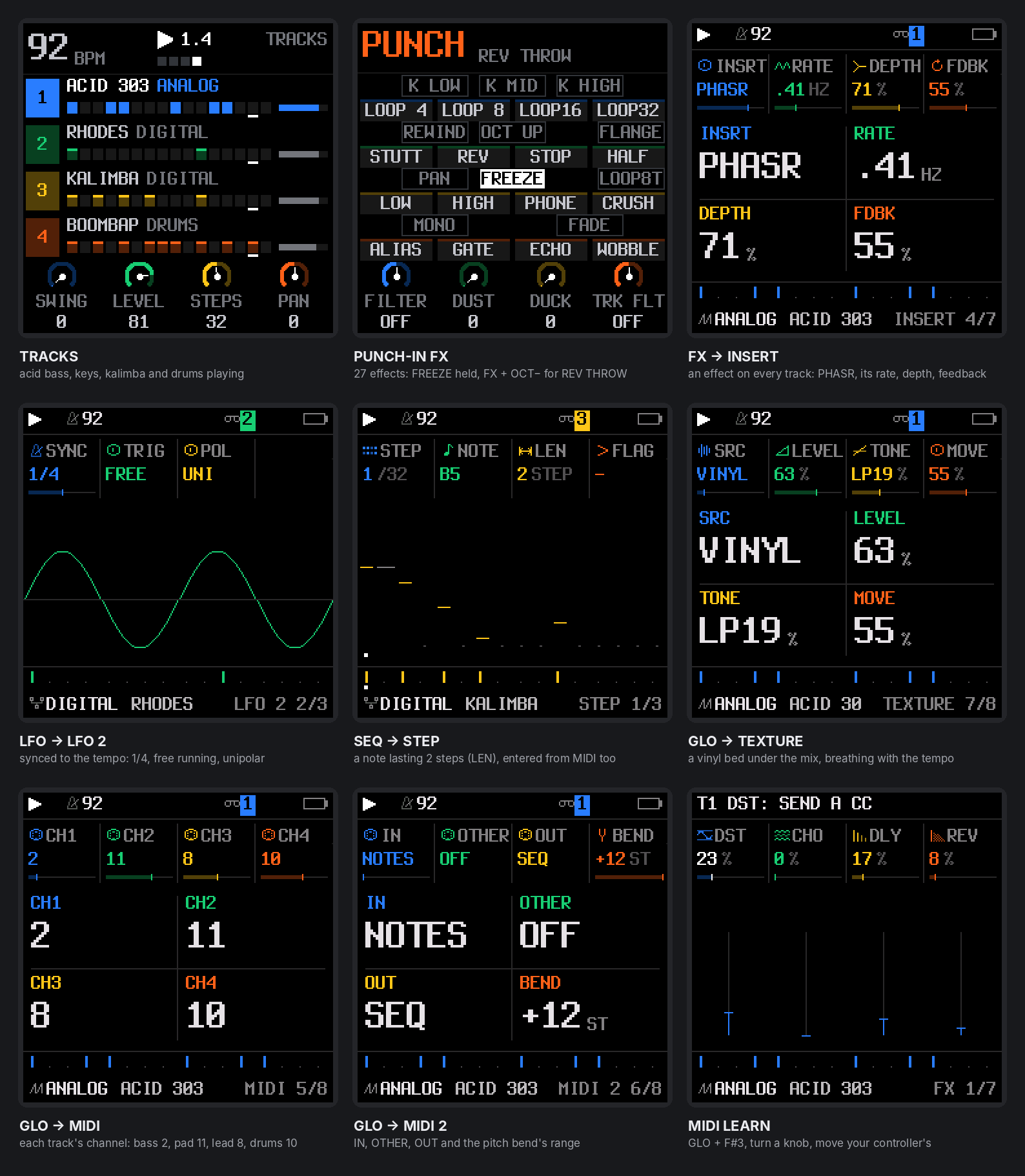
The upstream FM-1 screen, in its bold font: the tracks playing, the 27 punch-in effects (FREEZE held, REV THROW on), an INSERT on a track, LFO 2 synced to the tempo, a note's LEN on the STEP page, the TEXTURE bed, every track's MIDI channel (GLO → MIDI, MIDI 2) and MIDI LEARN.
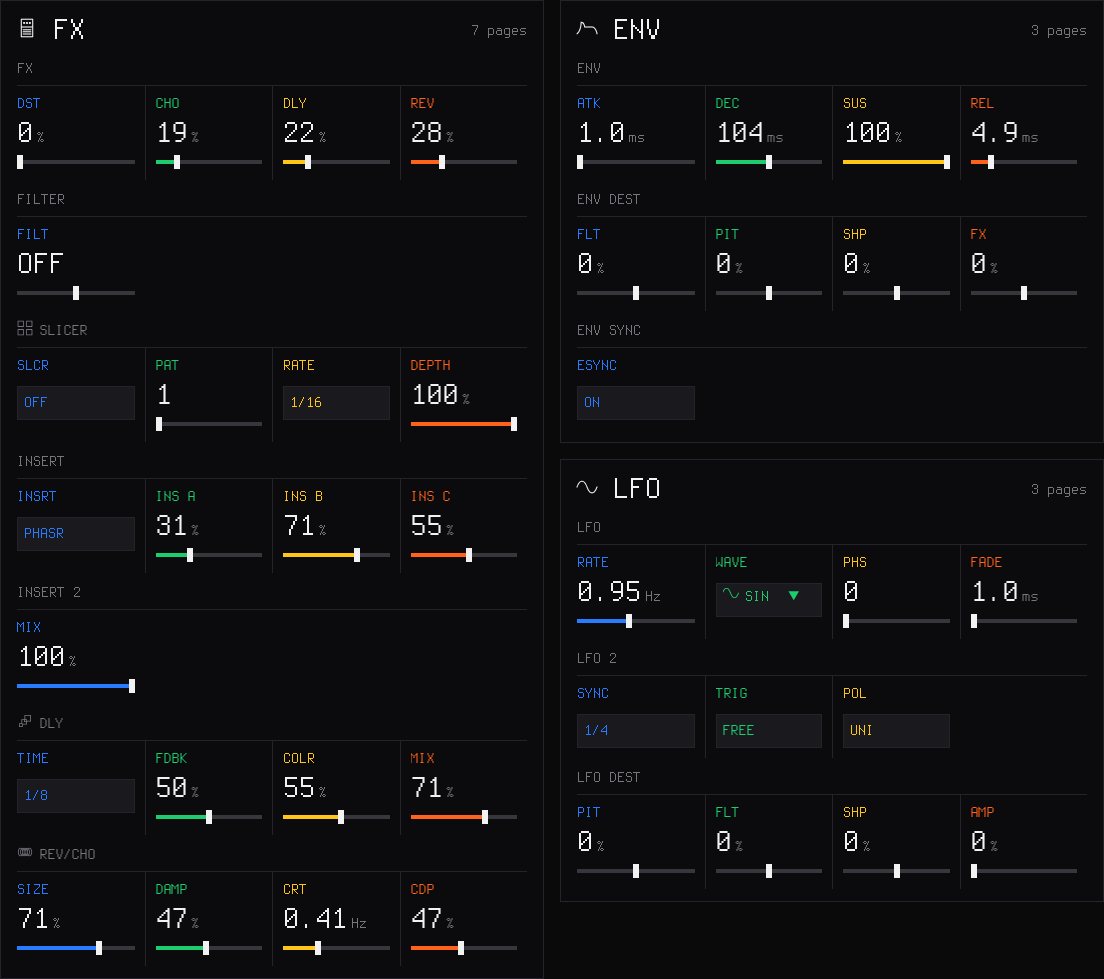
The web editor's Sound page: the INSERT and its dry / wet, ENV SYNC, LFO 2 (SYNC, TRIG, POL).
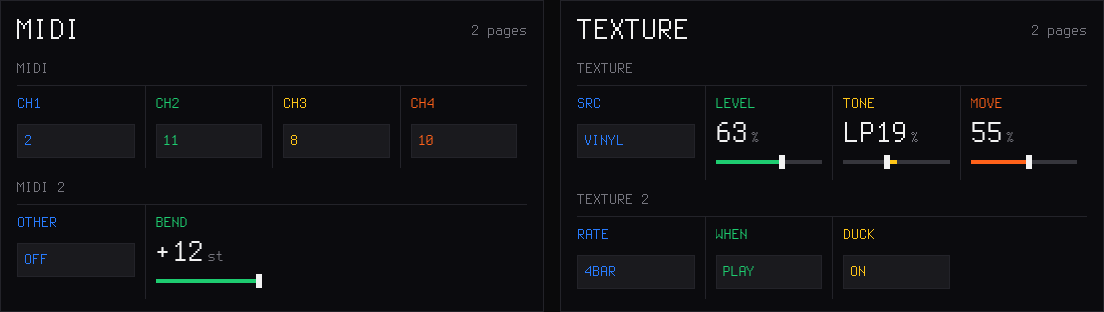
Settings: each track's MIDI channel, the other channels and the bend range; the TEXTURE bed.
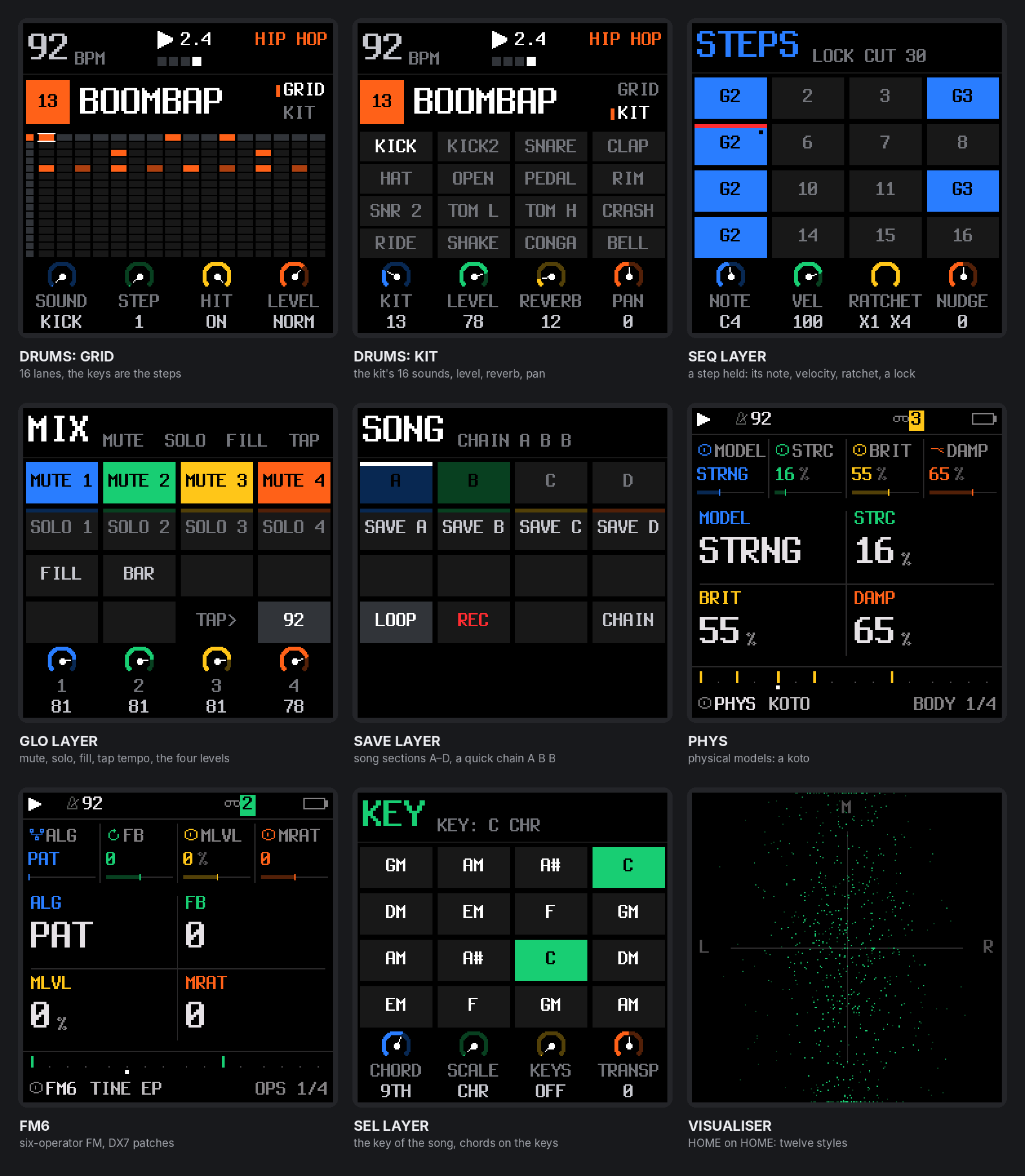
Other upstream screens: the drum grid and kit, a step held in the SEQ layer (its note, velocity, ratchet and a lock), the GLO mix layer, the SAVE layer's song sections and chain, PHYS, FM6, chords on the keys (SEL), the visualiser.
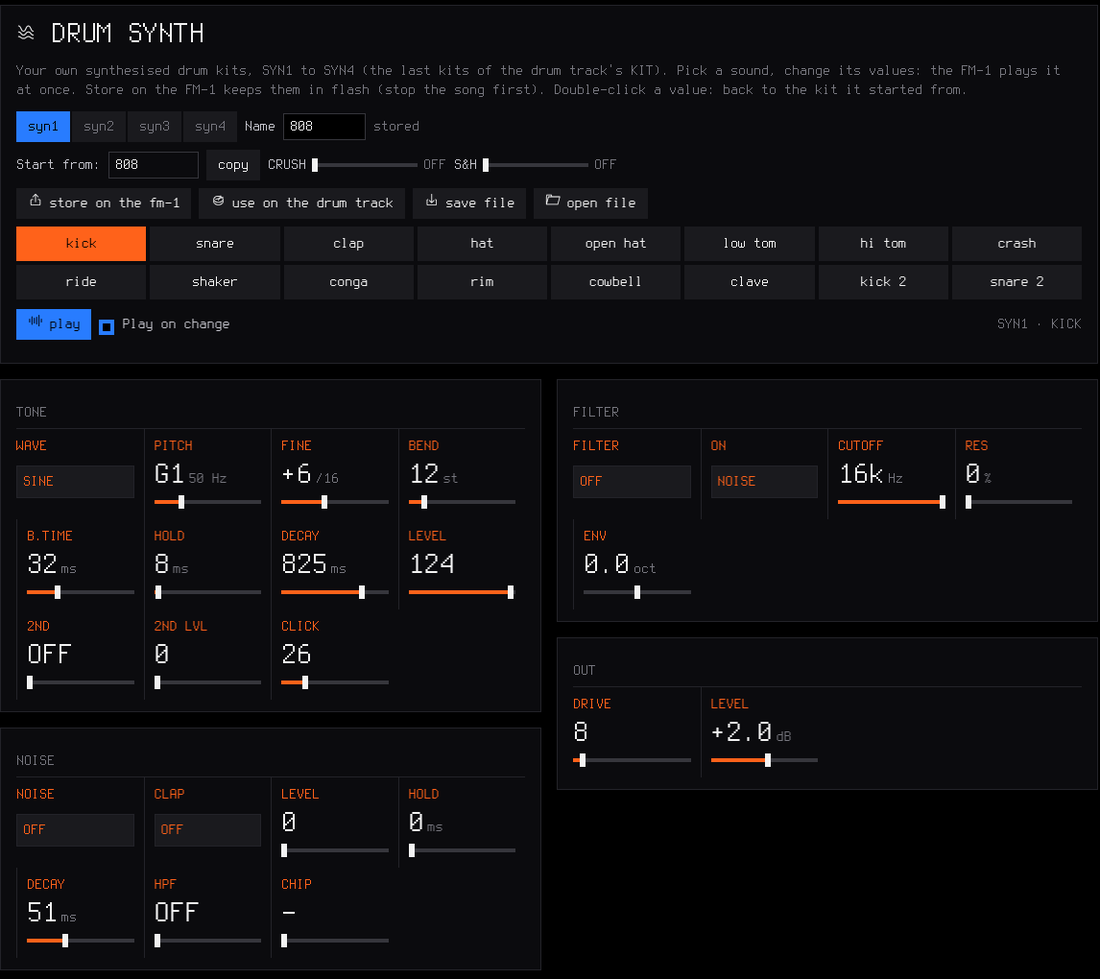
The web editor's Drum synth page: every value of every drum sound, heard on the FM-1 at once.
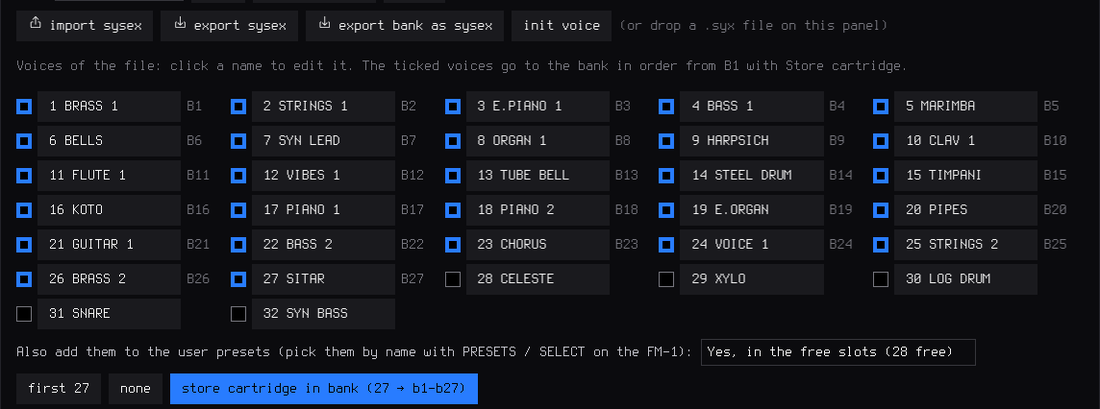
A 32-voice DX7 cartridge dropped on the FM6 panel: 27 voices ticked, into the bank in one write, and as user presets if you choose.
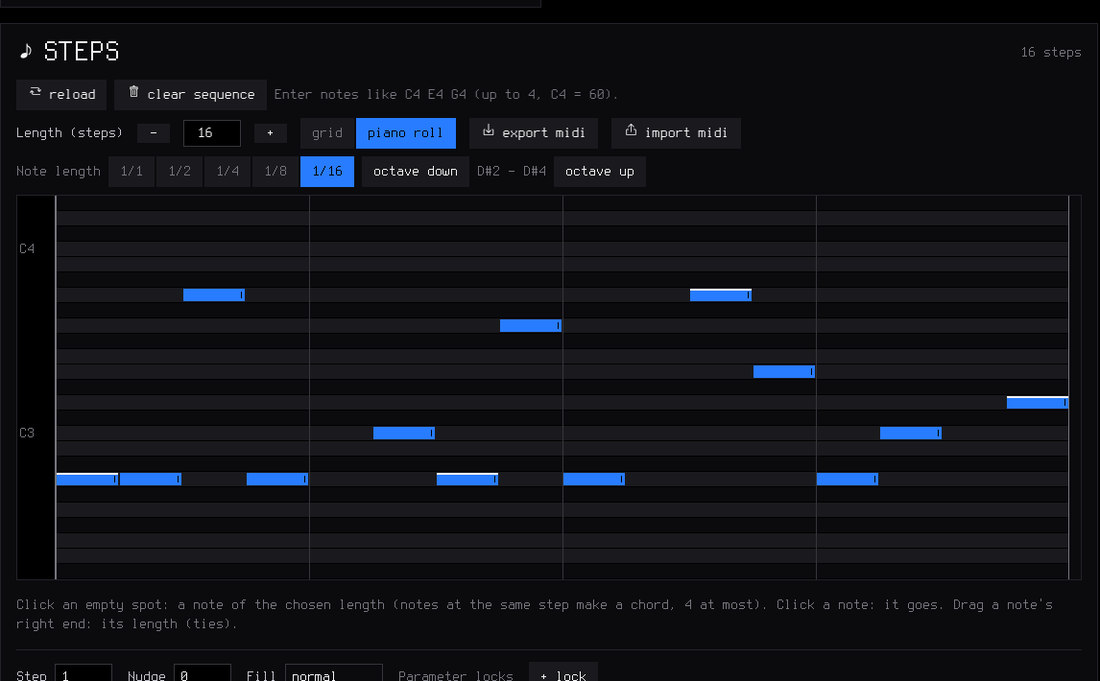
The piano roll: draw, delete and stretch notes and chords with the mouse; Export MIDI / Import MIDI next to it.
Features
Play it live: hold a button, touch a key
Every function button is a layer: hold it and the 16 white keys and the four knobs change job, and the screen shows how. Tap it and its pages open. Hold a layer button and tap HOME to lock it open, both hands free.
| Hold | Keyboard controls | KNOB 1 · 2 · 3 · 4 |
|---|---|---|
| FX — punch | 27 punch-in effects on the whole mix. White keys: loops 1/4–1/32, stutter, reverse, tape stop, half speed, filter sweeps, phone, bit crush, alias, gate, echo, tape wobble. Black keys: kill low / mid / high, rewind, double time, flanger, auto-pan, freeze, loop 1/8T, LOFI, fade out | FILTER · DUST · DUCK · the track's filter |
| LFO / ENV — modulation | playable keyboard, track-only vibrato / tremolo waveform panel | Hz · DEPTH · WAVE · SYNC |
| EDIT — erase | erase a sound or a note as the loop plays (stopped: from the whole pattern); a black key: live drum mutes | SHIFT · LENGTH ×2 / ½ · TRANSPOSE · OCTAVE |
| ARP — roll | note repeat on the grid, recorded as ratchets | RATE (1/8 … 1/64) |
| SEQ — steps | the 16 steps of the page; a step held: a level, a ratchet, a nudge, parameter locks (PRESETS / ALGORITHM), a fill condition (OCT+) | SOUND / NOTE · DIV · SWING · LENGTH (a step held: SOUND / NOTE · LEVEL or, synths, VELOCITY · RATCHET · NUDGE) |
| SEL — key | the key of the song | CHORD · SCALE · KEYS · TRANSPOSE |
| GLO — mix | 1–4 mute, 5–8 solo, 9 fill (held), 10 fill on the next bar, 16 tap tempo; F#3: MIDI LEARN | the levels of tracks 1–4 |
| SAVE — song | 1–4 play sections A–D (several tapped while held: a quick chain), 5–8 save the loop into them, 13 loop / song, 14 record the song, 16 the chain | — |
Keys 1, 5, 9 and 13 glow dimly while a layer is held: the first key of each row of the 4 × 4 grid on the screen. EDIT + OCT− / OCT+ is undo / redo.
Drums
- 16 sounds on the white keys, kick to cowbell; a black key doubles the white key on its left (fast rolls with two fingers).
- Ghost and hard hits: hold OCT− / OCT+ while you play. Every hit keeps its level (GHOST, SOFT, NORM, HARD) and a ratchet (x1–x4).
- 37 kits, all level-matched: a sampled acoustic kit in 5 treatments (CC0 studio recordings) and 32 synthesised kits — 808, 909, 606, 80s, vintage, trap, drill, boom bap, lo-fi, phonk, house, deep house, techno, minimal, electro, disco, UK garage, jungle, dubstep, reggaeton, amapiano, afrobeat, latin, tribal, synthwave, chiptune, arcade, glitch, industrial, hyperpop, ambient, jazz brushes. Each synthesised sound is built like on the classic machines; softer hits are darker as well as quieter. Your own kits too: KIT USR1–USR4 (or USR3+4, about 15 s) plays sample slots you fill in the editor's Drum kit page, a sound of yours per lane. And SYN1–SYN4, synthesised kits you make in the editor's Drum synth page.
- Grid and kit pages on the FM-1 (EDIT or SEQ on the drum track): on the grid, the keys are the steps of the sound you pick (and you hear it); a 16-lane grid in the web editor.
Synths and sounds
- Twelve engines: analog, 4-op FM, 6-op FM with DX7 patches (FM6), phase distortion, three-oscillator, tonewheel organ, formant voice, granular, lo-fi chip, sampler, physical models (PHYS), noise (NOISE).
- 179 sounds, browsed by kind — basses (sliding 808s, acid 303, reese, FM, bass guitar), guitars, sitar and koto (physical models), keys (Rhodes, a real Steinway grand, house and afro keys), organs and accordion, pads (string machine, granular clouds), leads (supersaw, talkbox, pan flute, harmonica), plucks and bells (harp, steel drum, glockenspiel, celesta, xylophone), stabs and dub chords — every one level-matched. 32 slots for your own presets.
- Envelopes (with a pitch punch for 808s; in note values with ENV SYNC), LFO (tempo-synced, free-running or unipolar), arpeggiator, glide and voice modes (POLY, MONO, LEGATO, UNISON), per-track drive, INSERT effect (soft / hard clip, wavefolder, fuzz, bit crush, phaser, flanger, chorus) and slicer, ANALOG's filter as LP, BP or HP, sends to a stereo chorus, a tempo delay (dotted 1/8 and 1/16 too) and a stereo reverb.
- Key and chords (SEL): the key of the song for all synths, 16 scales, one-key chords (triad, 7th, 9th, sus4, power), keys snapped to the scale or the scale on the white keys.
Recording and the sequencer
- Records as you play, no click needed: while it plays, REC records at once and every pass is added on top (overdub). Notes land where you heard them: the ~12 ms of the keys are taken back.
- The REC screen: mode free — no tempo, no grid: play, press REC on the "1" after your last bar, and the loop's length sets the tempo — or tempo — record at the tempo you set; length 1, 2 or 4 bars; start on your first note, or after a one-bar count-in.
- Hold REC ~2 s to clear a track; undo / redo brings it back.
- 64 steps per track, each track with its own length and division, 1/32 to two bars (polymeters stay in phase); chords up to 4 notes a step, ties, slide; MPC swing, 0 (straight) to 100; one sample-accurate clock for everything: no drift at any tempo.
- Parameter locks, micro timing and fills: hold a step to give it its own value of any sound parameter, to nudge it off the grid, or to make it play only (or never) during a fill.
- The PLAY light flashes on every beat (a visual metronome); an audible click is in GLO → GLOBAL → CLICK and is never recorded.
Songs
Save up to four sections A–D (SAVE + keys 5–8), play them live on the next bar (SAVE + keys 1–4), and record the song as you play it (SAVE + key 14). Keep SAVE held and tap several sections for a quick chain. In song mode PLAY plays the whole chain. The SONG screen edits it by hand.
Stopped section saves write flash immediately. A store made during playback says QUEUED: STOP TO SAVE: stop and release sounding notes, then wait for SECTIONS SAVED TO FLASH before powering off. Explicit saves also commit device settings, including the 1/8 swing grid.
Effects and master
- 27 punch-in effects (FX + a key, white or black), locked to the tempo: DJ kills, rewind, reverb freeze and more.
- Master: DUST (an old sampler and a record: bits, rate, crackle), DUCK (the kick pumps the synths), FILT (a DJ filter: low-pass ← off → high-pass), and an output limiter.
- TEXTURE: a looping bed under the mix: vinyl, tape, rain, wind, radio, room tone or one of your samples, with level, tone and a slow breath over 1–16 bars.
Your own samples
- Four slots (USR1–USR4) of about 7.4 s each, played by a synth track or as a drum kit (USR3+4: one kit of about 15 s); up to 16 WAV files per slot, each on its own key.
- CHOP in the web editor: open or drop a recording (WAV, MP3, AIFF…) of any length, tap along while it plays (each tap snaps to its hit), or find the hits, a tempo grid, equal parts; keep the chops you want, shorten them or Fit to slot; send them to a slot, one per key, or download them as WAV files.
MIDI
- USB MIDI in and out, class compliant.
- TRS MIDI IN (the 3.5 mm jack) for a keyboard or a pad controller.
- MIDI clock in (USB or TRS): tempo, START, CONTINUE, STOP.
- MIDI CCs: level, pan, filter, resonance, envelope, glide and the sends from a controller's knobs; MIDI LEARN: any knob of yours onto any parameter of a track.
- MIDI out: the keys always; the sequencer, the arp and the rolls too with GLO → MIDI 2 → OUT = SEQ.
- Details: MIDI and USB audio.
USB audio
The FM-1 is also a USB audio input: record its master output on a computer, no driver, over the same cable as MIDI and the editor. Details: USB audio.
Lights for playing in the dark
Every button can glow so its label is readable on a black FM-1; the C keys or every white key can glow too; the notes playing can light their keys. Details: The menu.
Memory and safety
- Autosave: stop and leave it 2.5 s, your work is kept; at power-on SLOOP comes back exactly as you left it.
- 4 projects, 32 user presets, 27 FM6 patches, undo / redo.
- Full backup and restore from the web editor.
- Safe updates: the installer checks the package (SHA-256) before writing it, the update loader checks it again (CRC) before starting it; an interrupted install finishes when you press Install again; USB rescue (OCT− at power-on).
Install
From the browser (recommended)
- Open the SLOOP installer in Chrome or Edge on a computer.
- Connect the FM-1 by USB — a data cable, directly (no hub).
- Press INSTALL, allow MIDI access, and wait for Done. The FM-1 restarts on the SLOOP logo.
Nothing to download or compile. Your projects, user presets, samples and settings are kept. After an install, unplug and plug the FM-1 back in once so the computer finds its USB audio input.
Other ways
- Python: the
.fwscof a release withpython tools/fm1_install.py sloop.fwsc(needspip install mido python-rtmidi). - Build it yourself: see Building and tests; on Windows,
INSTALL-SLOOP.batbuilds SLOOP and opens the installer locally.
Going back
- To an earlier SLOOP: install its
.fwscfrom releases. Samples, user presets and settings stay, but older firmware may not understand newer project formats, engines or kits. An incompatible project can appear empty and be overwritten by autosave. Save a backup before going back, check format compatibility in the manual, and restore only with firmware that supports that backup. - To the official firmware: save an editor backup first. M-VAVE's M-UPGRADE (Downloads → PC Software) works with the official FM-1 V16 firmware. Close other apps and tabs using MIDI. If M-UPGRADE cannot find the FM-1, Clipper's installer offers Return to the official firmware without installing Clipper first. MerthSloop's existing browser-return flow still accepts only its verified V15 file. To come back, install MerthSloop again and restore your backup.
Rescue
- The FM-1 no longer starts SLOOP: hold OCT− alone while switching it on (SLOOP USB RESCUE), then install again.
- An install was cut off: the FM-1 stays in update mode; press INSTALL again and it finishes.
- If an FM-1 no longer starts at all, recovery needs FM-1-transporter.
Custom firmware is installed at your own risk. No warranty.
Your first beat in 60 seconds
- ALGORITHM to track 4 (orange, drums). The white keys are 16 drum sounds; PRESETS picks a kit (try 808 or BOOMBAP).
- Press REC and play a beat freely, at your own tempo. Hold OCT− while you hit for ghost notes, OCT+ for hard ones.
- Press REC on the "1" after your last bar. The loop closes, its length sets the tempo, the hits snap to the grid and it plays at once. (Prefer a set tempo, or a count-in? Turn KNOB 1 and KNOB 3 on the REC screen before you start.)
- REC again while it plays: you record on top. Hold ARP and hold the hat key for a hat roll.
- ALGORITHM to track 1, REC, play a bass line. Hold SEL and press the key of your song; on track 2, hold SEL and turn KNOB 1 to 7TH: every white key now plays a chord.
- Hold FX and press a key (white or black) for a punch-in effect; still holding FX, turn KNOB 2 for DUST, KNOB 3 for DUCK.
- A mistake? Hold EDIT and press OCT−: undo.
The controls
| Control | What it does |
|---|---|
| MASTER | volume (and the USB audio level, if USB AUDIO is on MASTER) |
| SELECT | on HOME and inside a layer: tempo · on a page: the previous / next page of its group · DRUMS: grid / kit |
| ALGORITHM | the selected track: 1 · 2 · 3 (synths) · 4 (drums) |
| PRESETS | the selected track's sound, or the drum kit |
| KNOB 1–4 | what the four dials at the bottom of the screen show, each in its colour |
| OCT− / OCT+ | octave (both: back to 0) · on the drum track, held: ghost / hard hits |
| FX · SEL · ENV · LFO · EDIT · GLO (top row) | tap: their pages · hold FX, SEL, EDIT, GLO: a layer; hold LFO / ENV: temporary vibrato / tremolo. SEL is the second button of the top row, between FX and ENV (not the SELECT knob) |
| HOME | the TRACKS screen · on it: the full-screen visualiser (SELECT: 14 styles; HOME again closes it) · hold: the menu · tapped while a layer is held: lock it |
| SAVE | on TRACKS: the SONG screen · elsewhere: the SAVE pages · hold: the song layer |
| ARP · SEQ | tap: their pages · hold: note repeat · steps |
| PLAY | start / stop all four tracks; its light flashes on every beat |
| REC | playing: record now / stop · stopped: arm (the REC screen) · hold: clear the track |
| EDIT + OCT− / OCT+ | undo / redo |
Colours: blue track 1 and KNOB 1, green 2, yellow 3, orange 4 (drums). White is what you touch; red is recording.
The menu: settings of the FM-1
Hold HOME. The menu is in six sections: SCREEN (COLOR, ZOOM, KNOB ACCEL), LIGHTS (LIGHTS, KEYS, NOTES), AUDIO (LOWCUT, USB AUDIO, USB RATE), MIDI (MIDI SCALE), TIMING (SWING GRID), SYSTEM (2ND CORE, HARDWARE CALIBRATION, MIDI LEARN CLEAR, ABOUT). SELECT goes from one section to the next, KNOB 1–4 set the section's rows (each row shows its knob's colour), PRESETS moves the cursor, OCT+ steps the cursor's setting round or opens it (CALIBRATION, ABOUT), OCT− closes. These are settings of the FM-1, not of a project: loading a project or NEW PROJECT does not change them, and the backup keeps them.
| Item | Choices | What it does |
|---|---|---|
| COLOR (SCREEN) | 5 palettes, then your theme | the screen's colours; your own made on the editor's Theme page (and shared as one line of text) |
| ZOOM (SCREEN) | OFF / ON | a large readout of the value you turn |
| KNOB ACCEL (SCREEN) | ON / OFF | ON: a fast turn sweeps wider, progressively (after JIANT FM); OFF: one value a detent |
| LIGHTS (LIGHTS) | OFF / LOW / MID / HIGH | every button glows at that level; what is active stays at full light |
| KEYS | OFF / C KEYS / WHITE KEYS / ALL KEYS | the C keys, every white key, or every key glow too |
| NOTES | OFF / ON | the notes playing on the selected synth track light their keys (sequencer notes too, at least a tenth of a second each), on every page and in every layer |
| SPEAKER LOWCUT (AUDIO) | OFF / ON | a low cut for the small built-in speaker |
| USB AUDIO | MASTER / FULL | the level of the USB audio input: follows the MASTER knob, or a fixed full level |
| USB RATE | AUTO / 44.1 KHZ / 48 KHZ | the rates the USB audio input offers; 44.1 KHZ if a phone records it distorted; at the next start |
| HARDWARE CALIBRATION (SYSTEM) | the panel table, if a key or a knob answers wrongly | |
| MIDI SCALE | OFF / KEYBOARD | optional incoming-note mapping to the receiving synth’s scale keyboard |
| MIDI LEARN CLEAR (SYSTEM) | OCT+ | forget learned CC mappings |
| ABOUT | installed firmware identification and credits |
Two more settings of the FM-1 live elsewhere: SYNC (GLO → SYSTEM: INT, USB or TRS) and the REC screen's mode and start.
MIDI and USB audio
MIDI in
SLOOP takes MIDI from two places at once:
- The MIDI IN jack (3.5 mm TRS): a keyboard or a pad controller with a MIDI output, through a TRS-to-DIN MIDI adapter. If nothing plays, try the other adapter type (A / B).
- USB, from a computer or a phone (a DAW, a MIDI routing app) or a USB MIDI host box.
| MIDI channel | Plays |
|---|---|
| 1, 2, 3 | synth tracks 1, 2, 3 (GLO → MIDI → CH1, CH2, CH3 set any channel for each) |
| 10 | the drum track (the nearest of its 16 sounds; GLO → MIDI → CH4 changes the channel) |
| the others | the selected track: set your keyboard to channel 4 and it follows ALGORITHM (GLO → MIDI 2 → OTHER = OFF ignores them) |
Your own channels. For an external sequencer with its own channels (drums 10, bass 2, pad 11, lead 8…): GLO → MIDI sets each track's channel (CH1, CH2, CH3, CH4 the drums: OFF or 1–16, in and out; two tracks never share one) and GLO → MIDI 2 the rest: IN, OTHER (SEL: the channels no track has play the selected track; OFF: ignored), OUT, BEND. Notes, CCs and MIDI out follow. Settings of the FM-1, kept through power-off.
Your sequencer uses the other channels for other gear? GLO → MIDI 2 → IN = CH 1 … CH 16: SLOOP then answers that one channel only, on the selected track, and ignores the rest.
A USB keyboard plugged straight into the FM-1 cannot work: both are USB devices, and a USB link needs a host (a computer, a phone, or a USB MIDI host box). Bluetooth MIDI is not supported: SLOOP, like Felucca, never switches the radio on.
MIDI out
What you play on the keys always goes out on USB MIDI, each track on its channel (1–3 the synths, 10 the drums). GLO → MIDI 2 (or SYSTEM) → OUT = SEQ sends what the sequencer, the arp and the rolls play too: every note is ended, STOP ends whatever was still on, and notes that came in from a computer or the jack are never sent back. Record the FM-1's MIDI in a DAW and you get your pattern as notes.
MIDI clock in
GLO → SYSTEM → SYNC = USB or TRS (INT: SLOOP's own tempo). START plays from the top, CONTINUE carries on, STOP stops; the tempo follows the master and the steps follow its 24 pulses a beat, so SLOOP never drifts. When the clock stops for half a second, PLAY on the FM-1 plays at its own tempo again.
Clock only: GLO → MIDI 2 → IN = CLOCK: SLOOP follows the clock and ignores incoming notes (and CCs), handy when a DAW or a sequencer also sends notes to other gear.
MIDI CCs
The knobs of a MIDI controller set the sound, on the track the channel plays (as the notes: 1–3 the synths, 10 the drums, 4–16 the selected track). A CC sets its parameter as a knob would, 0–127 over its range. The standard map of Felucca 1.1.5:
| CC | Sets |
|---|---|
| 5 | GLIDE |
| 7 | LEVEL (on the drum channel: GLO → DRUMS → LVL) |
| 10 | PAN |
| 71 | the engine's resonance (RES or Q: ANALOG, TRIO, VOICE, NOISE; the others ignore it) |
| 72 · 73 · 75 | release · attack · decay |
| 74 | the track's FILTER: 64 off, lower a low-pass, higher a high-pass (every engine, the drums too) |
| 91 · 93 · 94 | the reverb, chorus and delay sends (on the drum channel 91 and 94 are GLO → DRUMS → REV and DLY) |
This fork also supports CC1 modulation as transient vibrato, separate from saved patch depth; CC120/121/123 clear modulation. The sustain pedal (CC 64) and pitch bend work too (the bend's range: GLO → MIDI 2 → BEND, 1–12 semitones).
MIDI LEARN: GLO + F#3, turn the knob of SLOOP you want, move a knob of your controller; GLO + F#3 again to finish. A learned CC sets that track's parameter on any channel, in place of the map above (up to 16; kept through power-off). HOME menu → SYSTEM → MIDI LEARN CLEAR forgets them. Details: GUIDE.md.
USB audio: record the FM-1 on a computer
On USB the FM-1 is also an audio input named "Felucca": 44.1 or 48 kHz (including phones and apps that only take 48 kHz), 16-bit stereo, class compliant — no driver on Windows, macOS or Linux. Choose it in your DAW or in Audacity and record: you get the master output, exactly what the headphones play (after DUST, DUCK and FILT). MIDI, the web editor and the installer keep working on the same cable.
- The level: HOME menu → USB AUDIO. MASTER (default): the recording follows the MASTER knob, as the headphones do — keep MASTER well up while you record. FULL: a fixed level, as with MASTER all the way up, kept from clipping by the limiter; MASTER then only sets the headphones (the right choice for an interface with no level control).
- The first time (and after an install), the computer sets the FM-1 up again as a MIDI + audio device: unplug and plug it back in if the input does not show. The MIDI port keeps its name.
- The audio input comes from Felucca 1.0.
The web editor
Open it from the installer page (or the editor link) in Chrome or Edge, with the FM-1 on USB, and press Connect. It follows the device live: turn a knob on the FM-1 and the editor moves.
Local audio preview. Build the browser audio engine with python3 tools/build_preview.py
(Emscripten required; see BUILDING.md), generate and serve the local site,
then open http://localhost:8766/webapp/editor/?mock=1. Press Connect and Play loop
to hear the current four-track loop. Presets, sound parameters, tempo, mixer, steps, locks, FM6 patches and
uploaded samples feed the actual firmware DSP compiled to WebAssembly, running in an AudioWorklet at 44.1 kHz.
The preview starts collapsed so the sound editor stays visible. Its compact bar keeps Play loop and
Stop, plus the selected sound and its live step/note. Show preview opens the piano/pads, volume
and sequence; Hide preview folds them again while the loop keeps playing. Sound parameters remain
editable during playback in either view.
Click the notes or play A W S E D F T G Y H U J K; Space toggles the sequencer, Stop releases all notes,
and Volume adjusts browser output. Current sequence shows all four patterns with the actual audio
engine's playing step highlighted, independently following each track's length and division. Patterns over
16 steps follow automatically. Click a synth step to enable or disable it: re-enabling keeps its previous
notes, velocity, levels and ratchets. Double-click a synth step to open a piano picker: click a key,
use − / + to browse octaves, then Apply to change the pitch (or Cancel to keep it).
Listen on click auditions the draft through that track's instrument without saving it to the sequence.
For chords, select a member above the piano and change its pitch. An empty
step uses the new note chosen beside its track or by playing its piano. Drum rows show individual percussion sounds: click a cell to toggle
that hit while keeping the other sounds on the same step. Drums start as a compact overview of hits per
step; Show drum grid (or clicking an overview step) expands the editable sound rows, and Hide drum
grid collapses them without changing the pattern or interrupting playback. Common and programmed sounds stay visible;
Show all 16 sounds reveals the rest. Edits reach the playing loop through the editor protocol.
Follow playback and the page arrows control which 16 steps are shown; paging pauses under the pointer
or keyboard focus so a click keeps its target. Full editor opens the detailed sequencer (including
chords and ties). Hide keys/pads saves space.
The simulated device stays still until you edit it; its changes are kept
only for the current page session. This mode makes no MIDI requests and does not connect to or update an FM-1.
It previews the current project loop; the saved Song section order and hardware recording are not emulated.
Audio preview requires the served site, rather than the downloaded single-file editor.
Offline. Download the editor (under Connect, or on the installer page) saves the whole editor as one file for a computer, an editor HTML file, also attached to each release. Double-click it: it opens in Chrome or Edge without internet (Chrome asks once to allow MIDI) and works as the online one. Its sound library (kept in the browser) is its own, apart from the online editor's: move sounds between them with Export / Import, or a backup.
As a web app, also on Android. Open the online editor or the installer once with internet, then Install the app (under Connect, or on the installer page; or Chrome's menu → Install app / Add to Home screen). From then on the SLOOP app opens the editor without internet, and its link to the installer works offline too (with the firmware it installs). It stays the online site kept by the browser, so it uses the same sound library as the online editor, and it takes each new SLOOP version by itself the next time it opens online. On Android, use the app rather than the downloaded file: Chrome on Android does not allow MIDI in a downloaded file.
- Sound — every parameter of the selected track, the engines and the presets; on an FM6 track the FM6 panel: every operator, the bank, Import / Export SysEx (DX7 voices and banks).
- Sequencer — the steps, as tiles or as a piano roll, and the track's length (1–64 steps); on the drum track a grid of 16 sounds × the steps, with levels and ratchets, and the kit. Click a step for its nudge, parameter locks and fill condition. Export MIDI / Import MIDI: the selected track as a MIDI file, and back.
- Tracks — the four channel strips.
- Song — the order of the sections A–D (the SONG screen): which section, how many bars, how many times, and whether the song starts again at the end.
- Library — your user presets and preset files.
- Samples — the three user slots, files and CHOP.
- Drum synth — your own synthesised kits SYN1–SYN4: every value of every drum sound, heard at once.
- Projects — the four projects, and Backup: Save a backup writes everything on the FM-1 to one file (with the FM6 bank); Restore from a file puts it all back (stop playback first).
- Settings — global, master (DUST, DUCK, FILT, ROLL), drums.
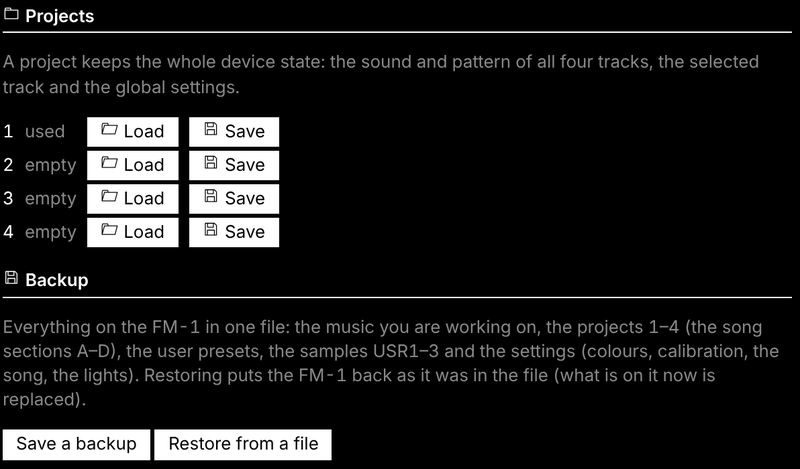
The protocol is documented in web/EDITOR_PROTOCOL.md.
Compatibility
New saves use FUN6. Older projects, autosaves and backups are migrated on load; firmware that only reads FUN5 cannot open newly saved FUN6 projects. Keep a pre-update backup before downgrading. Channel-specific device settings use the fork’s marked settings layout; unmarked words retain legacy fork interpretation.
| Device | M-VAVE FM-1 (the official firmware can be put back at any time) |
| Installer and editor | Chrome or Edge on Windows, macOS or Linux (they use Web MIDI with SysEx) |
| Cable | a USB data cable, plugged directly (no hub) |
| USB audio | any computer that takes a class-compliant USB audio input (no driver) |
| MIDI IN jack | 3.5 mm TRS, through a TRS-to-DIN MIDI adapter (type A or B) |
| Not supported | Bluetooth MIDI; a USB keyboard plugged straight into the FM-1 |
Troubleshooting
The installer or the editor does not find the FM-1. Use Chrome or Edge, a data cable, no hub, and allow MIDI access. Close every other app or tab that uses MIDI (a DAW, M-UPGRADE, another editor tab), then reload the page.
An install stopped half-way. The FM-1 waits in update mode: press INSTALL again. If SLOOP no longer starts, hold OCT− alone while switching on (SLOOP USB RESCUE) and install again.
The black keys make no sound on a synth track. That track plays chords or the scale on the white keys (in chord mode the black keys change the chord: CHORD+): hold SEL (between FX and ENV) and set KNOB 1 CHORD to OFF and KNOB 3 KEYS to OFF. The drum track always uses the black keys.
Nothing plays from the MIDI IN jack. Try the other adapter type (A / B); check the keyboard's channel (1–3 synths, 10 drums, the others the selected track; GLO → MIDI sets them).
The USB audio input does not show. Unplug the FM-1 and plug it back in (after an install the computer must find it again). On a Mac (macOS 13–15) in builds with USB SERIAL, check that HOME menu → USB SERIAL is OFF (the default), then restart the FM-1. In Audacity: Transport → Rescan Audio Devices. On Windows: Sound settings → Recording → show disabled devices.
The USB recording is too quiet, or follows the volume knob. Set HOME menu → USB AUDIO to FULL, or turn MASTER up.
Recorded notes move to the grid. SLOOP quantises what you record to the steps of the track (its DIV: 1/4 … 1/32, triplets). Set QUANT off on the REC screen (KNOB 4): your timing is kept as each step's nudge. Otherwise set DIV to 1/32, or hold the step and nudge it (KNOB 4); for groove, use SWING.
Notes fade out on a dense part. Sustained CPU overload can fade individual voices to protect playback. Automatic core balancing uses measured render work. Eligible held synth notes removed by CPU protection can return once there is sustained headroom; released notes and finished samples are not restarted. Voice limits still apply. Fewer held notes or a lighter engine help. Recovery and scheduling details.
An FM6 sound changed after loading a project. A project keeps the track's patch slot (PTCH), not the patch itself: store a patch you edited in the bank (editor → FM6 → Store in bank) and set PTCH to it.
The lights or SYNC went back to OFF / INT. You went back to an earlier SLOOP, which does not keep them; set them again after reinstalling compatible firmware.
Something else? Open an issue: what you did, what you expected, what happened, and the version shown in HOME menu → ABOUT.
Specifications
| Tracks | 3 synth parts (8 normal / 12 LOFI-WHEEL voices shared; optional up to 16 / 24 budget; 8 per-track maximum) + drums (16 sounds, 6 voices) |
| Sounds | 179 presets on 12 engines (browsed by kind, level-matched), 6-op FM with DX7 SysEx import and a 27-patch bank, 8 sampled sets (CC0), 4 slots for your own samples (USR1–USR4), 32 user presets |
| Drum kits | 37 (5 sampled, 32 synthesised, 16 sounds each), level-matched, plus your own: USR1–USR4 and USR3+4 (about 15 s) |
| Sequencer | 64 steps per track, own length and division each (1/32 to two bars); chords with a level and ratchet per note; drums with a level and ratchet per sound; ties, slide; per-step parameter locks (24 per track), mi |