README from GitHub, GPL-3.0
FM-1 Mirror: the M-VAVE FM-1's screen, big
The M-VAVE FM-1 is a wonderful little FM synth, but its screen is only 1.54 inches across. If your eyes aren't what they were, it's hard to read. FM-1 Mirror shows the FM-1's screen on your computer, tablet or phone, as big as you like: the whole window or the whole monitor, sharp, in colour, or in high-contrast looks such as yellow on black.
It's live. Turn a knob, press a button, play a note, and the big screen changes with the little one.
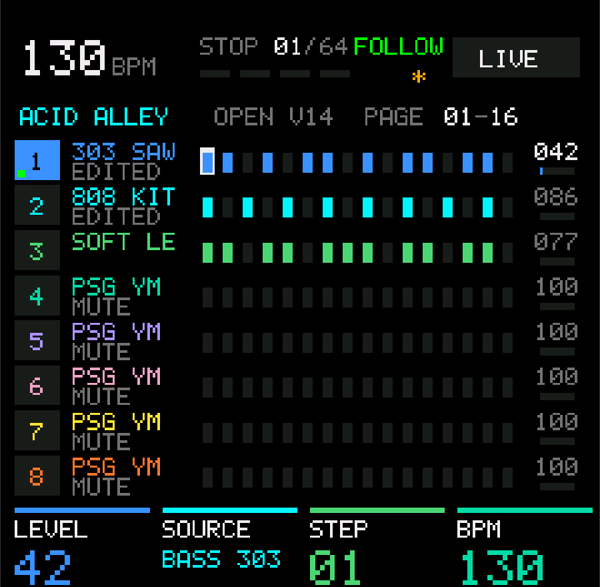
It also plays the FM-1 from a keyboard (Keys) and shows the notes and chords you play in a spyglass beside the screen, and on a Mac it works over Bluetooth as well as USB.
Free, for Mac, Windows and Linux, and on Android as FM-1 Mirror + Spyglass (the same app for tablets and phones). Questions, or something not working? Write to me: pfkellogg@gmail.com
Download
Click the file for your computer. These links always give the newest version:
| Computer | File | First time you open it |
|---|---|---|
| Mac (Apple silicon and Intel) | FM-1-Mirror-mac.zip | Double-click the zip to unzip it, drag FM-1 Mirror (the app, with the FM-1 Mirror name) to Applications and open it. It isn't from the App Store, so the first time macOS may refuse: open System Settings → Privacy & Security, scroll down and click Open Anyway next to FM-1 Mirror. |
| Windows 10 and 11 | FM-1-Mirror-windows.exe | Double-click. If Windows says "protected your PC", click More info → Run anyway. |
| Linux | FM-1-Mirror-linux | chmod +x FM-1-Mirror-linux and run it. |
| Android 11 or newer (tablet or phone) | FM-1 Mirror + Spyglass | Its own page, with the download and how to plug it in. |
Not the green "Code" button. GitHub's green Code → Download ZIP button at the top of this page gives the app's source code (a folder called
fm1-mirror-master), which doesn't run. Use the links above, or Releases on the right of the page.
Plug the FM-1 into the computer with a USB data cable (some cables only charge), turn it on, and open FM-1 Mirror.
On Android: see FM-1 Mirror + Spyglass.
How it works, in plain words
The FM-1 doesn't normally tell a computer what's on its screen. So the FM-1 needs slightly different firmware (the software inside it) that does.
- M-VAVE's Open firmware. In October 2026 M-VAVE made the FM-1's firmware open: they published its source code so the community can improve it, plus a free web page, the FM1 Workbench, that installs it. That's called "Official Open firmware", and it's M-VAVE's own.
- FM-1 Big Screen firmware. This is M-VAVE's Open firmware with one small addition: while FM-1 Mirror is running, the FM-1 also sends its screen to the computer over the same USB cable it already uses for MIDI. When nothing is asking, it sends nothing, and the FM-1 plays exactly as before. (The source code and what changed.)
- FM-1 Mirror asks for the screen about once a second and draws it big.
Everything else about the FM-1 is M-VAVE's Open firmware: its sounds, sequencer and menus.
Setting it up
FM-1 Mirror walks you through this itself. Open it with the FM-1 plugged in and it tells you which firmware your FM-1 has and what to do next.
If your FM-1 still has the firmware it came with (most FM-1s), it's two steps:
- Put M-VAVE's Official Open firmware on it, on M-VAVE's own page. In Chrome or Edge, open the
FM1 Workbench and go to Device update.
Open Recovery & force update, tick Force flash (migrate from other firmware), click
Connect device, tick I have backed up… and click Force flash. Allow MIDI access if
Chrome asks. It takes about two minutes and the FM-1 restarts by itself.
- This replaces the FM-1's sounds with M-VAVE's factory sounds. If you made your own, save them
first: the page's Projects & sounds tab can read and export each group of 32 voices as a
.syxfile, and load them back afterwards with Replace this group….
- This replaces the FM-1's sounds with M-VAVE's factory sounds. If you made your own, save them
first: the page's Projects & sounds tab can read and export each group of 32 voices as a
- Install Big Screen from FM-1 Mirror. Back in FM-1 Mirror, click Install Big Screen…, then Install now. A progress bar shows how it goes; it takes a minute or two and the FM-1 restarts by itself. Your sound library stays (save any unsaved work on the FM-1 first, as with any update).
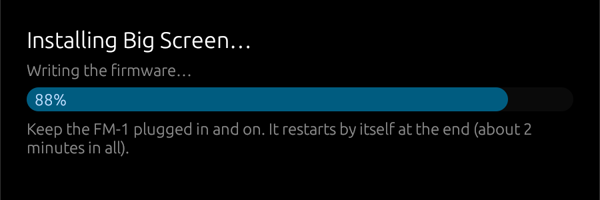
If your FM-1 already runs M-VAVE's Open firmware, only step 2.
On Android, step 2 works the same in FM-1 Mirror + Spyglass. Step 1 is easiest on a computer: the workbench page needs Chrome or Edge, and then the FM-1 goes back on the tablet for step 2.
Keep the FM-1 plugged in and turned on while either step runs. On Windows, close other music apps that use the FM-1 first (Windows lets only one app use a MIDI device at a time).
Going back is easy
Nothing here is permanent, and you don't need FM-1 Mirror to undo it. M-VAVE's own FM1 Workbench can put either of their firmwares back, whenever you like, the same way as step 1:
- Back to M-VAVE's Official Open firmware: Device update → tick I have backed up… → Connect device → Start update.
- Back to the original firmware the FM-1 came with: Device update → Recovery & force update → Restore original V15 → Connect device → tick I have backed up… → Install original V15. That also puts back the 128 factory sounds.
If an update is ever interrupted (a cable pulled out, the computer asleep, the computer losing the FM-1 while it restarts into its updater), nothing is broken: the FM-1 waits in its updater for the rest of the firmware. Plug it back in if it came out and open FM-1 Mirror: it says The FM-1 is waiting in its updater and Finish installing Big Screen carries on from there. M-VAVE's page, or M-Upgrade, can finish it too.
If the computer keeps losing the FM-1 during Step 2:
- Close every other app that uses the FM-1 first (a DAW, Synth Spyglass, M-VAVE's page in a browser tab). On Windows only one app can use it at a time, and the FM-1 reappears under a new name partway through the update, so another app can grab it.
- Plug the FM-1 straight into the computer, not through a hub, with a USB data cable.
Coming from M-VAVE's V16 firmware: the FM-1 keeps V16's updater, which names itself ota-FM-1_016. FM-1 Mirror
1.3.0 / FM-1 Mirror + Spyglass 1.4.0 and later find it; older versions looked only for V15's updater, said the
connection was lost partway through Step 2, and left the FM-1 waiting in its updater (M-Upgrade or M-VAVE's page
finishes it). With an older version, put the original V15 back first (Recovery & force update › Restore original V15).
Thanks to a viewer who reported it.
Using FM-1 Mirror
- F: full screen (Esc to leave). Drag the window to another monitor or a TV first if you like.
- Looks: Color, Bright color (lifts dark colours like purple so they can be read), Yellow on black, White on black, Black on white.
- The buttons hide after a few seconds so the screen is as big as it can be; move the mouse to bring them back.
- When a newer Big Screen firmware comes with a new FM-1 Mirror, a button offers to update the FM-1. Bluetooth needs the Big Screen build from FM-1 Mirror 1.2 or later: an older one sends its screen over USB only.
- Keys: a keyboard plugged into the computer plays the FM-1 through FM-1 Mirror. It's picked by itself (a keyboard first, not an audio interface's MIDI port); choose another (or None) in the Keys menu. Send on picks the channel: channel 1 by default, where the FM-1 listens (a keyboard knocked onto another channel would be silent); another channel for a firmware that listens there (ChoralRoot's MIDI Keys, for its chord engine); or as they come. SysEx is never passed on. If another app (MIDI Bridge, Synth Spyglass) also plays the FM-1 from the same keyboard, set Keys to None, or you'll hear notes twice.
- Spyglass: a round brass eyepiece over the screen with the note or chord you play, on a staff,
and how hard you hit the key. On top of it, the sound playing (
T1 FM6 ICE BELL), when the firmware says it: JIANT FM + Big Screen does, others don't yet (then there's nothing on top). Drag it to move it; scroll over it to resize it; Spyglass in the bar puts it away. The FM-1's own keys show too, once KEY OUT is on: on the FM-1, press SEQ, turn ALGO to page 6/8 MIDI TRACK, and turn K4 (KEY OUT) to ON (K3, OUT PORT, on USB+BLE). - No sound? A keyboard's volume slider (a Keystation has one) sets the FM-1's volume: keep it up.
Over Bluetooth (Mac): the FM-1's Bluetooth MIDI has to be on (on the FM-1, hold HOME and press GLO: K1 BLUETOOTH ON, K3 BLE ROLE DEVICE). Then once, in Audio MIDI Setup, Window › Show MIDI Studio, click the Bluetooth button and Connect next to FM1 Community_BLE; FM-1 Mirror finds it by itself (the bottom bar says "FM1 Community_BLE Bluetooth"). It's slower than USB but follows the screen well. USB comes first whenever the FM-1 is plugged in, and firmware is only ever installed over USB. The FM-1 takes one Bluetooth connection at a time, so close FM-1 Mirror on the tablet before connecting the Mac, and the other way round.
On Android, FM-1 Mirror + Spyglass does all of this on a tablet or phone, Bluetooth included. Watch it: FM-1 Mirror + Spyglass for Android.
Also playing it from a USB keyboard? Synth Spyglass (a separate app) recognises the Big Screen FM-1 too, shows the name of the sound it's playing, and has a See big screen button of its own.
Other firmwares: ChoralRoot, JIANT FM and Skiff
The screen messages work with any FM-1 firmware that sends them (the screen part is MIT). The first community firmware with it: ChoralRoot + FM-1 Big Screen (pfkellogg/ChoralRootFM1), Quixotic7's chord instrument with 32 lines added. Over USB; "Update FM-1" doesn't show on it (it would replace it).
The second: JIANT FM + FM-1 Big Screen (pfkellogg/JIANT), juanjiant's music system (synths, drums, a sequencer, songs), V10.49 with 38 lines added. Also over USB only, and "Update FM-1" doesn't show on it either. JIANT has daily builds; ours stays at V10.49 until the screen is added to a newer one. Watch it: JIANT FM on a Big Screen. JIANT also says which sound is playing, shown on top of the spyglass, and the app finds it by its own USB name, "JIANT" (both since 1.3.0; earlier versions kept waiting for the FM-1).
The third: Skiff + FM-1 Big Screen (pfkellogg/skiff), illuminus5's six-track groovebox, Skiff 2.1.1 with about 37 lines added, and the sound playing on the spyglass too. USB only. All three come from Leo Kuroshita's Felucca, and so do 23 of the 25 most popular FM-1 firmwares (FIRMWARE_FAMILY.md). Watch it: Skiff on a Big Screen + the FM-1 Firmware Family Tree.
For the curious
src/keys.rs: Keys (the keyboard passed on to the FM-1) and what's been played;src/glass.rs: the spyglass;src/chord.rs,src/staff.rs,src/glyphs.rs: chord names and the staff, from Synth Spyglass.src/screen.rs: the screen messages. The computer sendsF0 7D 'F' 'S' 00 F7about once a second (01to have the whole screen sent again); the FM-1 sends each row it paints asF0 7D 'F' 'S' 01 row col <runs> F7, each run a count and an RGB565 colour. Firmware that knows it also sends the sound playing asF0 7D 'F' 'S' 02 <name> F7(ASCII), after each hello and whenever it changes;F0 7D 'F' 'S' 02 F7asks for only that, without the screen.src/install.rs: the installer, a port of M-VAVE's own web updater (sdk/WebUpdate.jsin their source): the FM-1's updater asks for each block of the firmware and checks it itself.firmware/: the Big Screen firmware package this app installs, and its build identity. Built from pfkellogg/fm1_open, branchscreen-out.tools/simulate_fm1.py: a pretend FM-1 for trying the app without one;tools/flash_fm1.py: the installer as a script.- The Android app, FM-1 Mirror + Spyglass, has its own repository: pfkellogg/fm1-mirror-spyglass-android.
Build it yourself with Rust: cargo build --release (on Linux, install libasound2-dev first);
on a Mac, ./make_app.sh makes the app.
Thanks
To M-VAVE for opening the FM-1's firmware (FM1 Open). The Big Screen firmware is their work with a small addition; it's not an official M-VAVE product, and M-VAVE doesn't support it.
License
GPL-3.0 (see LICENSE), like M-VAVE's FM1 Open application code it builds on.
Contact: pfkellogg@gmail.com