README from GitHub, GPL-3.0
A live groovebox firmware for the M-VAVE FM-1 — for any style.
Free and open source (GPL-3.0), based on Felucca by Leo Kuroshita / Hügelton Instruments.
Web installer · Web editor · Manual · Guide en français · Releases · Report a bug
SHIFL turns the FM-1 into a six-track groovebox you play live: six synths and a drum machine with 16 sounds on the white keys, sounds across six engines — DX7 FM, virtual analogue, Phase Distortion (CZ-1), formant voice, lo-fi chip, Karplus-Strong plucked strings — four drum kits including physical modelling, your own samples, a song mode you play with your hands — and USB audio, a MIDI keyboard on the jack, MIDI CC control, MIDI clock, lights for playing in the dark and a full backup. House, techno, hip-hop, trap, drum & bass, amapiano, synthwave, lo-fi, ambient, chiptune — it does not pick a style for you. No factory patterns, nothing to load: everything you hear, you play.
Status: 3.0. Still a beta: install at your own risk, and please report what you find. Your projects, presets, samples and settings are kept when you update, and you can go back at any time (see Going back).
Contents
- What's new in 3.0
- What's new in 2.9
- What's new in 2.8
- What's new in 2.7
- What's new in 2.6
- What's new in 2.5
- What's new in 2.4
- Screenshots
- Features
- Presets
- MIDI CC reference
- Install
- Your first beat in 60 seconds
- The controls
- The menu: settings of the FM-1
- MIDI and USB audio
- The web editor
- Compatibility
- Troubleshooting
- Specifications
- Documentation
- Building and tests
- Contributing
- Credits and thanks
- Licence
What's new in 3.0
| Musical MUT and EVL | The ROLL page has been redesigned around targeted mutation. Pads 1–4 select one of four MUT subtypes suited to the current track type: LEAD / BASS / KEYS / PAD for melodic tracks, KICK / SN / CYM / ACC for drums. Pads 5–16 toggle EVL (auto-mutate) for each subtype at 4, 8, or 16 bar intervals — tap the same rate to turn it off, tap a different rate to change it. Multiple EVL subtypes can run simultaneously (e.g. KICK evolving every 4 bars while CYM evolves every 8). Each subtype has its own musical algorithm: BASS keeps anchors at beats 1 and 3, picks from root/fifth/octave, avoids tritones, and adds approach slides; KEYS voice-leads chord voicings or shuffles arpeggio order; PAD preserves long TIE chains while shifting inner voices; LEAD controls melodic contour, leap size, and rests. Drum types: KICK locks beat 1 loud and always-on, manages syncopated ghost kicks with adjacency limits; SN locks the backbeat hard and adds ghost snares at ghost velocity; CYM accents beats hard and ands normal, places open hat at the and-of-2 and and-of-4; ACC reserves toms for the last quarter and scatters cowbell/conga/shaker as sparse probabilistic patterns. |
| Sequenceable drum fills | The drum GRID page now has a fill row — a 16th row at the bottom of the step grid (the top 15 instrument rows remain unchanged; instrument 16 is still editable via the KIT and LANE pages). Any step in the fill row can be marked as a fill trigger: when the sequencer reaches that step it launches the same fill patterns available on the ROLL page. Scroll KNOB 1 past the last instrument lane to select the fill row. Tap a step to toggle a fill trigger on or off. With the cursor on a filled step: KNOB 3 cycles the fill pattern (FL 1–FL 6, or RND for a random pick each time); KNOB 4 sets the trigger condition — always, every 2nd loop (1/2), every 3rd (1/3), every 4th, 2nd-of-4, 3rd-of-4, 4th-of-4, every 8th (1/8), or 8th-of-8 — so you can set a fill that only fires on the last bar of a 4-bar phrase. Up to 8 fill triggers can be active in a pattern. Fill triggers are saved in the project (new project format FUN6; all existing projects load and convert automatically). |
What's new in 2.9
| Smarter drum GEN | The generate function on the drum track now builds patterns around conventional drum-kit roles. Kick lands near-certainly on beats 1 and 3; snare on beats 2 and 4; closed hi-hat keeps an 8th-note backbone (16th-note fills gated by SPICE). Open hat, clap, and ghost hits are added sparingly at moderate-to-high SPICE. Toms appear only at high SPICE and never clash with core beats. The result is patterns that groove rather than patterns that spray random hits. |
| Smarter melodic GEN | Step 0 is always the root note. Downbeat steps favour the root at ~60%. The note picker now strongly prefers stepwise motion (~94% of moves stay within 5 semitones), and when a larger interval is unavoidable, the octave nearest the previous note is chosen — no more random leaps across the range. |
| Smarter MUT | Mutation on synth tracks can now retype a step (REST → NOTE → REST), repitch it, swap two steps' notes, or add/remove a ratchet — rather than only toggling on/off. On bass tracks (mono/legato voice, average pitch below C4), new notes are picked from root, fifth, and octave of the track's key — intervals that lock with the root rather than wandering. Drum mutation protects kick, snare, and hi-hat on the four core beats; random edits are redirected to ghost-hit lanes. |
| EVOLVE (EVL) | Each track can now auto-mutate itself. Hold ARP and press white key 3 (melodic tracks) or 9 (drum track) to cycle the EVOLVE interval: OFF → 4 → 8 → 16 pattern loops. When a non-zero interval is set, MUT fires automatically every N loops while the sequencer plays, letting bass lines, melodies, and drum patterns drift and evolve over time without any manual input. |
What's new in 2.8
| Karplus-Strong engine | A new sixth synth engine — KARPLUS — uses the Karplus-Strong plucked-string algorithm: a noise burst fed through a short delay line and a weighted two-point loop filter, with a first-order allpass for fractional delay tuning. The result is natural-sounding plucked strings with genuine physical decay. 8 presets: NYLON GT, STEEL GT, HARP, BANJO, KALIMBA, SITAR, KOTO, PLUCK BASS. Parameters: DECA (decay time), TONE (loop filter brightness), PLUK (pluck position comb). |
| KS drum kit | A new drum kit — KS (kit 8) — applies the Karplus-Strong algorithm to each of the 16 drum lanes. Each lane uses a Schroeder allpass comb filter in the feedback path for membrane inharmonicity, making toms, kicks and snares sound like struck resonant bodies rather than pitched strings. Hi-hat lanes (CHH, OHH, PEDAL) share a choke group. All per-lane macros (TUNE, DECAY, LEVEL, PAN, REV, DRIVE, CRUSH, RING, FOLD) work as with the FM and circuit kits. |
| Drum fills | Hold ARP on the drum track and press white keys 3–8 to trigger one of 6 fill patterns. Each fill is a 16-step pattern aligned to the end of the remaining bar — the landing always falls on the last step regardless of when you trigger. |
| Microtonal scales | The SCL page now has 70 scale choices — the original 16 Western modes plus 54 new scales covering every equal division of the octave from 5-EDO to 53-EDO, just intonation (major, minor, 7-limit), harmonic series (8 and 16 partials), the full Partch 43-tone scale, Pythagorean and meantone temperaments (¼, ⅓, ⅙ comma), Werckmeister III, Kirnberger III, Vallotti, Young II, Indian 22-shruti, Slendro, Pelog, Bohlen-Pierce, and seven maqam models (Rast, Bayati, Hijaz, Saba, Husayni, Sikah, and more). Notes are treated as scale-degree addresses so recordings, chords, and voice releases all stay intact across tuning systems. |
| LFO → engine knobs | The LFO K page (new, between LFO DEST and FX) lets you route the LFO to each engine's four home-page knobs (K1–K4). Set a depth for any knob and the LFO modulates it in real time. Works alongside the existing LFO destinations (PIT, FLT, SHP, AMP). |
| Wah FX | The four LPF sweep punch effects (LPF SLW / FST / DWN / UP) have been replaced by WAH SLW / MED / FST / XFS: proper sinusoidal wah sweeps at 0.25, 0.5, 1, and 2 Hz. |
What's new in 2.7
| Generative sequences | Hold ARP and press the first white key to generate a new pattern from scratch; press the second white key to mutate the current one (roughly a quarter of the steps re-rolled). Works on both synth tracks and the drum track. Generation is scale-aware — notes are drawn from the track's current key and scale (SCL page) and land in the C4–C5 range. SPICE (EDIT page, 0–127) controls density and accent intensity: 0 is sparse and quiet, 127 is dense and accented. Every generate and mutate is undoable with EDIT + OCT−. |
What's new in 2.6
| 808 circuit kit | A new 808 drum kit (kit 6) models the TR-808's analog voice circuits — bridged-T resonators for BD, SD, toms and congas; noise voices for clap and maracas; six free-running square oscillators through band-pass and high-pass filters for the hats, cymbal and cowbell. Velocity sets the trigger level and changes the timbre, not just the volume. All synthesized, no samples. |
| 909 circuit kit | A new 909 drum kit (kit 7) ports the 9W9 TR-909 circuit model (Charles Vestal, GPL-3.0): exponential-ramp oscillators with pitch modulation for BD and SD; three-VCO toms; noise-burst clap; synthesized hi-hats and cymbals. All synthesized, no samples. |
| Filter envelope | A second, independent ADSR envelope — ENV → FENV — controls the filter cutoff separately from the amplitude envelope. Previously, a slow attack on the filter meant a slow attack on the sound too. Now set a long FENV attack for a slow filter sweep while the note opens instantly, or a fast FENV release while the amp sustains. Existing patches load with FENV set to the same shape as the amp envelope, so nothing changes unless you go to the FENV page and edit it. |
The 808 and 909 respond to TUNE, TONE, DECY and SNAP on the drum track's EDIT page, and all per-lane macros (TUNE, DECAY, LEVEL, PAN, REV, DRIVE, CRUSH, RING, FOLD) work as on the FM kits.
What came in 2.0–2.5: see below.
What's new in 2.5
| LIVE MODE | Press ARP to enter live mode — a jam-first alternative to song mode. 16 scenes (matching the 16 song fragments) loop indefinitely. Press REC while playing to put the keyboard into scene-selection mode: the 16 white keys switch scenes, waiting for the next bar boundary. Press REC again to go back to playing notes. Holding ARP shows a 16-tile scene grid; tap two or more tiles to build a scene chain — each scene plays for its configured bar count then advances automatically, looping forever. Knob 1 on the SONG page also queues scene switches. |
| CZ-1 improvements | Four sound-design effects on EDIT 2 — RING (ring modulator), FOLD (wavefolder), BITS (bit crush), PHSR (phaser) — tuned for a wider, more audible range. All factory presets load with filter fully open (CUT=127) for a transparent default. |
| Drum improvements | Global drum level raised to match synth tracks at their default levels. Drum lane probability per step (P75 / P50 / P25 / ratchet modes). |
What came in 2.0–2.4: see below.
What's new in 2.4
| New sound engine | Replaced the internal audio engines with fmsloop's sound engine. All presets are rebuilt around it: 116 sounds across five engines (DX7 FM, virtual analogue, Phase Distortion, formant voice, lo-fi chip) and three drum kits with 17 voices each. |
| CZ-1 presets | 65 Casio Phase Distortion presets: one init tone and the 64 Casio factory tones across banks A–D (BRASS, STRINGS, PIANO, ORGAN, SYNTH.LEAD and more), faithful to the original CZ-1. |
| 32 punch-in effects | The PUNCH FX page now has two pages of 16 effects. Page 1 is on the physical white keys as before. Page 2 (LPF sweeps, retrigger, shuffle, octave down, scratch, vibrato, glitch, feedback, distort, blinds) is accessible via MIDI CC. |
| MIDI CC control | A hardware controller can now drive the FM-1 in real time: per-track filter cutoff and resonance (CC 74 / 71 on channels 1–3), global effects (swing, delay, reverb, chorus on channel 16), master DJ filter and DUST, and all 32 PUNCH effects as momentary pads (CC 102–133 on channel 16). See MIDI CC reference. |
| Step probability | Each step on a synth track can fire at 100 %, 75 %, 50 % or 25 % chance per pass. Drum lanes support the same — certain hits, probabilistic hits and ratchets from a single per-lane dial (shown as on / P75 / P50 / P25 / ×2 / ×3 / ×4). |
| Six tracks | Two additional synth tracks, for a total of five synths and a drum track (six tracks). |
| Drums with the keys | The drum track can now be played on the keyboard keys, the same way as a synth track. |
| Song mode depth | Each arrangement fragment is now independent (its own state, not a shared scene). Fragments can carry: a key / root change, in-key transposition (diatonic snap instead of chromatic), per-track patch overrides (change engine + preset mid-song for any track), per-track slicer overrides (sequence the slicer on/off or switch GATE↔STUT per fragment), and FX overrides (reverb / delay settings change as the song progresses). |
| Dotted steps and delays | The step sequencer gains dotted 1-measure and dotted 2-measure step lengths; fragments can be half a measure. The delay adds dotted 1/4 and dotted 1/8 as time options. |
What came in 2.0–2.3 (USB audio, TRS MIDI in, MIDI clock, lights, backup): SHIFL.md. Release notes: Releases.
Screenshots
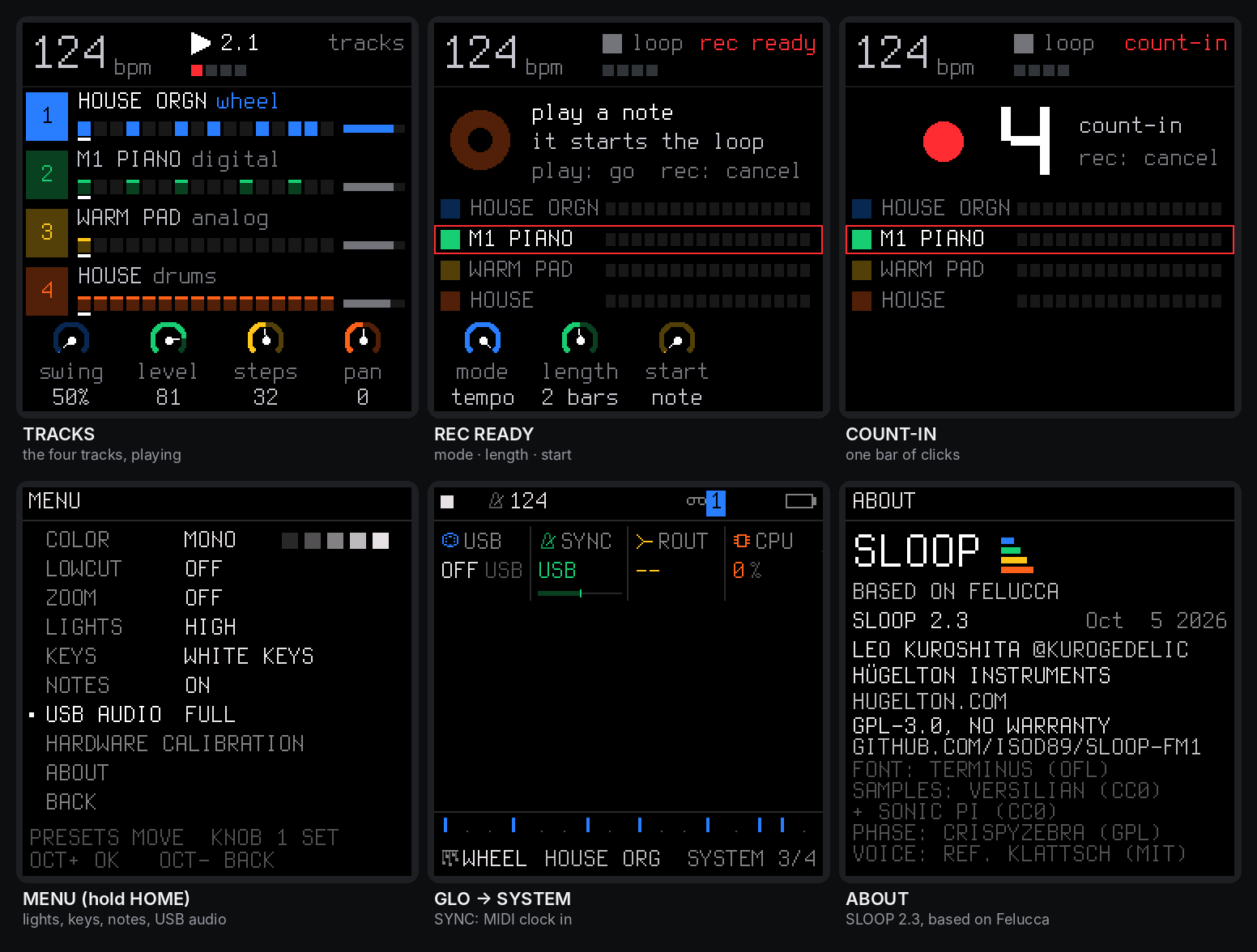
The FM-1's screen: the tracks, the REC screen and its count-in, the menu (lights and USB audio), MIDI clock, about.
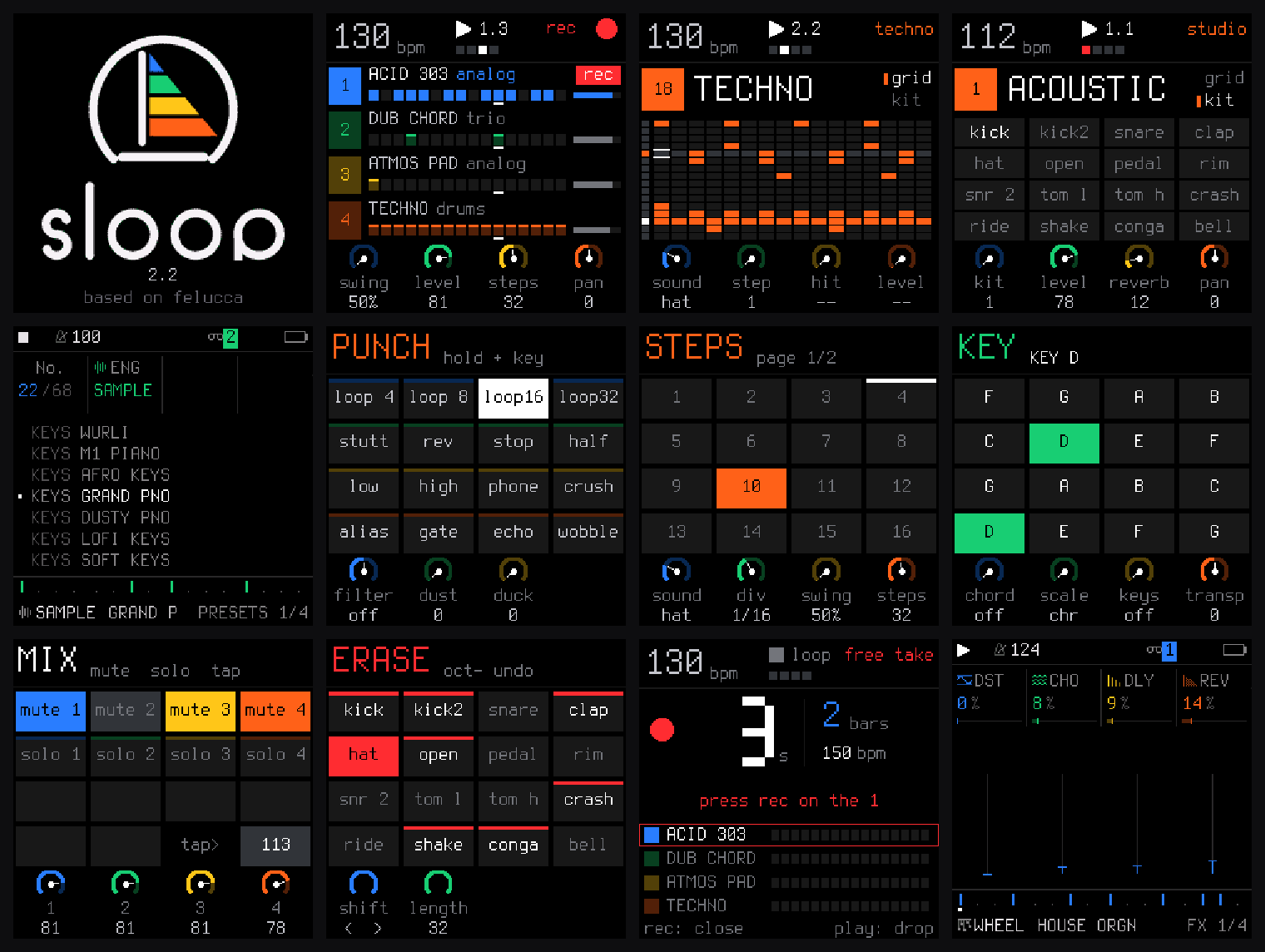
Start-up, the four tracks (recording), the drum grid and a drum kit, the sounds by kind, the layers (punch-in FX, steps, key and chords, mix, erase), a free take, the FX sends.
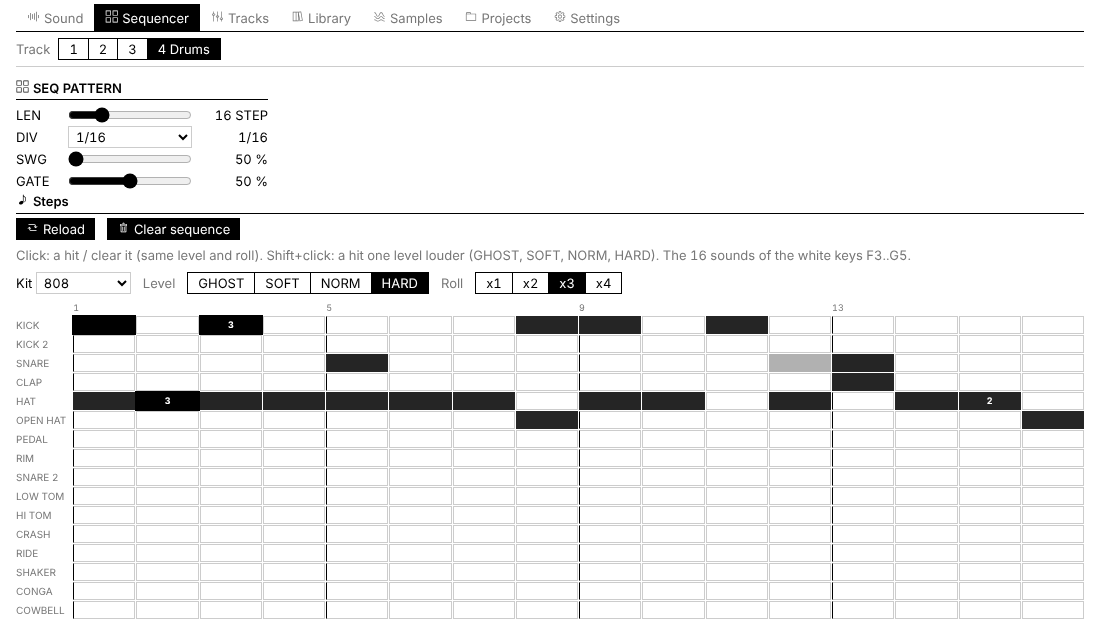
The web editor: the drum track as a 16-lane grid, with levels and ratchets.
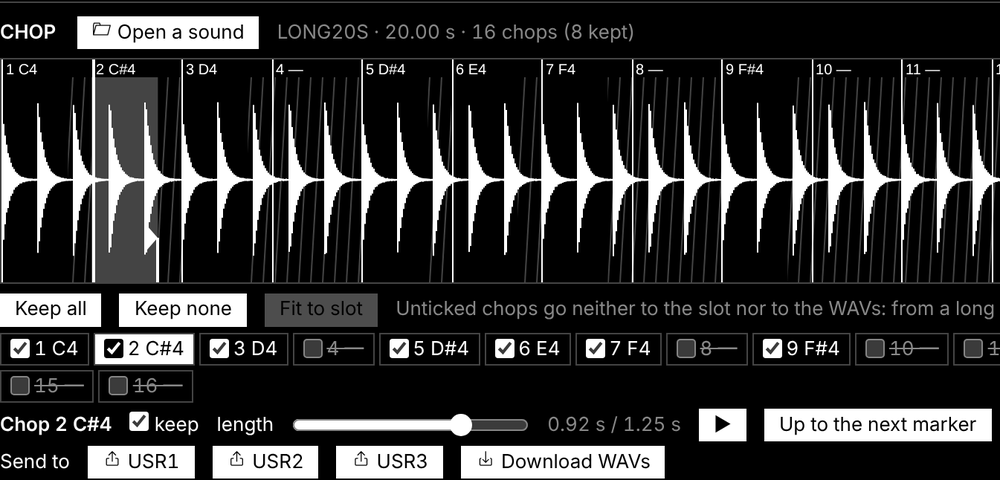
CHOP: a 20 s recording cut into 16 chops, 8 kept, fitted to the slot.
Features
Play it live: hold a button, touch a key
Every function button is a layer: hold it and the 16 white keys and the four knobs change job, and the screen shows how. Tap it and its pages open. Hold a layer button and tap HOME to lock it open, both hands free.
| Hold | The white keys | KNOB 1 · 2 · 3 · 4 |
|---|---|---|
| FX — punch | 16 punch-in effects on the whole mix (page 1 of 32): loops 1/4–1/32, oct up, stop, slap, echo tails, phone filter, bit crush, alias, gate | FILTER · DUST · DUCK |
| EDIT — erase | erase a sound or a note as the loop plays (stopped: from the whole pattern) | SHIFT · LENGTH ×2 / ½ · TRANSPOSE |
| SEQ — steps | the 16 steps of the page, with a level, ratchet and probability per step | SOUND / NOTE · DIV · SWING · LENGTH |
| SCL — key | the key of the song | CHORD · SCALE · KEYS · TRANSPOSE |
| GLO — mix | 1–4 mute, 5–8 solo, 16 tap tempo | the levels of tracks 1–6 |
| SAVE — song | 1–4 play sections A–D, 5–8 save the loop into them, 13 loop / song, 14 record the song, 16 the chain | — |
Keys 1, 5, 9 and 13 glow dimly while a layer is held: the first key of each row of the 4 × 4 grid on the screen. EDIT + OCT− / OCT+ is undo / redo.
Drums
- 16 sounds on the white keys, kick to cowbell; a black key doubles the white key on its left (fast rolls with two fingers).
- Play drums on the keys: the drum track responds to the keyboard like a synth track — hold a key, it plays that drum voice pitched.
- Ghost and hard hits: hold OCT− / OCT+ while you play. Every hit keeps its level (GHOST, SOFT, NORM, HARD) and a ratchet (×1–×4).
- Step probability per lane: each drum step can be certain, or fire at 75 %, 50 % or 25 % chance. The dial cycles:
--/on/P75/P50/P25/×2/×3/×4. Ratchets only apply on lanes that actually fired. - 5 kits, 17 voices each, all level-matched: 808 FM, ELECTRO and METAL (FM synthesis), 808 and 909 (analog circuit models — no samples); softer hits are darker as well as quieter.
- Grid and kit pages on the FM-1 (EDIT or SEQ on the drum track), and a 16-lane grid in the web editor.
Synths and sounds
- Five engines: DX7 FM synthesis, virtual analogue (two oscillators, filter, drive), Casio CZ-1 Phase Distortion, formant voice, lo-fi chip.
- 116 sounds, browsed by kind — all level-matched. 32 slots for your own presets.
- Two envelopes per track: the amp ADSR and an independent filter envelope (FENV) — set a slow filter sweep with an instant attack, or a fast filter close while the amp sustains. With a pitch punch for 808-style kicks.
- LFO, glide and voice modes (POLY, MONO, LEGATO, UNISON), per-track drive and slicer, sends to a stereo chorus, a tempo delay and a stereo reverb.
- Key and chords (SCL): the key of the song for all synths, 70 scales (including microtonal, world, historical), one-key chords (triad, 7th, 9th, sus4, power), keys snapped to the scale or the scale on the white keys.
- Chord sequencer (hold SEQ → CHORD layer): 32-step global chord progression. Each step has root, quality (14 types: major, minor, dim, aug, four 7ths, maj7, three 9ths), and inversion. Saves with the project. Both white and black keys work for entering roots.
- Chord follow (FLW — SCL 2, knob 4): per-track option that reharmonises the track's notes to match the current chord. Seven targets — BASS, MEL, ROOT, POW, TRI, 7TH, 9TH — each available in root position or first inversion (14 modes total).
Recording and the sequencer
- Records as you play, no click needed: while it plays, REC records at once and every pass is added on top (overdub). Notes land where you heard them: the ~12 ms of the keys are taken back.
- The REC screen: mode free — no tempo, no grid: play, press REC on the "1" after your last bar, and the loop's length sets the tempo — or tempo — record at the tempo you set; length 1, 2 or 4 bars; start on your first note, or after a one-bar count-in.
- Hold REC ~2 s to clear a track; undo / redo brings it back.
- 64 steps per track, each track with its own length and division (polymeters stay in phase); chords up to 4 notes a step, ties, slide; MPC swing 50–75 %; one sample-accurate clock for everything.
- Step lengths: 1/32 … 1/1, plus dotted values including dotted 1-measure and dotted 2-measure; fragments can be half a measure. Triplet and odd subdivisions keep polymeters in phase.
- Step probability: each step on a synth track fires at 100 %, 75 %, 50 % or 25 % chance per pass. Drum lanes add the same control.
- The PLAY light flashes on every beat (a visual metronome); an audible click is in GLO → GLOBAL → CLICK and is never recorded.
Songs
Save up to four sections A–D (SAVE + keys 5–8), play them live on the next bar (SAVE + keys 1–4), and record the song as you play it (SAVE + key 14). In song mode PLAY plays the whole chain. The SONG screen edits it by hand.
Each arrangement fragment is independent and can carry its own overrides:
- Key change — sets the root at that point in the arrangement.
- In-key transposition — CHR mode: chromatic semitone shift; KEY mode: snaps the transpose to the nearest note in the current scale (diatonic transposition).
- Per-track patch overrides — change the engine and preset for any track at any fragment, without touching the others.
- Per-track slicer overrides — enable, disable, or switch slicer mode (GATE / STUT) per track per fragment, independently of the scene's setting.
- Per-fragment chord slot (CHD) — choose which of the 6 saved chord progressions plays for each fragment.
--= keep the current chord unchanged. - FX overrides — reverb and delay settings change as the song progresses.
Effects and master
- 32 punch-in effects across two pages (FX + a key):
- Page 1 (white keys, always): LOOP 4, LOOP 8, LOOP 16, LOOP 32, OCT UP, STOP F, STOP S, SLAP, ECHO L, ECHO 2, ECHO, PHONE, CRUSH, ALIAS, GATE, GATE 2
- Page 2 (MIDI CC 118–133): LPF SLW, LPF FST, LPF DWN, LPF UP, RETRIG, RETRIG F, STUT L, STUT LL, SHUF, OCT DN, SCRATCH, VIBRATO, GLITCH, FEEDBK, DISTORT, BLINDS
- All effects are beat-synced to the tempo; loops start on the grid.
- Delay: dotted 1/4 and dotted 1/8 are available as delay time options.
- Master: DUST (old sampler and record: bits, rate, crackle), DUCK (the kick pumps the synths), FILT (a DJ filter: low-pass ← off → high-pass), and an output limiter.
Your own samples
- Three slots (USR1–USR3) of about 7.4 s each, played by a synth track; up to 16 WAV files per slot, each on its own key.
- CHOP in the web editor: open or drop a recording (WAV, MP3, AIFF…) of any length, tap along while it plays (each tap snaps to its hit), or find the hits, a tempo grid, equal parts; keep the chops you want, shorten them or Fit to slot; send them to a slot, one per key, or download them as WAV files.
MIDI
- USB MIDI in and out, class compliant.
- TRS MIDI IN (the 3.5 mm jack) for a keyboard or a pad controller.
- MIDI clock in (USB or TRS): tempo, START, CONTINUE, STOP.
- MIDI CC control: real-time parameter control from a hardware controller — filter, FX, swing, punch-in effects. See MIDI CC reference.
- Details: MIDI and USB audio.
USB audio
The FM-1 is also a USB audio input: record its master output on a computer, no driver, over the same cable as MIDI and the editor. Details: USB audio.
Lights for playing in the dark
Every button can glow so its label is readable on a black FM-1; the C keys or every white key can glow too; the notes playing can light their keys. Details: The menu.
Memory and safety
- Autosave: stop and leave it 2.5 s, your work is kept; at power-on SHIFL comes back exactly as you left it.
- 4 projects, 32 user presets, undo / redo.
- Full backup and restore from the web editor.
- Safe updates: the installer checks the package (SHA-256) before writing it, the update loader checks it again (CRC) before starting it; an interrupted install finishes when you press Install again; USB rescue (OCT− at power-on).
Presets
ANALOG — virtual analogue (22 presets)
808 BOOM, 808 DIRTY, SUB BASS, 808 SLIDE, ACID 303, PLUGG BASS, REESE, WOBBLE, FUNK BASS, G-FUNK LD, TRAP PLUCK, SYN BRASS, SUPERSAW, WARM PAD, DARK STR, ATMOS PAD, PAN FLUTE, FAT LEAD, MONO BASS, PWM LEAD, SAW BASS, SINE PAD
DX7 — FM synthesis (20 presets)
EPIANO 1, EPIANO 2, FM BASS, SLAP BASS, SUB BASS, BRASS, STRINGS, GLASS PAD, BELLS, MARIMBA, ORGAN, CLAV, PLUCK, FLUTE, SAW LEAD, KOTO, DEEP SUB, 808 SUB, REESE, INIT VOICE
LOFI — lo-fi chip (5 presets)
PULSE LD, WAVE BASS, ARP 8BIT, WAVE LEAD, STEP LEAD
VOICE — formant (4 presets)
CHOIR AAH, VOX LEAD, WOW BASS, WHISPER
CZ-1 — Casio Phase Distortion (65 presets)
1 init tone + 64 Casio factory tones across banks A–D:
Bank A: BRASS 1, BRASS 2, BRASS 3, STRINGS 1, STRINGS 2, STRINGS 3, STRINGS 4, ORCHESTRA, ACO.GUITAR, JAZZ GUITAR, ELEC.GUITAR, SLAP BASS, SYNTH.BASS, ELEC.BASS 1, ELEC.BASS 2, HARP
Bank B: BRASS 4, SAXOPHONE, CELLO, FLUTE, WHISTLE, HARMONICA, RECORDER, KOTO, PIANO 1, PIANO 2, PIANO 3, ELEC.PIANO, HONKY-TONK, FUNKY CLAV 1, FUNKY CLAV 2, HARPSICHORD
Bank C: JAZZ ORGAN 1, JAZZ ORGAN 2, PIPE ORGAN 1, PIPE ORGAN 2, ACCORDION, VOICE 1, VOICE 2, VOICE 3, MUSIC BOX, VIBRAPHONE, XYLOPHONE, MARIMBA, MALLET LOG, AFRO PERC, BELLS, METALLIC
Bank D: SYN STRINGS, FAT ENSEMBLE, SITAR, SYNTH.LEAD 1–4, SWEEP 1, SYN DRUMS 1, SYN DRUMS 2, CONGA, STEEL DRUM, SWEEP 2, JET ROAR, MOTORCYCLE, TYPHOON
Drum Kits (3 kits, 17 voices each)
808 FM: KICK 808, KICK 808 S, SNARE 808, CLAP 808, HAT 808, OHAT 808, PHAT 808, RIM 808, SNR 808 HI, TOM 808 L, TOM 808 H, CYM 808, RIDE 808, MARACA, CONGA 808, COWB 808, CLAVE
ELECTRO: KICK EL, KICK HARD, SNARE EL, CLAP EL, HAT EL, OHAT EL, PHAT EL, RIM EL, SNAP EL, TOM EL L, TOM EL H, CRASH EL, RIDE EL, SHAKE EL, ZAP, BLIP, CLAVE
METAL: KICK MTL, KICK MTL 2, CLANG, CLAP MTL, HAT MTL, OHAT MTL, PHAT MTL, ANVIL, ANVIL SNR, BELL TOM L, BELL TOM H, GONG, BELL RIDE, CHAIN, PIPE, BELL, CLAVE
MIDI CC reference
Program a hardware controller to control the FM-1 in real time. All channels are 1-indexed as on the controller.
Per-track filter (channels 1–3)
Each synth track responds on its own channel. On the DX7 engine, cutoff controls FM index and carrier ratio; on CZ-1 it controls phase depth.
| CC | Parameter |
|---|---|
| 71 | Filter resonance |
| 74 | Filter cutoff |
Global FX (channel 16)
| CC | Parameter | Notes |
|---|---|---|
| 20 | Swing | 0–100 (clamped) |
| 24 | Delay feedback | 0–127 |
| 25 | Delay color | 0–127 |
| 26 | Delay mix | 0–127 |
| 27 | Reverb size | 0–127 |
| 28 | Reverb damp | 0–127 |
| 29 | Chorus rate | 0–127 |
| 30 | Chorus depth | 0–127 |
| 71 | Master DUST (lo-fi) | 0–127 |
| 74 | Master DJ filter | 64 = off, 0–63 = LP, 65–127 = HP |
PUNCH FX — page 1 (channel 16, CC 102–117, momentary)
Send value 127 (held) and 0 (released). Only one effect active at a time; a new nonzero CC replaces the previous one.
| CC | Effect | CC | Effect |
|---|---|---|---|
| 102 | LOOP 4 | 110 | FLANGE / ECHO L |
| 103 | LOOP 8 | 111 | ECHO 2 |
| 104 | LOOP 16 | 112 | PHONE |
| 105 | LOOP 32 | 113 | CRUSH |
| 106 | OCT UP | 114 | ALIAS |
| 107 | STOP F | 115 | GATE |
| 108 | STOP S | 116 | ECHO |
| 109 | SLAP | 117 | GATE 2 |
PUNCH FX — page 2 (channel 16, CC 118–133, momentary)
| CC | Effect | CC | Effect |
|---|---|---|---|
| 118 | LPF SLW | 126 | SHUF |
| 119 | LPF FST | 127 | OCT DN |
| 120 | LPF DWN | 128 | SCRATCH |
| 121 | LPF UP | 129 | VIBRATO |
| 122 | RETRIG | 130 | GLITCH |
| 123 | RETRIG F | 131 | FEEDBK |
| 124 | STUT L | 132 | DISTORT |
| 125 | STUT LL | 133 | BLINDS |
Drum triggers (channel 10)
No CC needed — note-on on channel 10 triggers the drum sounds by nearest note, as always. Map pads to the 16 drum pitches for the loaded kit.
The full CC reference card is in docs/midi-cc-plan.md.
Install
From the browser (recommended)
- Open the SHIFL web installer in Chrome or Edge on a computer.
- Connect the FM-1 by USB — a data cable, directly (no hub).
- Press Install, allow MIDI access, and wait for Done. The FM-1 restarts on the SHIFL logo.
Nothing to download or compile. Your projects, user presets, samples and settings are kept. After an install, unplug and plug the FM-1 back in once so the computer finds its USB audio input.
Other ways
- SysEx app: download the
.fwscfrom a release and send it to the FM-1 with any SysEx tool — SysEx Librarian (macOS), a browser-based SysEx sender, or similar. The FM-1 must be connected by USB; send to its MIDI port. - Python: the
.fwscof a release withpython tools/fm1_install.py shifl-2.4.fwsc(needspip install mido python-rtmidi). - Build it yourself: see Building and tests; on Windows,
INSTALL-SHIFL.batbuilds SHIFL and opens the installer locally.
Going back
- To an earlier SHIFL: install the
.fwscof its release. It keeps your work and simply ignores the 2.4 settings. - To the official firmware: on the installer page, open Return to the official firmware (V15). Save a backup with the editor first, download FM-1 V15 from m-vave.com and select its
FM-1.fwsc— only that exact file is accepted. M-VAVE's updater, M-UPGRADE, works too. To come back, install SHIFL again and restore your backup.
Rescue
- The FM-1 no longer starts SHIFL: hold OCT− alone while switching it on (SHIFL USB RESCUE), then install again.
- An install was cut off: the FM-1 stays in update mode; press INSTALL again and it finishes.
- If an FM-1 no longer starts at all, recovery needs FM-1-transporter.
Custom firmware is installed at your own risk. No warranty.
Your first beat in 60 seconds
- ALGORITHM to track 6 (orange, drums). The white keys are 17 drum sounds; PRESETS picks a kit (try 808, 909, 808 FM or ELECTRO).
- Press REC and play a beat freely, at your own tempo. Hold OCT− while you hit for ghost notes, OCT+ for hard ones.
- Press REC on the "1" after your last bar. The loop closes, its length sets the tempo, the hits snap to the grid and it plays at once. (Prefer a set tempo, or a count-in? Turn KNOB 1 and KNOB 3 on the REC screen before you start.)
- REC again while it plays: you record on top. Hold ARP and hold the hat key for a hat roll.
- ALGORITHM to track 1, REC, play a bass line. Hold SCL and press the key of your song; on track 2, hold SCL and turn KNOB 1 to 7TH: every white key now plays a chord.
- Hold FX and press a white key for a punch-in effect; still holding FX, turn KNOB 2 for DUST, KNOB 3 for DUCK.
- A mistake? Hold EDIT and press OCT−: undo.
The controls
| Control | What it does |
|---|---|
| MASTER | volume (and the USB audio level, if USB AUDIO is on MASTER) |
| SELECT | tempo, on every page, even inside a layer |
| ALGORITHM | the selected track: 1 · 2 · 3 · 4 · 5 (synths) · 6 (drums) |
| PRESETS | the selected track's sound, or the drum kit |
| KNOB 1–4 | what the four dials at the bottom of the screen show, each in its colour |
| OCT− / OCT+ | octave (both: back to 0) · on the drum track, held: ghost / hard hits |
| FX · SCL · ENV · LFO · EDIT · GLO (top row) | tap: their pages · hold FX, SCL, EDIT, GLO: a layer. SCL is the second button of the top row, between FX and ENV |
| HOME | the TRACKS screen · hold: the menu · tapped while a layer is held: lock it |
| SAVE | on TRACKS: the SONG screen · elsewhere: the SAVE pages · hold: the song layer |
| ARP · SEQ | tap: their pages · hold SEQ: steps |
| PLAY | start / stop all tracks; its light flashes on every beat |
| REC | playing: record now / stop · stopped: arm (the REC screen) · hold: clear the track |
| EDIT + OCT− / OCT+ | undo / redo |
Colours: blue track 1 and KNOB 1, green 2, yellow 3, orange drums. White is what you touch; red is recording.
The menu: settings of the FM-1
Hold HOME. PRESETS moves, KNOB 1 sets, OCT+ steps round, OCT− closes. These are settings of the FM-1, not of a project: loading a project or NEW PROJECT does not change them, and the backup keeps them.
| Item | Choices | What it does |
|---|---|---|
| COLOR | 5 palettes | the screen's colours |
| LOWCUT | OFF / ON | a low cut for the small built-in speaker |
| ZOOM | OFF / ON | a large readout of the value you turn |
| LIGHTS | OFF / LOW / MID / HIGH | every button glows at that level; what is active stays at full light |
| KEYS | OFF / C KEYS / WHITE KEYS | the C keys, or every white key, glow too |
| NOTES | OFF / ON | the notes playing on a synth track light their keys, on every page and in every layer |
| USB AUDIO | MASTER / FULL | the level of the USB audio input: follows the MASTER knob, or a fixed full level |
| HARDWARE CALIBRATION | the panel table, if a key or a knob answers wrongly | |
| ABOUT | the version (SHIFL 2.4) and its build date, the credits |
Two more settings of the FM-1 live elsewhere: SYNC (GLO → SYSTEM: INT, USB or TRS) and the REC screen's mode and start.
MIDI and USB audio
MIDI in
SHIFL takes MIDI from two places at once:
- The MIDI IN jack (3.5 mm TRS): a keyboard or a pad controller with a MIDI output, through a TRS-to-DIN MIDI adapter. If nothing plays, try the other adapter type (A / B).
- USB, from a computer or a phone (a DAW, a MIDI routing app) or a USB MIDI host box.
| MIDI channel | Plays |
|---|---|
| 1, 2, 3, 4, 5 | synth tracks 1–5 |
| 10 | the drum track (the nearest of its 17 sounds; GLO → DRUMS → CH changes the channel) |
| 6–16 | the selected track: set your keyboard to channel 6 and it follows ALGORITHM |
A USB keyboard plugged straight into the FM-1 cannot work: both are USB devices, and a USB link needs a host (a computer, a phone, or a USB MIDI host box). Bluetooth MIDI is not supported.
MIDI clock in
GLO → SYSTEM → SYNC = USB or TRS (INT: SHIFL's own tempo). START plays from the top, CONTINUE carries on, STOP stops; the tempo follows the master and the steps follow its 24 pulses a beat, so SHIFL never drifts. When the clock stops for half a second, PLAY on the FM-1 plays at its own tempo again.
MIDI CC
A hardware controller (knobs, faders, pads) can control the FM-1 in real time. See the full mapping in MIDI CC reference and the setup guide in docs/midi-cc-plan.md.
USB audio: record the FM-1 on a computer
On USB the FM-1 is also an audio input named "Felucca": 44.1 kHz, 16-bit stereo, class compliant — no driver on Windows, macOS or Linux. Choose it in your DAW or in Audacity and record: you get the master output, exactly what the headphones play (after DUST, DUCK and FILT). MIDI, the web editor and the installer keep working on the same cable.
- The level: HOME menu → USB AUDIO. MASTER (default): the recording follows the MASTER knob, as the headphones do — keep MASTER well up while you record. FULL: a fixed level, as with MASTER all the way up, kept from clipping by the limiter; MASTER then only sets the headphones.
- The first time (and after an install), the computer sets the FM-1 up again as a MIDI + audio device: unplug and plug it back in if the input does not show.
The web editor
Open shifl.netlify.app in Chrome or Edge, with the FM-1 on USB, and press Connect. It follows the device live: turn a knob on the FM-1 and the editor moves.
- Sound — every parameter of the selected track, the engines and the presets.
- Sequencer — the steps; on the drum track a grid of 17 sounds × the steps, with levels, ratchets and probabilities, and the kit.
- Tracks — the six channel strips.
- Library — your user presets and preset files.
- Samples — the three user slots, files and CHOP.
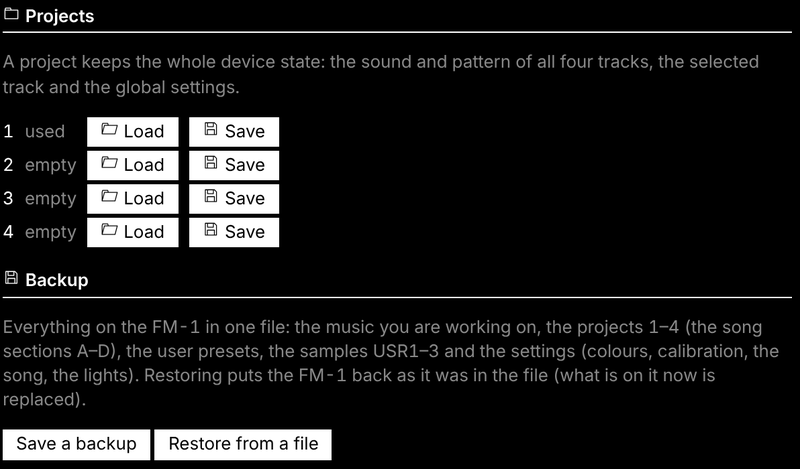
- Projects — the four projects, and Backup: Save a backup writes everything on the FM-1 to one file; Restore from a file puts it all back (stop playback first).
- Settings — global, master (DUST, DUCK, FILT), drums.
The protocol is documented in web/EDITOR_PROTOCOL.md.
Compatibility
| Device | M-VAVE FM-1 (the official firmware can be put back at any time) |
| Installer and editor | Chrome or Edge on Windows, macOS or Linux (they use Web MIDI with SysEx) |
| Cable | a USB data cable, plugged directly (no hub) |
| USB audio | any computer that takes a class-compliant USB audio input (no driver) |
| MIDI IN jack | 3.5 mm TRS, through a TRS-to-DIN MIDI adapter (type A or B) |
| Not supported | Bluetooth MIDI; a USB keyboard plugged straight into the FM-1 |
Troubleshooting
The installer or the editor does not find the FM-1. Use Chrome or Edge, a data cable, no hub, and allow MIDI access. Close every other app or tab that uses MIDI (a DAW, M-UPGRADE, another editor tab), then reload the page.
An install stopped half-way. The FM-1 waits in update mode: press INSTALL again. If SHIFL no longer starts, hold OCT− alone while switching on (SHIFL USB RESCUE) and install again.
The black keys make no sound on a synth track. That track plays chords or the scale on the white keys: hold SCL (between FX and ENV) and set KNOB 1 CHORD to OFF and KNOB 3 KEYS to OFF. The drum track always uses the black keys.
Nothing plays from the MIDI IN jack. Try the other adapter type (A / B); check the keyboard's channel (1–5 synths, 10 drums, 6–16 the selected track).
The USB audio input does not show. Unplug the FM-1 and plug it back in (after an install the computer must find it again). In Audacity: Transport → Rescan Audio Devices. On Windows: Sound settings → Recording → show disabled devices.
The USB recording is too quiet, or follows the volume knob. Set HOME menu → USB AUDIO to FULL, or turn MASTER up.
Recorded notes move to the grid. SHIFL quantises what you record to the steps of the track (its DIV: 1/4 … 1/32, triplets). For finer timing, set DIV to 1/32; for groove, use SWING.
Notes fade out on a dense part. The processor is at its limit: SHIFL fades one voice at a time rather than glitching. Fewer held notes help.
MIDI CC knobs have no effect. Check the channel: per-track filter uses channels 1–5, global FX and punch use channel 16. Check that the CC number matches the reference table above.
The lights or SYNC went back to OFF / INT. You went back to an earlier SHIFL, which does not keep them; set them again in 2.4.
Something else? Open an issue: what you did, what you expected, what happened, and the version shown in HOME menu → ABOUT.
Specifications
| Tracks | 5 synth parts (voices shared) + drums (17 sounds, polyphonic) |
| Sounds | 116 presets on 5 engines — ANALOG (22), DX7 FM (20), CZ-1 Phase Distortion (65), formant voice (4), lo-fi chip (5) — all level-matched; 3 user sample slots; 32 user presets |
| Drum kits | 3 FM-synthesised kits (808 FM, ELECTRO, METAL) + 2 analog circuit models (808, 909 — no samples), 17 sounds each, level-matched |
| Sequencer | 64 steps per track, own length and division each; dotted step sizes (1/32 … 2m•); chords with level, ratchet and probability per note; drums with level, ratchet and probability per sound; ties, slide; MPC swing 50–75 %; one sample-accurate clock (no drift) |
| Step probability | 100 % / 75 % / 50 % / 25 % per step (synth and drums) |
| Recording | live, quantised as heard (latency-compensated), overdub; free take or set tempo; start on first note or one-bar count-in; 1, 2 or 4 bars |
| Performance | layers: punch-in FX, erase, step entry, key / chords, mute / solo / tap tempo, song sections |
| Song mode | 4 sections × 16 steps × 1–64 bars; independent fragments with key changes, in-key transposition, per-track patch overrides, per-track slicer overrides, FX overrides |
| Effects | 32 punch-in effects (2 pages of 16, beat-synced); master DUST, DUCK, DJ filter, limiter; per track drive, slicer, sends to a stereo chorus, a dotted-aware tempo delay and a stereo reverb |
| MIDI CC | per-track filter cutoff / resonance (CC 71/74, ch 1–5); global FX and swing (ch 16); 32 momentary punch effects (CC 102–133, ch 16) |
| Memory | autosave, undo / redo, 4 projects, 32 user presets, full backup / restore (editor) |
| Audio | 44.1 kHz, fixed-point DSP; USB audio input (the master output, 16-bit stereo, class compliant) |
| MIDI | USB class-compliant in / out; TRS MIDI IN (3.5 mm); MIDI clock in (USB or TRS); MIDI CC in |
| Lights | button backlight (3 levels), C keys / white keys, played notes |
| Update | over USB from the browser (SHA-256 and CRC checked), USB rescue, return to the official V15 |
Documentation
- SHIFL.md — the full manual (every page, layer, sound and kit)
- DEMARRAGE-RAPIDE-FR.md — guide de démarrage en français
- BUILDING.md — building, build options and tests
- docs/midi-cc-plan.md — MIDI CC mapping and controller setup guide
- web/EDITOR_PROTOCOL.md — the editor's SysEx protocol
- LICENSING.md — the licences of the code and the assets
Building and tests
See BUILDING.md. In short: the JieLi toolchain and three files of the AC79 SDK, then ./build.sh (Linux / macOS) or INSTALL-SHIFL.bat (Windows with WSL), which builds the firmware and serves the installer and the editor on http://localhost:8766.
tests/run_tests.sh runs the host test suite with no hardware: audio renders against golden hashes, CPU budgets, the sequencer's timing (no drift, swing, ratchets, rolls, step probability, the REC modes and the count-in, MIDI clock), song mode (independent fragments, key changes, patch overrides), the UI pages and layers, the knobs, flash storage, the update loader, MIDI and USB audio, and the web pages (editor, backup, CHOP, installer).
Contributing
- Bugs and ideas: open an issue — what you did, what you expected, what happened, and the version in HOME menu → ABOUT.
- Pull requests are welcome. Keep the style of the code around your change, add a host test when you can, and make sure
tests/run_tests.shpasses. Contributions are credited in the release notes and the manual. - By contributing you agree that your code is released under GPL-3.0, like the rest of SHIFL.
Credits and thanks
- Felucca by Leo Kuroshita (@kurogedelic) / Hügelton Instruments — the original engines, the sequencer, the editor, the installer, USB audio, MIDI clock and many fixes (Felucca 1.0 / 1.0.1). Thank you.
- fmsloop — the sound engine used in 2.4.
- @renebohne — the played-note key lights (pull request #11).
- ChanceTheMaker and keremimo — the TRS MIDI input fix (Felucca Salt) and contributions to the MIDI clock.
- Everyone who installed SHIFL, made music with it, commented, reported a bug or asked for a feature — most of what is here comes from your messages.
- Samples: Versilian Studios VSCO-2 CE and VCSL, Sonic Pi (all CC0). Font: Terminus (SIL OFL 1.1). Icons: Fukiai (MIT, Hügelton Instruments). PHASE engine after CrispyZebra (GPL); VOICE after klattsch (MIT). CZ-1 preset names: Casio Computer Co., Ltd.
- Interface ideas after teenage engineering's pocket operators and EP-133, Elektron's step entry and Akai's MPC (swing, erase).
Licence
Code: GPL-3.0-only (see LICENSE, and LICENSING.md for the assets). No warranty. M-VAVE and FM-1 are trademarks of their owners; SHIFL is not affiliated with M-VAVE, teenage engineering, Elektron or Akai. Drum kit names describe styles, not products.