README from GitHub, GPL-3.0
MOPE-1
A sad wavetable synth for the M-VAVE FM-1, with an old-toy-keyboard backing band that only plays depressing beats. It plays anyway.
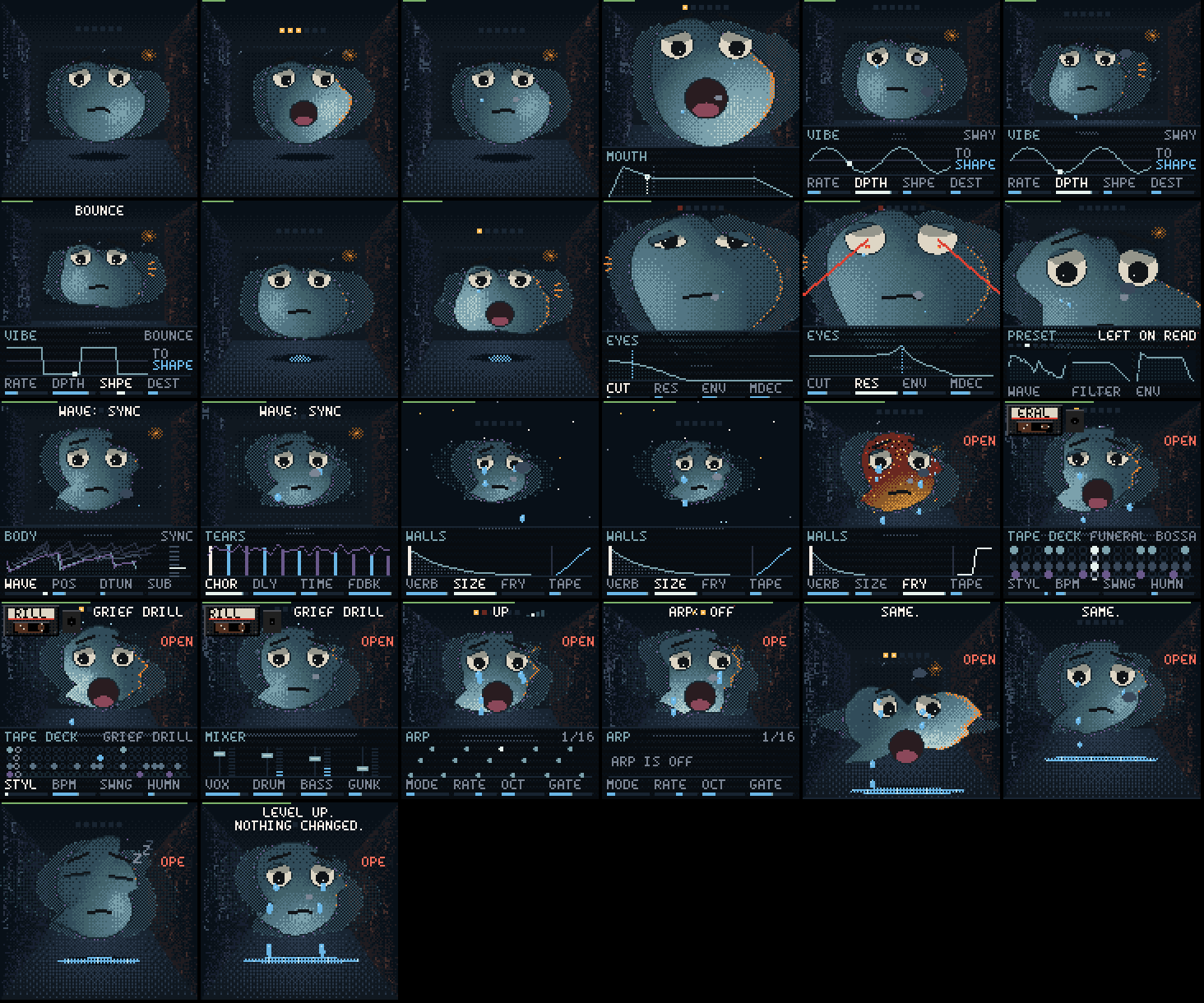
The main character is a blob: a lit, glossy jelly in chunky pixels, floating in a small sad room with a rainy window behind it. It shows what the sound is doing, and everything you turn happens to it. Under it, the part you are working on opens as a schematic: the envelope, the LFO, the filter curve, drawn the classic way, live.
The instrument, the blob, its room and tears, the maths underneath and the browser player are MOPE-1's own. It runs on the open FM-1 platform of Felucca (the drivers, the update loader, safe mode, the installer's protocol and the build tools), which reached it through X0X, FoMni and FiMba-1, the firmware MOPE-1 started from.
Status: beta, tested on a real FM-1. It installs from M-VAVE's own firmware, plays, records and updates itself on the device. https://slothpallas.github.io/mope-1/ has it to play in the browser, the blob in its states, a short manual and the installer (Chrome or Edge, USB). Custom firmware is installed at your own risk: keep M-VAVE's stock firmware (m-vave.com/download) to go back.
The blob is the synth
| You turn | What happens to the blob |
|---|---|
| Table, Position | Its outline is the wavetable wrapped round it, and it wobbles with the live output. Morphing the position reshapes its body. |
| Detune | A ghost of itself drifts apart from it, beating. |
| Sub | It gets heavier, and its bottom spreads. |
| Cutoff | Its big eyes: wide open, then half-lidded, then shut (stoned), all the way. |
| Resonance | Its pupils shrink to pinpoints and start to glow, and at the top they become laser eyes. |
| Filter kind, Drive | The Eyes page's curve shows the kind: low-pass, band-pass (a squint), high-pass (wide awake), notch (a wink) or comb (the blinds). |
| Sigh: Env amount / Mod decay | Its eyebrows rise with every note. |
| Attack / Decay / Sustain / Release | Its big mouth opens wide with the note, stays open at the sustain and closes with the release. A long release is a yawn. |
| LFO | Its whole body dances at the rate, as far as the depth: a sway (side to side, leaning into it), a bob (stretching as it rises), a bounce (squashed when it lands), a nod, a twitch, a heave (filling up slowly, then letting it all out), a wander (off somewhere and back), a stagger (sideways in four lurches) or a throb (two swells and a rest, like a heart); its lumps wobble along. It dances big while notes sound (riding their envelope), shows you a preview while you turn the Vibe knobs, and only murmurs when idle. |
| Chorus | See-through copies of itself peek out from behind it, a beat out of step: one a side, then more, further out and fainter. |
| Delay | It cries one tear per echo. Each tear is smaller than the one before, and they fall as far apart as the echoes. They collect in a dark puddle on the floor in front of it, which mirrors it (blurred, upside down) and ripples when a tear lands. |
| Reverb, Size | The walls throw cold light back onto its edges as the reverb rings. A bigger room pushes the walls out and the blob gets smaller in it. Past the walls is the void, with stars. |
| Fry | It gets deep-fried in burnt patches: brown, crusty, sweating, then steaming. |
| Volume | Its dirty orange aura. |
| Clipping | It catches fire and looks calm (this is fine). |
| The drums | A smoky see-through cassette in the top-left corner, the tape winding between its spools, the style on its label, its reels turning at the tempo. The label's stripe counts the bar's four beats (the one now lit) and a white mark runs along the tape through the bar. Kicks squash the blob and make the light flinch, snares make it blink, hats are rain on the window. Gabber makes it shake. |
| Nothing | Its mouth rests at meh. It falls asleep; much later it wakes up and stares at you. |
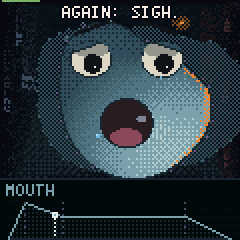 envelope | 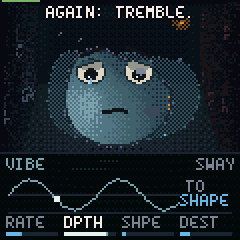 LFO | 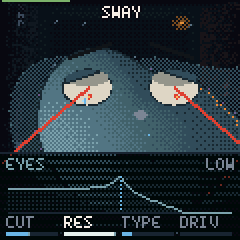 resonance | 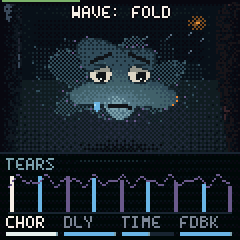 chorus (copies) |
 a preset's card | 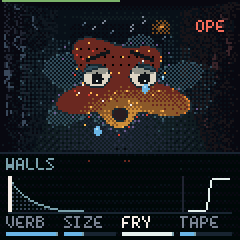 fry | 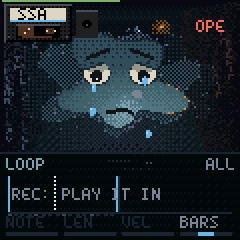 drums | 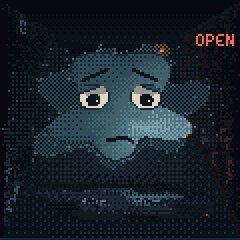 the blob alone |
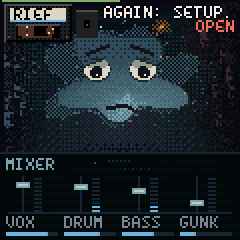 mixer | 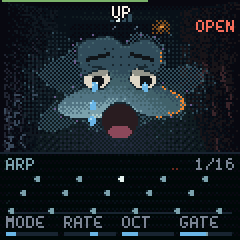 arpeggiator | 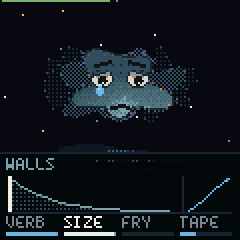 the void | 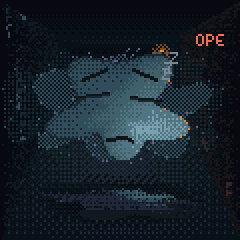 asleep |
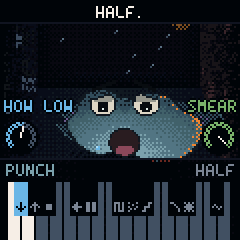 a punch (SEL) | 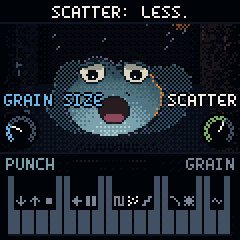 its knobs | 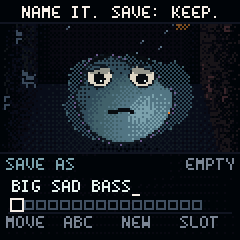 save as | 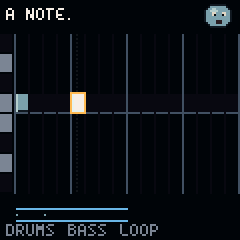 the sequencer |
The look
- Pixels, lit wrong: 120 x 120 pixels shown at 2x. The blob and its copies are shaded per pixel through a 4 x 4 dither, by a light that comes from below like a torch under a chin. Each note swings that light round the blob by its pitch, the envelope brightens it, and a kick makes it flinch. There is a soft dull sheen (none in close-ups), a one-pixel dark edge, and the streetlamp's orange rim that grows with the volume. The reverb shows as cold light thrown back by the walls onto its edges. It reflects in the wet floor.
- Never a ball: it sags at the bottom like a slime, has lumps that slowly drift, and leans a little; the wavetable shapes the rest.
- The room is tones, not lines: a back wall lit in the middle and fading at its edges (no frame), a window that fades into it, the window's light falling on the floor. The side walls are lit differently: cold plaster on the left, the lamp's faint warmth on the right, and tiny broken pieces of the font drip down both, barely there, like rain made of text.
- Colour: sad blues for the world. Warm reds, oranges and amber only for what is happening: the lamp's rim, the kick's edge, resonance, fry, the playheads, the meter you are turning.
- Its own font: a droopy 4 x 6 face. Crossbars sag, tops are rounded, the S slides, the T leans and the V is lopsided.
Controls
Press or hold a part's button: its schematic opens in a dark glass drawer over the bottom of the screen and the four knobs turn that part, each knob's name over its meter (the one you turn lights up). The drawer stays until 3 seconds after your last touch, then slides away, but the page stays: its button stays lit and the knobs still turn that part (turning one brings the drawer back). HOME goes back to the Body. Some parts have a second page: press the button again while its page shows (HOME: Shadow, ENV: Sigh, LFO: Tremble, GLO: Setup, SEQ: Tape deck; FX goes round four: Walls, Tears, Copies, Dust). Until you've found one, the caption nudges you (AGAIN: SHADOW.). Press a part's button twice quickly and its drawer stays open (switch pages with the other buttons) until you press HOME. OCT+ or OCT− is lit while the keyboard is shifted up or down. The blob stays big and shows faintly through the glass. The drawer is drawn in the room's cold colours, like the drum grid.
| Page | Its schematic |
|---|---|
| Body | the wavetable's frames stacked, the one playing in front, the detuned copy sliding, the position on a frame ladder |
| Eyes | the filter's curve for its kind (low, band, high, notch, or the comb's teeth) and its resonance peak, the cutoff marked, and where the note's envelope opens it now (red) |
| Mouth | the ADSR, a red dot riding it where the loudest note is |
| Vibe | the LFO's wave (more cycles: faster), a red dot at its phase, where it goes |
| Walls | the reverb's tail (its length: Size, its colour: Tone), the rain |
| Tears | the delay's taps, ping (blue) and pong (coral), each smaller and spaced in the tempo |
| Copies | the chorus as wobbling ribbons, as wide as Width |
| Dust | an old record: tape's wobble, crackle, dust, the fry's transfer curve |
| Punch | the keyboard, each black key with its punch's symbol; the whites beside a held punch lit |
| Save as | the name with its cursor, your sixteen places (filled lit, the chosen one outlined) |
| Tape deck | the drum grid as round steps in the room's cold colours (kick pale blue, snare tear-blue, hats rain-grey, bass violet; soft hits dimmer, empty steps rings), the fill on the fourth bar, a pale glint for the playhead |
| Mixer | the tempo, and three channel strips: each a fader and a live meter (voice, drums, bass) |
| Arp | the next 16 steps as a piano roll, the playing one lit, each as long as the gate |
| Setup | a note gliding to the next, MIDI out and channel |
| Shadow | the second wave over the first at its interval, how they meet (mix, FM, ring, sync), the interval in semitones |
| Sigh | the second envelope's rise and fall, full width, the wave a note starts on and the one its sweep reaches |
| Tremble | the second LFO, drawn like Vibe's |
| Button | Part | KNOB 1 | KNOB 2 | KNOB 3 | KNOB 4 |
|---|---|---|---|---|---|
| HOME | Body | Table | Position | Detune | Sub |
| HOME again | Shadow | Its table | Tune (semitones, ±24) | Meets (mix, FM, ring, sync) | Level (0: off) |
| EDIT | Eyes | Cutoff | Resonance | Kind (low, band, high, notch, comb, vowel) | Drive |
| ENV | Mouth | Attack | Decay | Sustain | Release |
| ENV again | Sigh | Its attack (0: the mouth's) | Its decay | Wave (how far it sweeps the table, either way) | Eyes (how far it opens the filter) |
| LFO | Vibe | Rate | Depth | Shape (sway, bob, bounce, nod, twitch, heave, wander, stagger, throb) | Destination (position, eyes, voice, volume, shadow, across the tables, detune, walls, tears, copies, dust) |
| LFO again | Tremble | Rate | Depth | Shape | Destination |
| FX | Walls | Reverb | Size | Tone | Rain |
| FX again | Tears | Delay | Time (in the tempo: sixteenths, triplets, eighths, slow triplets, dotted eighths, the beat, dotted quarters) | Feedback (each echo more worn, like tape) | Dark (past halfway: each echo smeared into a cloud) |
| FX again | Copies | Chorus | Rate | Depth | Width |
| FX again | Dust | Tape | Crackle | Dust | Fry |
| SEL | Punch | Held (or pressed twice): the last punch's first knob | Its second knob | ||
| SEQ | Loop | Step (the cursor, along the bars) | Note (under the cursor) | Length (of that note) | Bars (1, 2, 4) |
| SEQ again | Tape deck | Style | Tempo | Swing | Human (looser timing and velocity) |
| GLO | Mixer | Tempo (one for every beat) | Voice | Drums | Bass (0: no bass) |
| GLO again | Setup | Row (a list, full screen: Voices, Glide, Tempo, Room, Room level, Auto bass, Bass way, MIDI in, MIDI out, Clock, Aftertouch, Tune) | Its value | ||
| ARP | Arp | Mode (up, down, up and down, wander, stab) | Rate (1/4 .. 1/32, triplets) | Octaves (1-3) | Gate |
- ALGORITHM changes only the instrument's sound source, its wavetable (the blob's body shape). The caption says which ("WAVE: SIGH"); everything else stays.
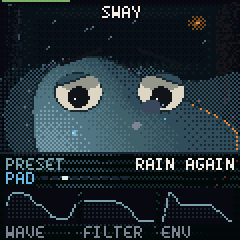
- PRESETS loads a whole saved sound at once: wave, filter, envelope, LFO and effects. Its card opens in the drawer: the name, where it sits in its kind, and thumbnails of the wave, filter and envelope it brought.
- SELECT: the drum tape (the blob swaps the cassette and shrugs).
- Close-ups: while you hold EDIT (Eyes) the view moves in on its eyes; while you hold ENV (Mouth), on its mouth.
- Tap tempo: on the tape deck or the mixer, tap HOME in time (two taps or more). Turning or tapping the tempo shows its number big at the top for a moment (BPM in blue while it follows a MIDI clock).
- Punches (hold SEL, or press it twice to keep them): a black key punches while it is held. The drawer shows the keyboard, each black key with its punch's symbol: lit while it plays, blinking while it waits for the step. The two white keys beside a held punch light up, on the screen and on the pads: hold the left one for more, the right one for a twist. The punch's two knobs sit at the bottom corners over the drawer, as big dials with their names (HOW LOW, SMEAR, GRAIN SIZE...).
- Captions sit in their own dark band at the top (right of the cassette when it is up), never on the blob. One tap alone is HOME, as always (a moment later).
- PLAY: the band on and off: drums, bass and your loop. ARP: tap for the arpeggiator on or off; hold for its page: the keys you hold become its pattern, at the tempo, starting each bar with the drums.
Recording a loop
As on X0X, Melodee and JIANT FM: PLAY, REC and SEQ do what they say.
- REC while stopped: a one-bar count-in (four red lights, a click on each beat), then the band starts and what you play is recorded into the loop (1, 2 or 4 bars; the Loop page's Bars). Notes snap to the 1/16 grid; the tape deck's Human puts some looseness back. The arpeggiator's notes are recorded too.
- REC while playing: it records at once, on top of what's there (overdub). REC again stops recording; the loop keeps playing with the band.
- HOME + REC undoes the last take. SAVE + REC clears the loop.
- SEQ: the loop as a piano roll on the whole screen, with a cursor. While it is open the 16 white keys are the steps of the bar on show (not while recording: then they play). Press a step: the cursor goes there, on its nearest note (you hear it). Press the cursor's step again: its note goes, or one comes (the last note you played). Knob 1 moves the cursor along the steps, knob 2 its note up or down, knob 3 that note's length, knob 4 the bars. OCT− / OCT+ go to the other bars.
- Patterns: four loops, saved with your sound (up to 150 notes each). On the SEQ screen the first four black keys (F#3, G#3, A#3, C#4) pick one: lit is playing, blinking is waiting. With the band playing it comes in on the next bar, from its first bar; stopped, at once. Each keeps its own length.
- Mutes: on the SEQ screen the next three black keys (F#4, G#4, A#4) silence the drums, the bass and the loop (lit: playing). The steps keep going; unmuted, it is back on the next hit. Not saved.
- The roll fits itself to your notes (fewer notes: taller rows). Turning a knob shows only that knob and its value (the step, the note, the length, the bars); untouched, the bottom line shows the mutes.
- Changing the drum style while playing also waits for the bar.
- OCT− / OCT+: octave. The 27 keys play F3 to G5.
- SAVE (tapped): SAVE AS, to keep the sound as a preset of yours (below). Everything else saves by itself when quiet. Hold SAVE for 1.5 s, then press it again, to reset everything; the blob keeps its level.
- The lowest and highest keys together: it gives up.
Presets (54, in seven kinds; the card shows the kind):
- Pad: Monday, 3AM, Rain again, Church of nothing, Sunday scaries, Seen 2:14, Weighted blanket, The void stares, Slow heart, Tide goes out
- Keys: Left on read, Hold music, Open plan, Music box, Glass office, Elevator, Worn tape
- Pluck: NPC, Read receipt, Bubble wrap, Typing..., Icicle, Second guessing
- Lead: Main character, Low battery, Deep fried, Cry on the floor, Bent out of shape, Drama, Scream into pillow, Noise complaint, All caps, Reply all
- Bass (an octave down): Sub-par, Bottom text, Doomscroll, Basement, Hollow inside, Underslept, Rage quit, Passive aggressive, Overdraft, Landlord, Burnout
- FX: Tinnitus, Dial tone, Ghosted, Heavy breathing, Broken record, Phantom vibrate
- VOX (the vowel filter): Choir of one, Humming alone, Aah well, Says nothing
Your presets: tap SAVE and SAVE AS opens in the drawer, with a sad name (DAMP MONDAY) in your first empty place of sixteen (or the place of the preset of yours that is playing). Knob 1 moves the cursor, knob 2 changes its letter, knob 3 gives another name, knob 4 (or PRESETS) picks the place; the header says EMPTY or whose place it was. In the web player, type the name (the first letter replaces the offered one; Enter keeps, Esc doesn't). SAVE again keeps it; any other button leaves it. A preset of yours keeps the sound (not the mixer, the tempo, the band or MIDI) and comes after the factory ones on PRESETS.
Drum styles: each named after its genre, sadly: Grief drill, Empty city pop, Gloom gabber, Missed phonk call, Jersey cry club, Heartbreakcore, Amapia-no, Cold footwork, Dembow out, Vaporweep, Hyperflop, Funeral bossa, Office ambivalent. Each style has a main bar, a fill every fourth bar, its own tempo and swing, and a synthesized kit (no samples). In Amapia-no the bass is a log drum.
Gunk (the Walls page's Rain) is the room's texture: rain on the window, a record's crackle, a low rumble. It swells when nothing plays and steps back when something does, and the rain on the window follows it.
The bass is always sad: the auto-bass plays natural minor. Hold something that sounds major (or one note) and it plays the relative minor, a minor third down: hold C and it plays A minor, every note of which is also in C major. Hold a minor chord and it plays that minor. Any note in a pattern outside the minor scale is pulled onto it.
MIDI in (USB and the TRS jack): notes with velocity, and pitch bend. The mod wheel moves the position and program change picks a preset. CCs: 74 cutoff, 71 resonance, 73 attack, 72 release, 70 position, 91 reverb, 93 chorus, 94 delay, 7 volume, 64 the sustain pedal. Aftertouch (channel or per key) does what Settings → Aftertouch says: vibrato (as it comes), the filter opening, the wave morphing, the LFOs deeper, or nothing.
MIDI out (Settings → MIDI out, on the MIDI channel, or 1 when it takes all):
| MIDI out | What goes out |
|---|---|
| Off | nothing |
| Keys | the keys you play (with the arpeggiator on at Notes or All: its notes instead) |
| Notes | the keys, the arpeggiator and the loop |
| All | that, plus the auto-bass (on the next channel up, skipping 10) and the drums on 10: kick 36, rim 37, snare 38, clap 39, hat 42, open hat 46 |
Clock (Settings → Clock):
| Clock | |
|---|---|
| Own | its own tempo; incoming clock is ignored |
| Follow | an incoming MIDI clock sets the tempo, and Start / Continue / Stop start and stop the band; it stays on their beat (within a few ms). Two seconds without clock: its own tempo again |
| Lead | it sends clock (24 a beat) all the time, and Start / Stop with PLAY |
Levels: every note is XP. Levels change nothing, but the captions say so ("LEVEL UP. NOTHING CHANGED.").
The sound
- 16 wavetables: Plain (a sine, then a square, then a saw), Moan, Pulse, Crush, Warble, Fold, Church, Sync, Glass, Breath, Cry, Hollow, Bend, Toy, Ice, Sag. Each has 8 frames, built at boot from harmonic recipes, so they take no flash space. Each frame is mipmapped at five sizes, so high notes don't alias (the test checks C7 on Sync: aliases at −68 dB).
- 6 voices: two detuned oscillators panned apart, a sine sub, slow analog drift, a resonant filter (Simper's SVF: low, band, high or notch; a comb; or a vowel filter, two formants from A to U) with key tracking and drive, an amp ADSR and a mod envelope (its own attack) on the cutoff and the wavetable's position. A stolen voice restarts from its current level, so stealing doesn't click.
- The shadow: a second oscillator per voice, its own table, ±24 semitones away, mixed in, frequency modulating the first, ring modulating it or synced to it.
- Two LFOs with 9 shapes (sine, triangle, square, saw down, random, saw up, smooth random, four steps, a heartbeat) and 11 destinations (the position, the cutoff, the pitch, the volume, the shadow, across the tables (crossfading two), the detune, and each effect: walls, tears, copies, dust).
- It keeps up: on the FM-1 a heavy sound (the shadow, drive, a band-pass) plays fewer voices so the audio never runs late, and if a moment still runs hot it lets the oldest voice go quickly.
- Presets at one level: each preset carries a trim measured on the FM-1, so switching doesn't jump.
- Effects: fry (drive, then bitcrush and sample-rate crush), a three-tap chorus (rate, depth, width), the tears (a ping-pong delay in the band's tempo: every echo crosses the room darker, thinner and more worn, saturating like tape, its time wandering and fluttering; Dark past halfway smears the echoes through all-passes), the room (a reverb of eight walls handing sound to each other, four of them breathing; Size goes from a one-second closet to a half-minute void; Tone), dust (vinyl crackle and hiss, a narrowing band), tape (wow, flutter, saturation, a darker top) and a limiter.
- Punches: twelve effects on the whole mix while a key is held. Six play from a 371 ms buffer of the mix (half and double speed, a tape stop, reverse, repeats, grains), one at a time; the others (gate, crush, sweep, wash, wobble) stack on top. Each costs the chip only while held, and heavy ones leave fewer voices free.
- Fry is level-matched: more fry is more grit, not more loud (full fry stays within about 2 dB of clean), and it glides, so a preset change doesn't slam it in.
- Drums: synthesized kick (808 to gabber), snare, clap, closed and open hats, perc (rim, cowbell, log drum, squeak), a sliding 808 bass and record crackle. They run sample-accurate with swing.
The test suite renders every table and every drum style to WAV in build/host/synth/.
Try it
tests/run_tests.sh
It runs the engine tests and writes the demo WAVs, then the app scenario (screenshots land in
build/scenarios/blob/), then the browser build if Emscripten is installed. To play it in a browser:
web/play/build.sh && node tools/serve_play.mjs
Then open http://localhost:8137, or open build/play/MOPE-1.html straight from disk. Computer keys,
as in a DAW: A S D F G H J K L ; ' play the white keys from F3 and W E R
Y U O P [ the black ones; Z X move them an octave (the letters are drawn on the keys).
1–6 are FX SEL ENV LFO EDIT GLO, 7 or Esc HOME, 8 SAVE, 9 or B ARP, 0 SEQ, Space
PLAY, Enter REC, - = the octave. ↑ ↓ turn ALGORITHM (the wavetable), ← → SELECT (the
drum tape), , . PRESETS. While SAVE AS is open the keys type the name.
To put the player in another page, serve index.html, voice.js and mope.wasm from build/play/
together and frame index.html: in a frame it drops its title and installer, and it needs no data:
scripts, only 'wasm-unsafe-eval' if the page has a content security policy.
Installing it
- Download M-VAVE's stock firmware (FM-1 V15, "PC Firmware", m-vave.com/download) so you can always go back (the installer's way back takes V15).
- Plug the FM-1 into the computer directly with a USB data cable, open https://slothpallas.github.io/mope-1/play/ in Chrome or Edge, and press Install MOPE-1. Or from a terminal:
python3 tools/fm1_install.py mope-0.1.0.fwsc. - It takes about a minute; don't unplug while it writes (if it's cut off, press Install again: it continues).
Leaving it is the same: install another firmware, or M-VAVE's, from the hub or its own installer. If a firmware ever crashes at start-up, the FM-1 comes up in safe mode after two tries (USB on, the installer works); the chip's own update mode can't be overwritten.
Saves and other firmwares: MOPE-1 keeps its sound and loop in the same flash slot FiMba-1 and FoMni use for their projects (0xFC000), and the panel calibration at 0xDC000, as they do. It can't read another firmware's project there (it starts from its defaults) and saving overwrites it; the same goes the other way.
The package identity is FM-1_6673 ("MOPE" on a phone keypad) followed by the version, e.g. FM-1_6673000100 for 0.1.0. No other firmware on thefirmwarehub.com uses it. The device build runs on GitHub (the JieLi toolchain is Linux-only); BUILDING.md has the details.
Licence
GPL-3.0-only, like the platform it runs on: see LICENSING.md for what is MOPE-1's and what comes from where. Not affiliated with M-VAVE.