README from GitHub, GPL-3.0
sloopy-sloop-32
SLOOP, the live groovebox firmware for the M-VAVE FM-1, running natively on an ESP32-S3 with a PCM5102A DAC. A web browser stands in for the FM-1's front panel.
|
|
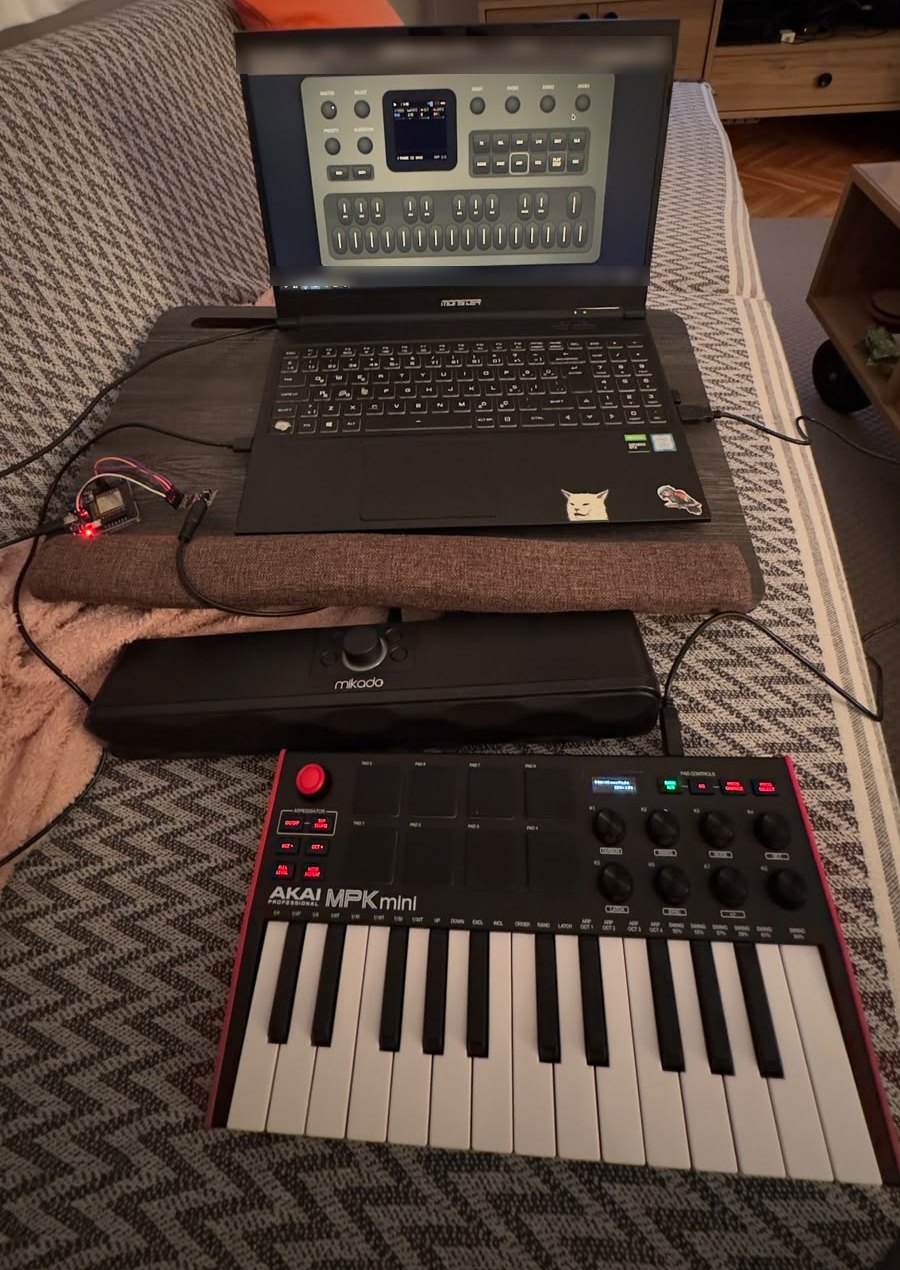
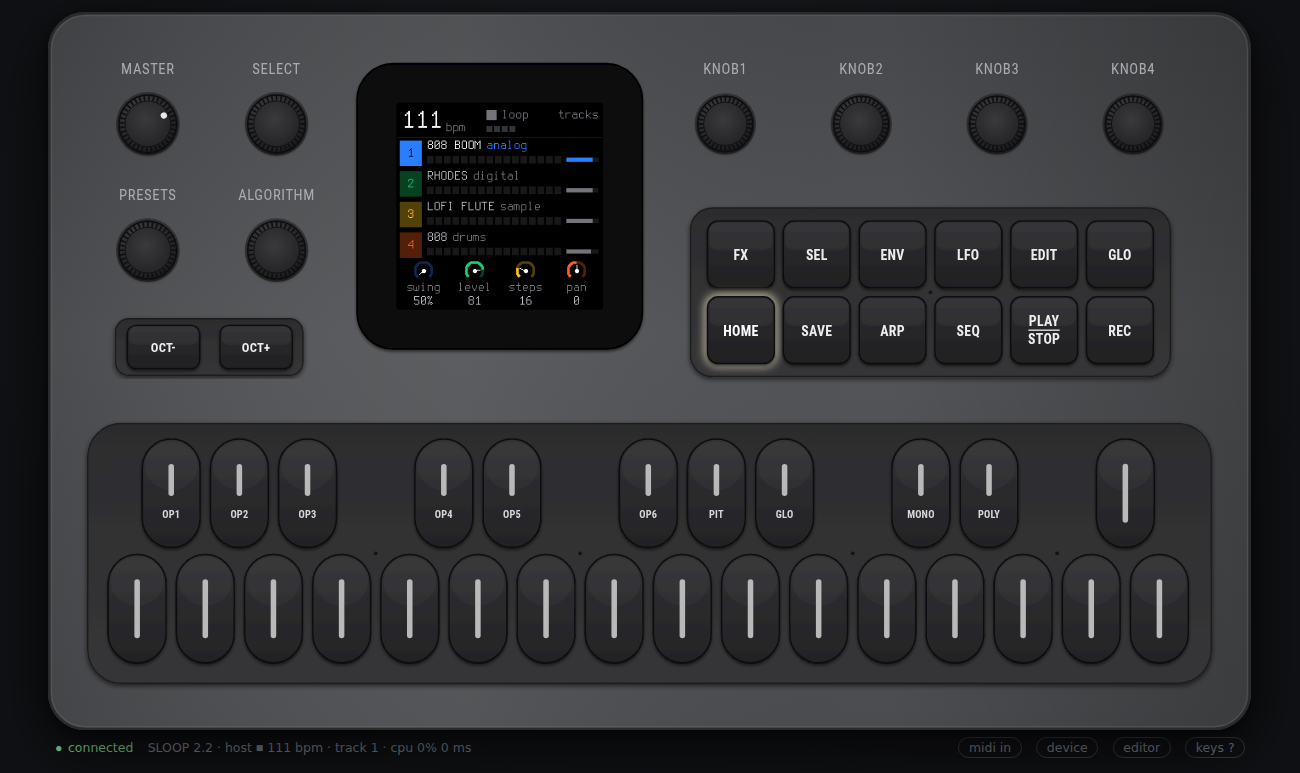
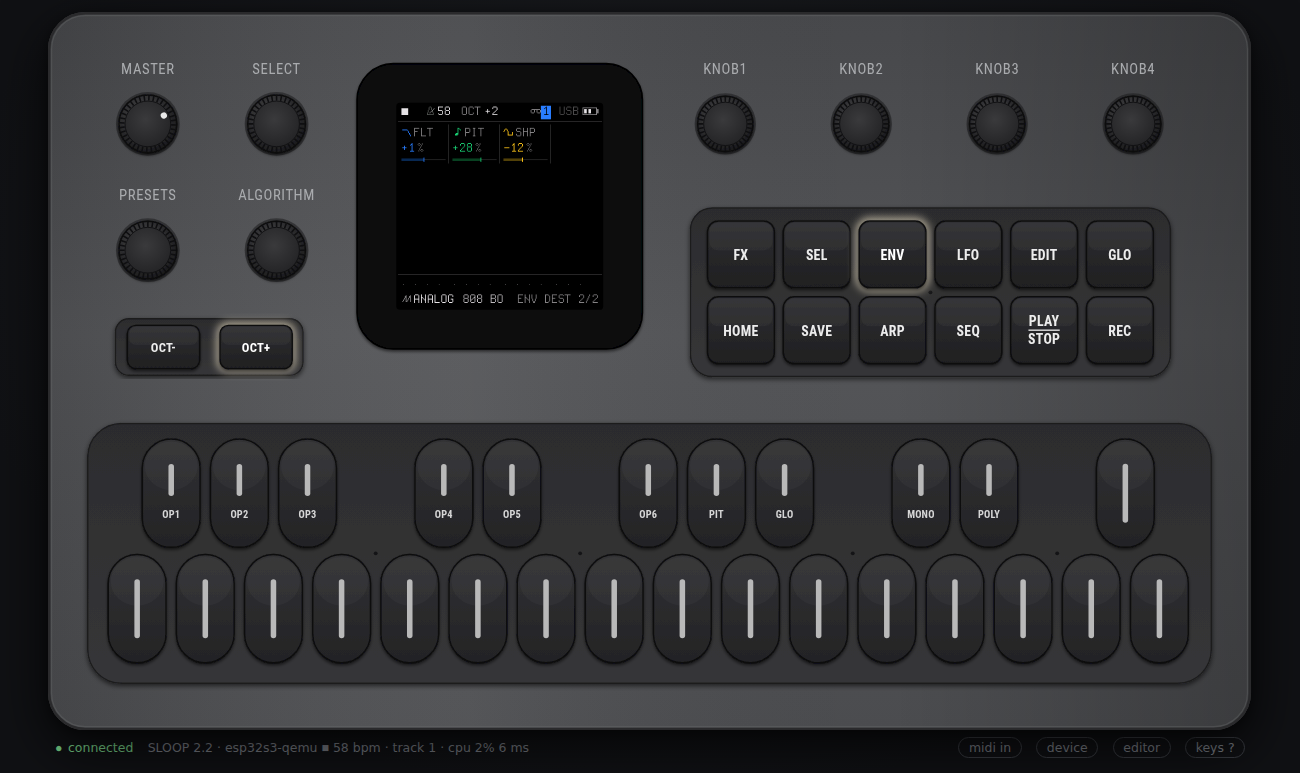
| The real thing. An ESP32-S3 module and a PCM5102A DAC (left, red LED) run SLOOP. The laptop only shows the panel over Wi-Fi, and an AKAI MPK mini 3 plays it. | Top: the browser panel with SLOOP's own TRACKS screen.
Bottom: the same panel served by the ESP32-S3 firmware running in Espressif's QEMU
(status line: esp32s3-qemu). |
 |
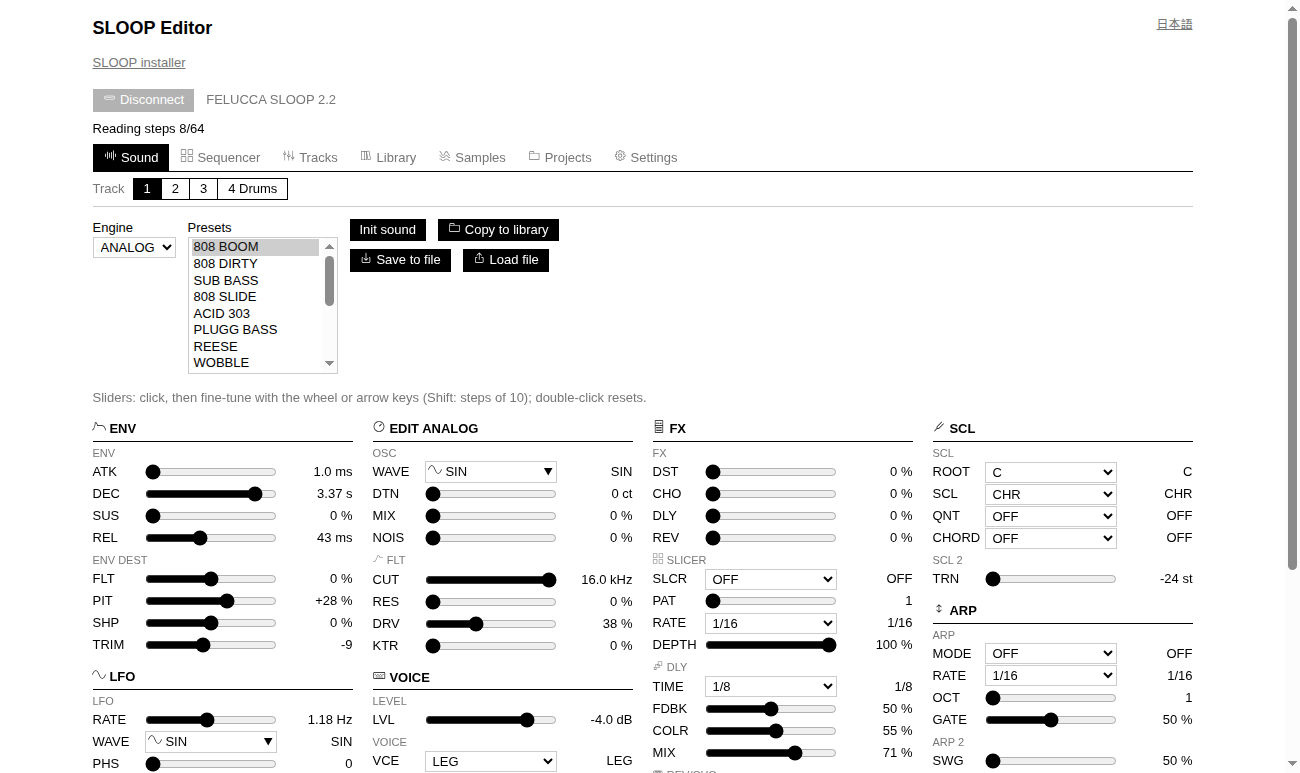 |
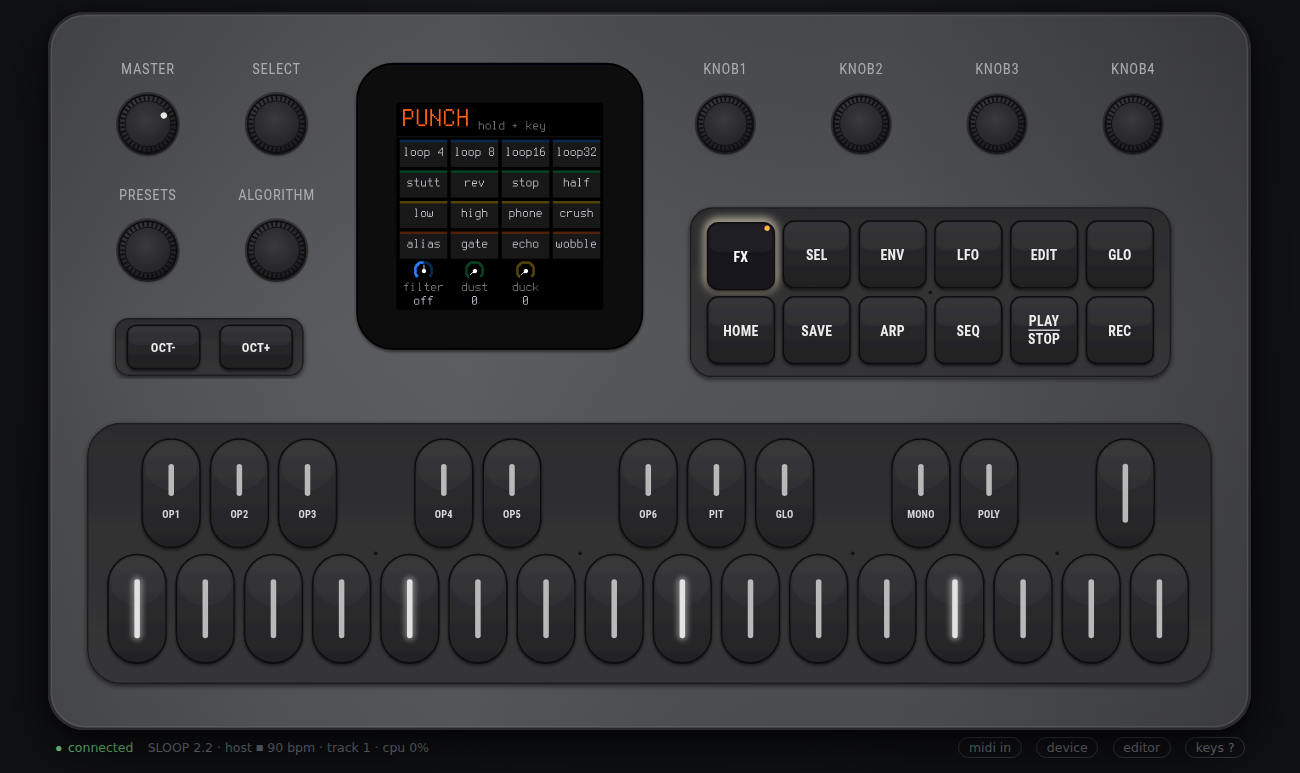
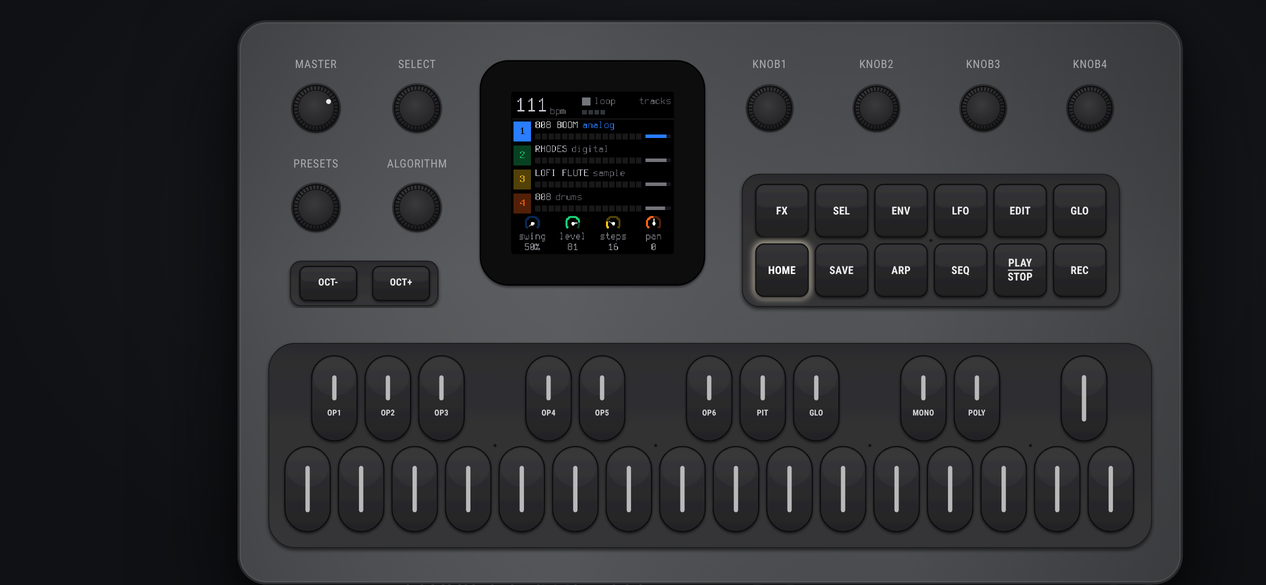
| Hold FX: SLOOP's punch-in effects layer. Keys 1, 5, 9 and 13 light up as on the FM-1. | SLOOP's own web editor (upstream code), served by the device and connected over the WebSocket instead of USB. |
 |
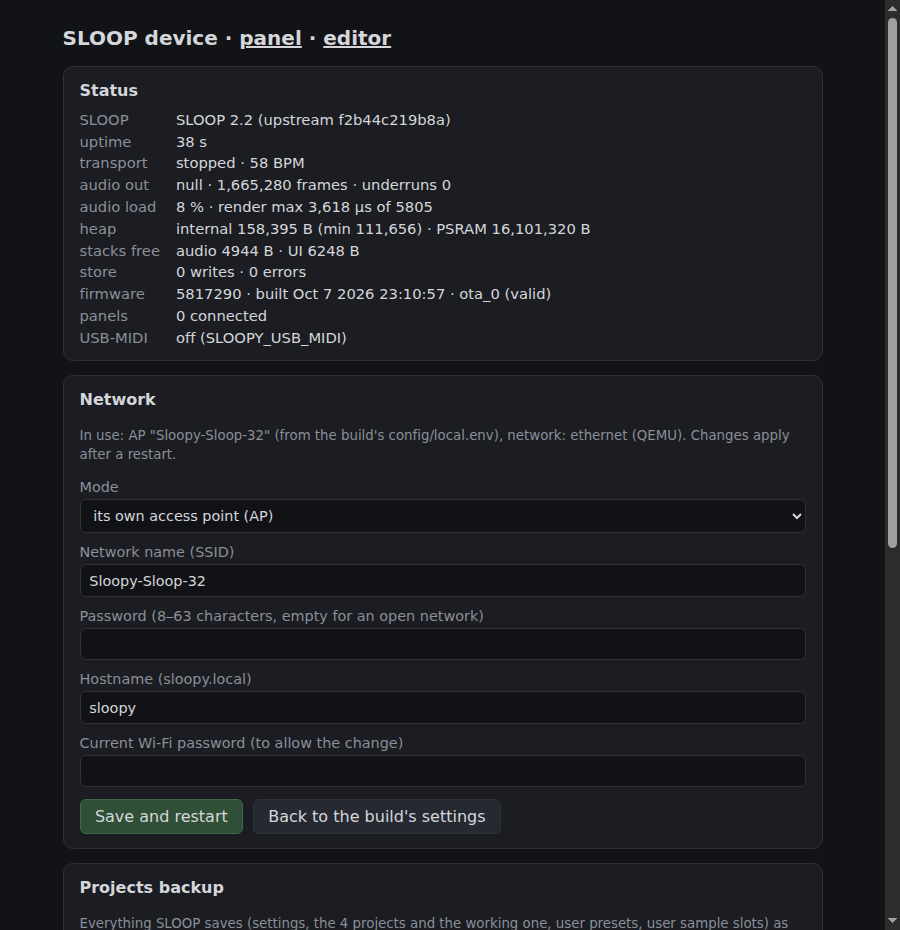 |
| On a phone, with multi-touch: hold a button with one finger and play keys with others. | The device page (here from QEMU): live status, network settings, project backup and restore, firmware update. |
QEMU console: the firmware's self-test (./scripts/test-qemu.sh)
I (20) boot: ESP-IDF v5.5.5 2nd stage bootloader
I (242) esp_psram: Found 16MB PSRAM device
I (278) sloopy: sloopy-sloop-32: SLOOP 2.5 on ESP32-S3 rev 0, 2 cores, ESP-IDF v5.5.5
I (279) sloopy: upstream SLOOP fa9ce5742f4a, profile qemu
I (283) sloopy: flash 16777216 bytes, PSRAM 16777216 bytes
I (284) sloopy: heap: internal free 215883, PSRAM free 16206500; SLOOP .pool in PSRAM: 568132 bytes
SLOOP_SELFTEST_RENDER ms=4000 hash=274479377fec3840 peak=25805 took_ms=205
SLOOP_SELFTEST_RENDER2 ms=5000 hash=8101ef4f04284d15 peak=28841 took_ms=430
I (1115) web: web panel on port 80 (11 files embedded)
I (1160) sloop_port: SLOOP_BOOTED
I (2116) net: IP 10.0.2.15: the panel is at http://10.0.2.15/
I (2681) selftest: UI task: SLOOP's main loop runs                              ok
I (2683) selftest: display: screens published (logo, TRACKS)                    ok
I (2764) selftest: transport: PLAY -> playing                                   ok
I (3766) selftest: audio: a key on track 1 is heard                             ok
I (4152) selftest: encoder: KNOB 2 changes track 1's level                      ok
I (21010) selftest: store: the autosave writes the project to the "sloop" partition ok
I (21514) selftest: heap: integrity                                              ok
SLOOP_QEMU_PHASE1_DONE level=88
   ... esp_restart: the chip reboots on the same flash ...
I (13333) selftest: store: the project came back from flash after a restart      ok
I (44393) selftest: random use: audio kept coming                                ok
I (44395) selftest: random use: the output stayed inside 24 bits                 ok
I (44397) selftest: random use: task stacks kept > 1 KB free                     ok
I (44982) selftest: random use: SLOOP still answers PLAY                         ok
SLOOP_QEMU_PASS
Contents
- What this is (and why)
- Credits and thanks
- Status
- How it works
- Hardware and wiring
- Getting started
- MIDI keyboards
- The browser panel
- Scripts
- Configuration
- Tests
- Repository layout
- Using SLOOP itself
- Limitations and known issues
- License
What this is (and why)
SLOOP is a custom firmware for the M-VAVE FM-1, a small MIDI keyboard with a screen built around a JieLi AC79 chip. SLOOP turns it into a four-track live groovebox: three synths (twelve synthesis engines), a drum machine, effects, a sequencer and a song mode. This port runs SLOOP 2.5.
sloopy-sloop-32 takes that firmware off the FM-1 and runs it on an ESP32-S3, a general-purpose microcontroller board that costs a few dollars:
- Native port, not an emulator. SLOOP's DSP and sequencer run natively. A small virtual FM-1 replaces the screen, key matrix, audio link, flash and clock; generated sample-address seams keep built-in and uploaded samples within their own memory objects on both targets.
- The browser is the front panel. The board has no screen, buttons or knobs. Any browser on the same network shows a faithful FM-1 panel and SLOOP's real screen, sent pixel for pixel. Its buttons, keys and knobs drive SLOOP exactly as the FM-1's would.
- Audio comes out of a PCM5102A I2S DAC at 44.1 kHz, 24-bit, stereo.
Why? For fun, and as a proof of concept. The goal was to show that a groovebox firmware written for one specific, closed piece of hardware can be lifted, untouched, onto cheap open hardware. Development was done mostly before the board arrived, using a host build and Espressif's QEMU, and then it worked on the real chip. This is a hobby project, not a product, and it is not affiliated with M-VAVE or with SLOOP's author.
Credits and thanks
This project exists only because of other people's work. Thank you!
- SLOOP by isod89: the groovebox itself. The
engines, drums, effects, sequencer, UI, screens, presets and web editor are all SLOOP's. The DSP
is unchanged; generated copies adapt sample addressing for this port. Tested revision: SLOOP
2.5, commit
fa9ce5742f4a, tagv2.5(config/upstream.lock). If you have an FM-1, install the real thing; see SLOOP's README for its browser installer. - Felucca by Leo Kuroshita (@kurogedelic), Hügelton Instruments: the open FM-1 firmware SLOOP is built on: the groundwork of running open code on the FM-1 at all. Also by the same author: FM-1-transporter, the FM-1 recovery tool.
- Third-party material inside SLOOP, as listed in its
LICENSING.md: CC0 instrument and drum samples (Versilian Studios VSCO-2 CE and VCSL; Sonic Pi), the Terminus font (SIL OFL), the Fukiai icon font (MIT) used by the editor, CrispyZebra (oscillator, GPL-3.0), klattsch (design reference for the formant voice), msfa by Google and Pascal Gauthier from Dexed (the FM6 engine, Apache-2.0), DaisySP by Electrosmith and Emilie Gillet and Mutable Instruments Rings' sympathetic strings (the PHYS engine, MIT). - Espressif: ESP-IDF, the ESP32-S3 fork of QEMU and esp_tinyusb; TinyUSB for the USB-MIDI device.
SLOOP is fetched from its own repository at build time (scripts/fetch-sloop.sh); it is not
copied into this one.
Status
| Part | State |
|---|---|
| SLOOP 2.5 (FM6, PHYS, NOISE, parameter locks, the new web editor, MIDI clock...) on Linux | works, host tested (upstream's suite, the port's tests, also under ASan + UBSan) |
| ESP32-S3 firmware with SLOOP 2.5 in QEMU (boot, PSRAM, flash store, web panel over emulated Ethernet) | works, QEMU tested |
| Cross-target check: the ESP32-S3 build renders bit-identical audio to the Linux build (also SLOOP 2.5's new engines) | passes |
| Firmware update and project backup / restore from the browser; updating a SLOOP 2.2 board to 2.5 keeps its projects | works, QEMU tested (also driven in Chrome) |
| SLOOP 2.5 on a real ESP32-S3: boot, octal PSRAM, I2S initialisation, Wi-Fi, the panel | verified on hardware on 2026-10-10; 16 MB PSRAM memory test passed, the panel and status API respond over Wi-Fi |
| PCM5102A sound on both channels | heard with SLOOP 2.2 (October 2026); listening with 2.5 is pending |
| A MIDI keyboard (AKAI MPK mini 3) playing the board through the PC | works on hardware (scripts/midi-bridge.py) |
| Long-run hardware tests (sample-rate accuracy, 10 min under load, latency, OTA over Wi-Fi) | pending: docs/HARDWARE_TESTS.md |
| USB-MIDI device on the ESP32-S3's native USB port (opt-in) | builds, bridge host tested; not yet tried on hardware |
The full log, with what was measured and how: PROGRESS.md, NEXT_STEPS.md, KNOWN_ISSUES.md.
How it works
flowchart TB
    subgraph Browser["Browser (phone, tablet, PC)"]
        P["FM-1 panel<br/>(web/: SVG controls, SLOOP's screen in a canvas)"]
        E["SLOOP's web editor<br/>(upstream, served as-is)"]
    end
    subgraph Board["ESP32-S3"]
        subgraph Core0["core 0"]
            W["Wi-Fi + HTTP server + WebSocket /ws<br/>(components/web_server)"]
            H["protocol hub<br/>(components/sloop_proto)"]
            U["USB-MIDI device, opt-in<br/>(components/usb_midi, TinyUSB)"]
        end
        subgraph Core1["core 1"]
            S["upstream SLOOP DSP<br/>(components/sloop_core)"]
            V["virtual FM-1 HAL<br/>screen · key matrix · audio link · NOR flash · clock"]
        end
        A["I2S -> PCM5102A<br/>(components/audio_backend)"]
        F[("flash: SLOOP's store,<br/>OTA slots, NVS")]
    end
    P <-->|"control events, screen rectangles"| W
    E <-->|"SysEx (editor protocol)"| W
    W <--> H
    H <-->|"mailboxes"| S
    U <-->|"MIDI / SysEx"| S
    S --- V
    V --> A
    V --- F
The core. components/sloop_core/port/sloop_unity.c includes upstream's firmware/src/*.c in
upstream's own order, against a virtual FM-1 HAL (port/hal/*.h) that stands in for upstream's
JieLi register headers. Two upstream files are replaced: main.c (by sloop_runtime.c: boot, the
UI loop body, the audio render, the mailboxes) and usb.c (by sloop_usb_shim.c: the same MIDI
and SysEx rings). Nothing under upstream/ is edited. The same unity build runs on Linux and on the
ESP32-S3.
Where the original's parts went:
| On the FM-1 (upstream) | In this port |
|---|---|
engines, drums, voices, FX, sequencer, arranger, UI, screens, projects, presets, editor protocol (firmware/src/) | reused unchanged |
ST7789 LCD driven by lcd.c | lcd.c unchanged, talking to a virtual ST7789: a 240x240 framebuffer whose changed rectangles stream to the browser (~30/s) |
| key / button / encoder matrix, LEDs | a virtual matrix, fed by browser events with hardware-like timing (presses last >= 20 ms, one encoder detent per UI pass) |
| ALNK audio link + DAC, audio ISR | audio.c unchanged; the audio task renders 256-frame halves and i2s_channel_write blocks on the DMA, so the I2S clock paces SLOOP |
| 1 MiB NOR flash, A/B storage | SLOOP's storage.c unchanged on a 448 KiB sloop partition with NOR semantics |
| TIMER interrupts, IRQ masking | the UI task (~1 ms steps) and an audio lock with the same exclusion |
USB-MIDI + SysEx (usb.c) | the WebSocket hub, and optionally a TinyUSB USB-MIDI device with the same descriptor |
M-UPGRADE updates, recovery (ota.c, recovery.c) | not built; ESP-IDF OTA slots with rollback, from the device page |
Concurrency. SLOOP was written for one core with an audio interrupt. On the ESP32-S3 both of its tasks are pinned to core 1 (audio at priority 20, UI at 5), so the UI never sees half a render, as on the FM-1. Wi-Fi, lwIP, the web server and USB run on core 0 and talk to SLOOP only through mailboxes.
Memory. Voices, tracks, mixer, the reverb lines, audio buffers and I2S DMA stay in internal RAM.
SLOOP's large .pool section (delay and chorus lines, slicer and punch rings, canvases, the engines'
shared state for GRAIN / FM6 / PHYS, ~566 KB) is placed in PSRAM by a linker fragment.
Flash layout (config/partitions.csv, 16 MB): two 4 MB app slots (ota_0, ota_1), the
sloop store (448 KiB, SLOOP's flash window), a 512 KiB stage partition for backup restores,
NVS, and a core-dump partition.
More: docs/ARCHITECTURE.md, and the file-by-file upstream map in docs/UPSTREAM_MAP.md.
Hardware and wiring
What you need
| Part | Notes |
|---|---|
| ESP32-S3 board or module with 16 MB octal PSRAM and >= 16 MB flash | "N16R16" class. A module with 32 MB octal flash (N32R16V class) works too: the build detects octal flash on its own. |
| PCM5102A DAC breakout | the common purple "GY-PCM5102" board works |
| USB cable | flashing and power |
| Headphones or an amplifier | into the DAC's 3.5 mm jack |
| Optional: a USB MIDI keyboard | see MIDI keyboards |
No screen, no buttons, no SD card: the browser is the panel.
PCM5102A wiring
The firmware drives three I2S lines. Choose the GPIOs yourself and write them into
config/local.env; pins are never hard-coded in the source, because boards differ.
| PCM5102A pin | Connect to | Notes |
|---|---|---|
| VIN | 3V3, or 5V if the board has a regulator (the purple board does) | |
| GND | GND | |
| BCK | SLOOPY_I2S_BCLK_GPIO | bit clock |
| LCK | SLOOPY_I2S_WS_GPIO | word select (LRCK) |
| DIN | SLOOPY_I2S_DOUT_GPIO | data |
| SCK | GND | no MCLK: the DAC makes its own clock from BCK. Left floating, it may stay silent. |
| FMT | GND | I2S format |
| XSMT | 3V3 | soft-mute off. Left open, the DAC stays muted. |
| FLT, DEMP | GND | normal filter, no de-emphasis |
On the purple board, FLT / DEMP / XSMT / FMT are the solder jumpers 1-4 on the back. Bridge them 1 L, 2 L, 3 H, 4 L; they often ship open.
Which GPIOs? On a DevKitC-style board, GPIO 4 / 5 / 6 are free. Avoid:
- 26-37: flash and octal PSRAM (the config script refuses these);
- 19, 20: native USB;
- 43, 44: UART0, the serial console;
- 0, 3, 45, 46: strapping pins;
- 38 or 48: the RGB LED on many boards.
scripts/generate-local-sdkconfig.sh refuses or warns about each of these.
If your labels lie: modules in adapters
The board in the photo is a bare ESP32-S3 module sitting in an adapter / programming board made for the classic ESP32-WROOM-32. The outline is the same, so GND, 3V3, EN, TX and RX line up and the module powers up and flashes. The other labels are the WROOM-32's GPIO numbers, not the S3's: on that adapter "IO33" is really GPIO 16, and "IO16" / "IO17" reach no usable pin at all.
scripts/probe-pins.sh finds out without a multimeter. It holds the chip in its ROM download mode,
so no firmware runs and no pin is driven. It reports which pins are tied high or low, then prints
every GPIO you touch with a GND wire. The measured map for this adapter is in
docs/HARDWARE.md. The setup in the photo uses:
| PCM5102A | Adapter label | Real ESP32-S3 GPIO | config/local.env |
|---|---|---|---|
| BCK | IO33 | 16 | SLOOPY_I2S_BCLK_GPIO=16 |
| LCK | IO34 | 6 | SLOOPY_I2S_WS_GPIO=6 |
| DIN | IO35 | 7 | SLOOPY_I2S_DOUT_GPIO=7 |
| VIN / GND / SCK | 3V3 / GND / GND |
No sound? Check, in order
- Are SCK and the solder jumpers set (above)? A floating SCK or an open XSMT is the classic cause.
- Does the console say
I2S TX: 44100 Hz, 32-bit stereo, BCLK .., WS .., DOUT ..with your pins? - Does
/api/statusshowaudio.peakabove 0 after you play a key? Then the firmware is sending sound, and the problem is wiring. - Do the wires reach the GPIOs you think? Run
scripts/probe-pins.sh. - Sound on only one side? Try another DAC board: the first board in this project had a dead channel. The firmware sends both channels.
Getting started
1. Set up the machine
The scripts target Linux and were developed on Nobara / Fedora:
git clone <this repository> sloopy-sloop-32 && cd sloopy-sloop-32
./scripts/bootstrap-nobara.sh   # system packages (asks for sudo, shows the list first), ESP-IDF v5.5.5,
                                # the ESP32-S3 toolchain, Espressif's QEMU, upstream SLOOP
./scripts/doctor.sh             # checks everything and prints the command for anything missing
On other distributions, install the equivalents of the bootstrap's package list (ESP-IDF's Linux
prerequisites: git cmake ninja flex bison gperf ccache dfu-util libusb; Python 3 with Pillow and
pytest; QEMU's runtime libraries SDL2 libslirp libgcrypt glib2 pixman; the ALSA development files
and nodejs for the host app and tests). Then run the bootstrap with SKIP_DNF=1. ESP-IDF is installed under tools/esp-idf, at the commit pinned
in config/upstream.lock. scripts/fetch-sloop.sh clones SLOOP into upstream/sloop-fm1 at the
locked commit; set SLOOP_REF=main to try a newer SLOOP.
2. Play it on the PC (no board)
./scripts/serve-web.sh          # builds and starts the host app; sound on the PC's sound card
# open http://127.0.0.1:8080/
This is SLOOP compiled for Linux, with the same browser panel and web editor. Useful options:
./scripts/serve-web.sh 8080 --bind 0.0.0.0 lets a phone on your LAN connect;
--audio null runs without sound; --wav out.wav records the output.
3. Run the firmware in QEMU
Espressif's QEMU fork emulates the ESP32-S3 well enough to run the real firmware image: the bootloader, partition table, FreeRTOS on two cores, PSRAM, the flash store and the web server.
./scripts/build-qemu.sh         # the firmware with the QEMU profile -> build-qemu/
./scripts/run-qemu.sh           # boot it: console in the terminal (Ctrl-A X quits)
# the firmware's own web panel: http://127.0.0.1:18080/
./scripts/test-qemu.sh          # automated: build, boot, self-test, web tests -> "QEMU test: PASS"
What happens on boot. The QEMU profile includes a self-test (main/selftest.c):
- Before SLOOP boots, two deterministic renders (a 4-track song; SLOOP 2.5's engines with engine switches) whose hashes must equal the Linux build's.
- Phase 1 checks PSRAM, plays, presses keys, turns knobs, waits for SLOOP's autosave into flash, then restarts the chip.
- Phase 2 checks that the project came back from flash, then randomly uses the panel for 30 s.
- It ends with
SLOOP_QEMU_PASS(about 45 s). After that, SLOOP and the panel keep running.
QEMU setup (scripts/run-qemu.sh):
| Setting | Value | Why |
|---|---|---|
| machine | esp32s3, Espressif QEMU 9.2.2 | |
| flash | 16 MB image from the build (build-qemu/flash_image.bin) | |
| PSRAM | 16 MB, quad mode | this QEMU crashes on octal PSRAM accesses; the hardware build uses octal |
| network | OpenCores Ethernet, user-mode NAT, hostfwd 127.0.0.1:18080 -> guest :80 | QEMU has no Wi-Fi radio |
| audio | the null backend, paced by the system timer | QEMU has no I2S |
| TCG | multi-threaded by default | the OTA / backup test runs single-threaded (see Known issues) |
| Variable | Effect |
|---|---|
KEEP_FLASH=1 | reuse the last run's flash image: NVS and SLOOP's store survive, and a self-test that already passed stays idle (SLOOP_QEMU_IDLE). It also keeps the old firmware, so drop it after a rebuild. |
QEMU_WEB_PORT=18080 | the host port forwarded to the firmware's web server |
QEMU_LOG=file | non-interactive: console to a file, stdin from /dev/null |
QEMU_TCG_THREAD=single | single-threaded TCG |
What QEMU proves, and what it can't. It proves boot, memory layout, PSRAM use, tasks on both cores, the flash store across a restart, the web panel and protocol, firmware update and backup flows, and SLOOP's DSP on Xtensa: the firmware's render hash equals the Linux build's.
It does not prove real-time behaviour, I2S timing, octal PSRAM, Wi-Fi, or coexistence with
audio; those are hardware tests. scripts/qemu-cpu-estimate.sh uses QEMU's instruction counting
to estimate the audio CPU load before you have a board: 29-44 % of one core for a 4-track song.
Details: docs/EMULATION.md.
4. Flash a real board
a. Configure. Copy the example and edit it. The file is gitignored: your Wi-Fi password and pins never go into git.
cp config/local.env.example config/local.env
$EDITOR config/local.env
SLOOPY_WIFI_MODE=STA                 # STA: join your Wi-Fi. AP: the board makes its own network
SLOOPY_WIFI_SSID=your-network        # 2.4 GHz only (ESP32-S3)
# your Wi-Fi password (AP mode: at least 8 characters)
SLOOPY_WIFI_PASSWORD=change-this-password
SLOOPY_I2S_BCLK_GPIO=4               # your three I2S pins (see the wiring section)
SLOOPY_I2S_WS_GPIO=5
SLOOPY_I2S_DOUT_GPIO=6
SLOOPY_USB_MIDI=0                    # 1: USB-MIDI device on the native USB port (see MIDI)
SLOOPY_SERIAL_PORT=/dev/ttyACM0      # or /dev/ttyUSB0
b. Flash. Connect the board's UART / COM USB port (the one with the USB-serial chip):
./scripts/flash.sh              # builds build-hw/ and flashes; or ./scripts/flash.sh /dev/ttyUSB0
./scripts/monitor.sh            # serial console (Ctrl-] quits)
If it can't connect, hold BOOT and tap RST (EN), then retry. On Linux, add yourself to the
dialout group if the port says Permission denied.
c. Check the boot log. You should see:
I (1324) sloopy: flash 16777216 bytes, PSRAM 16777216 bytes
I (1348) audio: I2S TX: 44100 Hz, 32-bit stereo, BCLK 16, WS 6, DOUT 7, DMA 4 x 256 frames
I (1518) sloopy: SLOOPY_APP_READY
I (1953) sloop_port: SLOOP_BOOTED
I (5493) net: IP 192.168.x.y: the panel is at http://192.168.x.y/
I (11518) sloopy: stats: stopped, cpu 8%, render max 1066 us, underruns 0, ...
d. Open the panel at the address printed by net:, or at http://sloopy.local/ (mDNS).
- In AP mode, join the board's network and open
http://192.168.4.1/. - In STA mode, if the network can't be reached after 8 tries, the board opens its own access point named after its hostname. It uses the same password, so it never ends up unreachable.
e. Afterwards, from the browser (http://<board>/device.html, the device link on the
panel):
- Network: change Wi-Fi and hostname without rebuilding; stored in NVS.
- Projects backup: download everything SLOOP saved as one file, or restore it.
- Firmware: upload a new
build-hw/sloopy_sloop_32.bin. It is written to the other OTA slot and the board restarts into it. An image that doesn't come up rolls back by itself.
Each of these asks for the current Wi-Fi password.
Then work through docs/HARDWARE_TESTS.md (H-1 ... H-15) to validate a board.
MIDI keyboards
SLOOP's MIDI input follows upstream (seq.c):
| MIDI channel | Plays |
|---|---|
| 1, 2, 3 | synth tracks 1, 2, 3 |
| 10 | the drums (each note plays the nearest of the 16 drum sounds) |
| any other | the track selected on the panel |
MIDI clock (SLOOP 2.3+): set GLO > SYSTEM > SYNC to USB and SLOOP follows a master's clock, START, CONTINUE and STOP. On this port every MIDI path below counts as "USB" (the board has no TRS jack, so SYNC = TRS has no source): the PC bridge, the panel's Web MIDI and the USB-MIDI device all pass the clock through.
An AKAI MPK mini 3 sends its keys on channel 1 and its pads on channel 10 by default: keys play synth 1, pads play drums. Three ways to connect a keyboard:
A. Keyboard on a Linux PC, no browser involved (recommended)
python3 scripts/midi-bridge.py --follow                         # the board at sloopy.local
python3 scripts/midi-bridge.py --device 192.168.x.y --port 24:0 # explicit board and ALSA port
The bridge reads the keyboard's ALSA port (via aseqdump) and sends each note over the panel's
WebSocket. It reads every hardware MIDI input unless you name a --port (list them with
aseqdump -l).
--follow moves everything except channel 10 to channel 16, so the keyboard plays the track
selected on the panel, as the panel's own keys do. The pads still play drums. The added delay on
the PC is about 6 ms; Wi-Fi and the 23 ms audio buffer add the rest.
B. Keyboard on the computer or phone running the browser (Web MIDI)
The panel's midi in button uses Web MIDI. Browsers only allow Web MIDI on https:// or
localhost pages, and the board serves plain http://. Two ways around it:
./scripts/panel-localhost.sh            # forwards http://localhost:8080/ to the board
# open http://localhost:8080/ in Chrome, press "midi in", allow MIDI -> "midi in (1)"
Or, in Chrome (desktop or Android): open chrome://flags/#unsafely-treat-insecure-origin-as-secure,
add http://<board-address>, enable it and restart Chrome.
Chrome and Edge support Web MIDI; Firefox needs a site-permission add-on, Safari doesn't support it. Use either A or B, not both, or every note arrives twice.
C. The board as a USB-MIDI device (like the FM-1)
With SLOOPY_USB_MIDI=1, the ESP32-S3's native USB port becomes a class-compliant USB-MIDI
device named "Felucca (sloopy-sloop-32)", with the FM-1's own USB descriptor. DAWs see it, and
SLOOP's original web editor finds it over Web MIDI as it would an FM-1.
- The native USB port then stops being a serial / flash port, so flash through the UART port.
- On adapter boards the native USB lines (GPIO 19 / 20) may not reach a connector.
- This path is built and host tested, but not yet tried on hardware. See docs/CONFIGURATION.md.
The browser panel
The panel (web/) is plain HTML / SVG / JavaScript, about 15 KB gzipped (the whole web UI, with
SLOOP 2.5's editor and its fonts, is ~215 KB), embedded in the firmware. It reproduces the FM-1's layout from measured geometry
(docs/UI_SPEC.md): 14 buttons, 27 keys, 8 knobs, and SLOOP's 240x240 screen.
| Control | How |
|---|---|
| Touch | multi-touch: hold a button with one finger and play keys with others (SLOOP's layers) |
| Mouse | click and hold. Right-click latches a button or key down; right-click again or Esc releases. |
| Computer keyboard | Z.../ white keys F3-A4, S D F H J L ; ' their black keys, Q W E R T Y B4-G5 with 3 4 6; Space PLAY/STOP; [ ] OCT- / OCT+ |
| Knobs | drag up / down, mouse wheel, or arrow keys when focused |
The panel sends semantic events (button down / up, key with velocity, encoder detents) over a versioned WebSocket protocol (docs/PROTOCOL.md). The board answers with binary screen rectangles, LED states and status. The screen is SLOOP's own framebuffer; no screen logic is re-implemented in JavaScript. Several browsers can connect at once, and they all see the same SLOOP.
Footer links: midi in, device (status, network, backups, firmware), editor (SLOOP's full parameter editor), keys ? (help).
Scripts
All in scripts/. make <target> shortcuts are in the Makefile.
| Script | make | What it does |
|---|---|---|
bootstrap-nobara.sh | setup | Install system packages, ESP-IDF v5.5.5 + ESP32-S3 toolchain + QEMU, fetch SLOOP. Idempotent. |
doctor.sh | doctor | Check the environment and print the command to fix anything missing. |
fetch-sloop.sh | fetch | Clone upstream SLOOP into upstream/sloop-fm1 at the locked commit (SLOOP_REF overrides). |
build-host.sh | host | Build the Linux target: SLOOP core, host app, host tests -> build-host/. |
serve-web.sh | web | Run the host app with the browser panel at http://127.0.0.1:8080/. |
test-upstream.sh | test-upstream | Run upstream SLOOP's own test suite (no JieLi toolchain needed). |
test-host.sh | test-host | Layout checks, upstream's suite, the port's host tests, web tests in headless Chrome. |
build-qemu.sh | build-qemu | Build the firmware with the QEMU profile -> build-qemu/. |
run-qemu.sh | qemu | Boot it in ESP32-S3 QEMU (options above). |
test-host-sanitize.sh | The port's C host tests under ASan + UBSan (build-host-asan/; skipped without the runtimes). Run by test-host.sh. | |
test-qemu.sh | test-qemu | Build, boot, self-test, cross-target hashes, web tests, then a second boot for backup / OTA tests. |
test-qemu-update.sh OLD_REV | Build an older revision's firmware, then update it over the air to this build in QEMU: SLOOP's projects must survive. | |
qemu-cpu-estimate.sh | Estimate SLOOP's CPU load on the ESP32-S3 from QEMU instruction counts. | |
generate-local-sdkconfig.sh | config/local.env -> config/sdkconfig.local.defaults (gitignored); checks pins. Run by the build. | |
build-hardware.sh | build | Build the real-hardware firmware -> build-hw/. |
configure-hardware.sh | config | menuconfig for the hardware build. |
flash.sh [port] | flash | Build if needed, then flash over serial. |
monitor.sh [port] | monitor | Serial console of the board. |
probe-pins.sh [port] | Find which GPIO a wire reaches (touch it with GND); no firmware involved. | |
panel-localhost.sh [board] | Serve the board's panel at http://localhost:8080/ so Web MIDI works. | |
midi-bridge.py | Play the board from a MIDI keyboard on a Linux PC (ALSA). | |
clean.sh | clean | Remove build outputs (not the toolchain, not your config). |
Configuration
| Where | What |
|---|---|
config/local.env (yours, gitignored) | Wi-Fi mode / SSID / password, hostname, the three I2S pins, USB-MIDI on/off, serial port |
sdkconfig.defaults | shared ESP-IDF settings: 16 MB flash, octal PSRAM at 80 MHz, partitions, caches, rollback |
config/sdkconfig.hardware.defaults | hardware profile: Wi-Fi, 240 MHz, Wi-Fi / lwIP buffers in PSRAM |
config/sdkconfig.qemu.defaults | QEMU profile: quad PSRAM, Ethernet, null audio, self-test |
main/Kconfig.projbuild | project options: web port, mDNS, sample rate (44100), I2S DMA depth, USB-MIDI VID / PID / name |
| NVS on the board | network settings changed from the device page |
Full reference: docs/CONFIGURATION.md.
Tests
./scripts/test-host.sh     # ~2 min: layout + upstream SLOOP's suite + the port's tests + browser tests
./scripts/test-qemu.sh     # ~3-4 min: the firmware in QEMU
- Host (13 suites, the C ones also under ASan + UBSan):
- upstream's own tests, unmodified (and upstream's shared-engine-memory test);
- boot, self-test hashes and a feature walk-through driven through the virtual panel;
- SLOOP 2.5's engines: every FM6 / PHYS / NOISE preset, a user sample, an engine-switching stress run;
- a store written by the SLOOP 2.2 build loads into 2.5 (settings, projects, presets);
- a soak test;
- protocol and WebSocket server tests;
- the USB-MIDI bridge (MIDI clock included) and store-backup checks;
- the panel's geometry in node;
- the panel, editor and device page in headless Chrome.
- QEMU:
- the two-phase self-test;
- two cross-target render hashes: the firmware and the Linux build must produce bit-identical audio (the 4-track song is also bit-identical to SLOOP 2.2's);
- the WebSocket end-to-end test against the firmware (SLOOP's editor protocol v10, MIDI clock, the FM6 bank and a user sample written to flash and read back);
- backup / restore and firmware update, through the API and through the device page in Chrome;
test-qemu-update.sh: the SLOOP 2.2 firmware updated over the air to this build keeps its projects.
- Hardware: the checklist in docs/HARDWARE_TESTS.md, with results in PROGRESS.md.
Repository layout
components/
  sloop_core/      upstream SLOOP via port/sloop_unity.c; port/hal/ = the virtual FM-1
  sloop_port/      the ESP-IDF platform: clock, locks, flash store, backups
  audio_backend/   I2S -> PCM5102A (null backend for QEMU)
  web_server/      Wi-Fi / Ethernet, HTTP + WebSocket, device page APIs, OTA, backups
  sloop_proto/     the panel protocol hub (shared by firmware and host app)
  usb_midi/        USB-MIDI device (TinyUSB) and its portable bridge
main/              app_main, Kconfig options, the QEMU self-test
host/              the Linux host app and platform (ALSA / WAV / null audio, WebSocket server)
web/               the browser panel, device page, editor bridge
tests/             host tests (C), web tests (Python, node, headless Chrome)
scripts/           everything above
config/            partitions, sdkconfig profiles, local.env example, upstream.lock
docs/              architecture, protocol, configuration, emulation, hardware, UI spec, upstream map
upstream/          SLOOP is cloned here by fetch-sloop.sh (gitignored, not vendored)
Using SLOOP itself
Everything musical is SLOOP's, so its own documentation applies. Read
SLOOP's README and its manual
SLOOP.md; after
scripts/fetch-sloop.sh you also have it locally at upstream/sloop-fm1/SLOOP.md. In short:
- Four tracks: three synths and a drum machine with 16 sounds on the white keys.
- Sounds: twelve synthesis engines (among them FM6, six-operator FM with DX7 patch import; PHYS, physical models; NOISE) and 153 level-matched presets, browsed by kind; synthesised drum kits, your own SYN1-4 kits and sample kits.
- Layers: hold a function button (FX, EDIT, ARP, SEQ, SEL, GLO, SAVE) and the keys and knobs change job. Punch-in effects, step entry, parameter locks, micro timing, fills, arpeggio, scales and chords (with strum), mute / solo, song sections, quick chains.
- Recording: a free take sets the loop length and tempo; REC records while playing; undo / redo.
- Memory: autosave, 4 projects, 32 user presets, a bank of 27 FM6 patches, 4 user sample slots.
- Songs: a live song mode; sections A-D start on the next bar; the editor's Song page.
- MIDI: clock in, CC map, the sequencer to MIDI out.
- The web editor (
/editor.htmlon the board): every parameter, piano roll, MIDI file import / export, the song order, DX7 cartridges into the FM6 bank, backups. SLOOP's complete guide:upstream/sloop-fm1/GUIDE.md.
The FM-1-specific parts of SLOOP's docs (the USB installer, M-UPGRADE, recovery, the USB audio
input, the TRS MIDI jack, the USB serial console) don't apply here: on the ESP32-S3 you flash with
scripts/flash.sh and update from the device page; audio leaves through the PCM5102A only (44.1 kHz:
SLOOP 2.5's 48 kHz option belongs to the FM-1's USB audio stream).
Limitations and known issues
- Hardware validation is in progress. SLOOP 2.5 boots on the board with octal PSRAM, I2S output initialised, Wi-Fi and the panel responding. Sound was heard with 2.2; listening with 2.5, long-run audio, latency, OTA over Wi-Fi and the cost of 2.5's new engines (their state is in PSRAM) are still to be measured (docs/HARDWARE_TESTS.md, H-16).
- No TRS / DIN MIDI and no USB audio input: they are FM-1 hardware (SLOOP 2.3+ builds them on the FM-1). MIDI goes through the browser, the PC bridge, or USB-MIDI.
- Going back from 2.5 to the 2.2 build loses the projects saved under 2.5 (SLOOP's format moved on; nothing is erased). Take a backup first (KNOWN_ISSUES.md KI-13).
- Web MIDI needs
httpsorlocalhost: see MIDI keyboards. - QEMU quirks (KNOWN_ISSUES.md):
- octal PSRAM crashes it, so the QEMU profile uses quad mode;
- its multi-threaded TCG can abort during heavy flash remapping, so the OTA / backup boot runs single-threaded;
- its system timer survives
esp_restart, so restarts are told apart by a boot counter; - it shows flash it has just written as it was before (in the mapped view), so the QEMU build maps SLOOP's store again after each write;
- it must run with stdin from
/dev/nullwhen not interactive.
- The panel is drawn from measured geometry, not traced from a photo, so it is close but not pixel-identical to the FM-1.
License
GPL-3.0-only, like SLOOP and Felucca: see LICENSE and
LICENSE-NOTICE.md. SLOOP's assets keep their own terms (upstream
LICENSING.md).
SLOOP is by isod89, based on Felucca by Leo Kuroshita (Hügelton Instruments). "M-VAVE" and "FM-1" are trademarks of their owners; "Felucca" and "Hügelton Instruments" are names of Hügelton Instruments. This project is not affiliated with or endorsed by any of them.