README from GitHub, GPL-3.0
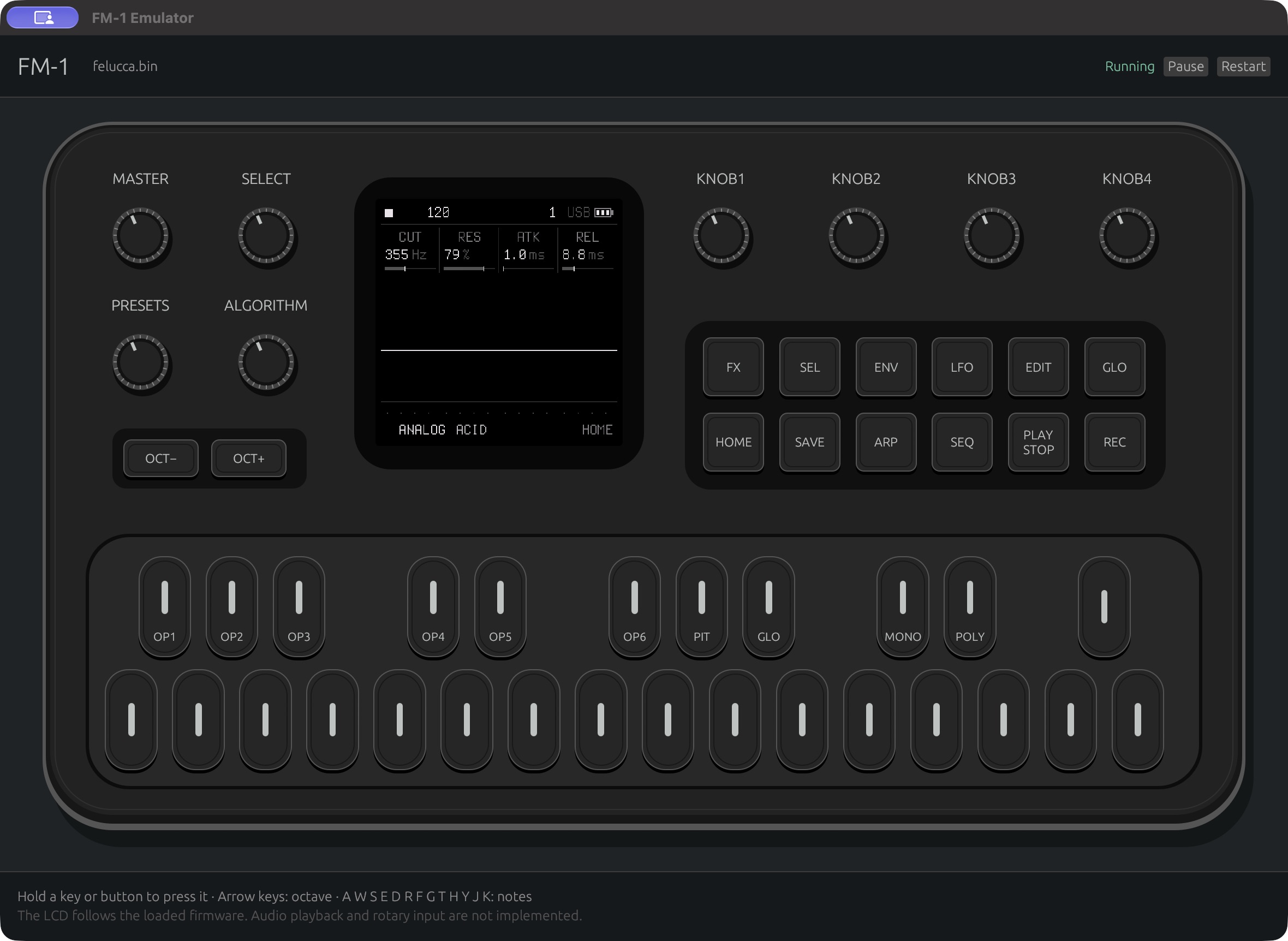
FM-1 emulator (hdavid fork)
An emulator for the M-VAVE FM-1 (pi32v2 / JieLi AC79 firmware, written in Rust). Load a firmware and play it from the emulated panel, with its own screen, buttons, knobs and sound.
This branch (feat/upstream-merge) is simonjohansson/fm1-emulator
(upstream main, by Simon Johansson) plus the additions listed below. The
UI, CPU, devices, speed and tools work was offered back to upstream as five pull
requests; all five were closed on 2026-10-09 without being merged, so this fork
carries that work on its own. Branches pr-group/* hold each group:
| Closed upstream PR | Group |
|---|---|
| #9 | UI: knobs, MASTER, host audio, LEDs, themes, computer keys, remembered settings |
| #10 | CPU: compiler forms, divide trap, float compare-branches, cycle counters |
| #11 | Devices: USB-MIDI host and web editor bridge, UART MIDI IN, USB audio host, nested IRQs |
| #12 | Speed: event-scheduled devices, idle skip, leaner interpreter, profiler |
| #13 | Tools and persistence: op-scan, flash kept between runs, diagnostics |
Contents: What this fork adds | Get the app | Quick start | Keys | TODO | Upstream's README
Everything below the "Upstream's README" heading is upstream's text, kept as it was (apart from its old to-do list, which the TODO above replaces). The emulator README has the full usage and design notes.
What this fork adds
Each line was checked against the code and git log upstream/main..feat/upstream-merge.
CPU correctness
- The compiler forms Felucca, Jangada, SLOOP and Optimist builds use: signed offsets
and increment forms of memory accesses, byte/halfword/word loads and stores
with register post-increment, rotates, 64-bit pair shifts and
multiply-accumulate, masked push/pop. Found with
op-scan(see Tools). - Signed wide division, conversions (float-to-integer saturates), special-register frames.
- The divide-by-zero trap, raised as the CPU exception when
EMU_CONarms it. - Float compare-branches (register and immediate forms, six-byte compare-branches) and float conditional blocks.
- SIMD packed 16-bit forms.
- The corex2 cycle counters (
TL_CKCNT) and theirDBG_CONenables. - Optional nested interrupts (
nested_irqs, off by default;FM1_NESTED_IRQ=1). - An interrupt can enter after a conditional arm returns (the conditional-exit IRQ fix).
- Upstream's hardware facts: 64-bit divide by zero gives 0 and
INT64_MIN / -1wraps, the 64-bit multiply-accumulate sets C to the carry out, the multiple-registerEB40-EB7Fforms and doubleword register sums, the pair rotate right.
Devices and I/O
- A USB-MIDI host and a loopback bridge to a firmware's own web editor,
served at
http://127.0.0.1:8765/(how it works). - TRS MIDI IN on UART1.
- A USB audio (UAC1) host.
- USB endpoint 4 with its own count and DMA registers (Felucca 1.0 and later).
- A stock
USRcopied from another package is installed where its CRC verifies. - NOR erase suspend and resume (
75h/B0h,7Ah/30h, SUS1 in status register 2); current Optimist builds need it to boot. - An SD card on the LCD's SPI1 (Optimist's SD mod):
fm1-ui --sd IMAGEorFM1_SD=IMAGE. The card is selected while PC7 is high; SDHC in SPI mode with CRC checks, single and multi-block reads and writes, written back to a raw FAT image (rust-emulator/scripts/sd_card_image.shmakes one). It models what the firmware assumes of the hardware, not measured card behaviour. Without--sdthe slot reads as empty. - A behavioural model of the BLE baseband engine and a virtual BLE central and
peripherals for BLE MIDI (
FM1_BLE_MODEL,FM1_BLE_ADVERTISERS,FM1_BLE_PERIPHERALS). Nothing in it has run against hardware (details).
Speed
2.7x to 5.7x faster than upstream on the firmware upstream can run (official firmware idle 0.047 to 0.27 times real time, Felucca 0.9 idle 0.081 to 0.234; Apple M4 Max, 2026-10-07), and upstream cannot run Felucca 1.0, Melodee, X0X, SLOOP or Optimist at all. Side-by-side table, method and what is still slower than real time: PERFORMANCE.md.
- Event-scheduled device time and idle skip (a halted core jumps to the next device event).
- A leaner interpreter loop: boxed faults off the hot path, interrupt check skipped while nothing is pending, inlined guest memory accesses, a short call chain, branch-free merging of parallel-bundle slots.
- Spin-loop skip (a core busy-waiting on a device is jumped over).
- The GUI worker thread runs at the main thread's scheduling class.
- The FM1_HOT profiler.
- Numbers and method: PERFORMANCE.md.
Panel UI (fm1-ui)
- Rotary encoders (drag, scroll, keys) and the MASTER potentiometer.
- Host audio output; the guest's audio queue paces the CPU.
- LEDs on the drawn panel, measured from the matrix pins and shown as a steady brightness level (an 80 ms average; on/off and blinking stay crisp).
- The FM-1's colour editions as panel themes: Classic, Black, Lilac, Orange, Mint, Cream, Blue.
- A computer key for every panel button, note-key tooltips; Space plays and stops.
- Remembered window settings (
fm1-ui.toml: MASTER, theme, LEDs, window size, recent firmware). - A desktop app: a macOS
.appbundle, a Load firmware… button with the system file dialog on macOS, Windows and Linux, drag and drop, a Recent menu; loading reboots into the new firmware (Get the app). - 192 and 312 MHz clock choices;
--cpu-mhz Nor--cpu-mhz=N.
Persistence
- The firmware's flash is kept between runs, like a power cycle:
state/<family>.nor,--fresh,--state PATH, and the "Reset flash state..." menu (details).
Tools (all headless, rust-emulator/examples/)
play_check: scripted panel sessions (hold,release,release:ID,ID,turn,click,run,png,wav,peek,leds,master, ...); see Scripted playback.bench: throughput and determinism (gui,batch,hashmodes,FM1_SCENARIO).op-scan: finds instructions the decoder does not cover, driven by the vendor objdump.diagnose,latency(input-to-audio and MIDI clock timing),knob_check,preset_sweep,extract.
Get the app
Every commit on this fork's CI publishes native builds on the releases page (Firmware is not included).
- macOS (Apple silicon): download
emulator-macos-arm64.zip, unzip it and moveFM-1 Emulator.appto Applications. The app is not signed by Apple (signing and notarization are a TODO), so the first time: right-click it and choose Open, then Open again; or runxattr -dr com.apple.quarantine "FM-1 Emulator.app"once. - Windows: unzip
emulator-windows-amd64.zipand double-clickemulator.exe(Windows SmartScreen may ask for "More info", then "Run anyway"). - Linux: untar
emulator-linux-amd64.tar.gz(or-arm64) and run./emulator. The file dialog needs the XDG desktop portal that most desktops provide.
Open it with no arguments (double-click) and press Load firmware… to pick a
.fwsc (or .elf / .bin) file; drag and drop onto the window works as well,
and the toolbar's Recent menu lists the last eight. Loading a firmware
reboots the emulator into it like a power cycle: the running firmware's flash
state is saved first and the new one's is restored. The last firmware opens
again at the next start unless you give one on the command line.
Settings (fm1-ui.toml) and the saved flash state live in the OS's per-user
application-data folder for the installed app, outside any repository:
~/Library/Application Support/FM-1 Emulator/ on macOS, %APPDATA%\FM-1 Emulator\
on Windows, $XDG_DATA_HOME/fm1-emulator/ (default ~/.local/share/fm1-emulator/)
on Linux. Details: the emulator README.
Quick start
Needs mise and a native toolchain
(see "Build from source" in upstream's README below). Firmware is not
included; .fwsc, .elf and .bin load.
git clone -b feat/upstream-merge https://github.com/w0ts/fm1-emulator.git
cd fm1-emulator
./emulator /path/to/firmware.fwsc
./emulator                              # no firmware: use the Load firmware button
./emulator builds fm1-ui and opens it; it takes only --cpu-mhz N and
--ui DIR (and an optional firmware). For the other options run the binary it builds:
rust-emulator/target/release/fm1-ui --theme mint --cpu-mhz 96 /path/to/firmware.fwsc
rust-emulator/target/release/fm1-ui --state ~/fm1-state/ /path/to/firmware.fwsc
rust-emulator/target/release/fm1-ui --fresh /path/to/firmware.fwsc
(On macOS ./emulator runs the same binary inside an app bundle under
rust-emulator/target/release/.) Options: --cpu-mhz N (instruction clock;
default is the firmware's own), --ui DIR (a firmware's web editor),
--theme NAME, --state PATH, --fresh, --app-data (keep the settings and
state in the per-user application-data folder, as the installed app does).
Flash state. Whatever the firmware writes to its flash (projects, presets,
settings) is saved under rust-emulator/state/<firmware family>.nor and laid
back over the package at the next start. --fresh or the Flash menu's
"Reset flash state..." starts clean.
Keys
| Panel button | Key | Panel button | Key | Panel button | Key |
|---|---|---|---|---|---|
| OCT- | Left | FX | X | HOME | U |
| OCT+ | Right | SEL | B | SAVE | Z |
| PLAY / STOP | Space | ENV | V | ARP | P |
| REC | C | LFO | L | SEQ | Q |
| EDIT | I | GLO | O |
The first thirteen notes are A W S E D R F G T H Y J K (a piano row). Knobs
turn by dragging, scrolling or keys ([ ], 9 0, - =, 1-8); MASTER by
drag, scroll or N M. Hover a button or key for its tooltip.
TODO
Checked against this branch on 2026-10-31. Sources: S1 =
PERFORMANCE.md, S2 = the other notes in
rust-emulator/ (FELUCCA, STOCK-FIRMWARE, BAUD-GIRL, SMP,
CLOCK, ATOMIC), S3 = the maintainer's upstream-PR notes, S4 = the "not
implemented" faults in rust-emulator/src.
Done on this branch (were open in upstream's list):
- Flash persistence between runs (
state/,--fresh). - USB MIDI: host, web editor bridge, TRS MIDI IN (S2: README).
- Host audio output and rotary controls.
- Nested interrupts (optional, off by default; unmeasured on hardware).
Open:
- Real time on a busy song. Measured 2026-10-07 on an M4 Max at host load about 10: the busy-song scenario runs at 0.96x real time at 96 MHz and 0.75x at Optimist's own 360 MHz clock, so the sound can still break up (S1, S3). Details in PERFORMANCE.md.
- Block cache and JIT are experimental and off by default
(
FM1_BLOCK_CACHE=1inbench): each native entry still runs one guest instruction, and measured throughput is the same or lower. Next step is batching native instructions between device ticks (S1). - The GUI audio path is not profiled (cpal queue, 70 ms pacing,
texture uploads);
bench ... guimeasures the worker loop only (S1, S4). - Dual-core firmware. The stock secondary-core handoff works (S2: SMP.md);
the SLOOP dual-core prototype is merged into this branch (
feat/dual-core-emu), emulator-only and untested on hardware. - Instructions and peripherals still faulting (S4): exceptional float operands (NaN and infinity; upstream's measured policy is to fault), high-speed USB, the Bluetooth/RF radio below the modelled BLE engine, UART data-register reads (MIDI input uses the RX latch), hardware sample-rate conversion in the audio block, SFC dynamic key changes, LCD dual data lane.
- Firmware coverage is partial for every firmware in the table below
(S2: FELUCCA.md, STOCK-FIRMWARE.md, BAUD-GIRL.md).
scripts/op-scan.shreports forms the decoder lacks. - Hardware validation. Only upstream's probe forms have physical comparison evidence; this fork's additions were checked against the vendor objdump and the firmwares' behaviour, not against captures from a device (S2, S3).
- Timing. Instructions run one per system-clock cycle; pipeline and bus timing, SPI/LCD timing and DAC analog behaviour are not modelled (S2: CLOCK.md, lcd.rs).
- Encryption: encrypted XIP below the application area and dynamic SFC key changes (S4).
- Upstream PRs #9-#13 were closed unmerged (2026-10-09); this fork stays separate. They depend on each other (devices on UI, speed on devices and CPU, tools on speed) and overlap some of upstream's own work (S3).
- SD card and BLE models are unverified on hardware: the SD card's SPI1 read
direction and CMD25 behaviour across deselects are open questions
(
docs/SD-CARD-DESIGN.mdin the Optimist repository); the BLE engine is a set of hypotheses from a fact sheet. - Not ported from the maintainer's fork: the per-PC decode cache (upstream's decode tables are used instead; about 3.7 % of samples in the last profile, S3).
Upstream README (Simon Johansson)
The rest of this file is upstream's README, with only its old to-do list removed.
A Rust emulator for the M-VAVE FM-1. Load firmware and interact with its own
screen and buttons. The firmware's USB serial console uses your terminal; type
commands such as Felucca's help and press Enter.
Download and run
Download and extract the release for your OS and architecture (upstream's build, without this fork's additions), then run it with a firmware path:
./emulator /path/to/firmware.fwsc
Use emulator.exe on Windows. Firmware is supplied separately; .fwsc, .elf
and .bin are supported.
Build from source
Install mise and a native C/C++ toolchain: Xcode Command Line Tools on macOS, Visual Studio Build Tools with Desktop development with C++ on Windows, or the following on Ubuntu:
sudo apt-get install build-essential pkg-config libx11-dev libxi-dev libgl1-mesa-dev libxkbcommon-dev libwayland-dev
From this checkout:
mise trust
mise install rust
mise exec -- cargo build --manifest-path rust-emulator/Cargo.toml --locked --release --features gui --bin fm1-ui
mise exec -- cargo test --manifest-path rust-emulator/Cargo.toml --locked --release --features gui
On Linux/macOS, run ./emulator /path/to/firmware.fwsc; the launcher builds and
opens the emulator. On Windows, run
.\rust-emulator\target\release\fm1-ui.exe C:\path\to\firmware.fwsc.
Building the emulator does not require the vendor firmware compiler or Docker.
Firmware compatibility
Updated on 2026-10-05. Partial means boot and some controls work, but other firmware paths can stop emulation. (The table is upstream's, as of that date; it was not re-measured for this fork.)
| Firmware | Status | Verified behavior / blocker |
|---|---|---|
Felucca 0.9-beta (FM-1_909, .fwsc) | Partial | LCD, USB console (help), watchdog, note audio/DMA and FX pass; full UI coverage remains incomplete |
Felucca source build (1e838e1, .elf) | Partial | Boot, note press/release, FX, HOME and ENV pass; other UI paths need broader coverage |
Official FM-1_015 (FM-1.fwsc) | Partial | LCD boot, PIANO 1, FX/HOME and note audio/DMA pass |
Baud Girl FM-1_093 (FM-1_093.fwsc) | Partial | LCD boot and FX/HOME pass; its factory preset payload fails integrity validation |
FX now opens and renders in both Felucca builds; see the Felucca investigation. See the stock firmware trials for the official and Baud Girl results.
GPL-3.0-only; see LICENSE. Based on research and components from Felucca, the JieLi AC79 SDK, and Quarkslab's pi32v2 reference.