README from GitHub, GPL-3.0
Arcturus S6
A Waveform Animation System for the M-VAVE FM-1. An experimental, self-playing wavetable instrument for generative, evolving soundscapes, with the sound and look of early digital machines.
Four PPG-style wavetable oscillators, no sequencer and no filter section: the movement comes from Serge-style modulators patched into the oscillators, into each other and into themselves. The engine runs natively at 12 bit and 22.05kHz on 8-bit wavetables, and the screen is a green phosphor CRT after the Fairlight CMI.
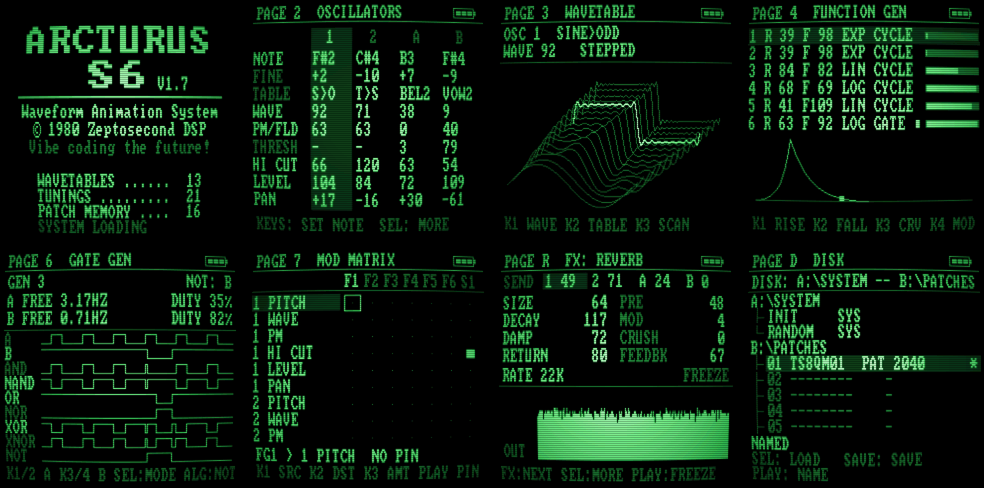
- 4 wavetable oscillators: 1 and 2 phase-modulate each other, A and B have wavefolders; each has a 12dB hi cut, level and pan.
- 13 wavetables, the last one generative (reroll it on the box); smooth or stepped scanning.
- 6 Serge-style function generators: rise, fall, lin / exp / log curves, cycle / gate / once, end-of-cycle gates.
- 2 sample-and-holds (noise or any modulator, slew) and a quadrature LFO.
- 4 gate generators: two square LFOs each (free or MIDI clock) into AND, NAND, OR, NOR, XOR, XNOR and NOT.
- An EMS-style mod matrix and a gate matrix, feedback welcome.
- 21 tunings (just intonation, shruti, Bohlen-Pierce, the Carlos scales and more) with per-oscillator quantisers.
- Effects: a low-rate plate reverb with freeze, a shift-register delay, a flanger, in any order.
- 16 named patches on a DOS-style disk page, INIT and RANDOM on the keys, a random drone at every power-on.
Quick start guide: getting around, page by page, and patch ideas (Krell, generative melodies, rhythms from logic).
Install
The easy way: the FM-1 Firmware Hub, in Chrome or Edge, installs it over USB with one click, and takes you back to the official firmware or any other the same way.
By hand: download arcturus-s6-X.Y.fwsc from the releases, then
pip3 install mido python-rtmidi                # (Windows: not needed, see below)
python3 tools/fm1_install.py arcturus-s6-X.Y.fwsc
On Windows, put the .fwsc, tools/fm1_install.py, tools/fm1_winmidi.py and tools/windows/install.bat in one
folder, rename the firmware arcturus-s6.fwsc and double-click install.bat (it needs Python 3).
If it won't start: hold OCT− while switching on. That's the USB rescue: no sound, only the updater, so you can install it again or install another firmware from the hub. Installing firmware is at your own risk.
Status
Tested on one FM-1. It's an experimental instrument written by machine (Claude, by Anthropic) with human guidance: expect rough edges, and tell us about them in the issues.
Build it yourself
Arcturus S6 is built on Dinghy, so it builds the same way: Linux on x86-64 (or Docker), Python 3 with Pillow, the JieLi toolchain and three files of the JieLi AC79 SDK.
pip3 install Pillow mido python-rtmidi
tools/get_toolchain.sh
git clone --depth 1 --branch AC79NN_SDK_V1.2.1_2023-12-13 \
    https://gitee.com/Jieli-Tech/fw-AC79_AIoT_SDK.git ~/fw-AC79_AIoT_SDK
./build.sh                                     # -> build/arcturus-s6.fwsc
tests/run_host.sh tests/scripts/demo.txt       # the firmware on your computer: build/host/*.wav and screen PNGs
GitHub builds every push to main, and a tag vX.Y builds, tests and publishes a release with a build
attestation. The firmware itself is firmware/src/dinghy.c and
firmware/src/verb.h (the effects); the wavetables and lookup tables come from
tools/gen_tables.py. Dinghy's own docs, for the platform under it: docs/API.md,
docs/RULES.md, docs/MAKE-IT-YOURS.md.
Credits and licence
GPL-3.0-only: you may change and share it, and whoever gets your firmware gets its source. Details in LICENSING.md.
Arcturus S6 by Zeptosecond DSP. Built on Dinghy by zvenson, on the platform of Felucca by Leo Kuroshita (Hügelton Instruments) as SLOOP (isod89) carries it, with the SMK-37 layer by M. Geisler (genkigenki) and the loader's screen after Skiff (illuminus5). The screen font is font8x8 by Daniel Hepper (public domain). Not made or endorsed by M-VAVE.